
Knowledge Base
Articles In This Section
How Workato Actually Works: A Simple BreakdownWorkato Workflow Apps: A Complete OverviewHow to Build Your First Recipe in Workato Getting Started with Data Orchestration in WorkatoUnderstanding Webhooks in WorkatoWorkato FAQs: The Ultimate List of Common Workato FAQsHow to Sync your SurveyMonkey Data within Quickbase using WorkatoWhat is WorkatoUnderstanding Workato Custom Connectors How to use Workato's Logging SystemHow to use GitHub Secret Scanning for your Workato Developer API10 Key Benefits of WorkatoHow to Use Workato to Send an Email through Outlook What is Workato ONEHow to Connect Workato to RingCentralHow to Set Up HTTP Requests in Workato: Built-in and Custom What is an MCP Server and Why It Matters for your AI Foundation How to Build a Workato Center of ExcellenceHow to use Data Tables in Workato: Step-by-Step GuideHow to Use Conditional Actions in Your Workato Recipe How to Set Up a Call Ended Trigger in Workato for RingCentralHow to Create a New App Connection in WorkatoWhat is Workato ONEHow to Set Up HTTP Requests in Workato (Built-in and Custom)How to use Data Tables in Workato: Step-by-Step GuideHow to Process File Attachments in WorkatoSections
How to Manage API Clients and Client Roles in Workato
API clients enable secure, controlled access to your system’s endpoints. They are designed to enforce security best practices while supporting scalable integrations across applications and services.
By using API clients, organizations can manage authentication, permissions, and access at a granular level.
Key Features of API Clients
- Granular Access Control
Create multiple API clients with customized permissions for specific endpoints or services. - Secure Authentication
All API requests require a single authentication header, simplifying implementation while maintaining strong security. - Role-Based Permissions
Each client operates under a defined role, ensuring consistent and controlled access.
Workspace-Level Scope
API clients are scoped at the workspace level, not tied to individual users. This structure improves consistency and security across teams.
- Access is governed by the assigned client role, not the creator’s user permissions
- Clients remain functional regardless of user changes or account status
- Ideal for team-based and system-level integrations
API Client Benefits in Workato
Workato API clients provide a secure and scalable way to automate and manage your workspace. They are essential for organizations looking to streamline deployments, control access, and enforce security best practices across integrations.
Using Workato’s Developer and Embedded APIs, teams can automate critical processes such as deploying recipe manifests from development to production and provisioning on-prem agents within their network.
Why Use API Clients?
API clients allow you to tailor API access based on each application's specific use case. This ensures that every integration operates with only the permissions it needs.
- Improve organizational security with scoped access
- Reduce risk by limiting unnecessary permissions
- Support automation across development, testing, and production environments
- Enable consistent and repeatable deployment workflows.
How API Clients Control Access
API clients in Workato use role-based and resource-based controls to define what each client can access.
Role-Based Access
- API clients are assigned roles that determine which API endpoints they can interact with
- Roles enforce least-privilege access and prevent overexposure of sensitive operations
Environment-Based Access
- API clients can be restricted to specific environments such as DEV, TEST, or PROD
- This ensures safe separation between development and production systems
- Note: Environment access depends on your Workato pricing plan and may not be available in all workspaces
Project-Level Access
- API clients can be limited to specific projects within a workspace
- This restricts access to only the assets and recipes within those projects
- Ideal for teams managing multiple integrations or business units.
Flexible Client Configuration
Workato allows you to create multiple API clients tailored to different needs within your workspace.
- Create dedicated clients for specific endpoints or services
- Assign clients to individual projects for tighter control
- Segment access by environment to support CI/CD pipelines
- Manage integrations across teams without overlap or conflict
Security Enhancements
Workato API clients include built-in security features to protect your credentials and integrations.
- API client tokens are integrated with GitHub Secret Scanning
- Helps detect and prevent accidental exposure of sensitive credentials
- Supports secure development workflows and compliance requirements
How to Create a New Client Role in Workato
You must create a client role before you create an API client. The client role allows you to configure which endpoints the API client can access. To create a client role, you will need:
1. Sign in to your Workato account.
2. Go to Workspace admin.
3. Select API clients > Client roles > Add client role.
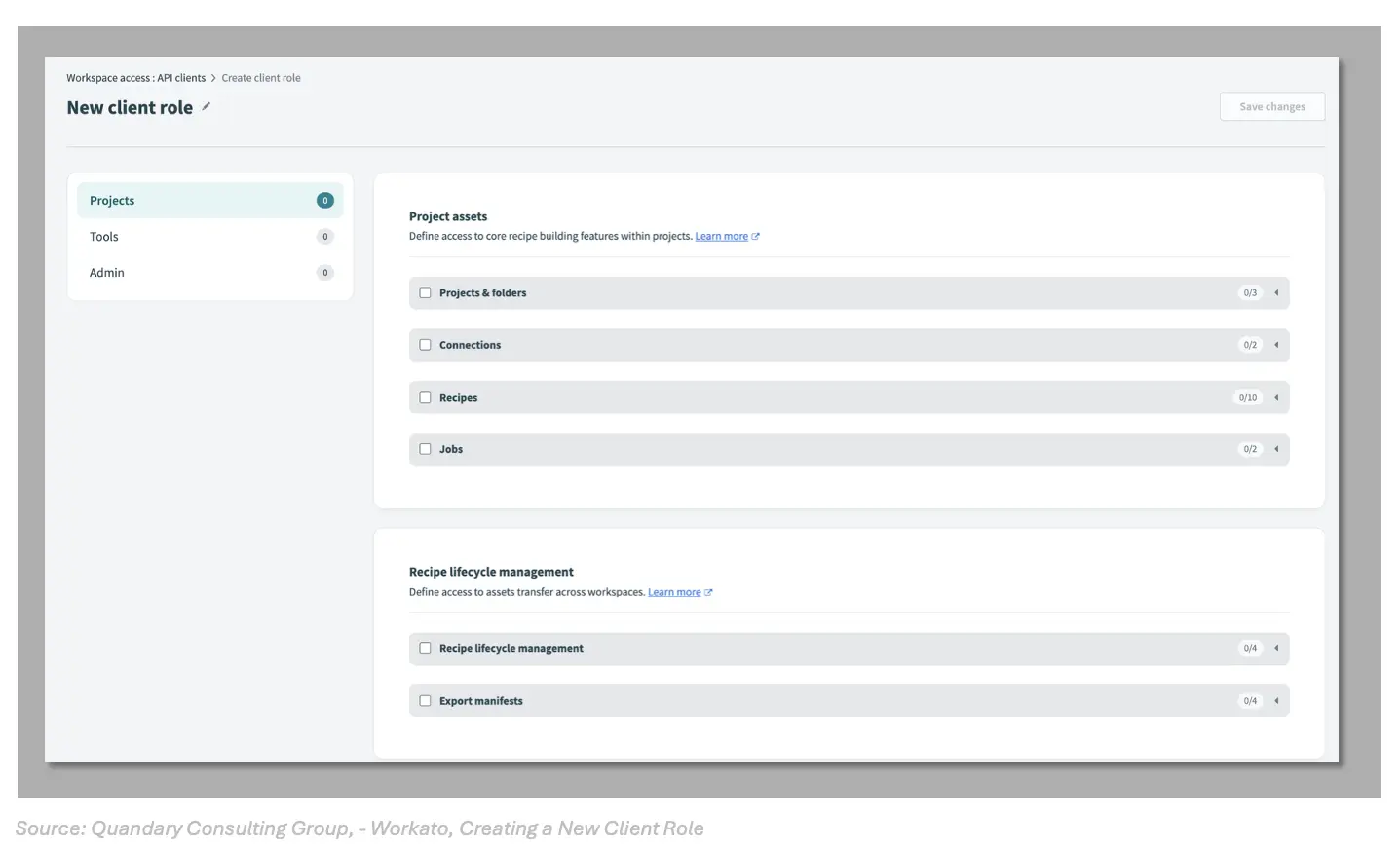
4. Enter a name for the new client role.
- For example, "Recipe Operator" for a role that can interact with Recipe API endpoints.
5. Select the required endpoints for the role under each section. All Workato API endpoints available to your workspace are listed under these sections.
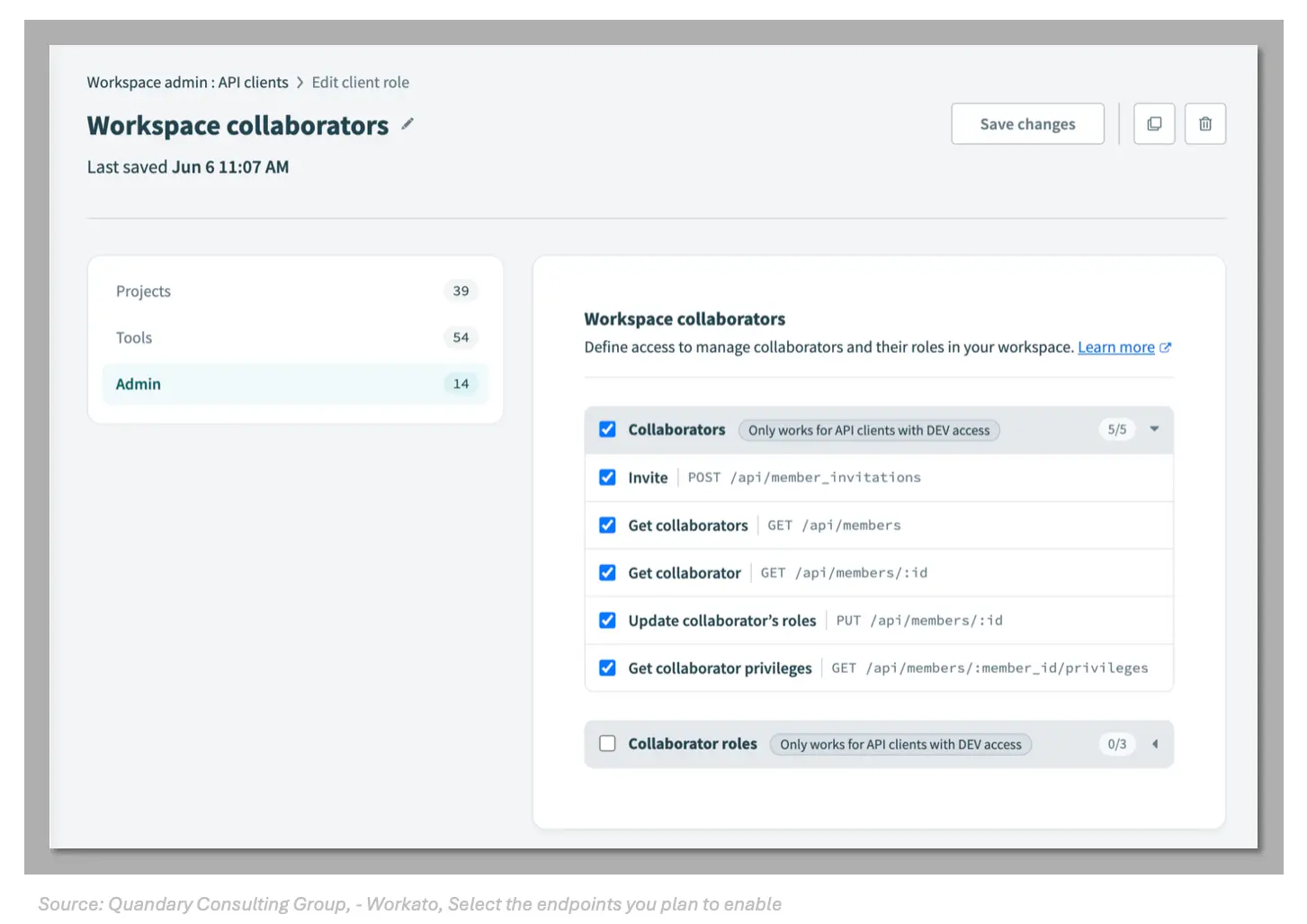
6. Save your role after you are done with your selections.
- You can edit the client role later if needed.
How to Create an API client in Workato
Complete the following steps to create an API client:
1. Go to Workspace admin.
2. Select API clients > Create API client.
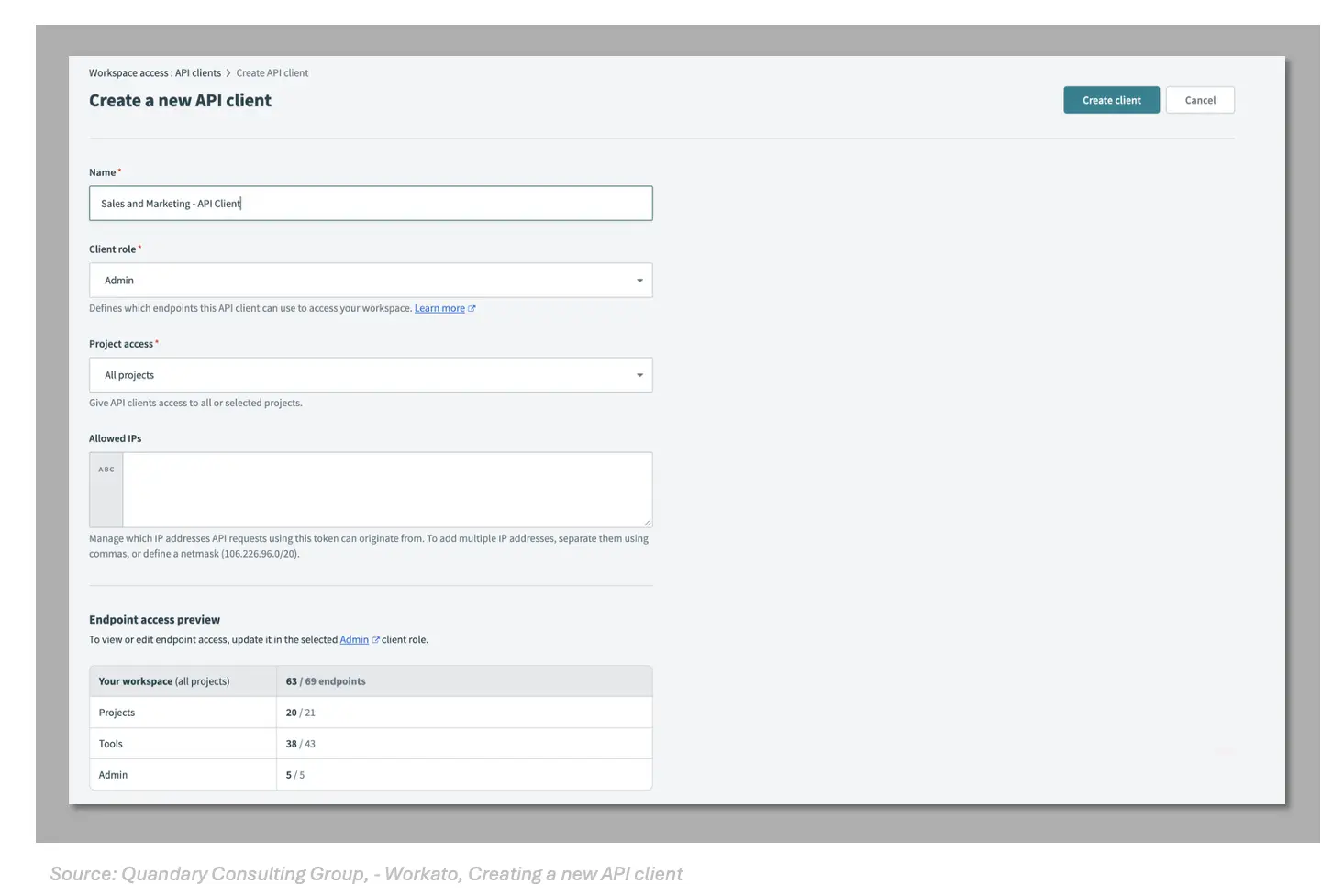
3. Enter a name for the new client that reflects its purpose. For example, "Sales and Marketing - Recipe Operator" for an API client that will be used by the Sales and Marketing team to operate their recipes through the API.
4. Select the appropriate client role. The client role determines which endpoints the API client can access.
5. If your workspace has environments enabled, select the environment the API client is allowed to access.
6. Select the projects the API client is allowed to access. Choose only the projects that are related to the team that will use this API client.
- Project access rules apply to all assets that can be scoped to projects including:
connections,recipes,folders,lookup tables,properties,API Platform collectionsandAPI Platform API Clients.
7. Optionally, add allowed IP ranges that API requests using this token can originate from. If you call our APIs from a static server, this further secures access to Workato's developer APIs.
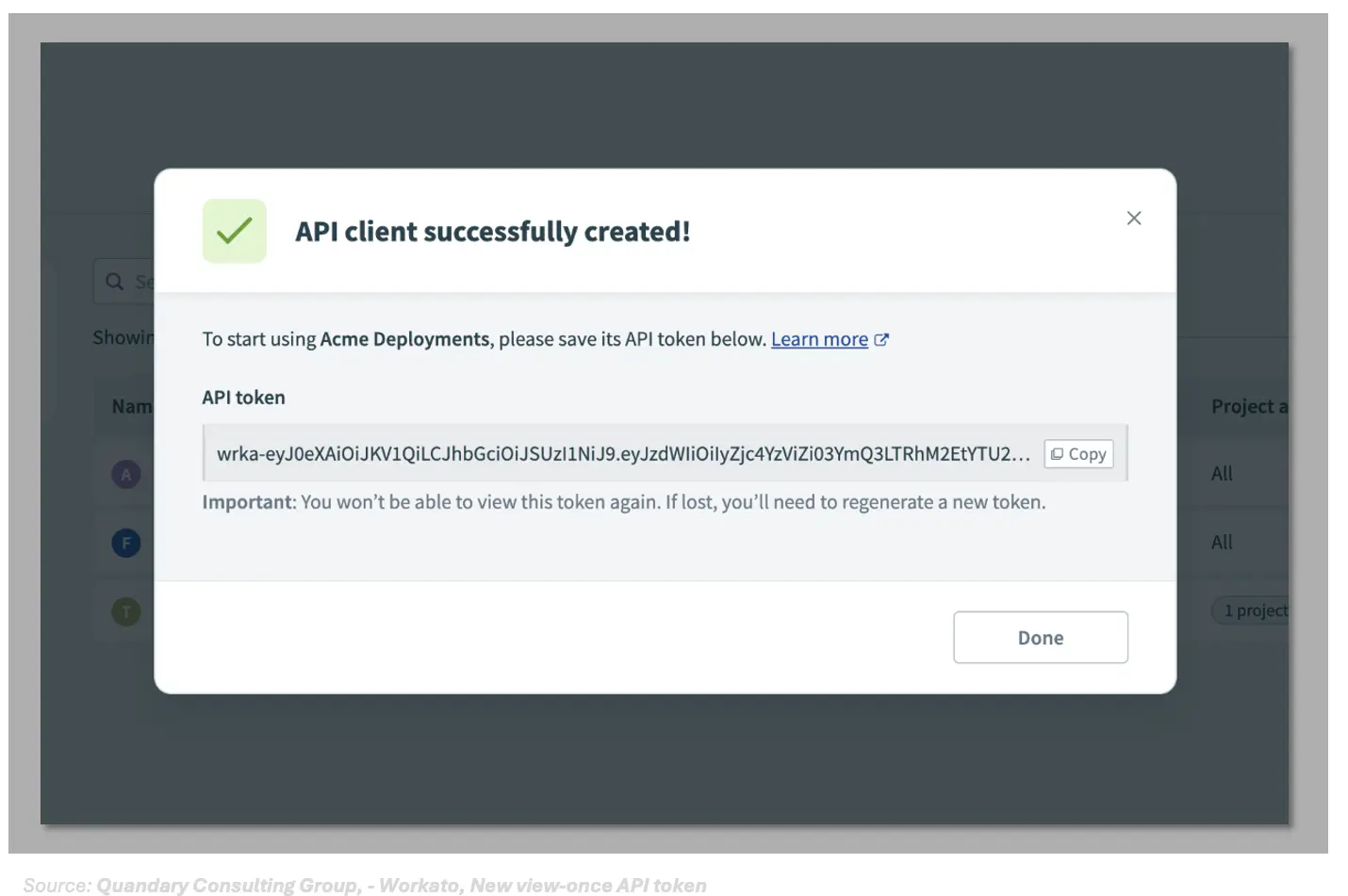
8. Store the API token that displays after creating your API client in a secure location, such as AWS Secrets Manager. You will not be able to retrieve the API token again.
9. Save the API client when you done with your configurations. You can edit the API client later if needed.
How to Refresh API client tokens in Workato
After creating an API client, you can regenerate a new API token for the existing client. To refresh an API client token:
1. Navigate to Workspace admin.
2. Select API clients > select the API client you want to edit.
3. Select the refresh icon located in the top right corner of the page.
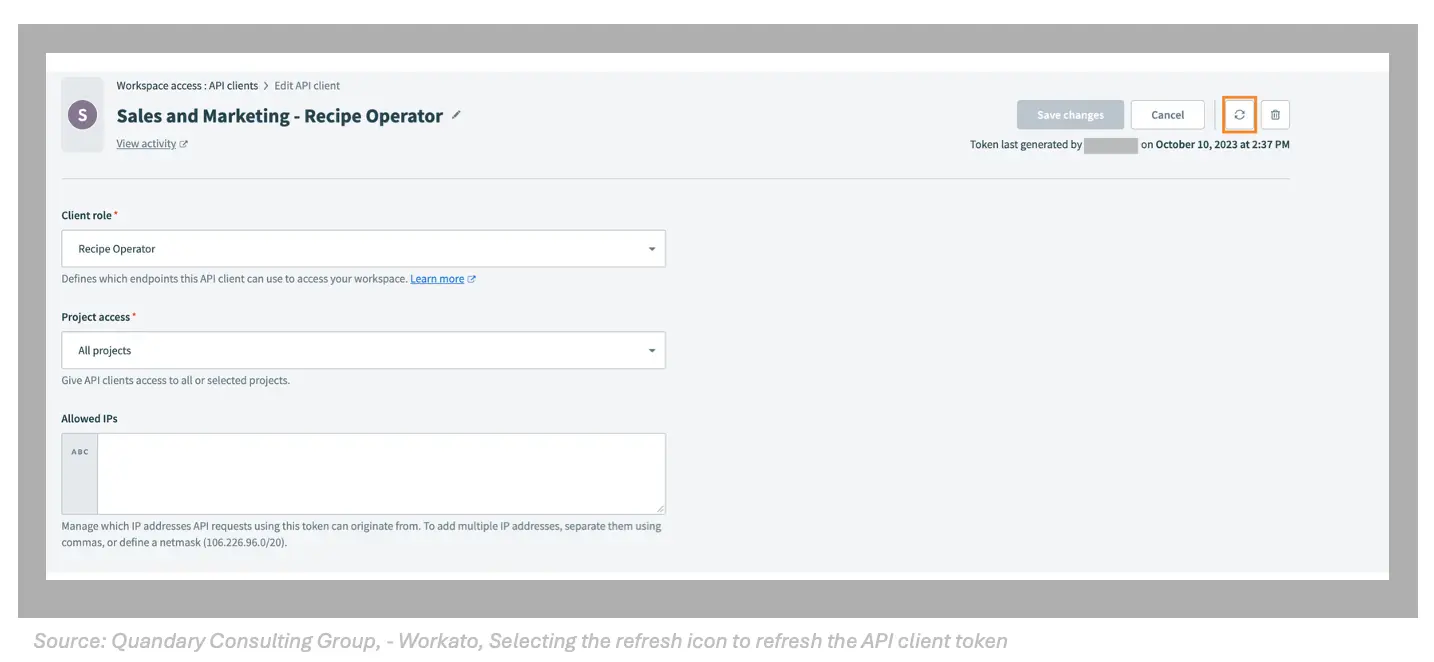
4. In the Regenerate API token modal, select Regenerate token. When you regenerate an API token, API calls using your previous API token will fail.
5. Store your new API token in a secure location, such as AWS Secrets Manager. You will not be able to retrieve this API token again.
6. Select Done to return to editing the API client.
- Generating a new token invalidates the previous API token. Legacy API client tokens cannot be regenerated.
- User error can cause compromised tokens when dealing with custom scripts or applications that upload tokens in plain text to public websites, such as GitHub public repositories or documentation.
How to Delete an API client or client role in Workato
Deleting an API client or client role is a permanent action that can immediately disrupt integrations. It is important to review dependencies and usage before proceeding.
Key Considerations Before Deletion
Before deleting an API client or role, ensure that no active processes rely on it. Removing access can cause failed API requests and service interruptions.
- Verify whether the API client is actively being used
- Identify integrations or automations that depend on the client
- Plan for replacement credentials if needed
Impact of Deleting an API Client
When an API client is deleted:
- All API requests using that client’s token are immediately rejected
- Any active integrations relying on the token will fail
- Access cannot be restored without creating a new client and token
Impact of Deleting a Client Role
When a client role is deleted:
- All API clients assigned to that role lose access instantly
- Incoming requests from those clients are rejected
- Multiple integrations may be affected if the role is widely used
Sure you still want to delete? Here are a few best practices for when you do
- Avoid deleting clients or roles without impact analysis
- Rotate or replace tokens before removing clients
- Reassign API clients to a new role before deleting an existing one
- Communicate changes with relevant teams to prevent downtime
Quandary Consulting Group + Workato Partnership
Improve your API security and integration performance with Quandary Consulting Group. Get expert guidance on Workato API clients, roles, and access control with a discovery call.
- By: John Orsak
- Title: Senior Developer, Workato Delivery Team
- Updated: April 2, 2026
- Email: jorsak@quandarycg.com
FAQs for Managing API clients and Client Roles in Workato
What is the difference between an API client and a client role in Workato?
- An API client is the entity that authenticates and makes API calls (it generates the API token).
- A client role defines what that client is allowed to do—i.e., which API endpoints it can access.
2. Why do I need to create a client role before creating an API client in Workato?
- Workato requires a client role first because:
- The role determines endpoint-level permissions
- API clients inherit all access from the assigned role
- This enforces least-privilege access by design
3. How is access scoped for an API client in Workato?
API clients are scoped across multiple dimensions:
- Endpoints → via client role
- Projects → limits which assets they can access
- Environments (Dev/Test/Prod) → restricts where calls can be made
- This allows very granular control (e.g., a client can deploy recipes only in DEV for a specific project).
4. Are API clients in Workato tied to individual users?
- No—API clients are workspace-level entities, not user-based.
- They operate independently of the user who created them
- Permissions come solely from the assigned role
- This is important for:
- Service accounts
- Automation
- Team-based integrations
5. What are key security best practices when managing API clients in Workato?
- Create multiple clients per use case (don’t reuse one global client)
- Use least-privilege roles (only required endpoints)
- Restrict access with:
- Projects
- Environments
- IP allow/block lists (for API keys)
- Regularly rotate/regenerate tokens via API or UI
- Avoid legacy API keys (fully deprecated


Services
Industries



© 2026 Quandary Consulting Group 2026. All Rights Reserved.
Privacy Policy