
Knowledge Base
Articles In This Section
How Workato Actually Works: A Simple BreakdownWorkato Workflow Apps: A Complete OverviewHow to Build Your First Recipe in Workato Getting Started with Data Orchestration in WorkatoUnderstanding Webhooks in WorkatoWorkato FAQs: The Ultimate List of Common Workato FAQsHow to Sync your SurveyMonkey Data within Quickbase using WorkatoWhat is WorkatoUnderstanding Workato Custom Connectors How to use Workato's Logging SystemHow to use GitHub Secret Scanning for your Workato Developer API10 Key Benefits of WorkatoHow to Use Workato to Send an Email through Outlook What is Workato ONEHow to Connect Workato to RingCentralHow to Set Up HTTP Requests in Workato: Built-in and Custom What is an MCP Server and Why It Matters for your AI Foundation How to Build a Workato Center of ExcellenceHow to use Data Tables in Workato: Step-by-Step GuideHow to Use Conditional Actions in Your Workato Recipe How to Set Up a Call Ended Trigger in Workato for RingCentralHow to Create a New App Connection in WorkatoGetting Started with Data Orchestration in WorkatoWhat is Workato ONEHow to Set Up HTTP Requests in Workato (Built-in and Custom)How to Manage API Clients and Client Roles in WorkatoSections
How to Use Workato For Handling Files
Almost every platform today allows for some version of file attachments. Take a project management system where you are working amongst engineers or technical resources, handing back and forth technical drawings or specifications. Or a sales system, where you are downloading / revising / re-uploading each version so everyone is always on the same page.
Whats the best way to communicate that? How best do you notify everyone when a new version is available? What if you want to make that file available in a place like DropBox or Box where you can publish documents to your entire team to access once a deal has been signed?
Luckily – Workato has plenty of built in features for accessing, transferring and storing files. The process is such that you host your files in your primary system – Workato acts as the middle man for downloading it – and then re-uploading or sending it where you’d like
Among the various file processing options at your disposal – common examples might include
✓ Transferring the scope of work to a new Jira project when a deal is Won
✓ Archiving Documents to DropBox to archive older versions from your main system
✓ Upload a new Document in Quick Base and have Workato send it as an attachment via Outlook to all of the internal and external stakeholders involved
✓ Copying attachments received in a Shared Email Inbox and transferring them to a secure server using FTP
Lets take the third item as an example:
When I upload a new Project document in Quick Base – I want that to be sent to all of the stakeholders on my project and attach that file in the email
For more info about the basics around setting up a new Recipe – check out this article on Creating your first Workato Recipe
- First off – establish your trigger. In this example – we’re saying that I want this to occur when I add a new document to my Quick Base project

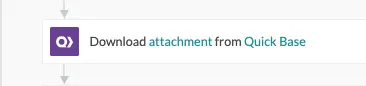
- Next – depending on what system you’re interacting with – you likely have to take the step of actually downloading the file in order to get the actual ‘File Contents’. Using Workato with Quick Base, it looks something like this:
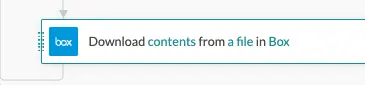
You would do something similar in Box if your files were being hosted there:
- With the actual File Contents in hand – you can now move on to sending your email through Outlook. A more structured example of using Outlook can be found here Using Workato to Send an Email Through Outlook
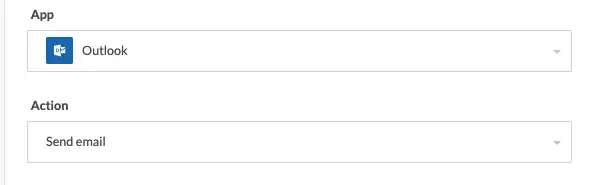
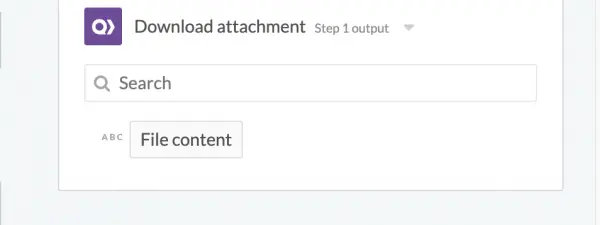
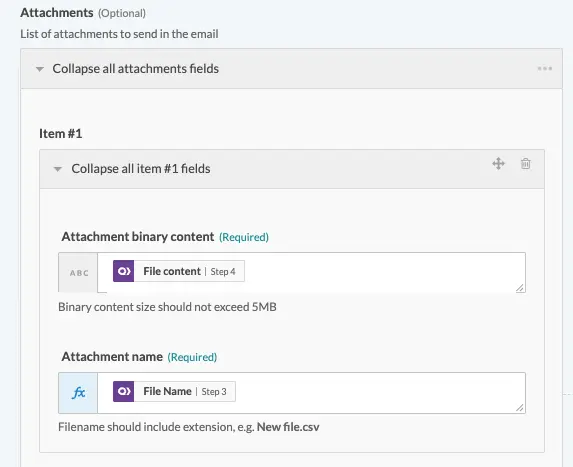
- In your Outlook send email action – there is a space for adding file attachments. In that section, you will include the file content as a new attachment – and you will have completed set up of sending out an email with this document as a new attachment
Using Workato in a workflow such as this can be a great time saver when it comes to documents. It eliminates the need for you to open open where the file is hosted – download it to your machine – and then transfer or send it to the next link in the chain. More so – using Workato also empowers you to add and create more comprehensive workflows as extensions of examples like the above, such as utilizing Workato for logging things like email communication
- Author: Chayce Duncan
- Email: chayceduncan@quandarycg.com
- Date Submitted: 4/1/2019


Industries
Resources


© 2026 Quandary Consulting Group. All Rights Reserved.
Privacy Policy