
Knowledge Base
Articles In This Section
How Workato Actually Works: A Simple BreakdownWorkato Workflow Apps: A Complete OverviewHow to Build Your First Recipe in Workato Getting Started with Data Orchestration in WorkatoUnderstanding Webhooks in WorkatoWorkato FAQs: The Ultimate List of Common Workato FAQsHow to Sync your SurveyMonkey Data within Quickbase using WorkatoWhat is WorkatoUnderstanding Workato Custom Connectors How to use Workato's Logging SystemHow to use GitHub Secret Scanning for your Workato Developer API10 Key Benefits of WorkatoWhat is Workato ONEHow to Connect Workato to RingCentralHow to Set Up HTTP Requests in Workato: Built-in and Custom What is an MCP Server and Why It Matters for your AI Foundation How to Build a Workato Center of ExcellenceHow to use Data Tables in Workato: Step-by-Step GuideHow to Use Conditional Actions in Your Workato Recipe How to Set Up a Call Ended Trigger in Workato for RingCentralHow to Create a New App Connection in WorkatoWhat is Workato ONEHow to Set Up HTTP Requests in Workato (Built-in and Custom)How to use Data Tables in Workato: Step-by-Step GuideHow to Manage API Clients and Client Roles in WorkatoHow to Process File Attachments in WorkatoSections
How to Use Workato to Send an Email through Outlook
One of Workato’s most simple but powerful tools is its ability to send emails. Emails can be sent on a set schedule (daily, weekly, etc.), based on a change in another system (new customer in Salesforce, change to a box folder, etc.), or part of any existing recipe. It is great for keeping internal and external stakeholders abreast of changes in various systems. Furthermore, it can be used to create a communication log, an audit trail of sent emails.
Workato has three built in connectors to send emails: Email by Workato, Gmail, and Outlook. This article will use Outlook as the example, but the other two connectors work similarly.
In this article, for illustration, we will build a recipe to send a daily reminder to ourselves.
- Determine the trigger. In our example we want to send the report daily – choose the Scheduler by Workato app, then choose New scheduled event as the trigger, then determine how often it should repeat;
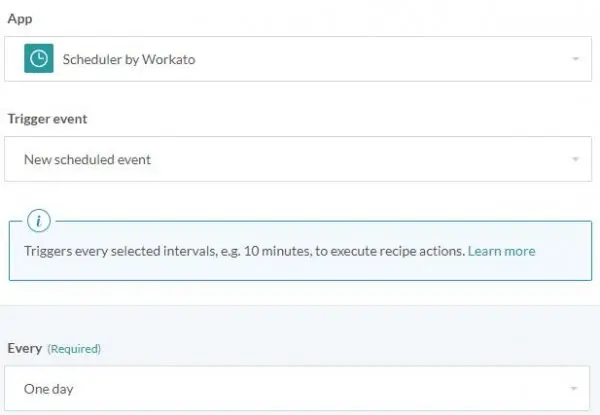
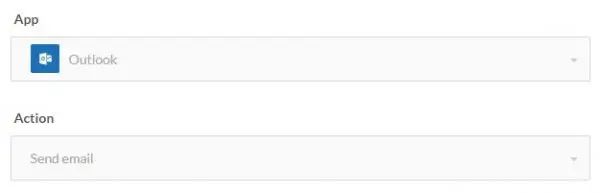
- Add a simple action, select Outlook and then select Send email;
- Insert the From and To email addresses in the fields provided, then insert the Subject (Daily Remainder) and Message in their respective fields. Note: the message can be in written in plain text or html;
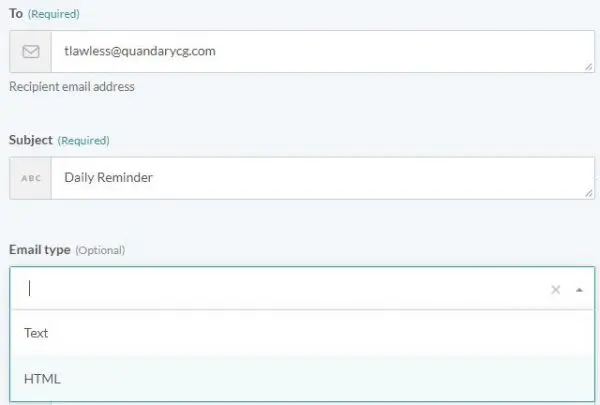
Additionally, as you build more complex recipes, you can pass data pills from other steps in the recipe into these fields;
- Click Save and Start Recipe and you are good to go.
The Gmail and Email by Workato connectors work similarly to the steps listed above. The advantage of using Gmail and Outlook is you can log your sent emails in the sent folder of the email address entered in the From field.


Services
Industries


© 2026 Quandary Consulting Group 2026. All Rights Reserved.
Privacy Policy