
Knowledge Base
Articles In This Section
How Workato Actually Works: A Simple BreakdownWorkato Workflow Apps: A Complete OverviewHow to Build Your First Recipe in Workato Getting Started with Data Orchestration in WorkatoUnderstanding Webhooks in WorkatoWorkato FAQs: The Ultimate List of Common Workato FAQsHow to Sync your SurveyMonkey Data within Quickbase using WorkatoWhat is WorkatoUnderstanding Workato Custom Connectors How to use Workato's Logging System10 Key Benefits of WorkatoHow to Use Workato to Send an Email through Outlook What is Workato ONEHow to Connect Workato to RingCentralHow to Set Up HTTP Requests in Workato: Built-in and Custom What is an MCP Server and Why It Matters for your AI Foundation How to Build a Workato Center of ExcellenceHow to use Data Tables in Workato: Step-by-Step GuideHow to Use Conditional Actions in Your Workato Recipe How to Set Up a Call Ended Trigger in Workato for RingCentralHow to Create a New App Connection in WorkatoWhat is Workato ONEHow to Set Up HTTP Requests in Workato (Built-in and Custom)How to use Data Tables in Workato: Step-by-Step GuideHow to Manage API Clients and Client Roles in WorkatoHow to Process File Attachments in WorkatoSections
How to use GitHub Secret Scanning for your Workato Developer API

Starting from mid-May 2023, Workato Developer API client tokens are now integrated with GitHub Secret Scanning(opens new window), allowing us to provide additional layers of security when your API tokens are found in plain text on public GitHub repositories.
How does GitHub Secret Scanning Workato Developer API Client Tokens Work?
GitHub Secret Scanning automatically monitors public repositories for sensitive credentials, including Workato Developer API tokens.
- If a Workato API token is committed in plain text to a public repository:
- GitHub scans and detects the exposed token
- The exposure is flagged as a potential security risk
- Appropriate alerts and actions can be triggered
This integration enables faster detection and response to credential leaks, helping protect your Workato environment.
When these tokens are found, Workato will perform the following steps:
- Revoke your Developer API token to ensure no bad actors can have unauthorized access to your Workato workspace
- Send an email to the workspace admins about the leaked token, including information about where it was found and how to recover from the leaked token
- Mark the API Client as leaked on the Workato UI
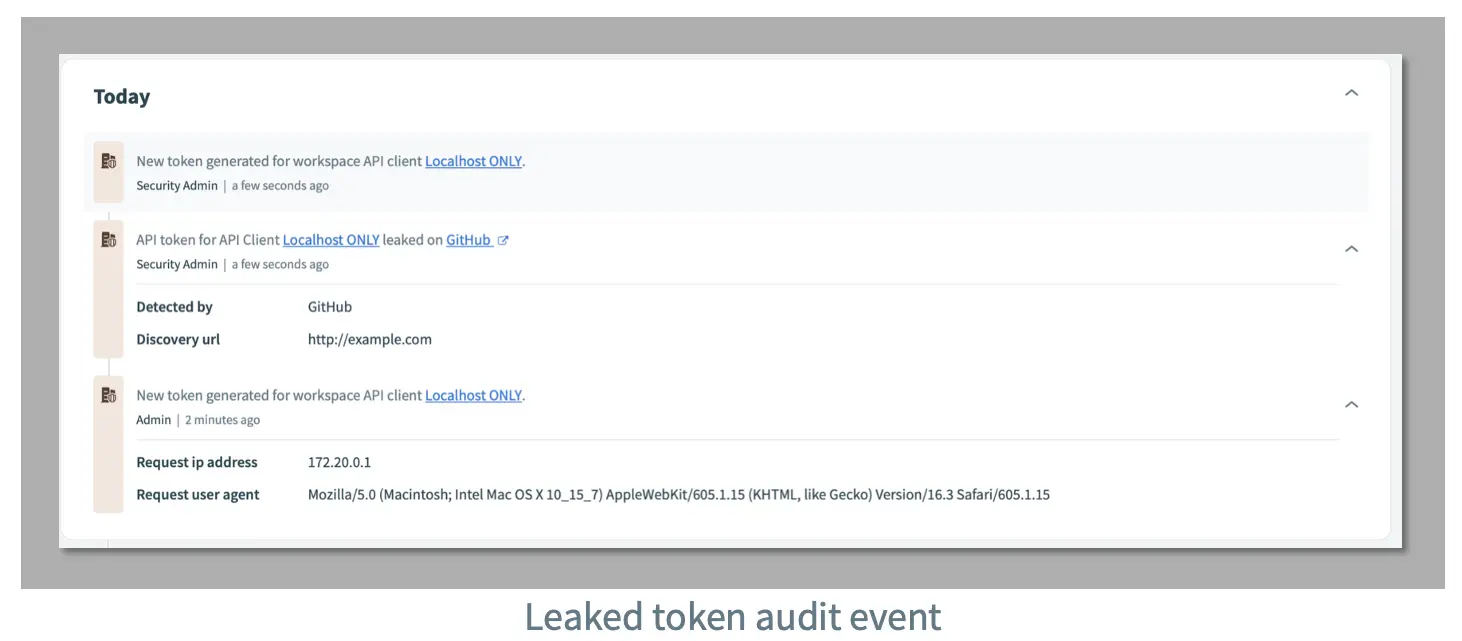
- Add an audit log event indicating that the API token was leaked
Why does Workato Revoke Tokens Immediately?
Human error is one of the most common ways that malicious actors can access your account. We have found that many bad actors use crawlers on GitHub public repositories to find leaked tokens which makes it important that we are able to secure your Workato workspace.
- This process is also aligned with many best practices proposed by tools like GitLab and Okta, and more!
Key Benefits for Workato Users
- Enhanced API Security
Provides an additional layer of protection for Workato integrations and automation workflows. - Real-Time Detection of Exposed Tokens
Identifies leaked API tokens quickly, reducing the window of vulnerability. - Reduced Risk of Unauthorized Access
Helps prevent misuse of exposed credentials and protects sensitive data. - Alignment with Security Best Practices
Supports secure development practices, including DevSecOps and credential management standards.
- By: John Orsak
- Title: Senior Developer, Workato Delivery Team
- Updated: January 19, 2026
- Email: jorsak@quandarycg.com


Services
Industries




© 2026 Quandary Consulting Group 2026. All Rights Reserved.
Privacy Policy