
Knowledge Base
Articles In This Section
How Workato Actually Works: A Simple BreakdownWorkato Workflow Apps: A Complete OverviewHow to Create Your First Workato Recipe Understanding Webhooks in WorkatoWorkato FAQs: The Ultimate List of Common Workato FAQsSyncing your SurveyMonkey Data within WorkatoWhat is WorkatoUnderstanding Workato Custom Connectors Best Practices for Workato Logging SystemGitHub Secret Scanning for Workato Developer API10 Key Benefits of WorkatoHow to Use Workato to Send an Email through Outlook Workato ONE OverviewBuilding a High-Impact Workato Center of ExcellenceHow to use Data Tables in Workato: Step-by-Step GuideHow to Use Conditional Actions in Your Workato Recipe Creating a New App Connection in WorkatoHow to use Data Tables in Workato: Step-by-Step GuideHow to Manage API Clients and Client Roles in WorkatoHow to Use Workato For Handling FilesSections
Workato HTTP Requests: Complete Overview
An HTTP connection lets Workato talk to any system that exposes an API, even if there’s no native connector. In Workato, you will typically use an HTTP connection for:
- Custom or internal APIs
- AI / LLM APIs
- Legacy systems
- Tools Workato doesn’t (yet) support natively
The Workato HTTP connector enables you to integrate with applications or services that provide HTTP-based APIs (Application Programming Interfaces).
This allows you to interact programmatically with the service to perform various actions, such as retrieving data or creating and updating records.
When to Use HTTP in Workato:
- HTTP enables direct interaction with REST and custom APIs at the protocol level.
- By using HTTP actions, Workato can construct raw requests (GET, POST, PUT, PATCH, DELETE) that align precisely with an API’s contract.
- This is essential for systems that require specific endpoint paths, query parameters, request bodies, or content types (e.g.,
application/json,application/xml, or multipart payloads).
- HTTP provides explicit control over authentication and authorization mechanisms.
- Unlike opinionated connectors, HTTP allows engineers to manually configure authentication schemes such as OAuth 2.0 (including token refresh flows), API keys, HMAC signatures, bearer tokens, or custom headers.
- This is critical when integrating with security models that fall outside Workato’s standard connector patterns.
- HTTP supports advanced request customization and dynamic runtime behavior.
- Engineers can dynamically construct headers, URLs, and payloads at runtime using datapills and formulas.
- This enables patterns such as conditional routing, dynamic endpoint resolution, pagination handling, and versioned API calls, all within a single recipe.
- HTTP allows full visibility and control over API responses and error handling.
- Workato’s HTTP actions expose raw response bodies, status codes, and headers, allowing for precise handling of success, retry logic, throttling responses (e.g., 429), and non-standard error formats.
- This makes HTTP ideal for building resilient integrations with robust exception handling and observability.
- HTTP decouples integrations from connector abstraction and lifecycle constraints.
- Prebuilt connectors may lag behind API changes or limit access to new endpoints.
- Using HTTP removes this dependency, allowing teams to adapt immediately to API version changes, beta features, or vendor-specific extensions without waiting for connector updates or schema revisions
Where does the HTTP Connector Live in Workato?
In Workato, the HTTP connector "lives" within the App Selection menu when building a recipe. It is designed as a universal, flexible connector for integrating with APIs that do not have pre-built connectors; here is where to find and how to use it:
- Location: When adding a step to your recipe, search for HTTP in the app selection menu.
- Version: You should use HTTP Connector V2, which provides updated functionality.
- Access Point: You can select it as an Action (e.g., "Send request") or as a Trigger (e.g., "New event via webhook").
- Custom Action Location: If you are within a specific app connector and need a custom call, you can often select "Custom action" at the end of the pre-configured list.
Key Aspects of the Workato HTTP Connector:
- HTTP Wizard: Guides you through setting up connections, including REST API calls (GET, POST, PUT, DELETE).
- Functionality: Allows for custom headers, query parameters, request bodies, and complex authentication (OAuth, API Keys, Bearer Tokens).
- Use Cases: Ideal for connecting to internal systems, unsupported third-party apps, or prototyping API interactions. Workato Docs
- Additionally, for managing API endpoints (rather than just making requests in a recipe), HTTP configurations can be found under API Platform > API Collection
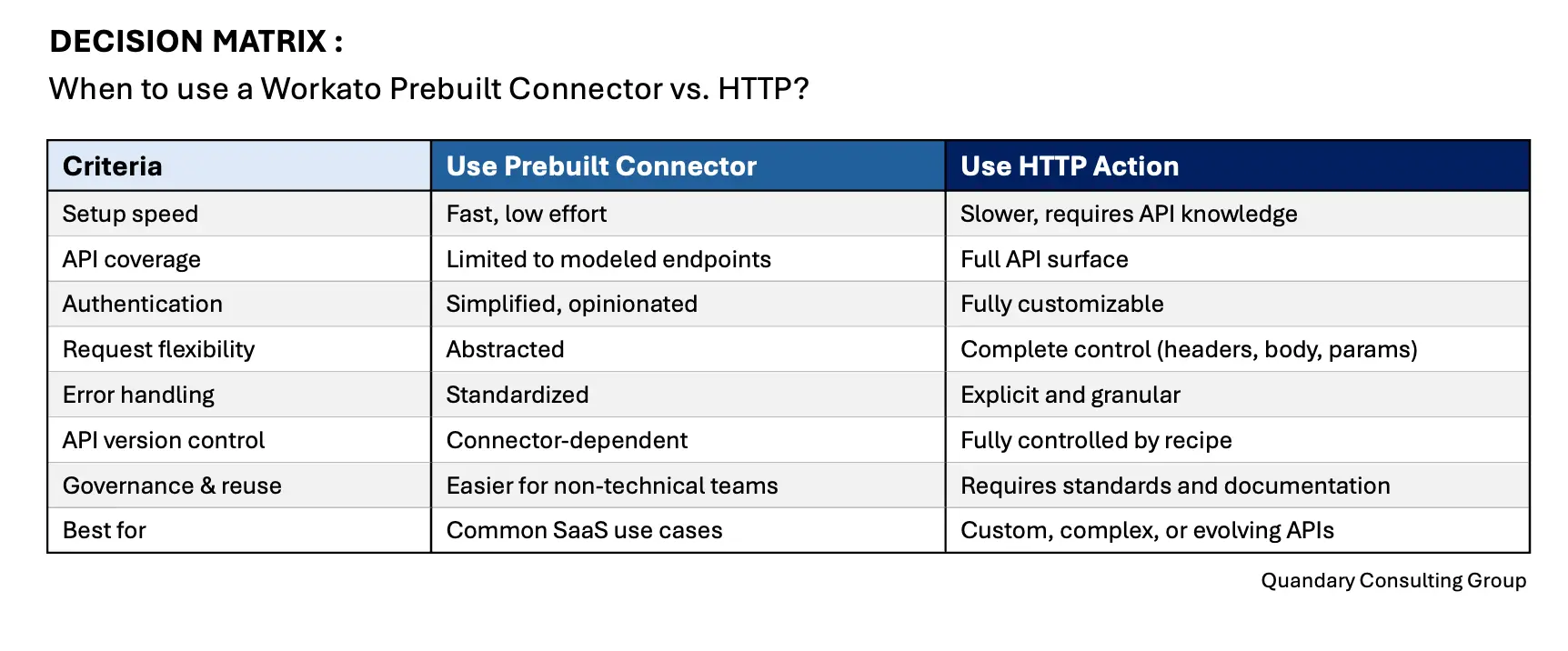
Connector vs. HTTP Decision Matrix
The Connector vs HTTP matrix is not about right vs wrong tooling. It exists to prevent two common failure modes in Workato programs:
- Over-abstracting too early
Teams rely exclusively on connectors because they are easy, fast, and “safe,” only to discover later that critical API capabilities are missing, inflexible, or lagging behind vendor changes. - Over-engineering too early
Engineers default to HTTP for everything, creating brittle, opaque, and hard-to-maintain recipes that only the original builder understands.
The matrix gives teams a shared language to decide when simplicity is a strength and when control is necessary.
How the Matrix Should be used inside a Center of Excellence
The matrix is a decision support tool, not a policy hammer. Some best practice usage:
- During design reviews
- As part of intake questionnaires
- When justifying architectural decisions to stakeholders
- To document why HTTP was chosen over a connector
In mature programs, the matrix becomes:
- A training artifact
- A governance accelerant
- A way to prevent philosophical debates disguised as technical ones
Best Practices: Pagination, Rate Limits, and Retries
Pagination
- Most APIs paginate results using page numbers, cursors, or tokens.
- Best practice:
- Capture pagination metadata (e.g.,
next_page,cursor,offset) - Use loop actions to iterate until no next token exists
- Store cursors in variables to support resumability
- Capture pagination metadata (e.g.,
- Why HTTP helps:
- Connectors often hide pagination logic. HTTP lets you align exactly with the API’s pagination model.
Rate Limits & Throttling
- APIs commonly return:
429 Too Many Requests- Headers like
Retry-AfterorX-RateLimit-Remaining
- Headers like
- Best practice:
- Inspect status codes explicitly
- Implement conditional logic to delay and retry
- Use exponential backoff for high-volume integrations
- Why HTTP helps:
- You can read raw headers and status codes and implement vendor-specific throttling strategies.
Retries & Fault Tolerance
- Best practice:
- Retry only on transient failures (5xx, timeouts)
- Fail fast on 4xx validation errors
- Log request/response payloads for diagnostics
- Why HTTP helps:
- You decide what constitutes a retryable failure instead of inheriting connector defaults.
Sample HTTP Recipe: OAuth + Error Handling (Conceptual)
Use case: Sync records to a third-party API using OAuth 2.0.
- High-level flow:
- Trigger fires (e.g., new or updated record)
- HTTP action retrieves OAuth access token (if not cached)
- HTTP POST sends payload to target API
- Conditional logic evaluates response status
- Errors are logged and routed for remediation
- Key implementation details:
- Token stored securely using Workato connections or variables
- Authorization header injected dynamically:
Authorization: Bearer {{access_token}} - Response body parsed manually for success or error messages
- Status codes ≥ 400 routed to exception handling logic
- Why HTTP shines here:
- OAuth nuances (custom scopes, grant types, token refresh rules) are often too specific for generic connectors.
When NOT to Use HTTP in Workato?
Workato's HTTP are powerful, but sometimes HTTP is not always the right choice. We strongly recommended avoiding HTTP when:
- A connector already supports 90–100% of your use case
- The integration will be maintained by non-technical users
- Governance requires strict standardization across teams
- The API is unstable or poorly documented
- Time-to-value matters more than flexibility
Governance & Enablement Recommendations
If your organization relays heavily on HTTP in Workato, we suggest you establish very clear guardrails to prevent HTTP recipes from becoming fragile or tribal knowledge; here are some key guardrails we always establish with our clients for Workato HTTP:
- Standard templates: For common HTTP patterns (CRUD, pagination, webhooks)
- Shared error-handling framework (logging, alerts, retries)
- Clear documentation of endpoints, auth methods, and assumptions
- Naming conventions for recipes and variables
- Promotion guidelines from dev → test → prod
HTTP in Workato is a precision tool. It trades ease-of-use for flexibility, control, and long-term resilience. When APIs evolve faster than connectors or require custom security and behavior, HTTP enables teams to integrate at the protocol level without platform dependency.
How to Use Workato's HTTP Connector
Outlined below are details about Workato's V2 HTTP connector:
- The HTTP connector provides universal API access for integrating with applications that don't have a prebuilt connectors in Workato.
- You can use the HTTP connector to make custom HTTP requests to any API endpoint, providing greater flexibility compared to prebuilt connectors that are designed for specific services.
- The HTTP connector enables you set up triggers and actions, and map data from the HTTP response to variables for use in subsequent steps of your recipe.
- You can also define custom headers, query parameters, error handling, and request bodies, which is not always possible with prebuilt connectors.
- Please make sure to manually configure the HTTP method, URL, headers, and body for each request.
- You can also manually configure custom handling for data parsing and mapping.
HTTP Use Cases
Based on recommendations from Workato, the HTTP connector is recommended for the following use cases:
- Custom integrations with APIs that do not have a prebuilt connector in Workato.
- For example, you can create an invoice in your accounting system by making a
POSTrequest with a JSON request body.
- For example, you can create an invoice in your accounting system by making a
- Prototyping and testing API interactions before building a more robust integration.
- Custom request and response handling.
Build Options for your HTTP Connector
Workato provides the following options to enable you to build your own connector:
- HTTP connector: Allows you to make API requests using a visual interface
- Connector SDK: Provides programmatic control over connector behavior and advanced customization options
The Connector SDK supports advanced customization and works best for users with development experience. You can use Workato's Connector Copilot to generate code, explore examples, and streamline development.
The following capabilities charts below outline the differences between these options and helps you determine the best approach for your connector development.
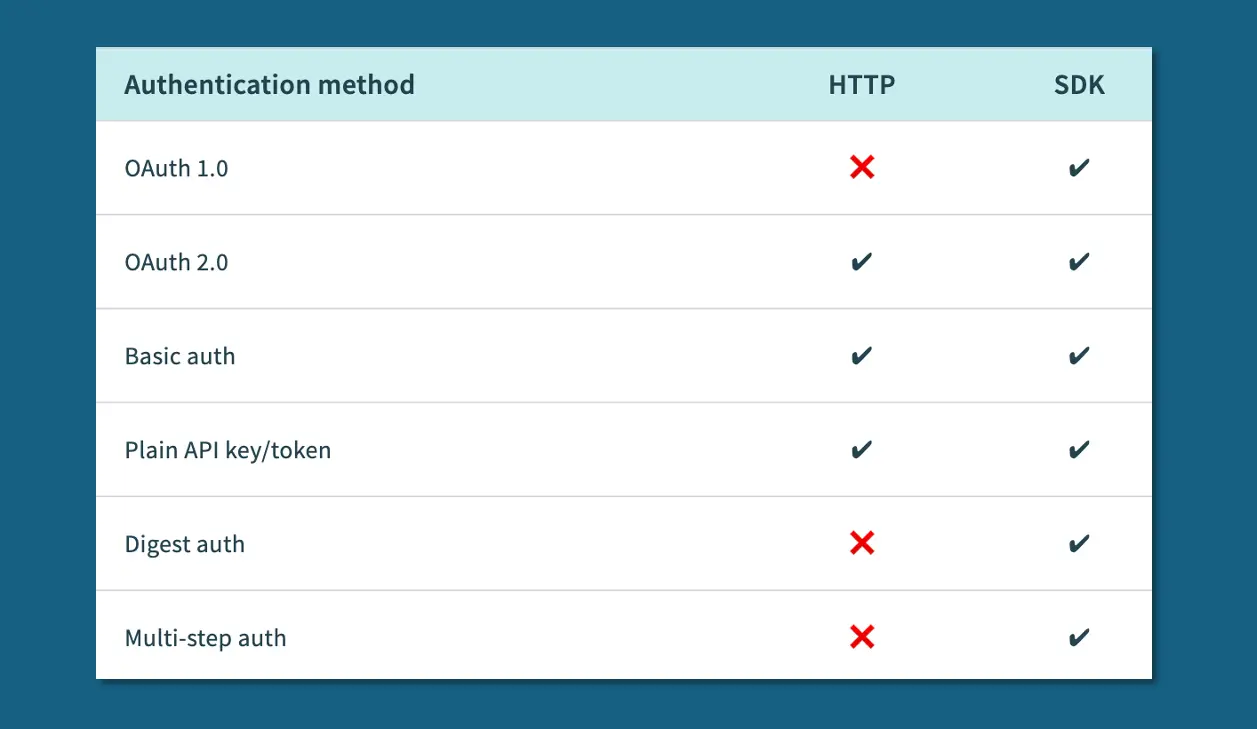
Authentication Methods
- APIs use a range of authentication mechanisms, from basic authentication (username and password) to more complex methods like OAuth 2.0.
- The HTTP connector and the Connector SDK support the following authentication methods:
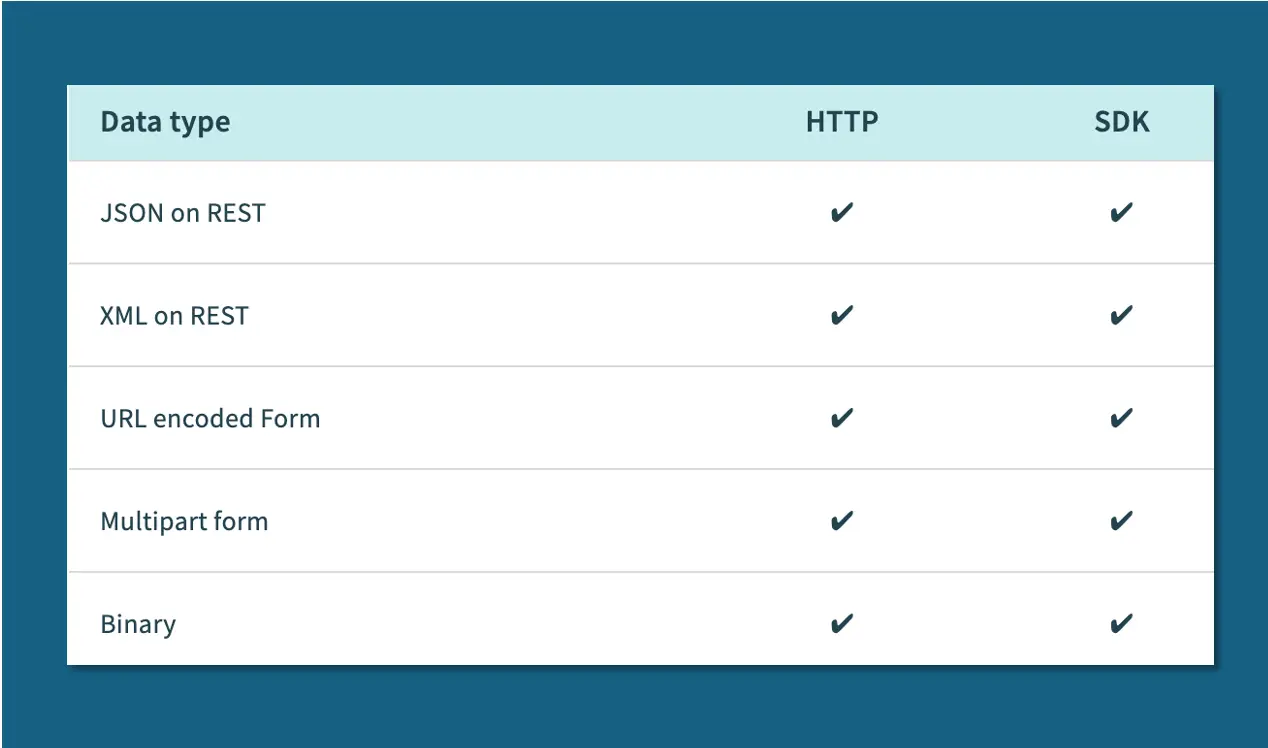
Data Types
- The HTTP connector and the Connector SDK support the following data types:
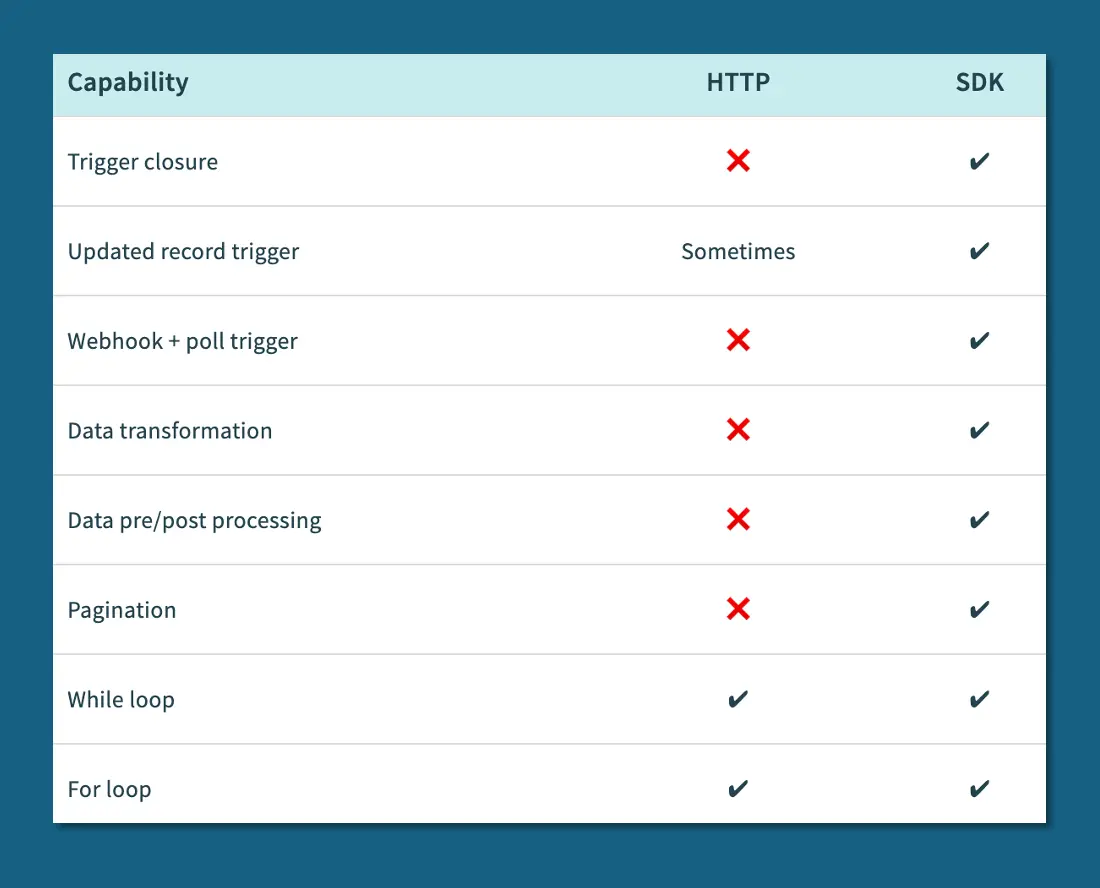
Capabilities
- The HTTP connector and the Connector SDK offer the following capabilities:
Additional Functionality
- The HTTP connector and the Connector SDK have the following additional functionality:
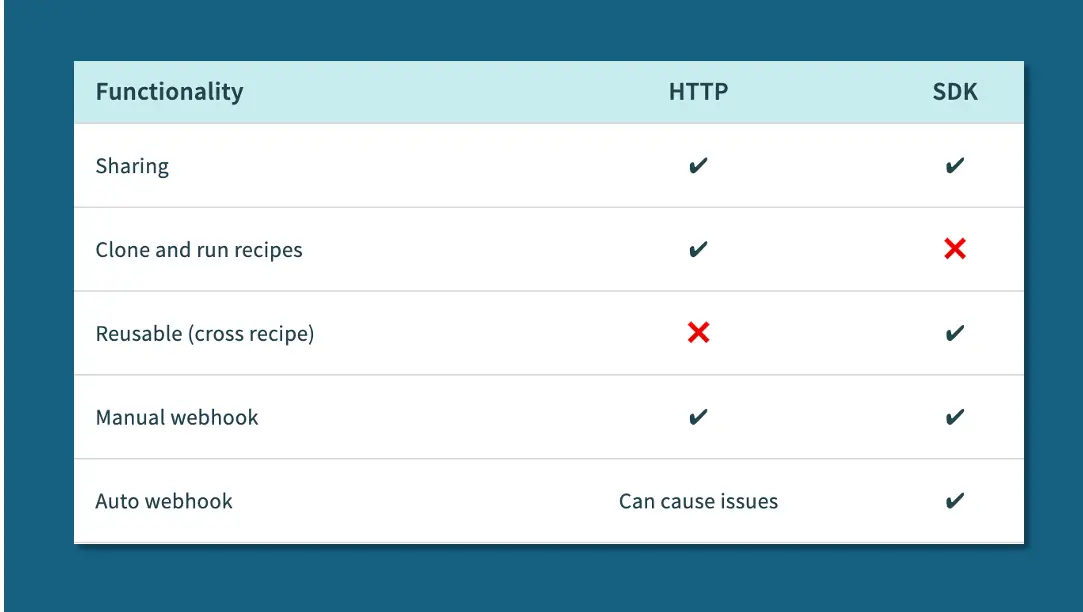
Webhook Connectors
- You can use the New Event Webhook Trigger if your use case requires your recipe to respond to trigger events in real-time.
- Verify that your app allows you to create webhooks before pursuing this option.
- By: Jeff Richey
- Email: jrichey@quandarycg.com
- Date Submitted: 06/14/2025


Resources


© 2026 Quandary Consulting Group. All Rights Reserved.
Privacy Policy