
Knowledge Base
Articles In This Section
How Workato Actually Works: A Simple BreakdownWorkato Workflow Apps: A Complete OverviewHow to Build Your First Recipe in Workato Getting Started with Data Orchestration in WorkatoWorkato FAQs: The Ultimate List of Common Workato FAQsHow to Sync your SurveyMonkey Data within Quickbase using WorkatoWhat is WorkatoUnderstanding Workato Custom Connectors How to use Workato's Logging SystemHow to use GitHub Secret Scanning for your Workato Developer API10 Key Benefits of WorkatoHow to Use Workato to Send an Email through Outlook What is Workato ONEHow to Connect Workato to RingCentralHow to Set Up HTTP Requests in Workato: Built-in and Custom What is an MCP Server and Why It Matters for your AI Foundation How to Build a Workato Center of ExcellenceHow to use Data Tables in Workato: Step-by-Step GuideHow to Use Conditional Actions in Your Workato Recipe How to Set Up a Call Ended Trigger in Workato for RingCentralHow to Create a New App Connection in WorkatoWhat is Workato ONEHow to Set Up HTTP Requests in Workato (Built-in and Custom)How to use Data Tables in Workato: Step-by-Step GuideHow to Manage API Clients and Client Roles in WorkatoHow to Process File Attachments in WorkatoSections
Understanding Webhooks in Workato
When designing a system integration, one of the most important decisions you’ll make is how data will move between applications.
Should you use APIs, webhooks, RPA (robotic process automation), or custom scripts?
Each approach has its place—but choosing the right one depends on factors like real-time requirements, scalability, and system architecture.
In this guide, we’ll break down webhooks—including what they are, how they work, when to use them, and why they’re a powerful alternative to traditional APIs.
What Is a Webhook?
A webhook is a lightweight, event-driven integration method that enables real-time data transfer between systems.
Often described as a “reverse API,” a webhook allows one system to automatically send data to another when a specific event occurs—without requiring constant polling or manual requests.
How Webhooks Work
Webhooks operate on a simple, efficient trigger-based model:
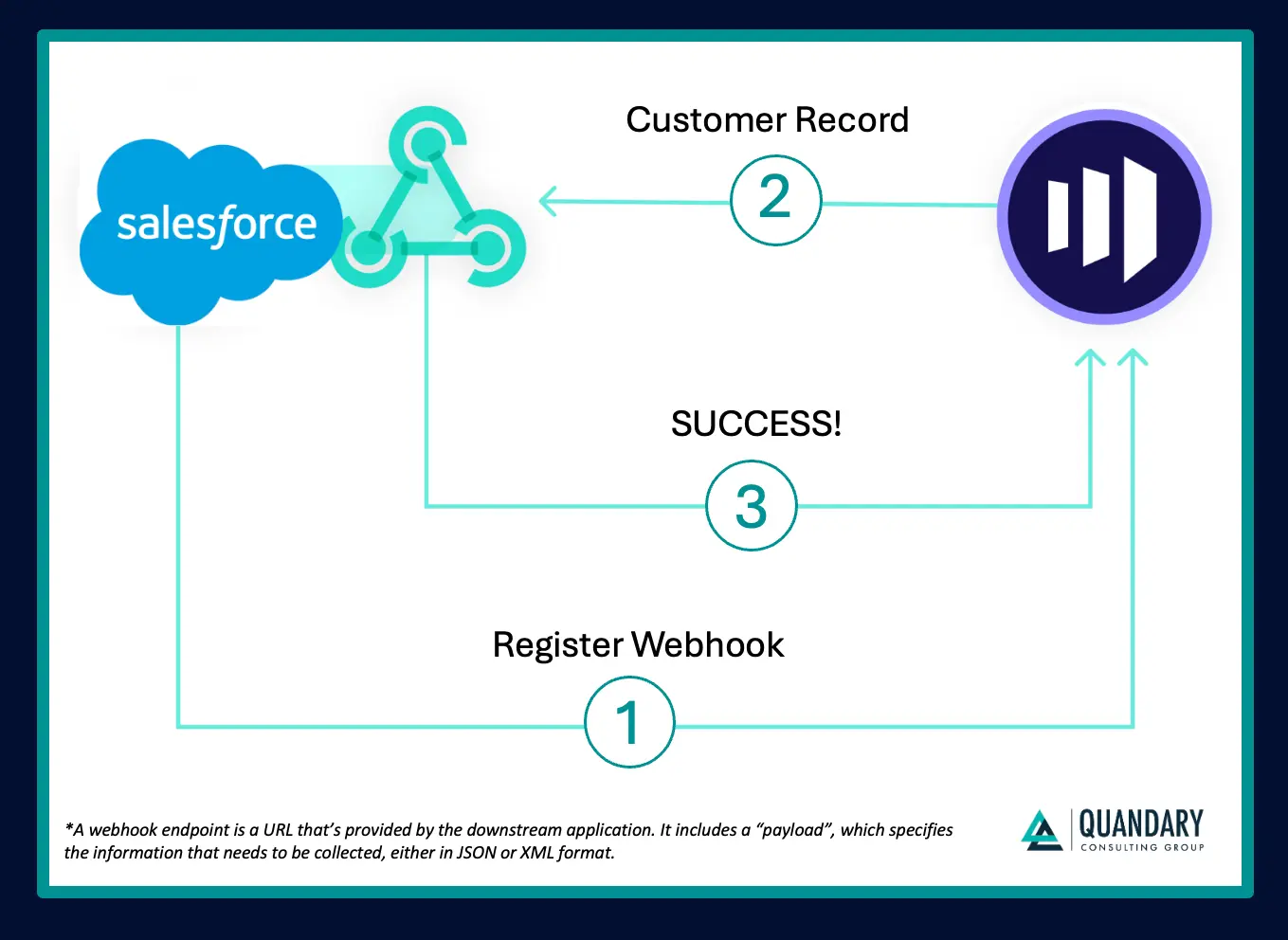
- A downstream application registers a webhook endpoint (URL) in a source system
- The webhook is configured to listen for a specific event (e.g., a new record, status change, or update)
- When that event occurs, the source system automatically sends an HTTP request (payload) to the webhook endpoint
- The receiving system processes the data and returns a status response (e.g., “200 OK” or “Success”)
This enables near real-time data synchronization without the overhead of continuous API polling.
Webhook Example: Syncing Marketo and Salesforce
Let’s say you want to automatically send new leads from Marketo to Salesforce (SFDC).
Here’s how a webhook makes that happen:
- You configure a webhook in Marketo and define the trigger event: “new lead created”
- You provide a webhook URL (endpoint) tied to Salesforce or middleware
- When a new lead is added in Marketo, it instantly sends the lead data to the webhook endpoint
- Salesforce receives the data, creates the lead record, and returns a success response
The result: automated, real-time lead syncing—no manual intervention or scheduled API calls required.
Why Use Webhooks?
Webhooks are ideal when your integration requires speed, efficiency, and responsiveness to real-time events. Instead of repeatedly asking a system if something has changed (like with traditional APIs), webhooks allow systems to automatically notify each other the moment an event occurs.
Here’s where they shine:
- Real-time or near real-time data updates
Webhooks push data instantly when a trigger event happens, making them ideal for time-sensitive use cases like lead routing, order processing, or status updates. - Event-driven architecture
If your systems are designed to react to specific actions (e.g., a new record, update, or deletion), webhooks provide a clean, scalable way to power those workflows without constant querying. - Reduced API load (no polling required)
Unlike APIs that require frequent polling (repeated requests to check for new data), webhooks only send data when necessary—reducing unnecessary traffic and improving system performance. - Faster, more efficient integrations
Because webhooks eliminate delays and reduce overhead, they enable simpler, more lightweight integrations that are easier to maintain and scale over time.
When Not to Use Webhooks
While webhooks are powerful, they’re not always the best fit. In some scenarios, other integration methods—like APIs, batch processing, or middleware—may be more reliable or easier to manage.
Here are a few cases where webhooks may not be the right choice:
- When real-time data isn’t required
If your use case can tolerate delays (e.g., nightly syncs or scheduled updates), a batch API approach is often simpler and more predictable than managing event-driven triggers. - When the receiving system can’t support incoming requests
Webhooks require a publicly accessible endpoint to receive data. If your system can’t expose an endpoint (due to security policies, firewalls, or infrastructure limitations), webhooks won’t work without additional tooling. - When guaranteed delivery and retry logic are critical
Not all webhook implementations handle failures robustly. If your use case demands strict delivery guarantees, advanced retry logic, or transactional integrity, a more controlled API or middleware solution may be a better fit. - When events are too frequent or high-volume
In high-throughput systems, webhooks can generate a flood of requests that overwhelm downstream systems. In these cases, streaming, queuing, or batch processing patterns may be more scalable. - When you need to query or manipulate data on demand
Webhooks are event-driven—they don’t support pulling data or performing ad hoc queries. If your integration requires frequent lookups or complex data retrieval, a traditional API is more appropriate.
Webhooks vs. APIs: What’s the Difference?
Although webhooks and APIs are often mentioned together in integration discussions, they serve fundamentally different purposes. The key difference comes down to how data is delivered.
With a traditional API integration, the receiving system must continuously send requests to another system’s API endpoint to check for updates—a process known as polling. This can introduce delays and unnecessary system load, especially when no new data is available.
Webhooks, by contrast, follow a push-based model. Instead of polling, the source system automatically sends data when a specific event occurs, enabling real-time or near real-time communication.
There’s also a difference in how each handles communication:
- APIs support two-way communication: A request is sent, and the API responds with the requested data
- Webhooks support one-way communication: Data is pushed to a designated endpoint, which simply acknowledges receipt (e.g., “200 OK”)
In short:
- Use APIs when you need to request, query, or manipulate data on demand
- Use webhooks when you want systems to automatically react to events in real time
Common Webhook Use Cases
Webhooks are incredibly versatile and can support a wide range of event-driven automation use cases across your organization.
Below are a few high-impact examples:
1. Sync ITSM Issues with CRM Cases
When your support team manages issues in tools like Jira, it’s critical that customer-facing teams—such as account managers—have visibility into those updates.
With webhooks, you can automatically sync issue activity between systems:
- A webhook is registered from Salesforce (CRM) to Jira (ITSM)
- When an issue is created or updated in Jira, it triggers the webhook
- Salesforce automatically:
- Creates an account (if it doesn’t exist)
- Creates a case (if needed)
- Updates the case with the latest issue status
Result: Customer-facing teams stay informed in real time, improving account management and customer experience.
2. Automatically Add Event Registrants to Your CRM
Marketing teams often rely on platforms like Eventbrite to manage event registrations—but without automation, getting that data into your CRM can be slow and manual.
Webhooks streamline this process:
- A webhook is configured to trigger when a new event registration (order) occurs
- The event platform sends registrant data to your CRM (e.g., Salesforce)
- The system:
- Creates a new lead if the email doesn’t exist
- Skips duplicates if the contact is already present
Result: Faster lead follow-up, improved conversion rates, and better alignment between marketing and sales.
3. Trigger Real-Time IT Alerts and Notifications
When business-critical incidents occur—like outages, security alerts, or system failures—your IT team needs immediate visibility.
Webhooks enable instant notifications:
- A webhook connects your monitoring tool (e.g., Splunk) to your communication platform (e.g., Slack)
- When an alert is generated, it triggers the webhook
- A message is automatically posted in the appropriate Slack channel with relevant context
Result: Faster incident response times and reduced operational risk.
Benefits of Using Webhooks
Webhooks offer several advantages for modern, event-driven integrations:
- Real-Time Data Synchronization
- Because webhooks trigger instantly when events occur, they keep data accurate and up to date across systems—eliminating delays and inconsistencies.
- Faster Response to Time-Sensitive Events
- Teams can act on critical information as soon as it’s available, whether that’s following up on leads, resolving support issues, or responding to incidents.
- Reduced API Usage and Lower Costs
- Polling APIs can be inefficient and costly, especially when you’re making frequent requests that return no new data.
- Webhooks eliminate unnecessary API calls, helping you:
- Stay within API limits
- Reduce infrastructure load
- Lower operational costs
Simple, Lightweight Implementation
Most platforms make it easy to register and configure webhooks. Once set up, they require minimal ongoing maintenance—making them a low-overhead integration solution.
Scaling Webhook Integrations with Workato
While webhooks are powerful, managing them manually across multiple systems can become complex.
Platforms like Workato simplify this process by:
- Automatically generating and registering webhook endpoints
- Managing authentication and event triggers
- Enabling teams to build scalable, enterprise-grade automations without heavy engineering effort
This allows your team to focus less on infrastructure and more on designing impactful workflows and integrations.
Unlock the Full Potential of Your Integrations with Quandary
Designing scalable, real-time integrations with webhooks, APIs, and automation tools can get complex quickly—especially across a growing tech stack.
At Quandary Consulting Group, we help organizations design, implement, and optimize integration strategies that are reliable, scalable, and built for business impact.
Whether you’re:
- Evaluating webhooks vs. APIs
- Building event-driven architectures
- Or looking to streamline operations with automation platforms like Workato
Our team can help you move faster—with confidence.
Talk to an integration expert at Quandary and start building smarter, more connected systems.
- By: John Orsak
- Email: jorsak@quandarycg.com
- Date: August 15, 2025


Services
Industries



© 2026 Quandary Consulting Group 2026. All Rights Reserved.
Privacy Policy