
Knowledge Base
Articles In This Section
How Workato Actually Works: A Simple BreakdownWorkato Workflow Apps: A Complete OverviewHow to Build Your First Recipe in Workato Getting Started with Data Orchestration in WorkatoUnderstanding Webhooks in WorkatoWorkato FAQs: The Ultimate List of Common Workato FAQsHow to Sync your SurveyMonkey Data within Quickbase using WorkatoWhat is WorkatoUnderstanding Workato Custom Connectors How to use Workato's Logging SystemHow to use GitHub Secret Scanning for your Workato Developer API10 Key Benefits of WorkatoHow to Use Workato to Send an Email through Outlook What is Workato ONEHow to Connect Workato to RingCentralHow to Set Up HTTP Requests in Workato: Built-in and Custom What is an MCP Server and Why It Matters for your AI Foundation How to Build a Workato Center of ExcellenceHow to use Data Tables in Workato: Step-by-Step GuideHow to Use Conditional Actions in Your Workato Recipe How to Set Up a Call Ended Trigger in Workato for RingCentralHow to Create a New App Connection in WorkatoWhat is Workato ONEHow to Set Up HTTP Requests in Workato (Built-in and Custom)How to Manage API Clients and Client Roles in WorkatoHow to Process File Attachments in WorkatoSections
How to use Data Tables in Workato: Step-by-Step Guide
Modern businesses are increasingly building their own applications using low-code platforms. But while these platforms simplify app development, the data layer often remains a hidden bottleneck.
To truly enable non-technical users to build powerful applications, the data storage layer must be just as intuitive, flexible, and scalable as the rest of the platform.
Why Data Storage Still Slows Things Down
Many so-called low-code platforms still rely on traditional databases behind the scenes. That creates friction:
- Users may need database expertise (like SQL)
- Managing infrastructure becomes a burden
- Integrating data across systems can be complex
In short, if you still need to manage a database, you’re not getting the full promise of low-code.
A true low-code platform should eliminate this complexity entirely.
What a Modern Low-Code Data Layer Should Offer
An effective data storage solution for low-code apps should meet three key criteria:
1. Simple to Build and Use
Users should be able to define and manage data structures through a visual interface—no coding required.
2. Seamless Integration
Data should flow easily between systems, apps, and workflows without manual intervention or complex queries.
3. Enterprise-Ready Performance
The solution must handle large volumes of data reliably, with strong performance, security, and scalability.
Low-code platforms need a data layer that matches their ease of use—otherwise, the experience breaks down.
Workato Table Storage - A New Approach to Data Storage
Workato’s Table Storage is designed specifically to solve this problem.
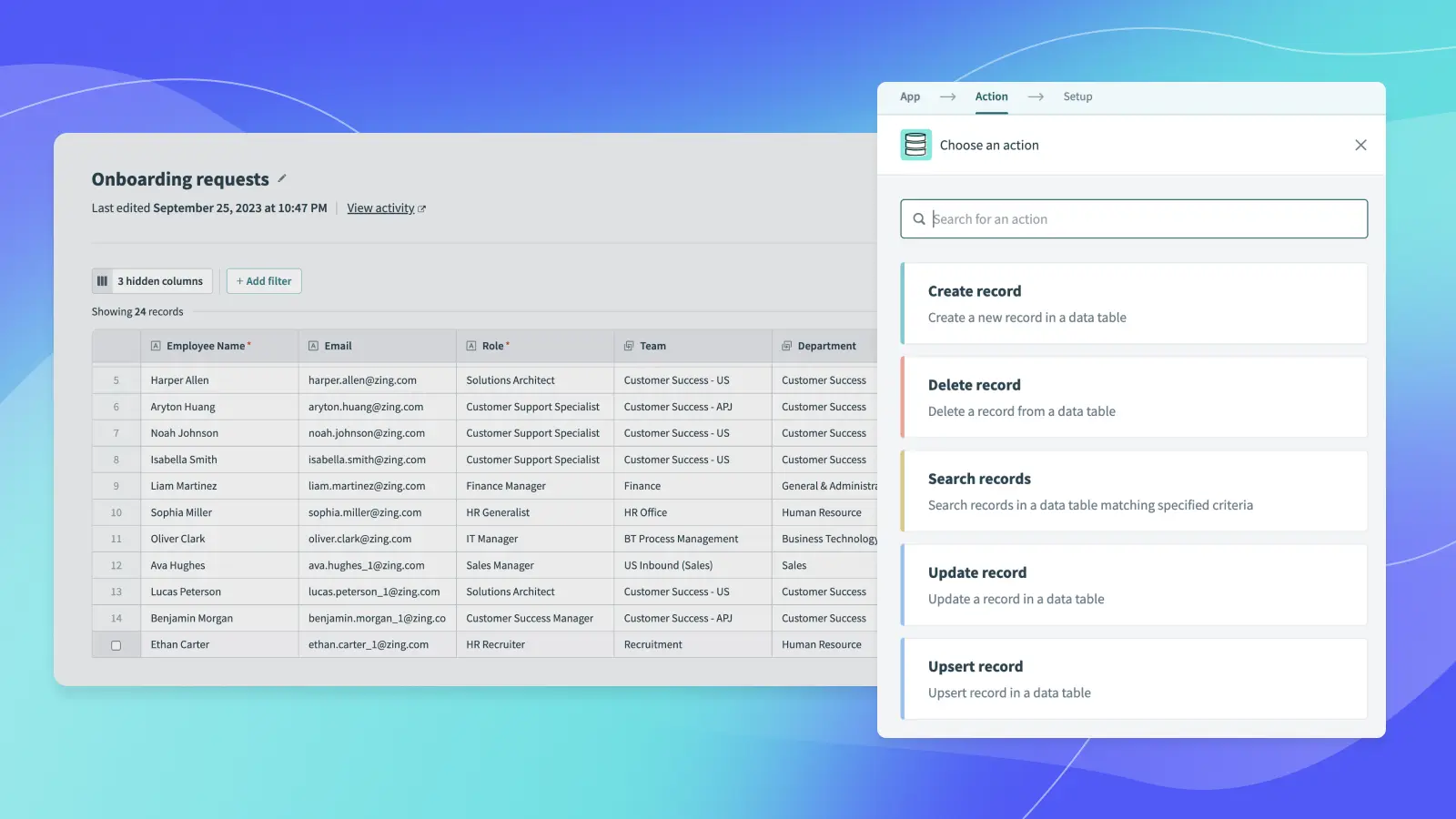
It provides a fully managed, low-code data layer that integrates directly into application workflows, enabling users to store, manage, and use data without writing code.
With it, users can:
- Create and link data tables through a visual interface
- Store and manage application data centrally
- Power workflows and automations directly from stored data
Everything is built to work seamlessly with Workato’s broader platform, including its automation “recipes” and connectors.
What Makes Workato's Table Storage is a Great Data Storage Option
Table Storage stands out by combining simplicity with enterprise-grade capabilities:
No maintenance required – infrastructure, scaling, and optimization are handled automatically
High performance – supports large datasets (up to millions of records) without tuning
Flexible data modeling – easily adapt structures as business needs evolve
Built-in security and reliability – includes backups, recovery, and isolation by design
This allows business users—not just developers—to build and manage data-driven applications confidently.
The Tradeoff: Simplicity Over Full SQL Control
There’s an intentional tradeoff. Unlike traditional databases, Table Storage does not support full SQL querying. Instead, it uses optimized filtering and structured access patterns.
This decision prioritizes usability over flexibility—making the system easier to use for non-technical users while still delivering strong performance.
For more advanced needs, support for SQL-based transformations is being expanded within workflows.
How Workato Data Table Works Behind the Scenes
Although the interface is simple, the underlying system is sophisticated. Workato uses a flexible data model that stores metadata and values in a consistent structure. This allows users to define custom tables and fields without creating new database schemas every time.
The result:
- Greater flexibility in how data is structured
- Consistent performance regardless of complexity
- Reduced risk of misconfiguration or downtime
Enabling the Next Generation of Builders
Low-code platforms are changing who can build software.
Instead of relying solely on developers, organizations are empowering business users—often called “citizen developers”—to create their own tools and workflows.
But for that to work, every layer of the platform must be accessible—including data storage.
Workato Table Storage is a key step toward that vision: a fully integrated, low-code data layer that removes complexity while maintaining enterprise standards.
If low-code platforms are meant to democratize application development, they can’t stop at the interface or workflow layer.
The data layer matters just as much.
By simplifying how data is stored, connected, and managed, platforms like Workato are helping businesses move faster, reduce reliance on IT, and unlock new levels of innovation.
But technology alone isn’t enough. To fully realize the value of low-code and automation, organizations need the right strategy, architecture, and implementation approach.
Frequently Asked Questions
What is low-code data storage?
Low-code data storage is a modern approach to data management for low-code platforms that allows users to store and manage application data without writing code. Instead of relying on traditional databases, users can build data models through visual interfaces—making it easier for citizen developers and business teams to create applications quickly.
How is low-code data storage different from a traditional database?
Traditional databases require technical expertise in SQL, database administration, and infrastructure management. In contrast, low-code data storage simplifies enterprise data management by abstracting these complexities, enabling users to focus on building workflow automation and business applications instead of managing backend systems.
- When should I use low-code data storage instead of a traditional database?
- Low-code data storage is ideal when you need to:
- Rapidly build internal tools and business applications
- Empower non-technical users or citizen developers
- Reduce reliance on IT for application development and data management
- Accelerate digital transformation initiatives
- For highly complex, data-intensive applications requiring advanced queries, a traditional database may still be the better choice.
- Low-code data storage is ideal when you need to:
- Can low-code data storage scale for enterprise use?
- Yes—modern low-code platforms like Workato offer scalable data storage solutions designed for enterprise-grade performance, security, and reliability. These platforms can handle large datasets and support complex automation workflows, especially when paired with strong data architecture and governance.
- Does low-code mean less flexibility?
- Low-code platforms prioritize speed and usability, which can limit some advanced customization. However, they still provide significant flexibility for most business process automation and application development use cases. The tradeoff allows teams to move faster while reducing technical complexity.
- How does low-code data storage integrate with other systems?
- Low-code data storage is typically built into integration and automation platforms (iPaaS) like Workato, allowing seamless connectivity with APIs, SaaS applications, and databases. This enables real-time data integration, workflow automation, and system orchestration without manual coding.
- What are common challenges when implementing low-code data storage?
- Common challenges in low-code application development include:
- Designing scalable data models and schemas
- Establishing proper data governance and access controls
- Avoiding short-term builds that don’t support long-term automation strategy
- Addressing these early is key to successful adoption.
- Common challenges in low-code application development include:
- Do I need a partner to implement low-code solutions like Workato?
- While many teams can start on their own, working with a partner can accelerate success—especially for enterprise automation and low-code strategy.
- A partner like Quandary Consulting Group helps organizations design scalable Workato implementations, optimize data architecture, and build sustainable automation ecosystems that drive long-term business value.
- By: Logan Lott
- Date: September 9, 2025
- Email: llott@quandarycg.com


Services
Industries



© 2026 Quandary Consulting Group 2026. All Rights Reserved.
Privacy Policy