
Knowledge Base
Articles In This Section
How Workato Actually Works: A Simple BreakdownWorkato Workflow Apps: A Complete OverviewHow to Build Your First Recipe in Workato Getting Started with Data Orchestration in WorkatoUnderstanding Webhooks in WorkatoWorkato FAQs: The Ultimate List of Common Workato FAQsHow to Sync your SurveyMonkey Data within Quickbase using WorkatoWhat is WorkatoHow to use Workato's Logging SystemHow to use GitHub Secret Scanning for your Workato Developer API10 Key Benefits of WorkatoHow to Use Workato to Send an Email through Outlook What is Workato ONEHow to Connect Workato to RingCentralHow to Set Up HTTP Requests in Workato: Built-in and Custom What is an MCP Server and Why It Matters for your AI Foundation How to Build a Workato Center of ExcellenceHow to use Data Tables in Workato: Step-by-Step GuideHow to Use Conditional Actions in Your Workato Recipe How to Set Up a Call Ended Trigger in Workato for RingCentralHow to Create a New App Connection in WorkatoWhat is Workato ONEHow to Set Up HTTP Requests in Workato (Built-in and Custom)How to use Data Tables in Workato: Step-by-Step GuideHow to Manage API Clients and Client Roles in WorkatoHow to Process File Attachments in WorkatoSections
Understanding Workato Custom Connectors
Out of the box – Workato comes pre-loaded with hundreds of pre-built connectors. That means that within a few clicks of sign in, you have the ability to integrate with hundreds of leading systems available today. You can instantly start connecting dozens of popular enterprise grade to small team tools.
Each year, the number of available systems on the market grows exponentially, which are all now fighting for niche markets. Salesforce might be considered the market leading CRM, but their competitors try to target industry specific companies. Take roofing for example, there are companies that claim they have revolutionized the sales and estimating process in that sector with systems Salesforce cannot compete with.
From an integration stand point, that makes it difficult for companies like Workato to keep up. Not everyone’s system has the bang-for-the-buck need to add an out-of-the-box connector in Workato. That doesn’t mean Workato isn’t the tool for you.
If you’ve read our knowledge base article, What is Workato, it’s described as an ‘integration engine’. In this circumstance, even without having pre-built connectors, Workato still has all the tools you need to let you integrate even the most niche systems.
Enter the Workato SDK and building your own custom connectors. With these tools – you can become a Workato developer yourself and start building your own triggers, actions, and processes in order to change your business. You can use this to connect with any system that allows API access to authorized users and program any and all methods available in that system to work with Workato.
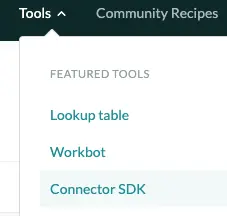
Available in every Workato account under the ‘Tools’ tab of your home page – you can opt for the Connector SDK and start creating your own connector. Note – this takes some real development skill and by no means meant for anyone brand new to Workato. When would you go this route?
- Workato doesn’t currently support / have connectors for the system you need
- At this time, the trigger or actions you need for your integration aren’t available for use
- You have a complex process that requires extensive coding to manipulate / parse / work with
Let’s take a simple example. As of this writing – HubSpot – a CRM software, has an out-of-the-box connector. But currently only has one trigger: ‘New Contact in Hubspot’.
- If you’re company is a big user of HubSpot – thats a good start. But what about when a contact is updated? Or when a ‘Deal’ is created or changed. Using the Workato SDK and building your own custom connector – you can do all that and more to build a personalized workflow specific to you and your exact business need.
- If you’re proficient in development and the Workato SDK seems like a reasonable path – you might be asking why you would go this route rather than just use HTTP Requests via standard Workato connectors. In truth, in a lot of situations, if you were the sole Workato developer in your enterprise you might be able to.
- However, that approach means a couple things:
- Anyone else who helps work / manage your Workato recipes would also need to be familiar with HTTP. Given that Workato takes a lot of the development out of Integrations – this may not always be the case.
- HTTP will have to be re-entered every time. Each new recipe would need to have a new HTTP request generated and the same set-up to get your similar results.
- It becomes much more difficult to use HTTP as a trigger. Many Workato connectors have defined triggers that wait for events to happen. Using the HTTP connector, your system that is being integrated with will need to send a Request to Workato in order to start your recipe rather than Workato trigger itself.
In summary, it’s likely that Workato already has exactly what you need to revolutionize your business processes. But if you have fringe systems or a strange workflow, Workato can’t account for them all. Using the Workato SDK and building your own connectors – you can program like your own to make the engine that is Workato operate exactly how you need it to in any circumstance.
In addition to this – Keep a look out for a more in depth article regarding how to actually use the HTTP connector to be help bridge the gap between your current processes.
- Author: Kevin Shuler
- Email: kevin@quandarycg.com
- Date Submitted: March 29, 2019


Services
Industries



© 2026 Quandary Consulting Group 2026. All Rights Reserved.
Privacy Policy