
Knowledge Base
Workato FAQs
Curious about Workato and how it can streamline your business processes? Outlined below are common Workato FAQ that we have heard here at Quandary Consulting Group:
What is an iPaaS?
- Integration Platform as a Service (iPaaS) is a suite of cloud-based services that enables organizations to connect, automate, and manage applications, data, and business processes across cloud and on-premises environments.
- It serves as a centralized hub to sync disparate systems, enabling data synchronization and workflow automation through low-code tools
What is Workato?
- Workato is a leading cloud-native, low-code/no-code Enterprise Automation Platform (iPaaS) that enables businesses to integrate applications, databases, and systems to automate workflows.
- Workato allows both IT and business teams to create automated, real-time workflows—called "recipes"—without complex coding, facilitating improved operational efficiency across departments like HR, finance, and marketing.
- Workato helps you automate business workflows across cloud and on-premises apps.
- For example, you can automate quote-to-cash business processes, which may involve transferring data between apps such as Salesforce, NetSuite, BILL, ServiceNow, Apttus, etc.
- Workato combines an enterprise-grade workflow automation platform with the ease of use expected from consumer apps, enabling both business and IT users to quickly build workflow automations.
- To learn more, visit Workato
Who Invented Workato?
- Workato was founded in 2013 by Vijay Tella, Gautham Viswanathan, Harish Shetty, and Dimitris Kogias to solve the problem of fragmented, siloed data across SaaS applications. The founders aimed to create a user-friendly, no-code platform for enterprise automation and integration, driven by Tella’s vision to make enterprise software as accessible and "always-on" as consumer apps.
Why was Workato Invented?
- The Problem (Why): With the explosion of SaaS applications, companies struggled with "chopped up" data.
- The founders aimed to create an iPaaS (Integration Platform as a Service) that would securely connect these apps and automate workflows without requiring deep coding expertise.
- The vision behind Workato was designed to empower business users to build automations for complex, cross-functional processes.
Where is Workato HQ’ed?
- Workato is headquartered in Mountain View, California, and has become a major player in the automation space, with significant backing from investors like Battery Ventures.
What is Workato's Integration Process?
- Define Data Flow: Identify what data needs to be integrated, from where to where.
- Configure Connectors: Use Workato’s vast library of connectors or APIs.
- Map and Transform Data: Define how data should be mapped and transformed between systems.
- Set Triggers and Actions: Determine when and what actions should occur.
- Deploy and Monitor: Deploy the integration workflow and continuously monitor for performance and issues.
What are Workato's Key Features?
- Workflow apps: Workato Workflow Apps are a feature of the Workato automation platform that let you build interactive business applications without writing code—combining UI, data, and automated logic into one end-to-end solution.
- Process automation: Streamline workflows and optimize operational efficiency.
- Insights: Visualize data using Workato's drag-and-drop query builder.
- Workbot: Connect apps and automate workflows within Slack and Microsoft Teams.
- Data orchestration: Move, transform, and orchestrate data across sources and destinations at scale.
- API Platform: No-code, server-less, and enterprise grade APIM tool.
- Event streams: Orchestrate real-time workflows with event streaming.
- Universal connectivity: Integrate your apps and build custom automation solutions.
Does Workato Support Integration with On-Premise Systems?
- Yes, Workato supports both cloud-based and on-prem systems.
- Workato, also, offers on-prem agents that allow secure connections to on-prem databases, file systems, and applications.
is Workato a Enterprise-Grade Foundation platform?
- The Workato platform has a powerful feature set to handle real-world problems, including the integration of applications, data, and people. Both cloud-based and on-premises systems are supported.
- The runtime system is designed for security, robustness, reliability, and high performance.
Is Workato suitable for Citizen Integrators?
- Workato is the only integration platform that was built from the ground up to support a single design interface for developer/IT and citizen integrators, ensuring that citizens and IT have access to the same ease-of-use driven productivity improvements, and at the same time offering citizens the same power and capability available to IT.
What are Workato's Mobile Capabilities?
- While the desktop interface is designed for building complex recipes, the mobile experience is focused on managing, interacting with, and triggering those automated processes on the go.
- Workato is designed to work on mobile devices through the Workato GO mobile app and responsive web portals, enabling users to manage automations and interact with AI agents while away from their desks. Workato DocsKey aspects of Workato's mobile capabilities include:
- Workato GO App (iOS): This app, available for iOS 16 and later, allows users to interact with AI-powered "Genies" (agents), search across company applications (like Slack, Salesforce, and Google Drive), and review chat history.
- Workato Actionable AI: This app enables users to upload files, take photos, and trigger automated workflows directly from their mobile device.
- Workato Workflow Apps Portal: The Workato Workflow Apps portal in Workato is fully responsive, allowing end-users to access customized, low-code apps on both tablets and mobile devices.
- Security: The mobile experience is built with enterprise-grade security, ensuring that mobile interactions comply with organization standards.
Does Workato offer Pre-Built Solutions?
- Workato provides over 1,000 pre-built connectors, Automation Accelerators, and AI-driven Workato Genies to quickly integrate apps and automate business processes across departments like HR, Finance, and Sales.
- These customizable, pre-packaged solutions—including AI agents—facilitate faster deployment of complex workflows, such as lead management, employee onboarding, and IT service desk automation, without requiring extensive coding.
- Workato has three main categories their pre-built solutions fall under:
- Workato Genies (AI Agents): Purpose-built, intelligent agents for specialized, multi-step tasks across enterprise functions like HR (onboarding), Sales (CPQ), and IT (password resets).
- Automation Accelerators: Pre-packaged, modifiable workflows and recipes for common use cases like quote-to-cash or invoice processing.
- Pre-built Connectors: Over 1,000+ connectors for popular SaaS applications and databases, including Salesforce, Quickbase, OutSystems, ServiceNow, Marketo, Workday, NetSuite, Jira, Slack, Microsoft, etc.
What is Workato's approach to IT Governance?
- Governance is a key requirement for any platform that allows business users to work with corporate data.
- Workato Aegis is a management tool that provides cross-enterprise visibility into users and usage, integration processes, and the applications they connect.
- Workato Aegis supports assigning different levels of responsibility and visibility within the platform, and enables collaboration between business and IT users.
- This enables the implementation and enforcement of policies to improve security and governance across all Workato users within an enterprise.
Is Workato's Platform Extensible?
- Workato's platform is extensible to add support for new applications beyond the many that are available pre-built.
- A powerful and configurable REST data connector allows integration with many systems without writing any code.
- Workato also provides a Connector SDK that handles and abstracts multiple aspects of application and data orchestration for cases where custom development is required.
- Existing connectors can be extended via the SDK or via adding functions from the REST connector. In addition, a public API allows control of recipes from third-party applications.
Does Workato Offer AI Solutions?
- Yes, Workato offers extensive AI capabilities through their AI@Work suite and Agentic platform, which allow users to build AI-driven automation workflows ("recipes") and intelligent agents ("Genies").
- These tools leverage Large Language Models (LLMs) like Anthropic Claude and OpenAI GPT to interpret requests, analyze data, and execute actions across business applications.
- Workato's AI Key Features:
- Workato Genies: Workato Genies are prebuilt AI agents designed to handle high-impact work within key business functions—like CPQ in Sales or onboarding in HR. They integrate with your systems, operate securely, and are customizable to your needs—so you can put AI to work, fast.
- AI@Work Suite: A comprehensive framework including features like WorkbotGPT, which helps take actions based on insights, and various pre-configured AI actions within recipes.
- Parse Text Action: Enables the extraction of structured data from unstructured text (emails, documents) without code.
- Agent Studio: A workspace to build, test, and deploy AI agents, supporting models like Claude Sonnet 4.0 and OpenAI GPT-4o.
- Data Security: Workato provides governance for AI, ensuring data privacy and compliance during AI-driven processes.
What are Workato's Enterprise SLAs?
- Workato’s Enterprise Support and Service Level Agreements (SLAs) are designed for large-scale, mission-critical automation, providing higher reliability guarantees, faster response times, and dedicated resources compared to standard plans.
- As of 2026, Workato offers enterprise-grade support with 24x7x365 availability, dedicated Customer Success Managers (CSMs), dedicated Workato Onboarding support, and various advanced governance features.
- Quandary Consultant Group is a certified Workato Onboarding Partner.
- Workato guarantees high availability for its cloud-native platform to ensure continuity for business-critical workflows; as well as:
- Uptime Guarantee: Workato offers a 99.9% uptime guarantee.
- Infrastructure Reliability: Built on AWS, the platform uses redundant clusters and multiple availability zones to prevent service disruptions.
- On-Premise Resilience: For hybrid integrations, on-premise agents can be configured to maintain high availability and avoid data loss, with specific "on-prem groups" designed to ensure zero downtime.
- Data Retention: Enterprise plans offer configurable data retention policies for transaction logs (job reports).
Can Workato Integrate with my Existing Apps?
- Yes, Workato has a wide range of pre-built connectors for popular apps like Salesforce, Slack, Quickbase, Microsoft Teams, NetSuite, SAP, Marketo, Workday, and many others.
- Additionally, the Workato platform is extensible and supports the ability to create custom connectors with the HTTP connector or Connector SDK.
Does Workato offer Conversational Integration?
- Workato provides a chat-based (Slack, Microsoft Teams, Cisco Spark, and IBM Workspace) bot-building platform for building compelling UX centered around integrations and workflows.
Is Coding Required to use Workato?
- While basic knowledge of logic and data structures can be helpful, Workato's visual interface allows users to create workflows and integrations without writing extensive code.
- However, advanced users can also leverage Workato's scripting capabilities for more complex automations.
How secure is Workato for Handling Sensitive Data?
- Workato follows industry-standard security practices, including encryption of data in transit and at rest, role-based access control (RBAC), and audit logs.
What are Workato Security and Compliance Frameworks:
- PCI-DSS v4.0.1 − Level 1: Secure cardholder data.
- ISO 27001 & 27701: Information and privacy management aligned with global standards.
- SOC 1 Type II, SOC 2 Type II, and SOC 3: Audited controls for financial and security integrity.
- HIPAA: Healthcare data protection, with Business Associate Agreements (BAAs) available.
- IRAP: Strict cybersecurity standards aligned to Australian government requirements.
- NIST 800-171A r2: Controlled Unclassified Information (CUI) protection for federal contractors, partners, and subcontractors.
- Users can also implement additional security measures like IP whitelisting and single sign-on (SSO).
- To learn more, visit: Workato Security Overview
What Browsers does Workato Support?
- Workato is supported on all modern and up-to-date browsers, including Google Chrome, Apple Safari, Microsoft Edge, and Mozilla Firefox.
Can Workato Automate Complex Business Processes?
- Yes, Workato is designed to handle complex workflows and business processes.
- Users can create multi-step workflows (recipes) with conditional logic, data transformations, error handling, and scheduled tasks to automate intricate processes across multiple systems.
Does Workato Enable B2B/EDI Integrations?
Workato enables organizations to automate and streamline B2B data exchanges by connecting with Electronic Data Interchange (EDI) systems and other business partners. With Workato, companies can:
- Automate EDI workflows: Convert, route, and process documents like purchase orders, invoices, and shipping notices automatically.
- Connect multiple systems: Integrate ERP, CRM, WMS, and other internal systems with trading partners without manual intervention.
- Enhance accuracy and speed: Reduce errors from manual data entry and accelerate transaction processing.
- Ensure compliance: Maintain EDI standards (X12, EDIFACT) and meet partner-specific requirements.
- Monitor and track transactions: Use Workato’s logging and analytics to gain visibility into data flows and quickly resolve exceptions.
- Business impact: Faster order-to-cash cycles, reduced operational costs, improved partner satisfaction, and scalable B2B operations.
What is a Workato "Recipes"?
- Workato recipes are automated workflows that connect multiple apps through triggers and actions.
- Triggers initiate a recipe, actions are the tasks performed, and a job is the complete execution of a recipe from start to finish.
What is a Workato "Connectors"?
- A connection authorizes a recipe to interact with apps like Salesforce and Zendesk through triggers and actions.
- Connections are reusable, allowing you to use the same connection across multiple recipes.
- To Learn more about, visit connections
What are Workato "Steps" and "Actions"?
- A recipe executes steps each time a trigger event occurs.
- Every recipe requires at least one step
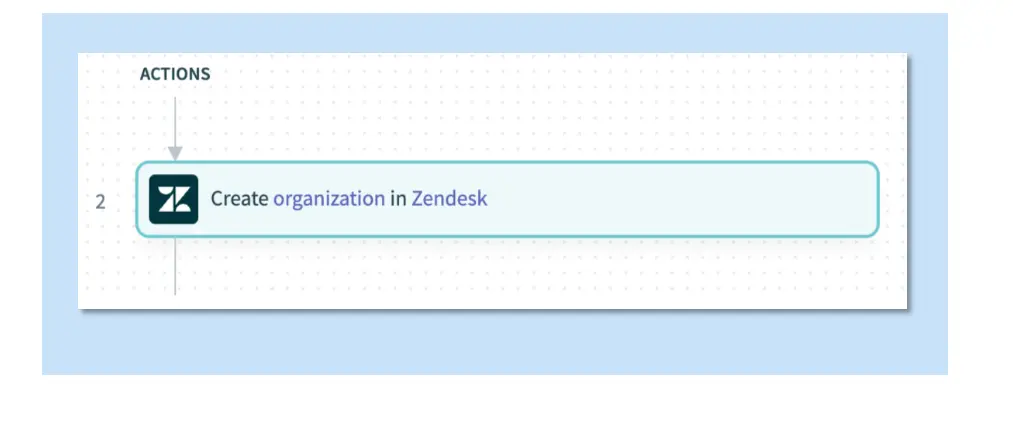
- The simplest step is an action, such as creating an organization in Zendesk.
- Steps in Workato can include actions, conditional actions, list actions, actions that call other recipes, or try/catch blocks (see image below).
- To learn more about, visit recipe steps and actions.
What is a Workato"Datapill" and "Datatree" ?
- Every step, including triggers, adds data to the recipe.
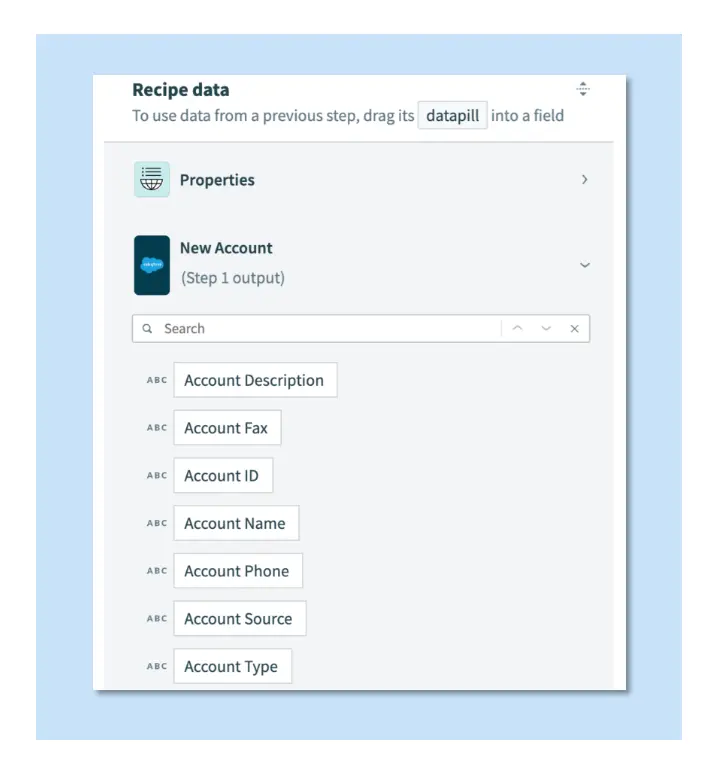
- This data is accessible in the recipe through the datatree.
- The datatree contains individual data fields called datapills.
- You can use datapills in subsequent steps to map data to input fields.
- To Learn more about, visit datapills.
- The following screenshot displays the output datatree for the New Salesforce account trigger (see image below)
- This datatree lists all variables available when a trigger event occurs.
What types of "Triggers" and "Actions" Can Be Used in Workato Recipes?
- You can configure recipe triggers to run on a scheduled interval, each time an event occurs, only for events that meet a specific condition, or when a specific number of events occur.
- Actions in a recipe can include configuring conditional statements, repeating actions with loops, handling errors, and modifying data using data-pills and formulas.
What are Workato "Input Fields"?
- Triggers and actions include input fields.
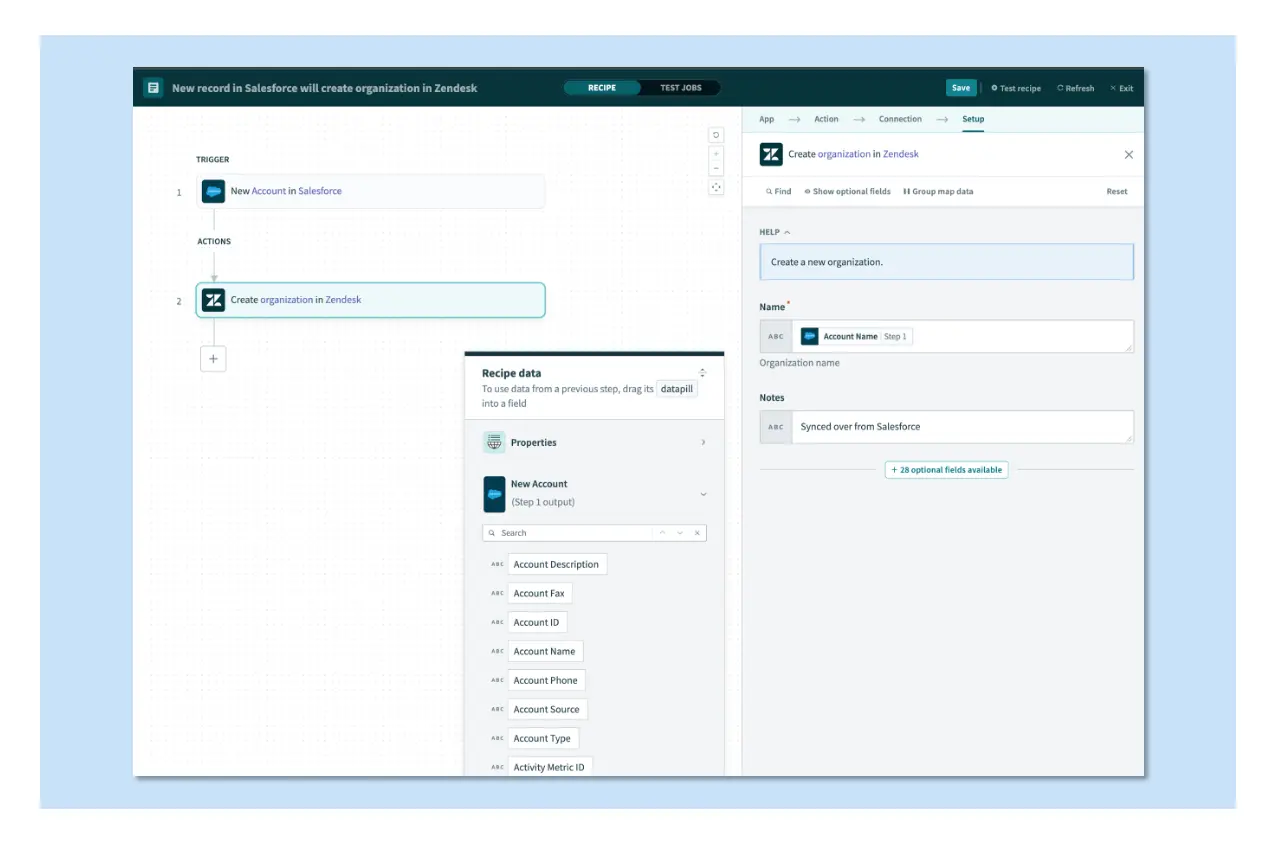
- The values you map to these fields define how triggers and actions execute customized workflows. Input fields accept variables (datapills) or constants.
- Inserting variables (datapills) or constants into input fields is called fields mapping.
- The following screenshot (see below) displays an expanded view of the Create organization in Zendesk action, with values mapped to its Name and Notes input fields.
- To learn more about, visit fields mapping.
What is a "Job" in Workato?
- A job represents the flow of a trigger event through a Workato recipe.
- Each time a trigger event occurs, the recipe executes its actions. Jobs succeed when all actions execute successfully. If an error occurs, subsequent actions do not run unless error handling is configured.
- To learn more about, visit jobs.
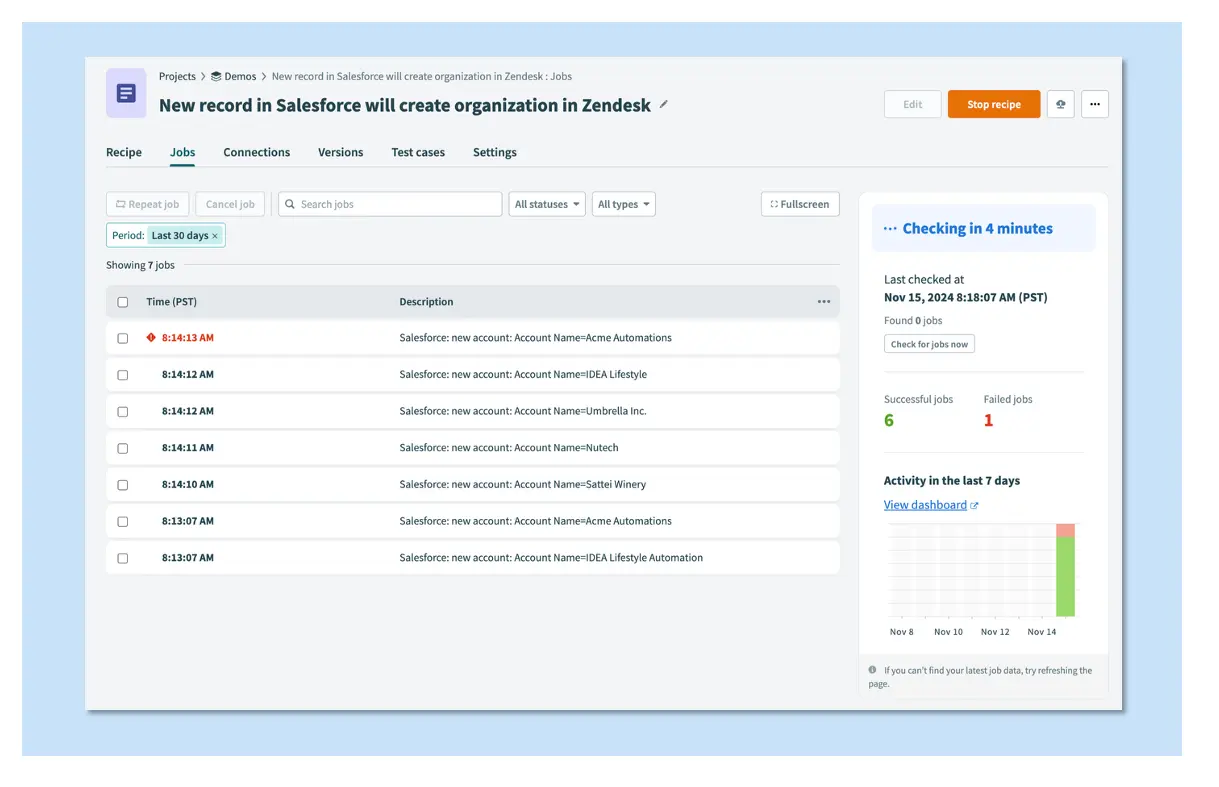
What is a Workato "Job Report"?
- The Workato job report (see image below) summarizes all trigger events processed by the recipe.
- Each trigger event's flow through the recipe is a job.
- This report provides details such as the date, time, and job ID for each processed job.
- Click a job to view more detailed information.
- To learn more, visit job reports.
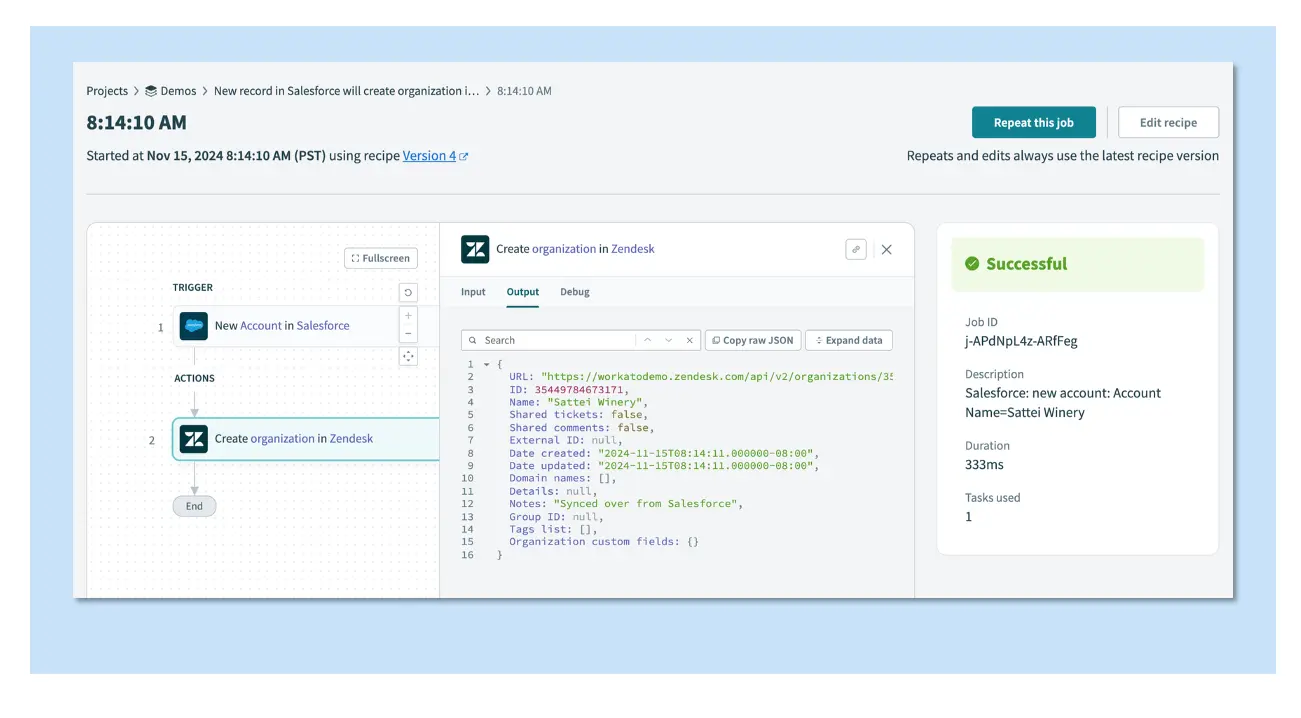
How to Use Workato "Job Details"?
- The job details page provides step-by-step input and output for a single trigger event as the recipe processes it.
- You can use this page to troubleshoot recipes by viewing the data passed into each step and the output returned after each step executes.
- To learn more, visit job details.
Does Workato offer Analytics and Monitoring Capabilities?
- Workato provides real-time monitoring of workflows, activity logs, error notifications, and performance analytics.
- Users can track the execution of workflows, identify bottlenecks, monitor data transformations, and gain insights into automation performance.
What is Workato's Approach to Security?
- Workato has a comprehensive approach to security, which includes a complete security program with documented policies and procedures, secure development and testing, a secure and scalable infrastructure, and product capabilities that enhance security.
- Workato employs encryption for data at rest and in transit, supports SAML 2.0-based authentication, two-factor authentication, and has robust access control with role-based access control (RBAC) for assigning user privileges.
What is the difference between Workato and other iPaaS Solutions?
- Workato is often chosen for its ability to handle complex, enterprise-grade workflows, offering better real-time synchronization and AI capabilities compared to simpler automation tools
Who are Workato's Competitors?
- Top Workato competitors for enterprise automation and integration include Zapier, Tray.io, Boomi, and MuleSoft.
- These platforms offer similar iPaaS capabilities, with Zapier preferred for ease of use, Tray.io for modern low-code, and Boomi/MuleSoft for heavy enterprise-grade API management.
- Other strong alternatives include Make, Microsoft Power Automate, SnapLogic, and Celigo.
What is Workato's Learning Path?
- Workato has a full training program which includes online self paced training, and instructor led training.
- Workato Academy offers online courses for beginners and advanced users that are self-paced courses; Foundation levels taking 3-6 hours.
- Certificates are generated on completion and can be shared by your users on LinkedIn.
- Please Note: Both the Automation Pro series and Workato Foundations are certificate programs, not formal certification programs.
PLEASE NOTE: This section does get updated often. Last update is Monday, February 4, 2026. If you cannot find the information you are looking for, please email bbinder@quandarycg.com directly and we will get you the information you need.


Resources


© 2026 Quandary Consulting Group. All Rights Reserved.
Privacy Policy