
Knowledge Base
What is an HTTP Connection in Workato?
An HTTP connection lets Workato talk to any system that exposes an API — even if there’s no native connector. In Workato, you will typically use an HTTP connection for:
- Custom or internal APIs
- AI / LLM APIs
- Legacy systems
- Tools Workato doesn’t (yet) support natively
The Workato HTTP connector enables you to integrate with applications or services that provide HTTP-based APIs (Application Programming Interfaces). This allows you to interact programmatically with the service to perform various actions, such as retrieving data or creating and updating records.
Outlined below are details about Workato's V2 HTTP connector. If you are using the deprecated V1 HTTP connector, please refer to Workato's documentation found on their website for V1 HTTP connector documentation.
How to Use the HTTP Connector
- The HTTP connector provides universal API access for integrating with applications that don't have a prebuilt connectors in Workato.
- You can use the HTTP connector to make custom HTTP requests to any API endpoint, providing greater flexibility compared to prebuilt connectors that are designed for specific services.
- The HTTP connector enables you set up triggers and actions, and map data from the HTTP response to variables for use in subsequent steps of your recipe.
- You can also define custom headers, query parameters, error handling, and request bodies, which is not always possible with prebuilt connectors.
- Please make sure to manually configure the HTTP method, URL, headers, and body for each request.
- You can also manually configure custom handling for data parsing and mapping.
HTTP Use Cases
Based on recommendations from Workato, the HTTP connector is recommended for the following use cases:
- Custom integrations with APIs that do not have a prebuilt connector in Workato.
- For example, you can create an invoice in your accounting system by making a
POSTrequest with a JSON request body.
- For example, you can create an invoice in your accounting system by making a
- Prototyping and testing API interactions before building a more robust integration.
- Custom request and response handling.
Build Options for your HTTP Connector
Workato provides the following options to enable you to build your own connector:
- HTTP connector: Allows you to make API requests using a visual interface
- Connector SDK: Provides programmatic control over connector behavior and advanced customization options
The Connector SDK supports advanced customization and works best for users with development experience. You can use Workato's Connector Copilot to generate code, explore examples, and streamline development.
The following capabilities charts below outline the differences between these options and helps you determine the best approach for your connector development.
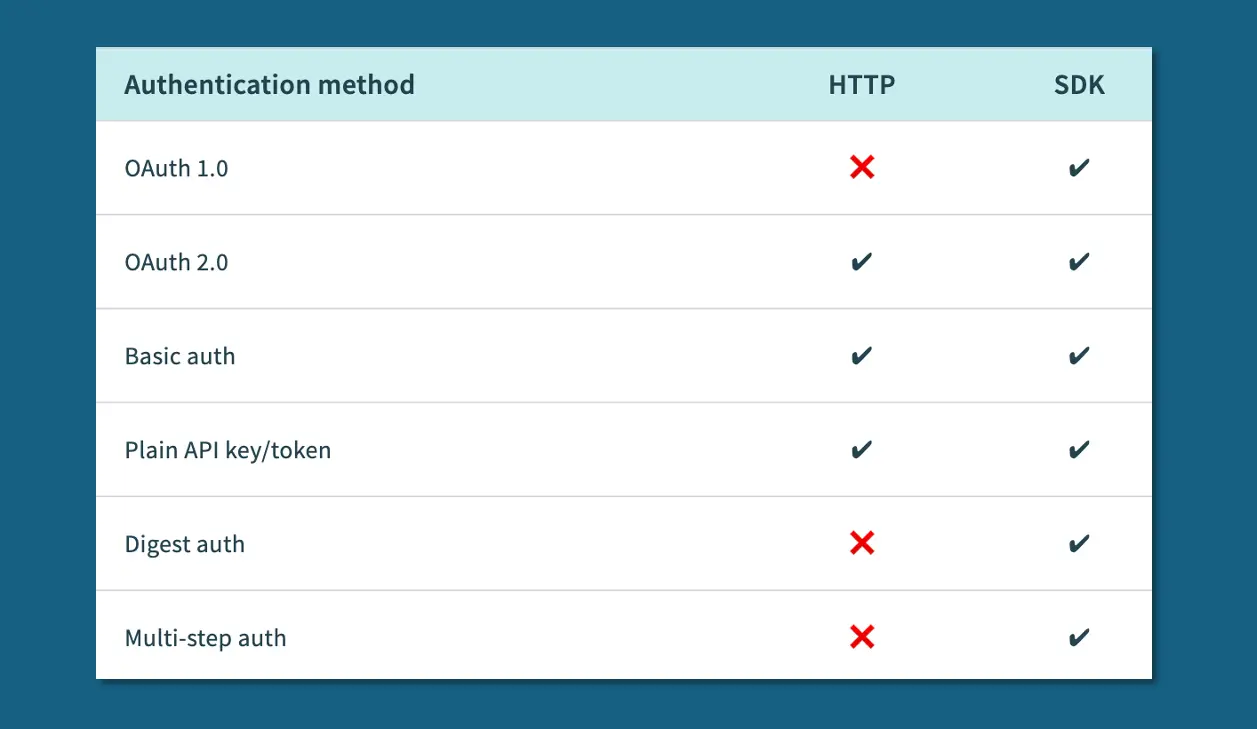
Authentication Methods
- APIs use a range of authentication mechanisms, from basic authentication (username and password) to more complex methods like OAuth 2.0.
- The HTTP connector and the Connector SDK support the following authentication methods:
Data Types
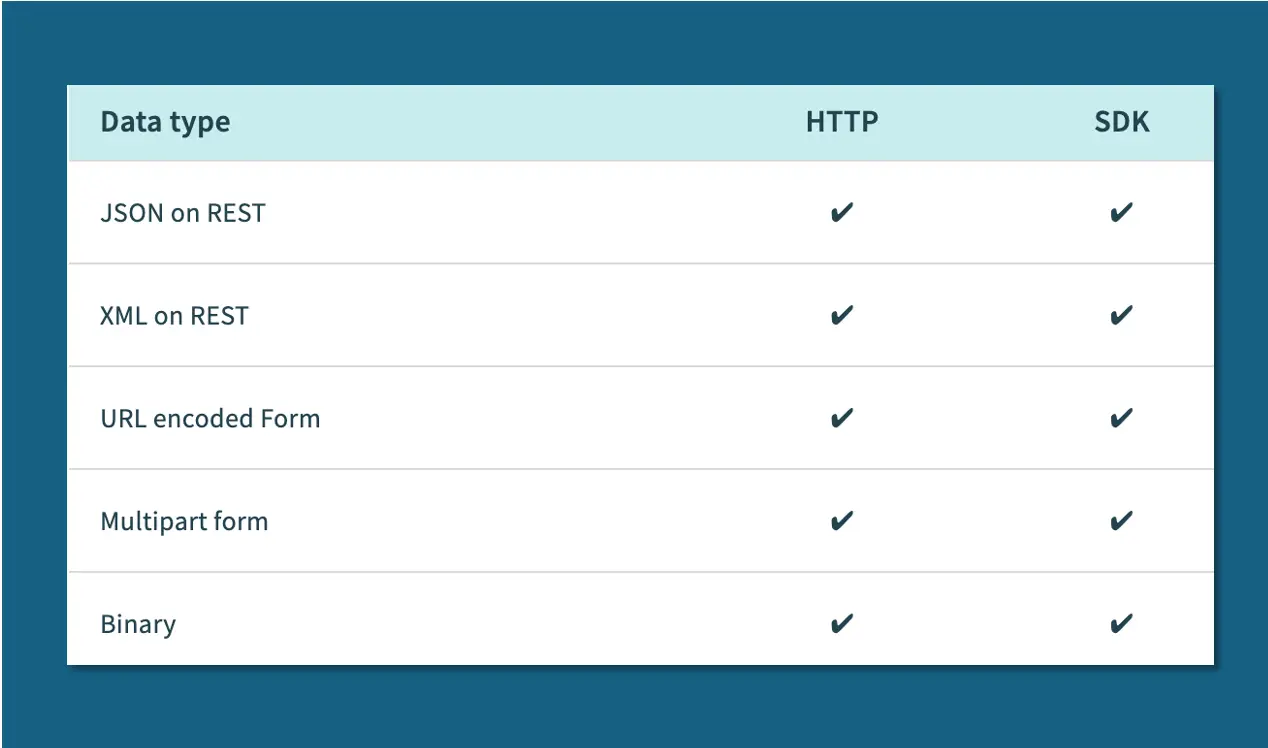
- The HTTP connector and the Connector SDK support the following data types:
Capabilities
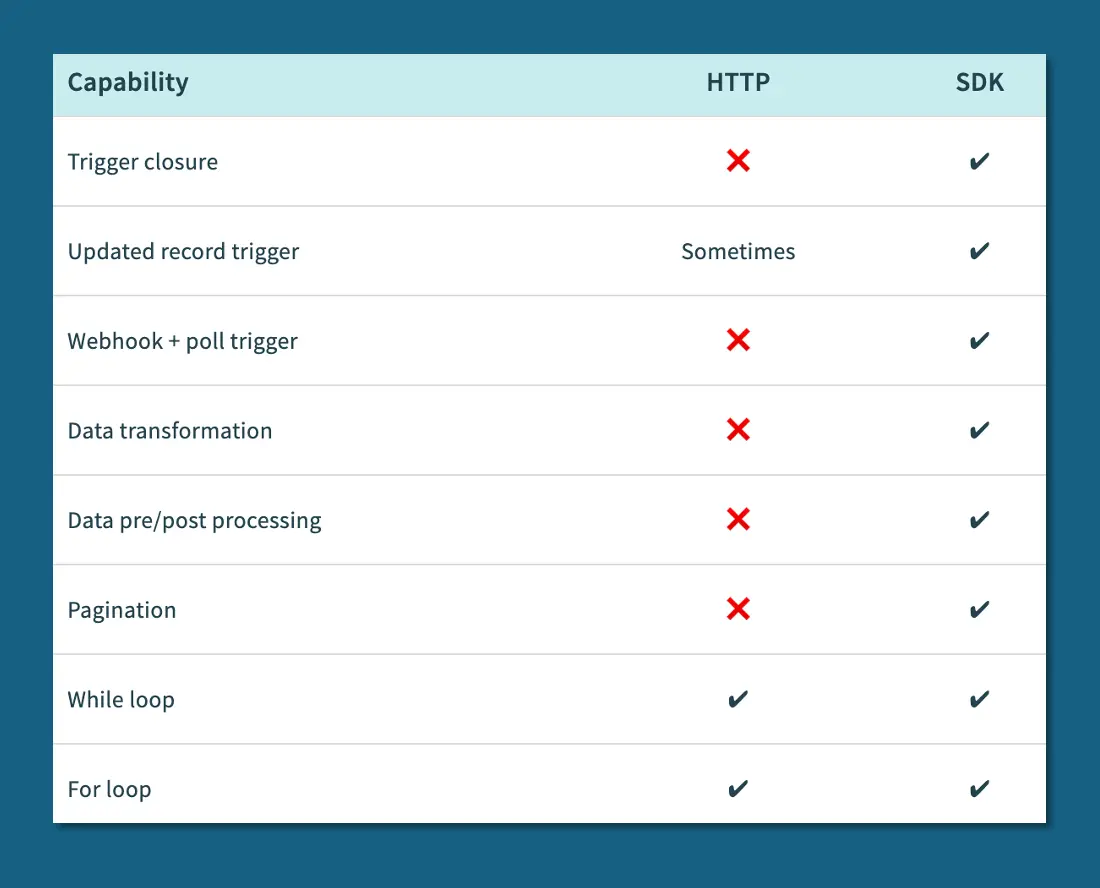
- The HTTP connector and the Connector SDK offer the following capabilities:
Additional Functionality
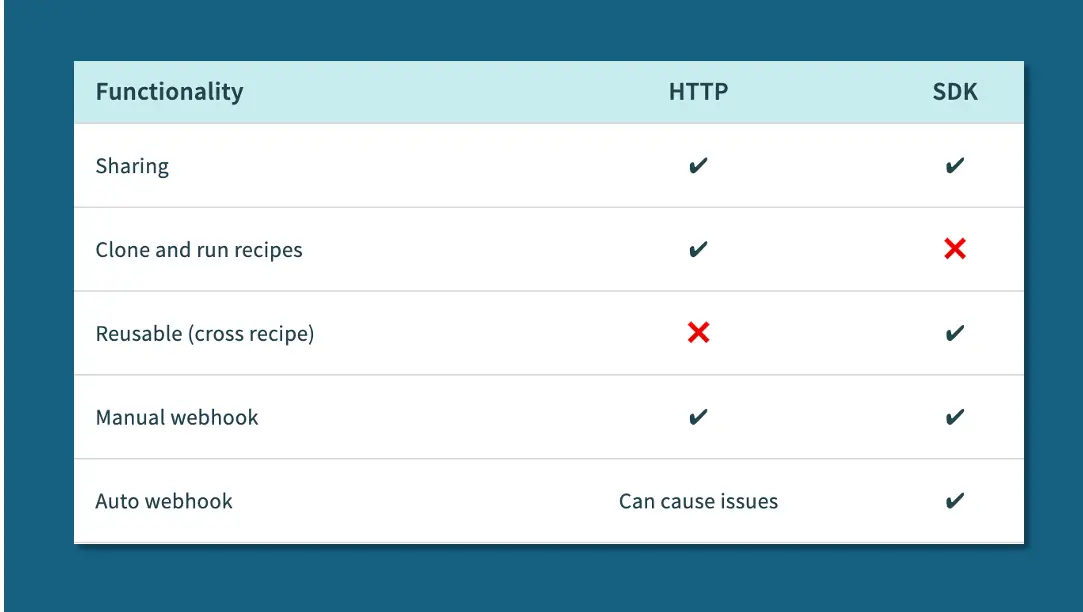
- The HTTP connector and the Connector SDK have the following additional functionality:
WEBHOOKS CONNECTOR
- You can use the New Event Webhook Trigger if your use case requires your recipe to respond to trigger events in real-time.
- Verify that your app allows you to create webhooks before pursuing this option.
- To learn more, visit New Event Webhook Trigger
By: Jeff Richey
Email: jrichey@quandarycg.com
Date: 02/05/2026


Resources



© 2026 Quandary Consulting Group. All Rights Reserved.
Privacy Policy