
Knowledge Base
Articles In This Section
How Workato Actually Works: A Simple BreakdownWorkato Workflow Apps: A Complete OverviewHow to Build Your First Recipe in Workato Getting Started with Data Orchestration in WorkatoUnderstanding Webhooks in WorkatoWorkato FAQs: The Ultimate List of Common Workato FAQsHow to Sync your SurveyMonkey Data within Quickbase using WorkatoWhat is WorkatoUnderstanding Workato Custom Connectors How to use Workato's Logging SystemHow to use GitHub Secret Scanning for your Workato Developer API10 Key Benefits of WorkatoHow to Use Workato to Send an Email through Outlook What is Workato ONEHow to Connect Workato to RingCentralHow to Set Up HTTP Requests in Workato: Built-in and Custom What is an MCP Server and Why It Matters for your AI Foundation How to Build a Workato Center of ExcellenceHow to use Data Tables in Workato: Step-by-Step GuideHow to Use Conditional Actions in Your Workato Recipe How to Create a New App Connection in WorkatoGetting Started with Data Orchestration in WorkatoWhat is Workato ONEHow to Set Up HTTP Requests in Workato (Built-in and Custom)How to Manage API Clients and Client Roles in WorkatoHow to Process File Attachments in WorkatoSections
How to Set Up a Call Ended Trigger in Workato for RingCentral
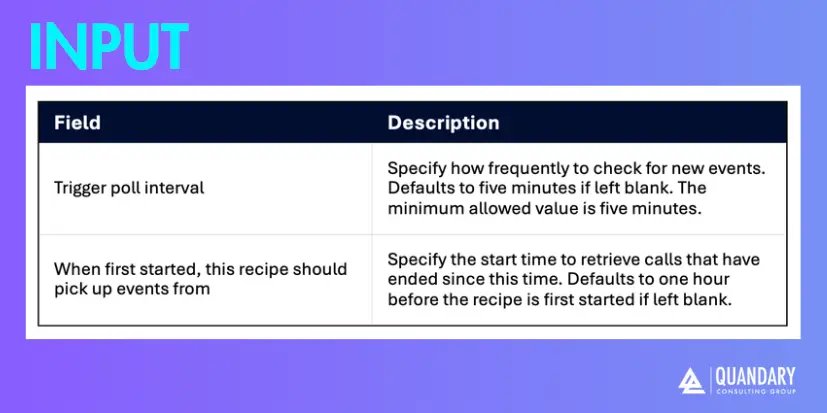
The Call ended trigger in Workato retrieves calls that have ended on the connected RingCentral extension. The trigger checks for ended calls every five minutes.
Ensure the connected RingCentral extension has Read Call Log permissions. These permissions are typically enabled for predefined or default RingCentral roles.
Key Benefits for Creating a Workato Call Ended Trigger for RingCentral
You get complete call context (not partial data)
Unlike “call started” events, a call-ended trigger gives you:
- Final duration
- Call outcome (answered, missed, voicemail, etc.)
- Full participant info
That means your automations run on final, reliable data, not guesses.
Perfect timing for post-call automation
This trigger fires at the exact moment you actually want to act:
- Log the call to Salesforce/HubSpot
- Create follow-up tasks
- Send recap emails or Slack notifications
- Trigger surveys (CSAT, NPS)
You avoid premature actions while the call is still in progress.
Enables accurate reporting & analytics
Because the call is finished, you can confidently track:
- Talk time
- Call volume
- Agent performance
- Missed vs answered rates
This is essential for sales teams, support centers, and RevOps.
Improves CRM data hygiene automatically
Instead of relying on reps to log calls manually:
- Every call gets recorded
- Data is standardized
- Activities are tied to the right contact/company
Reduces human error and increases CRM adoption without friction.
Powers smart follow-up workflows
You can branch logic based on what happened:
- Missed call → create callback task
- Short call → flag as low-quality lead
- Long call → notify account owner or trigger next step
This turns raw call data into actionable workflows.
Supports compliance & audit trails
Automatically storing call metadata (and linking recordings) helps with:
- Legal/compliance requirements
- Customer dispute resolution
- Internal QA processes
Works as a central orchestration point
The “call ended” event can act as a hub to trigger:
- CRM updates
- Marketing automation
- Support ticket creation
- Internal alerts
One trigger → multiple coordinated actions across systems.
How to Set Up a Call End Trigger in Workato for RingCentral
Additional Resources
To learn how to create a Workato + RingCentral connection, please visit: How to Connect Workato to RingCentral
To review Workato's technical documentation on creating an end call trigger for RingCentral, please visit: RingCentral - Call ended trigger
FAQs about Workato's RingCentral Call Ended Trigger
1. When exactly does the “Call ended” trigger fire?
- It fires after a connected call session ends (not just when it rings).
- In Workato specifically, it polls for ended calls every ~5 minutes (minimum interval).
It’s not real-time and you can expect a delay of up to ~5 minutes.
2. What data do I actually get from the trigger?
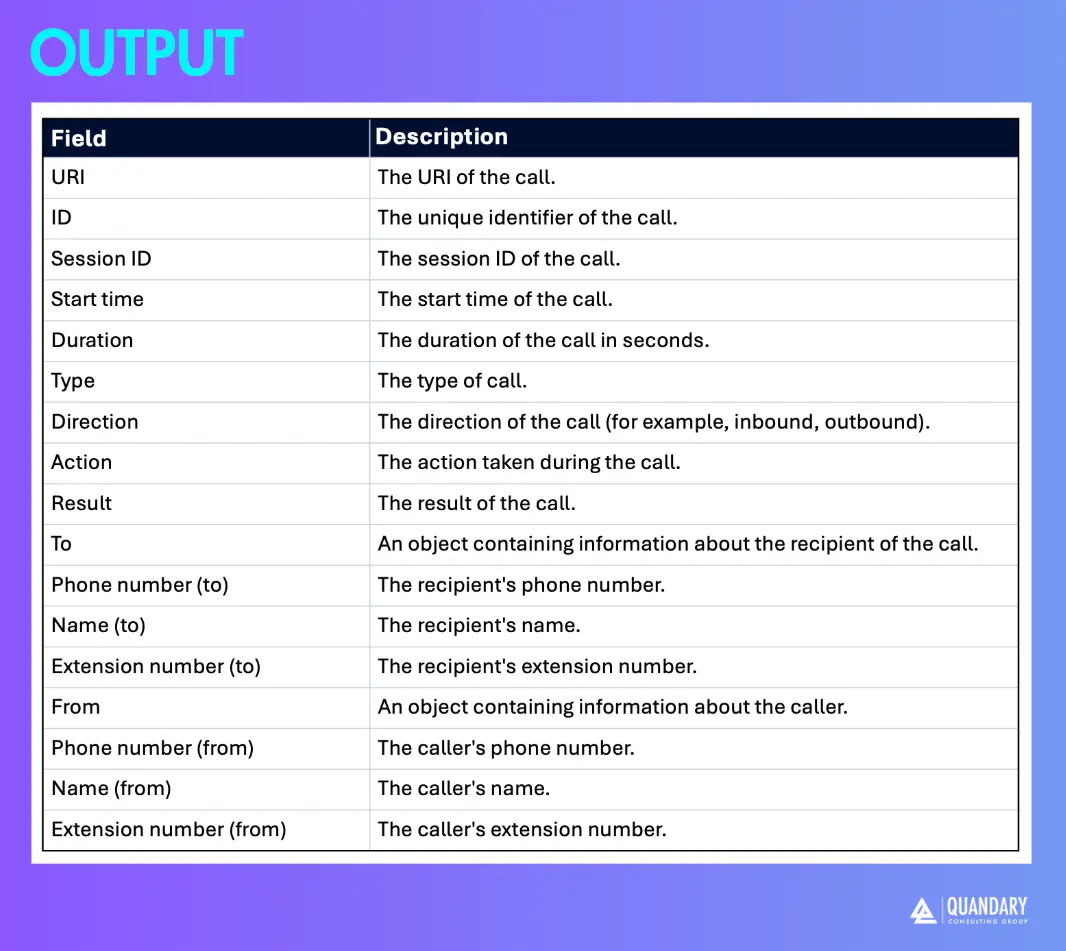
Typical payload includes:
- Call ID, session ID
- Start time + duration
- Direction (inbound/outbound)
- Caller + recipient info (name, phone, extension)
- Result / action fields
This is why people use it for:
- Logging calls in CRM
- Triggering follow-ups
- Analytics / reporting
3. Why is my trigger missing calls or not firing?
Most common causes:
- Polling window issue (missed between runs)
- Incorrect start time configuration (defaults to 1 hour before first run)
- Missing “Read Call Log” permissions on the RingCentral connection
This is a polling trigger, not webhook-based, so gaps can happen if not configured carefully.
4. Can I tell why the call ended (e.g., voicemail, hang-up, transfer)?
- Sometimes—but not reliably for all scenarios
- For example:
- Outbound calls often return “No Reason”
- IVR scenarios may provide values like:
Voicemail,CallerDropped,CallFinished
5. What’s the difference between “Call ended” vs other RingCentral triggers?
- Call ended → after conversation completes
- New call → when call starts
- New call recording → when recording is available
Why it matters:
- Use Call ended when you need:
- Duration
- Outcome
- Complete metadata
- Use New call when you need:
- Real-time routing or alerts
- By: John Orsak
- Email: jorsak@quandarycg.com
- Date updated: 03/09/2026






© 2026 Quandary Consulting Group. All Rights Reserved.
Privacy Policy