
Knowledge Base
Articles In This Section
What Are Quickbase Dashboards Set Up Personalized Dashboards Using User-Filtered ReportsHow to Create a Dashboard in QuickbaseEmbedding an I-Frame (Webpage Widget) in a Dashboard | BEGINNERHow and When to Use Calculated Columns for Quickbase Reports How to Create Summary Report in Quickbase Utilizing the Dashboard Side Bar | BEGINNERHow to Build an Operations Dashboard in Quickbase | INTERMEDIATE to ADVANCEDHow to Color-Coding Rows for Quickbase Reports Using Automations to Log Approval Time and User in QuickbaseHow to Create External Stakeholder Forms, Reports, and Dashboards in QuickbaseUpdating the Default Table Home Page and Default Report Columns | BEGINNEROrganizing & Assigning Groups To Reports | BEGINNERSetting Up Report and Chart Types in Quickbase | BASICSUsing Rich Text to make your Dashboard Pop | BEGINNERUsing Report Formulas as a Filter in a Report in QuickbaseKanban Reports | BEGINNERHow to Create an Audit or Change Logs with Automations Understanding and Setting Up Subscription Emails in Quickbase Create Audit/Change Logs with Automations | INTERMEDIATEHow to Set Up Pie Reports in Quickbase How to Build Standard Reports in Quickbase | BEGINNERAdding Reports to Dashboards | BEGINNERSections
Linking Dashboards Together | BEGINNER
As a best practice with Dashboards – you want them to have a clear and specific focus. They should each tell a story or message about what you are trying to accomplish when on that page. To help keep that focus, a great approach is to set up multiple dashboards, each with a different focus, and then link them all together to tell your users story.
Imagine a scenario when working with a Sales Team in Quick Base, where Sales Reps are responsible for seeing new leads as they come in, scheduling follow ups, working the leads, closing deals etc. Their dashboard likely contains several reports or queues so they can see and log their activity for that day. The focus and purpose of it is to highlight their daily to do’s and where to focus their time.
What if they want to see their metrics for the entire year? Where they are against their current goals? You would set up a different dashboard to highlight that information that they could check in on from time to time. This way – their summary information doesn’t take away from their daily checklist.
Some common reasons to set up multiple dashboards might be:
✓ Having daily / task oriented dashboards with the daily To Do’s and activities, with another dashboard being a Summary dashboard with reports on year to date, goals etc.
✓ Setting up different Manager dashboards to let you focus on different teams and different reports
✓ Back link to other roles dashboards so you can see what they see
To link one or more dashboards together:
- From the dashboard you want to modify – click ‘Customize This Page’
- From the list of widgets, drag a ‘Button Bar’ widget onto your page.
- Hover your mouse over the newly created button, click the arrow to expand the options – and click the magnifying glass looking icon to open the configuration options
- Click to the ‘Page’ tab
- Under the ‘Page’ dropdown – select the Dashboard you want to link this button to and click off to save that setup
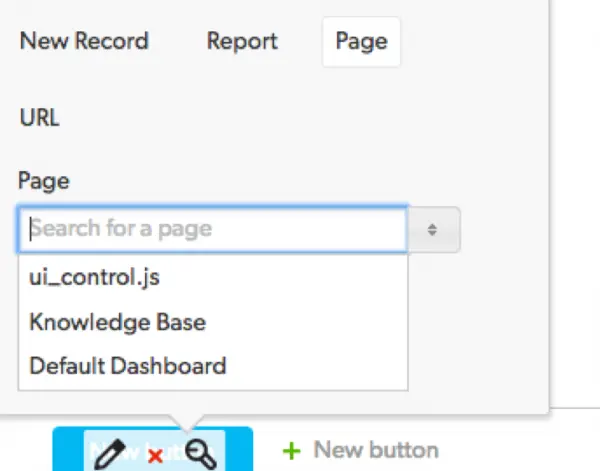
See the below video to view a brief walk through of linking via the above steps
As highlighted in the beginning – dashboards are an excellent way to display items that need someone's attention right when they log in. Another option though is to send that information via email utilizing Notifications and Subscriptions, to get real-time feedback whether they’re in Quick Base or not.
- Author: Chayce Duncan
- Email: chayceduncan@quandarycg.com
- Date Submitted: 12/25/2018


Resources


© 2026 Quandary Consulting Group. All Rights Reserved.
Privacy Policy