
Knowledge Base
Articles In This Section
What Are Quickbase Dashboards How to Set Up Personalized Dashboards in QuickbaseHow to Create a Dashboard in QuickbaseHow to add a Webpage Widget (embedded iFrame) to your Quickbase DashboardHow and When to Use Calculated Columns for Quickbase Reports How to Create a Summary Report in QuickbaseHow to Utilize the Dashboard Side Bar in QuickbaseHow to Build an Operations Dashboard in Quickbase How to Color-Coding Rows for Quickbase Reports Using Automations to Log Approval Time and User in QuickbaseHow to Create External Stakeholder Forms, Reports, and Dashboards in QuickbaseHow to Update the Default Table and Report Columns in QuickbaseHow to Organize & Assign Groups to Quickbase ReportsHow to Link Dashboards Together in QuickbaseHow to Create Reports and Charts in QuickbaseHow to use Rich Text to Make your Quickbase Dashboard Dynamic Using Report Formulas as a Filter in a Report in QuickbaseHow to Create a Kanban Report in QuickbaseHow to Automatically Log Reviewers, Approvers, and Approval Dates in QuickbaseHow to Organize and Assign Groups to Quickbase ReportsHow to Use Report Formulas as a Filter in a Quickbase ReportHow to Create an Audit or Change Logs with Automations How to Create a Pie Chart in QuickbaseHow to Build Standard Reports in QuickbaseHow to Add a Report to your Quickbase DashboardSections
How to Create Subscription Emails in Quickbase
Keeping teams informed is essential to running efficient business processes. Rather than manually sending reports every day, week, or month, Quickbase allows you to automate report delivery using Subscription Emails.
Subscription Emails automatically send reports to designated users on a recurring schedule, ensuring stakeholders always receive the latest information without requiring manual effort.
Whether you're sending sales reports to executives, project updates to team leads, or issue summaries to clients, Subscription Emails help keep everyone informed while saving valuable time.
In this article, you'll learn what Subscription Emails are, when to use them, how to create them, and best practices for getting the most from this powerful Quickbase feature.
What Are Subscription Emails in Quickbase?
A Subscription Email is an automated email that delivers the results of a Quickbase report on a scheduled basis.
Instead of manually exporting and emailing reports, Quickbase automatically generates the report and sends it to selected recipients according to a schedule you define.
Subscription Emails are ideal for recurring reports that need to be delivered consistently.
Common scheduling options include:
- Daily
- Weekly
- Monthly
Because the report is generated at the time the email is sent, recipients always receive the most current information available.
When Should You Use Subscription Emails?
Subscription Emails work best when users need regular visibility into changing data without logging into Quickbase every day.
Common use cases include:
- Executive Reporting: Automatically email monthly sales, financial, or operational reports to leadership teams.
- Project Management: Send weekly open task reports to project managers before recurring status meetings.
- Client Updates: Provide customers with daily or weekly updates on project progress, issue tracking, or support requests.
- Operations Dashboards: Distribute production metrics, inventory reports, or service-level performance summaries to operational teams.
- Compliance Reporting: Automatically send audit reports, exception reports, or compliance dashboards to designated stakeholders.
When Should You NOT Use Subscription Emails?
Subscription Emails are designed for scheduled reporting—not real-time notifications.
Instead, use Quickbase Notifications or Quickbase Reminders when you need to:
- Notify users when a new record is created
- Alert someone when a record is updated
- Remind users about upcoming deadlines
- Trigger workflow communications based on specific events
These automation tools are better suited for event-driven communication.
Who Can Create Subscription Emails in Quickbase?
Quickbase permissions determine who can create and manage report subscriptions.
Standard Users
Users without administrative privileges can:
- Subscribe to reports they have permission to access
- Create subscriptions for themselves only
They cannot send subscriptions to other users.
Application Administrators
Application Managers have additional capabilities, including:
- Sending reports to multiple users
- Sending reports to specific roles
- Sending reports to all application users
- Managing subscriptions for the application
How to Create a Subscription Email in Quickbase
Method 1: Create a Subscription from a Report
- Open the table containing the report.
- Select Reports & Charts.
- Open the report you want to automate.
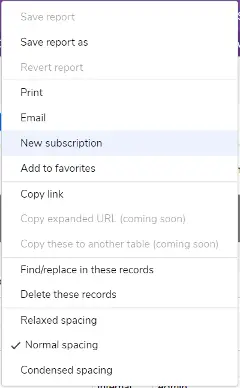
- Click the More menu.
- Select New Subscription.
For legacy reports and charts, the Subscription option is also available from the More menu.
Method 2: Create a Subscription from Application Settings
- Open the appropriate table.
- Select Settings.
- Under Notifications, Subscriptions & Reminders, click + New.
- Select Subscription.
- Click Create.
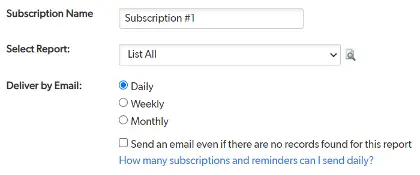
Step 1: Name Your Subscription
Enter a descriptive name that clearly identifies the subscription.
Examples include:
- Weekly Open Projects
- Monthly Executive Sales Report
- Daily Customer Support Summary
- Weekly Compliance Dashboard
If you created the subscription while viewing a report, Quickbase automatically selects that report.
Step 2: Select the Report
Choose the report you want Quickbase to send.
You can subscribe to:
- Shared reports
- Personal reports
Selecting the report carefully is important because recipients will receive exactly what appears in that report.

Step 3: Choose a Delivery Schedule
Next, determine how often the report should be sent.
Quickbase supports:
- Daily
- Weekly
- Monthly
When selecting Weekly or Monthly schedules, you'll also choose the appropriate day(s).
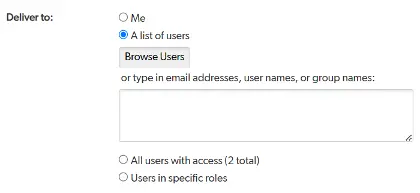
Step 4: Choose the Recipients
The available delivery options depend on your permissions. Application Managers can send reports to:
- Themselves
- All application users
- Specific user roles
- Individual users
Standard users can only schedule reports for themselves.
Step 5: Decide Whether to Send Empty Reports
If a report contains no records when the subscription runs, you can choose whether Quickbase should still send the email.
Sending empty reports can be useful when recipients expect confirmation that no records matched the report criteria.
Step 6: Configure the Sender
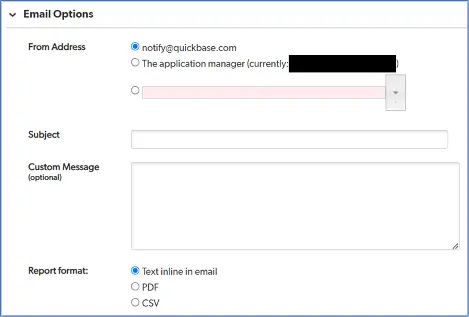
Choose who the email appears to come from.
Options may include:
- notify@quickbase.com
- The Application Manager
- The user who owns the subscription (depending on your application's configuration)
Selecting the appropriate sender can improve trust and email deliverability.
Step 7: Customize the Email
Personalize the subscription by configuring:
- Subject Line
- Optional custom message
- Report format
Available delivery formats include:
- Email body
- PDF attachment
- CSV attachment
Adding a custom message provides recipients with helpful context before they review the report.
Quickbase's Enhanced Email Builder Features
Quickbase's modern email builder provides significantly more flexibility than legacy notification tools. Depending on your application's configuration, administrators can take advantage of features such as:
- Custom email layouts
- Drag-and-drop email design
- Rich text formatting
- Multiple file attachments
- CC and BCC recipients (if enabled by Realm Policies)
- Improved "From" address options
- Record change elements
- Enhanced audit logging
- User @mentions in supported rich text fields
These enhancements make Subscription Emails more professional and informative while improving overall communication.
Quandary's Best Practice
Rather than creating one large report for every stakeholder, create multiple targeted reports based on user roles.
For example:
- Executives receive KPI dashboards.
- Project Managers receive active project summaries.
- Sales Managers receive pipeline reports.
- Operations teams receive production metrics.
Smaller, role-specific reports are easier to read and provide more relevant information to each audience.
Common Mistakes to Avoid
When configuring Subscription Emails, avoid these common pitfalls:
- Sending reports to users who do not need the information.
- Using Subscription Emails instead of event-driven Notifications.
- Forgetting to review report permissions before distributing sensitive data.
- Creating reports with unnecessary columns or excessive detail.
- Using unclear subscription names that make future administration difficult.
- Neglecting to periodically review subscriptions that are no longer needed.
Keeping subscriptions organized improves both security and application maintenance.
Quandary's Final Thoughts
Subscription Emails are one of the easiest ways to automate recurring reporting in Quickbase. By automatically delivering reports on a daily, weekly, or monthly schedule, organizations can keep employees, managers, executives, and clients informed without requiring manual effort.
When combined with well-designed reports and thoughtful user permissions, Subscription Emails improve communication, increase operational efficiency, and ensure stakeholders always have access to timely, accurate information.
Whether you're distributing executive dashboards, project updates, compliance reports, or customer summaries, Subscription Emails help transform Quickbase into an automated reporting platform that keeps your business moving forward.
- Author: April Barragan
- Title: Solution Consultant | Quickbase
- Email: abarragan@quandarycg.com
- Date Published: June 22, 2026
Top 10 FAQs About Quickbase Subscription Emails
1. What is a Subscription Email in Quickbase?
A Subscription Email is an automated email that sends the results of a Quickbase report to designated recipients on a recurring schedule. Organizations commonly use Subscription Emails to distribute project updates, sales reports, executive dashboards, compliance reports, and operational metrics without manually exporting or emailing reports.
2. How do Subscription Emails differ from Notifications and Reminders in Quickbase?
Subscription Emails are schedule-based and send reports at regular intervals, such as daily, weekly, or monthly.
- Quickbase Notifications are event-driven and are triggered when records are created, updated, or deleted.
- Quickbase Reminders are designed to alert users about upcoming dates, deadlines, or time-sensitive events.
If your goal is recurring reporting, Subscription Emails are the appropriate choice.
3. Who can create Subscription Emails in Quickbase?
Any user with access to a report can create a Subscription Email for themselves. However, only Application Managers and users with appropriate administrative permissions can create subscriptions that are sent to other users, user roles, or everyone with access to the application.
4. What report formats are available for Subscription Emails?
Quickbase allows Subscription Emails to be delivered in several formats depending on your configuration. Reports can be included directly in the email body or attached as PDF or CSV files, making it easy for recipients to review or analyze the data.
5. Can I customize the email that is sent?
Yes. Subscription Emails can include a custom subject line, personalized message, sender information, and report format. Organizations using Quickbase's modern email builder may also have access to additional customization options, including rich formatting, drag-and-drop email design, and multiple attachments.
6. How often can Subscription Emails be scheduled?
Subscription Emails can be scheduled to run:
- Daily
- Weekly
- Monthly
Depending on the schedule you choose, you can also specify the day of the week or day of the month when the report should be delivered.
7. Can Subscription Emails be sent even if a report contains no records?
Yes. Quickbase provides the option to send a Subscription Email even when the report returns zero records. This is useful when recipients need confirmation that there were no open issues, overdue tasks, or exceptions during the reporting period.
8. Are Quickbase Subscription Emails secure?
Subscription Emails respect Quickbase security permissions. Users only receive reports they are authorized to access, and the data included reflects the permissions assigned to the report and recipients. Before distributing reports that contain confidential information, administrators should review report permissions and verify that recipients have the appropriate level of access.
9. What are the best use cases for Subscription Emails?
Subscription Emails are commonly used for:
- Executive KPI dashboards
- Weekly project status reports
- Sales pipeline updates
- Customer issue summaries
- Compliance reporting
- Inventory reports
- Financial summaries
- Operational performance metrics
- Team workload reports
- Service-level agreement (SLA) reporting
Automating these reports helps reduce manual work while keeping stakeholders informed with up-to-date information.
10. What are the best practices for using Subscription Emails in Quickbase?
To get the most value from Subscription Emails, consider these best practices:
- Create reports that are tailored to each audience.
- Keep reports concise and focused on key metrics.
- Use descriptive subscription names for easier administration.
- Review subscriptions periodically to remove outdated reports.
- Verify recipient permissions before sending sensitive information.
- Use Notifications instead of Subscription Emails for real-time workflow events.
- Test report formatting before distributing reports to large groups.
- Schedule reports to align with meetings or business processes.
- Limit unnecessary recipients to reduce email fatigue.
- Regularly review report filters to ensure recipients receive accurate data.
Following these practices helps ensure your automated reporting remains secure, relevant, and valuable to your organization.


Industries
Resources




© 2026 Quandary Consulting Group. All Rights Reserved.
Privacy Policy