
Knowledge Base
Articles In This Section
How to Create a Code Page in Quickbase What is Quickbase and Who Are Their PartnersHow to Navigate the Quickbase 'My Apps' PageHow to Manage and Delete Reports in QuickbaseHow to Use Application Diagram in Quickbase Copying Quick Base App ComponentHow to Create Cross-App Relationships in QuickbaseHow to Use Quickbase's Built-in Copy Feature Changing The Record Title Seen On Forms BeginnerHow to Create a Reminder in QuickbaseSections
What is a Many-to-Many Relationships in Quickbase
A Many-to-Many Relationship in Quickbase is a relational structure comprised of two separate one-to-many relationships connected by a Join Table (Intermediate table) that allows two tables to act as though they are both master and details tables, allowing records from either table to be a parent to the other table’s records.
In theory, students can have many classes, and classes can have many students. There is a correct and incorrect way of creating this relationship. The upcoming examples will illustrate both methods:
Many-to-Many Relationship | The Wrong Way
In this example, you can see that both students and classes are related to one another and represent information passing to each other similar to how cars move on a two-lane highway.
Ultimately, this method is not ideal and creates duplication of work in Quickbase.
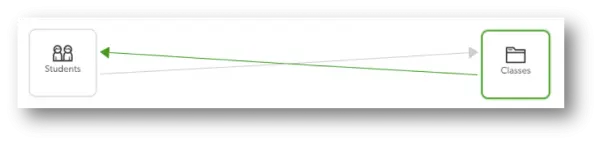
Many-to-Many Relationship | The RIGHT Way
In this example, we have created a Join Table. It’s a third table that helps connect data from the two tables you are trying to connect.
To help further illustrate, our students and classes table both contain lists of information.
The join table allows us to take the information from both the students and classes tables and create every combination of classes to students or students to classes with that information.
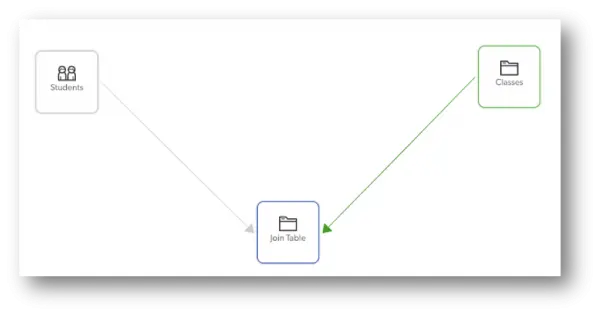
For example, our join table for students and classes could be called “Registrations” or “Assignments.”
How to Create a Many-to-Many Relationship in Quickbase?
Create a new table to serve as the join table.

You will want to add a new table to your application and provide an appropriate name.
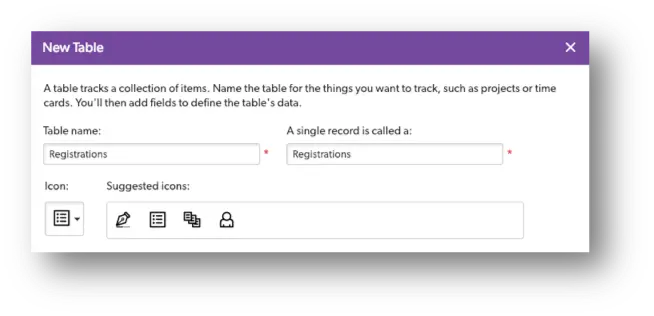
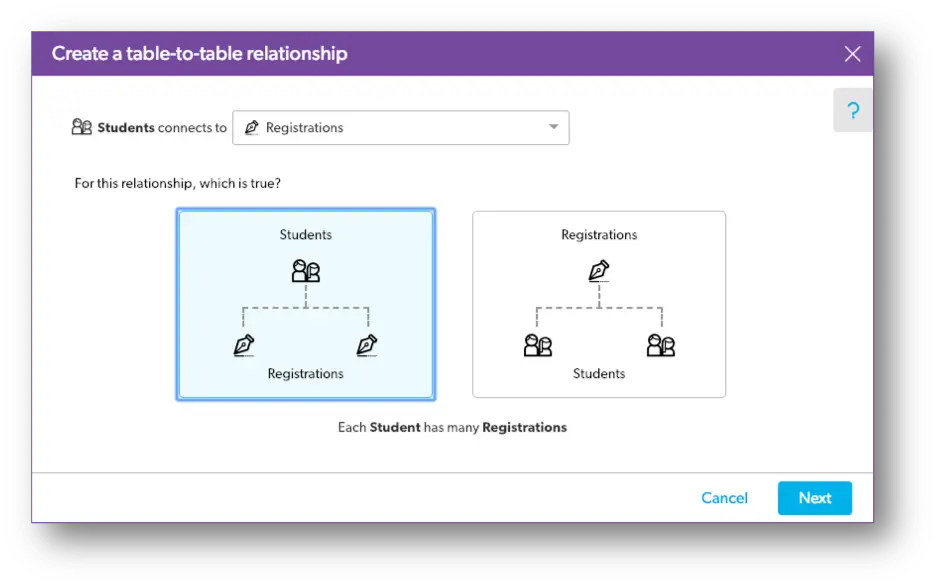
Create a relationship between the new table and the existing tables.
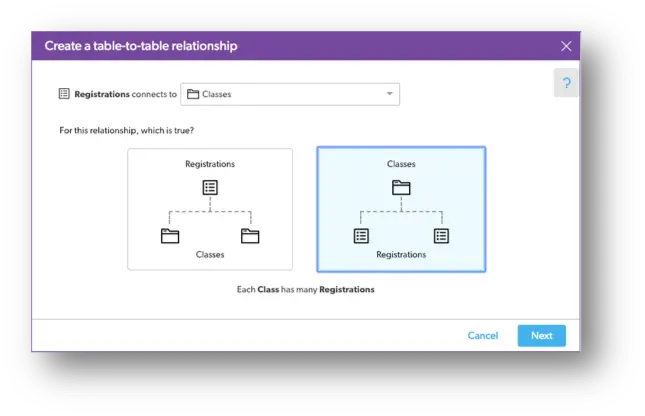
In our example, we created a One-to-Many Relationship between Classes and Registrations (above) and a One-to-Many Relationship between Students and Registrations (below).
Add lookup fields to the relationship.
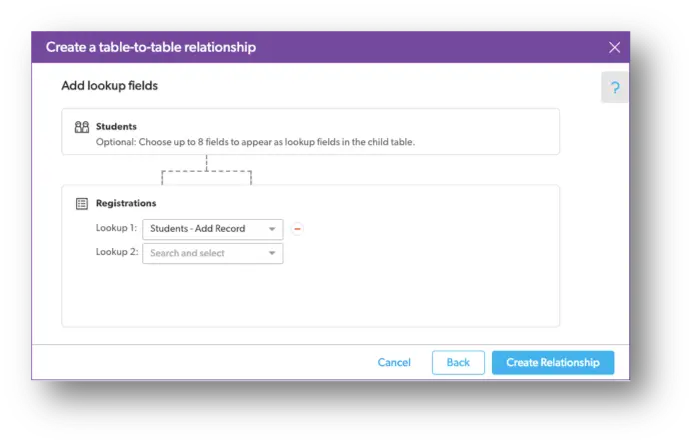
For example, a class field in the students table that you’ll no longer use. By removing these fields, you will avoid duplicate information.
How to Use a Many-to-Many Relationship in Quickbase?
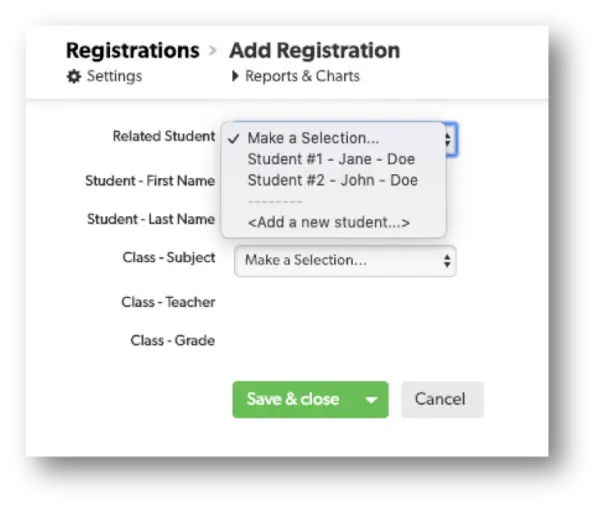
Step 1: Once you establish your join table and have both related tables connected, you can add information through the newly created join table.
For example, if you want to register a new student into a class, you would add a new record to the Registration table.

Step 2: Continuing with our example, within the new record, you would select the student and select the class. Finally, save & close.
- By: Alistar Marsden
- Title: Solution Consultant | Quickbase
- Email: amarsden@quandarycg.com
- Date: April 25, 2026
FAQ: Many-to-Many Relationships in Quickbase
1. What is a Many-to-Many Relationship in Quickbase?
A Many-to-Many Relationship in Quickbase is a relational database structure that allows records in two separate tables to connect to multiple records in each other.
This is accomplished using a third table called a:
- Join Table
- Intermediate Table
- Bridge Table
Example:
- One student can enroll in many classes
- One class can contain many students
In Quickbase, the Join Table stores the relationship combinations between those two tables.
Common Quickbase Many-to-Many examples include:
- Students ↔ Classes
- Employees ↔ Projects
- Users ↔ Roles
- Products ↔ Orders
- Vendors ↔ Contracts
2. Why do you need a Join Table in Quickbase?
A Join Table prevents duplicate data and allows Quickbase to properly manage complex relationships between records.
Without a Join Table, builders often create:
- duplicate fields
- redundant relationships
- difficult-to-maintain structures
- inconsistent data
The Join Table acts as the connection point between both tables while preserving relational integrity.
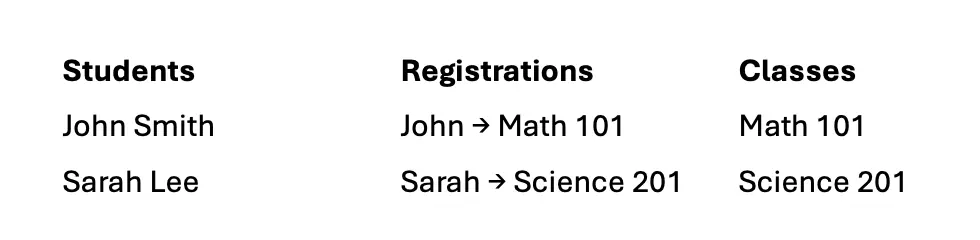
In this example:
- Students and Classes never connect directly
- Registrations handles the relationship logic
This is considered the Quickbase best practice for Many-to-Many design.
3. How do you create a Many-to-Many Relationship in Quickbase?
To create a Many-to-Many Relationship in Quickbase:
Step 1: Create a Join Table
Add a third table that will store the relationship combinations.
Example names:
- Registrations
- Assignments
- Enrollments
- Project Resources
Step 2: Create Two One-to-Many Relationships
You will create:
- One-to-Many between Table A and the Join Table
- One-to-Many between Table B and the Join Table
Example:
- Students → Registrations
- Classes → Registrations
Step 3: Add Lookup Fields
Use lookup fields to pull related information between tables.
This allows users to view connected data without duplicating information.
Step 4: Remove Redundant Fields
Delete older direct-reference fields that are no longer needed to avoid duplicate data entry and reporting issues.
4. What is the best naming convention for a Quickbase Join Table?
Quickbase best practice is to name the Join Table based on the relationship between the two tables.
Examples:
- Students + Classes → Registrations
- Employees + Projects → Assignments
- Users + Permissions → User Permissions
- Products + Orders → Order Line Items
A descriptive Join Table name improves:
- application readability
- report clarity
- user adoption
- long-term maintainability
5. What is the difference between One-to-Many and Many-to-Many Relationships in Quickbase?
A One-to-Many Relationship allows:
- One parent record
- Many child records
- Example: One Project → Many Tasks
A Many-to-Many Relationship allows:
- Many records in Table A
- Many records in Table B
- Example: Many Students ↔ Many Classes
Since Quickbase does not directly support native Many-to-Many relationships, builders create them using:
- Two One-to-Many relationships
- A Join Table
- This is the standard relational database design pattern used in Quickbase.
6. What are the most common use cases for Many-to-Many Relationships in Quickbase?
Many-to-Many Relationships are commonly used for:
- Student class registrations
- Employee project assignments
- Users and security roles
- Products and orders
- Vendors and contracts
- Resources and schedules
- Assets and maintenance records
- Customers and subscriptions
Any workflow where records need multiple connections in both directions is a strong candidate for a Many-to-Many structure.
7. Can you use lookup fields in a Many-to-Many Relationship?
Yes.
Lookup fields are a critical part of Many-to-Many design in Quickbase.
They allow information from parent tables to flow into the Join Table automatically.
Examples:
- Student Name
- Class Instructor
- Project Manager
- Department
- Status
Lookup fields reduce duplicate entry while improving reporting and visibility across relationships.
8. What is the biggest mistake when building Many-to-Many Relationships in Quickbase?
The most common mistake is trying to directly connect two tables without a Join Table.
This often creates:
- duplicate data
- circular references
- reporting issues
- maintenance complexity
- poor scalability
Example of the wrong approach:
- A Students table storing multiple classes
- A Classes table storing multiple students
This creates synchronization problems and redundant updates.
The correct approach is always:
- Students → Registrations ← Classes
using a dedicated Join Table.
9. How do you add records to a Many-to-Many Relationship in Quickbase?
Records are added through the Join Table.
Example:
To register a student into a class:
- Create a new Registration record
- Select the Student
- Select the Class
- Save the record
The Join Table becomes the relationship manager between both tables.
This approach keeps data normalized and easier to report on.
10. What are the benefits of using Many-to-Many Relationships in Quickbase?
Benefits include:
- Reduced duplicate data
- Better scalability
- Cleaner reporting
- Easier automation
- Improved relational integrity
- Better user experience
- More flexible app architecture
For larger Quickbase applications, Many-to-Many Relationships are considered a foundational database design best practice.


Services
Industries


© 2026 Quandary Consulting Group. All Rights Reserved.
Privacy Policy