
Knowledge Base
Articles In This Section
How to Create a Code Page in Quickbase What is Quickbase and Who Are Their PartnersHow to Navigate the Quickbase 'My Apps' PageHow to Manage and Delete Reports in QuickbaseHow to Use Application Diagram in Quickbase Copying Quick Base App ComponentHow to Use Quickbase's Built-in Copy Feature Changing The Record Title Seen On Forms BeginnerWhat is a Many-to-Many Relationships in QuickbaseHow to Create a Reminder in QuickbaseSections
How to Create Cross-App Relationships in Quickbase
Often, you may need to share data from one of your applications with another in Quickbase. This is common when you have a set of core tables, such as Employees or Contacts, that you want to maintain in a single location.
Using a Cross-App Relationship you can create a child-to-parent relationship to share record data between applications.
How to create a Cross-App Relationship:
- The relationship must be created from the application where the child table lives.
- However, you must allow access to that app from the parent table’s application.
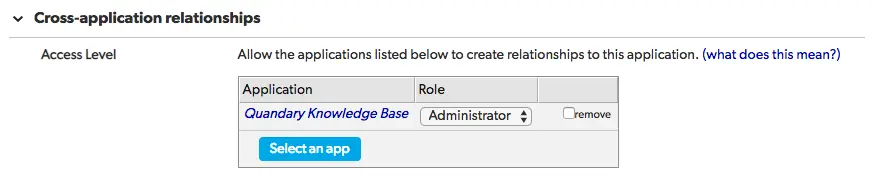
- To do this, visit Settings > App properties in the parent application and scroll down to Cross-application relationships.
- However, you must allow access to that app from the parent table’s application.
- Click Select an app, find the app you wish to connect to, and click Save at the top of the page.
- The Role you select filters what information is available to you in the child application.
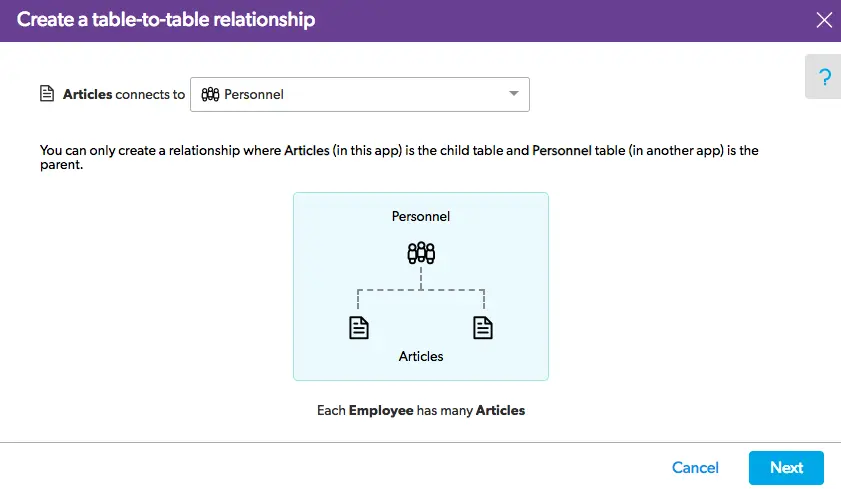
- From the child table’s application, visit the table you would like to relate then navigate to Settings > Table-to-table relationships and click the + New Relationship button. From the dropdown, pick Select a table in another app.
Follow the instruction prompts to complete this step.
- Select the table you wish to become the parent, select your reference field, select your lookup fields and click Create Relationship.
- Once you’ve created the new relationship, you will see it appear on the child table only. You can edit the relationship, change field properties and add fields from the Table-to-table relationships page of the child table.
If you’re looking to brush up on creating table-to-table relationships check out Alex’s article on Setting up a New Relationship.
To learn more about relationship type fields, take a look at how to create Summary and Lookup Fields.
- Author: QCG Development Team
- Email: dev@quandarycg.com
- Date Submitted: 1/29/2019


Services
Industries



© 2026 Quandary Consulting Group 2026. All Rights Reserved.
Privacy Policy