
Knowledge Base
Articles In This Section
What is Quickbase and Who Are Their PartnersHow to Navigate the Quickbase 'My Apps' PageHow to Manage and Delete Reports in QuickbaseHow to Use Application Diagram in Quickbase Copying Quick Base App ComponentHow to Create Cross-App Relationships in QuickbaseHow to Use Quickbase's Built-in Copy Feature Changing The Record Title Seen On Forms BeginnerWhat is a Many-to-Many Relationships in QuickbaseHow to Create a Reminder in QuickbaseSections
How to Create a Code Page in Quickbase
One of the most useful tools for creating a robust Quickbase application is a Code Page. This Page Type allows you to create markup documents using HTML, JavaScript, CSS, or XML.
This functionality is definitely more pro-code than low-code. However, it’s a great place to begin expanding your Quickbase creativity. Plus, there are plenty of tutorials out there to get you started, including this one.
Sample Use Cases:
Code pages can be used to accomplish just about anything you can imagine (and write!). Here are some ideas to get you started:
✓ Dynamically generated invoices or other documents. ✓ Data import interfaces with customized user experience and error checking. ✓ Automated processes beyond the limits of Actions and Automations. ✓ Enhanced mapping functionality with Google Maps. See more here!
The Quickbase side of creating a Code Page:
This example will demonstrate how to create a new Code Page and allow users to access it via a button on their Home Page.
The rest of the code is up to you!
- From your Home Page, navigate to Settings > Pages and click + New Page.
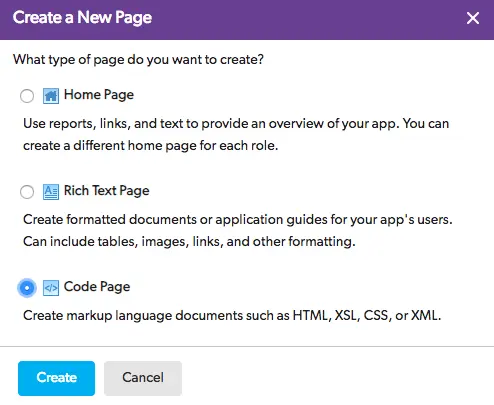
- Select Code Page and click Create.
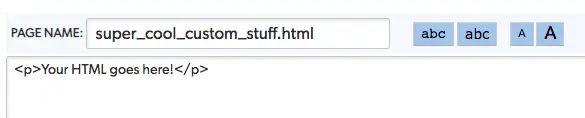
- Enter a PAGE NAME, paste your code in the text area below, and click Save. You can also write your code directly in the input. However, I’m going to assume you’re using a text editor (please be using a text editor, if not VSCode is highly recommend and free!).
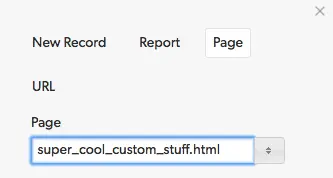
- Buttons are the most common way to access a Code Page. Add a new button on your Home Page by selecting Customize this Page and selecting your PAGE NAME from the Page tab property.
- After saving your page, test the button by clicking it. Congratulations, you’ve successfully created your first Code Page!

Check out our articles on Implementing Custom Imports and Google Maps for Data Visualization to get an idea of how Code Pages can be used to create a more powerful user experience.
To get started with HTML/CSS check out this free introduction at Khan Academy, and download VSCode to begin writing code.
- Author: QCG Development Team
- Email: dev@quandarycg.com
- Date Submitted: 2/11/2019


Services
Industries




© 2026 Quandary Consulting Group 2026. All Rights Reserved.
Privacy Policy