Automation
Workflow Optimization: How to Automate and Improve Business Processes in 2026

TL;DR
- Workflow optimization improves how work moves across people, processes, data, and enterprise systems. By eliminating unnecessary steps, manual handoffs, approval bottlenecks, and disconnected applications, organizations can reduce costs, accelerate cycle times, improve data accuracy, and scale operations more efficiently.
- Integration and intelligent automation are critical to scalable workflows. Connecting CRM, ERP, finance, HR, procurement, and operational systems allows data and actions to move automatically across the enterprise while reducing repetitive work and improving visibility.
- AI and AI agents are expanding workflow automation beyond rules-based tasks. AI can interpret documents, retrieve enterprise knowledge, identify exceptions, recommend next steps, and coordinate approved actions across connected systems, while human-in-the-loop controls preserve oversight for sensitive or consequential decisions.
- Successful workflow optimization starts with understanding the process before automating it. Organizations should map current workflows, identify bottlenecks, establish trusted data, simplify approvals, define ownership, and prioritize opportunities based on business value, feasibility, risk, and ROI.
- Workflow optimization is an ongoing discipline, not a one-time automation project. Organizations should continuously measure cycle time, costs, errors, throughput, exceptions, employee capacity, and customer outcomes to build increasingly connected, scalable, and AI-ready operations.
As organizations grow, the way work moves through the business becomes increasingly complex. What begins as a handful of straightforward processes can quickly evolve into an interconnected network of people, applications, data, approvals, integrations, business rules, and manual workarounds spanning multiple departments.
Over time, this complexity creates friction: Employees spend more time entering the same information into multiple systems, searching for data, following up on approvals, reconciling records, managing exceptions, and moving work between applications. Processes that once worked effectively begin to slow as transaction volumes increase, systems change, teams expand, and customer expectations evolve.
These inefficiencies do more than increase operating costs. They can delay revenue, reduce employee capacity, create inconsistent data, increase operational risk, slow customer response times, and make it harder for the organization to scale.
In 2026, there is another important consideration: inefficient workflows can also limit the value organizations receive from AI and AI agents.
AI performs best when it operates within well-defined processes supported by reliable data, connected systems, clear business rules, appropriate permissions, and measurable outcomes. Automating a fragmented process without addressing the underlying workflow can simply accelerate the existing inefficiency.
Organizations therefore need to understand how work actually moves through the business, identify where friction occurs, and determine which combination of process redesign, integration, automation, data engineering, and AI can produce the greatest business impact.
Workflow optimization provides that framework.
What Is Workflow Optimization?
Workflow optimization is the systematic process of analyzing, redesigning, automating, and continuously improving how work moves across people, data, systems, and departments.
The goal is to eliminate unnecessary friction while creating workflows that are faster, more accurate, scalable, measurable, and resilient. Traditional workflow optimization often focused primarily on eliminating repetitive tasks and reducing manual effort. Those objectives remain important, but modern workflow optimization has expanded considerably.
Today, organizations can combine:
- Process mapping and redesign to eliminate unnecessary steps and clarify ownership
- Enterprise integration to connect applications and reduce manual data movement
- Workflow automation to execute repetitive tasks, routing, notifications, and approvals
- Data engineering and orchestration to provide reliable information across processes
- Business rules and conditional logic to automatically determine how work should move
- Intelligent document processing to extract and classify information from documents
- AI and AI agents to interpret information, identify exceptions, recommend next steps, and execute approved actions
- Human-in-the-loop workflows to preserve employee judgment and oversight where appropriate
- Analytics and process monitoring to continuously identify bottlenecks and improvement opportunities
Consider a process that requires an employee to receive information by email, enter it into a spreadsheet, update an ERP or CRM system, notify another department, request approval, and manually follow up when the request stalls.
An optimized workflow could capture the information automatically, validate it against trusted data, update the appropriate systems through integrations, apply business rules, route approvals to the correct person, trigger notifications, monitor exceptions, and escalate the process when human intervention is required.
AI can add another layer of intelligence by interpreting unstructured information, summarizing supporting documentation, identifying anomalies, retrieving relevant enterprise knowledge, or recommending the appropriate next action.
This creates an important progression: Manual Process → Connected Workflow → Automated Workflow → Intelligent Workflow
The objective is not to remove people from every process. It is to determine which activities require human expertise and which can be handled more effectively by technology.Employees can then spend less time on repetitive administration, data movement, status tracking, and routine coordination and more time on analysis, problem-solving, customer engagement, exception management, and strategic decision-making.
Ultimately, workflow optimization creates the operational foundation organizations need to scale. By connecting processes, systems, data, automation, AI, and people around clearly defined business outcomes, organizations can reduce costs, accelerate execution, improve data quality, increase employee capacity, strengthen customer experiences, and build more adaptable operations.
As organizations grow, their operating models become increasingly complex. What may begin as a set of straightforward processes often evolves into a highly interconnected network of workflows spanning functions, systems, and stakeholders. This complexity, if not actively managed, can inhibit scalability, reduce efficiency, and constrain business performance.
To operate effectively at scale, organizations must develop a clear understanding of their workflows and implement targeted strategies to optimize them. This requires more than incremental cost reduction or isolated efficiency gains—it demands a disciplined, enterprise-wide approach to process design and improvement.
Quandary Case Study: Landis Mechanical Modernizes HVAC, Plumbing & Field Service Operations With Quickbase and Workato
How to Define Your Workflows
Every organization operates through a combination of tasks, workflows, and broader business processes.
A task is an individual unit of work, such as approving an invoice, updating a customer record, reviewing a document, or sending a notification.
A workflow connects those individual tasks into a structured sequence that produces a specific business outcome. Workflows define how information enters a process, where it moves, who or what is responsible for each step, which systems are involved, what decisions need to be made, and how the work reaches completion.
For example, approving an invoice is a task. The broader accounts payable workflow may include: Invoice Received → Data Captured → Vendor Validated → PO Matched → Exception Reviewed → Approval Routed → ERP Updated → Payment Authorized → Vendor Notified
Some of those activities may be completed by employees, while others can be executed through integrations, workflow automation, business rules, or AI.
As organizations grow, these workflows rarely remain simple or linear. They expand across departments, applications, databases, vendors, customers, and other stakeholders. Exceptions increase, approval structures become more complicated, and employees often create spreadsheets, emails, and manual workarounds to bridge gaps between systems.
Eventually, what appears to be a straightforward workflow may actually be an interconnected operational ecosystem.
Common Examples of Business Workflows
Organizations can find workflows across virtually every department, including:
- Employee onboarding and offboarding
- Accounts payable and invoice processing
- Billing and accounts receivable
- Procurement and purchase approvals
- Vendor onboarding and management
- Supply chain and inventory management
- Order management and fulfillment
- IT service and change management
- Marketing and content operations
- Inbound and outbound sales
- Lead qualification and sales prospecting
- Customer onboarding
- Customer service and case management
- Contract review and approval
- Project and work order management
- Field operations and inspections
- Safety and compliance reporting
- Web development and application delivery
- Revenue recognition and reporting
The more frequently a workflow occurs and the more people, systems, and data involved, the more important it becomes to understand how that workflow actually operates.
1. Start by Mapping How Work Actually Happens
When defining a workflow, document the process as it operates today rather than how it is supposed to work on paper. Employees frequently develop workarounds that never appear in official process documentation. They may maintain separate spreadsheets, send approval requests through email, copy information between applications, message coworkers for missing information, or manually reconcile data when systems do not communicate.
Those steps are often where the most valuable optimization opportunities exist.
For each workflow, identify:
- Trigger: What starts the workflow? This could be a form submission, customer request, invoice, purchase request, system event, new employee, service ticket, or scheduled activity.
- Inputs: What information, documents, or data are required for the workflow to begin?
- Tasks: What individual activities must be completed?
- People and Ownership: Who owns the overall workflow, and who is responsible for each step?
- Systems: Which applications, spreadsheets, databases, communication tools, and other platforms are involved?
- Data Movement: Where does information originate, where does it need to go, and where is it manually re-entered?
- Decision Points: Which conditions determine what happens next?
- Approvals: Where is human authorization required, and which approvals exist primarily because of historical process design?
- Exceptions: What prevents the workflow from following its standard path?
- Handoffs: Where does work move between people, departments, applications, or external stakeholders?
- Outputs: What indicates that the workflow has been successfully completed?
- Metrics: How will the organization know whether the workflow is performing effectively?
2. Identify Where the Workflow Creates Friction
Once the workflow is visible, organizations can begin identifying bottlenecks and unnecessary complexity.
Look for areas where employees repeatedly:
- Enter the same information into multiple applications
- Copy and paste data between systems
- Search for information before completing a task
- Wait for approvals or responses
- Send status-update emails
- Reconcile conflicting records
- Manually generate recurring reports
- Track work through spreadsheets
- Resolve the same exceptions repeatedly
- Depend on one employee's institutional knowledge
- Switch between multiple applications to complete a single activity
These are strong indicators that the workflow may benefit from process redesign, system integration, automation, improved data management, or AI.
3. Determine What Should Be Automated—and What Should Remain Human
Defining the workflow also creates an opportunity to determine how work should be distributed between people and technology.
Repeatable, rules-based activities such as data movement, notifications, routing, validation, record creation, and status updates are often strong candidates for traditional workflow automation. AI can help with activities that require more interpretation, such as extracting information from unstructured documents, classifying requests, summarizing records, retrieving enterprise knowledge, identifying anomalies, or recommending next steps.
AI agents can potentially coordinate multiple approved actions across connected systems, allowing workflows to become increasingly dynamic and context-aware. However, activities involving significant financial decisions, sensitive customer situations, regulatory requirements, complex exceptions, or consequential judgment may still require human review or approval.
The objective is not maximum automation. The objective is to design the most effective combination of people, automation, integration, data, and AI for the business outcome.
4. Define the Future-State Workflow
Once the current workflow and its bottlenecks are understood, organizations can design a more efficient future state.
- A useful framework is: Current State → Friction → Business Impact → Optimization Opportunity → Future State → KPI
This approach ensures workflow optimization remains connected to a measurable business problem rather than introducing technology simply because it is available.
Build Workflows Around Outcomes
Ultimately, defining a workflow should answer a simple question: How should work move through the organization to produce the desired outcome as efficiently, accurately, and reliably as possible?
Once organizations can clearly see the people, tasks, systems, data, decisions, handoffs, exceptions, and metrics involved, they can make much better decisions about where to simplify processes, integrate applications, automate work, introduce AI, and maintain human oversight.
That visibility becomes the foundation for workflow optimization, intelligent automation, scalable operations, and AI-ready business processes.
Quandary Case Study: Colorado Mountain School Cuts Manual Processing by Up to 40% with Workato
The Importance of Understanding Workflows
Organizations cannot effectively optimize what they cannot see.
A lack of visibility into how work actually moves across people, departments, applications, data, approvals, and external stakeholders makes it difficult to identify bottlenecks, control costs, manage risk, or determine where automation and AI can create meaningful value.
This becomes increasingly important as organizations grow. Processes that once depended on a few employees and applications can expand into complex workflows involving multiple departments, enterprise platforms, spreadsheets, email approvals, integrations, vendors, customers, and manual workarounds. Each additional handoff introduces another opportunity for delays, errors, duplicated effort, inconsistent data, and lost visibility.
Over time, these inefficiencies can become embedded in normal operations. Employees may spend hours reconciling information between systems. Approvals may sit unnoticed in inboxes. Teams may maintain separate spreadsheets because applications do not communicate. Customers may wait while employees search for information. Finance teams may manually translate operational data into billing-ready records.
Individually, these activities may appear minor. Across hundreds or thousands of transactions, however, they can create significant operational costs.
Workflow Visibility Helps Explain Where Margin Is Going
Revenue growth does not automatically translate into operational scalability. If transaction volume increases and the organization must continually add employees to manage manual processes, administrative work, data entry, reconciliation, approvals, and exceptions, operating costs can rise alongside revenue.
That creates a common scalability problem: More Customers → More Transactions → More Manual Work → More Employees → Higher Operating Costs → Margin Pressure
Workflow optimization changes that equation.
By understanding where employees spend time, where information becomes stuck, where errors originate, and where systems fail to communicate, organizations can identify opportunities to redesign the process and increase operational capacity without requiring resources to grow at the same rate.
Workflow Visibility Reveals the Real Bottlenecks
Many organizations know that a process is slow without knowing exactly why. Mapping the workflow can uncover issues such as:
- Duplicate data entry across applications
- Excessive or unnecessary approvals
- Manual system-to-system data transfers
- Spreadsheet-dependent processes
- Repetitive employee follow-up
- Unclear process ownership
- Inconsistent business rules
- High exception volumes
- Disconnected data sources
- Work sitting in queues without visibility
- Dependence on individual employees' institutional knowledge
- Manual reporting and reconciliation
Once these constraints are visible, organizations can determine whether the appropriate solution is process redesign, system integration, workflow automation, data engineering, application modernization, AI, or a combination of approaches.
Understanding the Workflow Should Come Before Automating It
One of the most important principles of workflow optimization is simple: understand the process before automating it. Automating an inefficient workflow can make the existing problem move faster without solving the underlying issue.
An unnecessary approval remains unnecessary when automated. Poor-quality data remains unreliable when transferred faster. A fragmented process remains fragmented even when individual tasks are automated.
Organizations should first determine which steps create value, which can be eliminated, which should be standardized, which systems need to be connected, and where human involvement is genuinely required.
Only then can automation be designed around the optimal future-state process.
Workflow Understanding Is Also Critical for AI
This principle becomes even more important as organizations introduce AI and AI agents into business operations.
AI agents need clearly defined objectives, reliable data, connected systems, appropriate permissions, business rules, escalation paths, and measurable outcomes. However, before giving an AI agent the ability to retrieve information or take action across enterprise systems, organizations should understand questions such as:
- What initiates the workflow?
- Which systems and data are involved?
- Which actions can be automated safely?
- What decisions require human judgment?
- Which exceptions require escalation?
- What permissions should an AI agent have?
- How will actions be monitored and audited?
- What defines successful completion?
Workflow visibility therefore becomes part of the foundation for responsible AI adoption and agentic automation.
From Workflow Visibility to Scalable Operations
Understanding workflows gives organizations the information they need to move from reactive problem-solving toward continuous operational improvement.
A mature optimization cycle looks like: Understand → Map → Measure → Identify Friction → Redesign → Integrate → Automate → Govern → Monitor → Improve
The result is greater than incremental efficiency, organizations gain the ability to reduce operating costs, increase employee capacity, improve data quality, accelerate cycle times, strengthen customer experiences, introduce AI more responsibly, and support business growth without allowing operational complexity to scale at the same rate. Workflow transparency is therefore not simply a process improvement exercise. It is a foundational capability for building efficient, scalable, intelligent operations.
See Workflow Optimization in Action
Quandary Consulting Group helps organizations uncover operational friction and redesign complex workflows using enterprise integration, intelligent automation, data orchestration, application development, and AI.
To see what this can look like in practice, explore our procurement automation case study, where workflow transformation delivered $200,000 in annual cost savings by reducing manual effort and creating a more efficient, connected procurement process.
To see additional client success stories, please visit our Case Studies
How Do Organizations Typically Manage Workflows
In smaller organizations, workflow management is often informal and manual. Individual contributors or managers oversee processes, track progress, and validate outputs with limited system support.
As organizations scale, however, workflows become more complex, and legacy approaches to process management frequently persist. Manual processes and fragmented systems are often extended beyond their intended use, resulting in inefficiencies and operational strain.
For example, organizations may continue to rely on spreadsheets or email-based processes to manage increasingly complex activities such as employee training, financial tracking, or approvals. This creates a disproportionate dependency on individuals to manage workflows, increasing the risk of errors, delays, and scalability constraints.
Three Main Types of Workflows
Workflows vary considerably depending on the nature of the work, the predictability of the process, the number of people and systems involved, and the amount of judgment required to reach an outcome.
Most business workflows can be grouped into three broad categories: case workflows, project workflows, and process workflows. Understanding the differences can help organizations determine which optimization strategy, automation technology, integration approach, or AI capability is best suited to the work.
1. Case Workflows
Case workflows are dynamic, information-driven workflows where the path to resolution can change depending on the circumstances of the individual case. Unlike highly structured processes, case workflows may involve unpredictable events, new information, exceptions, multiple decision points, and significant human judgment.
Common examples include:
- Insurance claims
- Customer complaints and escalations
- Healthcare case management
- Fraud investigations
- Compliance reviews
- IT incidents
- Legal matters
- Complex customer service requests
The objective may be clear, but the exact sequence of steps required to achieve it is not always known in advance. For example, resolving a customer complaint may require reviewing previous interactions, retrieving account information, analyzing supporting documentation, communicating with multiple departments, determining an appropriate resolution, and escalating the issue depending on its complexity or risk.
AI can be particularly valuable in case workflows because it can help employees interpret large amounts of information, summarize records, classify cases, retrieve relevant knowledge, identify patterns, recommend next steps, and prioritize work. AI agents can potentially coordinate approved activities across connected systems while routing exceptions or consequential decisions to employees for review.
The goal is to combine AI speed and information processing with human judgment and accountability.
2. Project Workflows
Project workflows organize work around a defined objective, beginning and ending with a specific initiative, deliverable, or outcome.
These workflows usually follow recognizable stages, but the activities within each stage can vary based on the project's scope, requirements, stakeholders, resources, and risks.
Common examples include:
- Construction projects
- Software implementations
- Application development
- Marketing campaigns
- Product launches
- Client implementations
- Mergers and acquisitions
- Business transformation initiatives
- Facility expansions
A project workflow might follow a structure such as: Initiation → Planning → Design → Execution → Review → Approval → Delivery → Closeout
However, the tasks, dependencies, approvals, documentation, and stakeholders involved can differ significantly from one project to another. Workflow optimization can help project-based organizations standardize repeatable components without eliminating the flexibility required to manage individual projects.
Automation can support task assignments, approvals, notifications, document routing, status updates, reporting, resource coordination, and system updates. AI can further assist with project summaries, document analysis, risk identification, knowledge retrieval, reporting, and exception management.
The objective is to create enough structure to improve consistency and visibility while preserving the flexibility necessary to respond to changing project conditions.
3. Process Workflows
Process workflows are structured, repeatable workflows that follow a relatively predictable sequence of activities.
Because the steps, business rules, inputs, and desired outcomes are generally known in advance, process workflows are often strong candidates for workflow automation, enterprise integration, and intelligent automation.
Common examples include:
- Employee onboarding
- Invoice processing
- Accounts payable
- Purchase approvals
- Vendor onboarding
- Expense reimbursement
- Order processing
- Billing
- Credentialing
- Payroll processing
- Routine compliance activities
A purchase approval workflow, for example, might follow: Request Submitted → Data Validated → Budget Checked → Approval Routed → Purchase Order Created → Requester Notified
Many of these steps can be automated through business rules and system integrations. AI can enhance structured workflows when the process encounters unstructured information or exceptions. For example, AI might extract information from an invoice, classify a request, identify a discrepancy, summarize supporting documentation, or determine which exception queue requires human attention.
This allows organizations to automate predictable work while maintaining appropriate human involvement when the process requires judgment.
Many Modern Workflows Are Hybrid
In practice, enterprise workflows do not always fit neatly into a single category. A process may begin as a standardized workflow and become a case workflow when an exception occurs.
For example: Standard Invoice → Automated Process Workflow Invoice With a PO Mismatch → Exception Case Workflow
Similarly, a construction project may contain dozens of standardized process workflows for inspections, procurement, safety reporting, labor tracking, change orders, billing, and approvals. This is why modern workflow architecture increasingly combines structured automation with dynamic decision-making.
A well-designed environment might operate like this: Standard Work → Automated Workflow → Exception Detected → AI Analysis → Human Review → Resolution → Workflow Resumes
This approach allows organizations to automate predictable work without forcing complex or unusual situations through rigid automation.
Quandary Case Study: PSG Dover Automates Credential Tracking for 13,000+ Employees With Quickbase, Workato & DocuSign
Workflows vs. Tasks: Understanding the Difference
It is also important to distinguish a workflow from an individual task.
A task is a specific action, such as approving a request, entering information, reviewing a document, or contacting a customer.
A workflow connects multiple tasks, decisions, people, systems, and data around a defined business outcome.
For example:
Task: Approve an invoice.
Workflow: Receive Invoice → Extract Data → Validate Vendor → Match Purchase Order → Review Exception → Approve → Update ERP → Schedule Payment → Notify Vendor.
The distinction matters because optimizing isolated tasks may produce incremental efficiency gains, while optimizing the end-to-end workflow can eliminate handoffs, connect systems, improve data quality, reduce cycle times, and create significantly greater business value.
In 2026, organizations should therefore evaluate workflows based not only on whether they are case-, project-, or process-driven, but also on how much of the work should be handled through human expertise, deterministic automation, system integration, AI, and AI agents. This broader perspective helps organizations move from automating individual tasks toward building connected, intelligent, and scalable operations.
How Processes and Workflows Work Together
Processes and workflows are closely connected, but they serve different purposes. A business process defines what the organization needs to accomplish and why, while a workflow defines how the work moves from one step to the next to achieve that outcome.
For example, employee onboarding is a business process. The workflows supporting it may include collecting documents, provisioning system access, completing background checks, assigning training, configuring payroll, requesting approvals, and notifying managers.
Understanding this distinction becomes increasingly important as organizations introduce workflow automation, enterprise integration, intelligent applications, and AI agents. Technology can execute individual workflow steps, but the underlying process still needs to be designed around a clear business objective.
1. Processes Define the Business Outcome
Processes establish the broader structure, objectives, ownership, policies, and expected outcomes of a business activity. A procurement process, for example, may encompass everything from an employee requesting a purchase through vendor selection, approval, purchase order creation, receiving, invoicing, payment, and reporting.
Before optimizing individual workflows, organizations should understand the entire process and determine:
- What business outcome is the process designed to achieve?
- Which people, departments, and systems participate?
- What information is required?
- Where are approvals or controls necessary?
- Which exceptions occur regularly?
- Where do delays, errors, and unnecessary handoffs happen?
- How should success be measured?
Without this broader perspective, organizations risk automating individual tasks while leaving the underlying process fragmented.
2. Workflows Turn Processes Into Action
Workflows translate the broader process into specific, executable steps. They determine how information enters the process, where it moves, which business rules apply, who is responsible for each action, what systems need to be updated, when approvals are required, and what happens when an exception occurs.
A modern workflow might look like: Request Received → Data Validated → Business Rules Applied → System Updated → Approval Routed → Exception Checked → Action Completed → Stakeholder Notified → Performance Recorded
Some steps may be completed by employees. Others may be executed automatically through integrations, business rules, workflow automation, or AI agents. The objective is to assign each activity to the person or technology best equipped to perform it.
3. Connected Workflows Improve Efficiency and Consistency
Well-designed workflows create repeatability. Instead of relying on employees to remember every step, manually transfer information, send follow-up emails, or determine where work goes next, the workflow provides a structured path from initiation through completion.
This can help organizations:
- Reduce manual data entry and repetitive work
- Eliminate unnecessary handoffs
- Standardize approvals and business rules
- Improve data quality and consistency
- Reduce processing delays
- Create clearer accountability
- Improve visibility into work in progress
- Manage exceptions more effectively
Integration is particularly important because many business processes span multiple applications.
A single workflow may need to exchange information between a CRM, ERP, accounting platform, HR system, project management application, document repository, customer service platform, or industry-specific system. Connecting those applications allows work and data to move without requiring employees to act as the integration layer.
4. AI Adds Intelligence to Workflows
AI introduces another layer to the relationship between processes and workflows. Traditional automation performs predefined actions based on established rules. AI can help workflows interpret information and respond to situations that are more difficult to address with rules alone.
For example, AI can:
- Classify incoming requests
- Extract information from documents
- Summarize records and communications
- Retrieve relevant enterprise knowledge
- Identify anomalies and exceptions
- Recommend next-best actions
- Prioritize work based on context
- Draft communications
- Coordinate approved actions across connected systems
AI agents can potentially take this further by using approved tools and enterprise integrations to complete multiple steps toward a defined objective.
However, AI should still operate within the structure of the broader business process. Organizations need clear permissions, business rules, escalation paths, human oversight, and measurable objectives to determine what an AI agent can do, when it should act, and when a person needs to take over.
5. Processes and Workflows Enable Continuous Improvement
Once workflows are structured and measurable, organizations gain greater visibility into how processes actually perform. Metrics such as cycle time, processing time, backlog volume, error rates, exception rates, approval time, cost per transaction, throughput, and customer outcomes can reveal where friction remains.
This creates a continuous improvement cycle: Map the Process → Analyze the Workflow → Identify Bottlenecks → Redesign → Integrate → Automate → Measure → Improve
Instead of treating workflow optimization as a one-time technology project, organizations can continuously refine operations as transaction volumes, customer expectations, regulations, systems, and business requirements change.
6. Modular Workflows Make Operations More Adaptable
Complex business processes are often easier to manage when they are divided into connected, reusable workflows.
For example, vendor onboarding, approval management, document validation, invoice processing, and payment notifications can operate as separate workflow components while contributing to the larger procure-to-pay process.
This modular approach makes it easier to modify one part of the operation without redesigning everything around it. Organizations can introduce new integrations, change approval rules, replace applications, incorporate AI capabilities, or respond to regulatory requirements with less disruption.
It also creates reusable components that can support multiple business processes across the enterprise.
From Process Design to Intelligent Operations
Ultimately, processes and workflows provide different layers of the same operating model:
- Processes define the outcome.
- Workflows define how work gets there.
- Integrations connect the systems involved.
- Automation executes repeatable tasks.
- AI adds intelligence and context.
- People provide judgment, expertise, and accountability.
When these elements work together, organizations can move beyond isolated process improvements and build connected, measurable, and increasingly intelligent operations that are easier to optimize and scale as the business evolves.
Quandary Case Study: Walgreens Drives Savings Across 9,000+ Locations with Healthcare Workflow Automations
The Real-World Impact of Workflow Optimization
Workflow optimization creates the greatest value when organizations focus on processes that directly affect cost, employee capacity, cycle time, revenue, customer experience, and operational performance.
Rather than simply automating individual tasks, effective workflow optimization examines how work moves across people, data, applications, and departments. Organizations can then eliminate unnecessary steps, connect disconnected systems, automate repetitive activities, and introduce AI where it can improve decisions or accelerate execution.
Real-world opportunities include:
- Work Order and Field Operations Automation: Connecting field applications, operational systems, and back-office workflows can eliminate hours of manual coordination. Work orders can be created, assigned, updated, approved, and routed automatically, while field data flows directly into the systems used for payroll, billing, reporting, and management oversight.
- Accounting and Finance Automation: Integrating accounting, ERP, procurement, and operational systems can reduce repetitive data entry and accelerate invoice processing, reconciliation, approvals, billing, and payment workflows. Instead of employees manually transferring information between applications, data can move automatically based on defined business rules.
- Procurement and Accounts Payable Transformation: Intelligent workflows can connect vendor onboarding, purchasing, invoice capture, approvals, ERP systems, and payment processes. Automation can reduce processing times, improve data accuracy, eliminate unnecessary handoffs, and give procurement and finance teams greater visibility into every stage of the transaction.
- Customer Service and Communication Automation: Organizations can replace fragmented email chains and manual follow-up with structured workflows that automatically route requests, trigger notifications, update records, assign responsibilities, and escalate exceptions. AI can further support these processes by summarizing interactions, classifying requests, retrieving relevant information, and preparing responses.
- CRM and Customer Workflow Modernization: Connecting CRM platforms with marketing, sales, customer service, billing, and operational systems creates a more complete view of the customer. Automated workflows can reduce administrative work, improve follow-up, personalize engagement, and ensure important customer actions do not fall through the cracks.
- Employee and Workforce Processes: Onboarding, credentialing, staffing, approvals, document collection, training, and other workforce processes can be standardized and automated across HR and operational systems, reducing administrative effort while improving consistency and visibility.
- Revenue and Billing Workflows: Operational data can be transformed into billing-ready information automatically, reducing the manual work required between service delivery and invoicing. For organizations with complex production, field service, or project-based billing models, this can help shorten the path from completed work to recognized revenue.
From Workflow Automation to Intelligent Operations
The next stage of workflow optimization extends beyond predefined automation. When organizations establish connected systems, reliable data, standardized processes, and governed integrations, they create a foundation for AI and AI agents to participate in workflows.
AI can help classify incoming work, interpret documents, identify exceptions, summarize information, recommend next steps, retrieve information across enterprise systems, and initiate approved actions. Human employees can then focus on exceptions, decisions, and activities where judgment or expertise creates greater value.
The business impact can compound across the organization: Less Manual Work → Faster Processes → Fewer Errors → Greater Employee Capacity → Better Visibility → Faster Decisions → Improved Customer Outcomes
The most successful workflow optimization initiatives therefore do more than make an existing process faster. They redesign how work moves through the business, creating connected, scalable operations that can support greater transaction volumes, changing business requirements, and increasingly intelligent automation.
Ultimately, targeted workflow optimization can translate directly into lower operating costs, shorter cycle times, increased productivity, faster revenue realization, improved customer and employee experiences, and a stronger foundation for AI-powered operations.
Quandary Case Study: Jacobs Saves $72K Annually With Custom Invoice Workflow Automations Using Workato + Quickbase
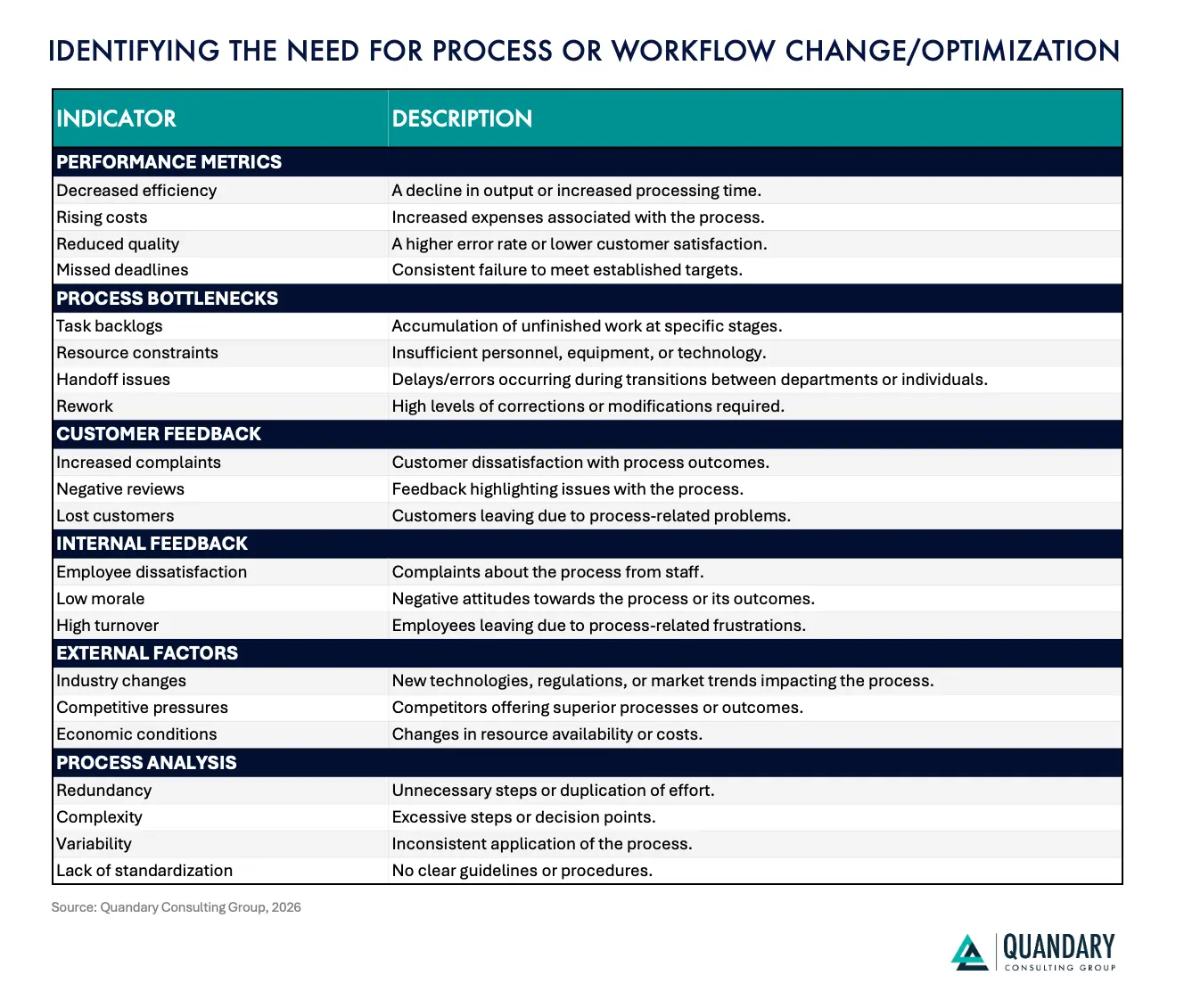
Key Metrics That Signal the Need for Workflow Optimization
Organizations do not need to wait until a process completely breaks before improving it. Operational data often reveals warning signs long before employees, customers, or leadership experience the full impact of an inefficient workflow.
The key is knowing which workflow performance metrics to monitor and what they reveal about the underlying process.
Several indicators can signal that a workflow should be reviewed, redesigned, automated, or better integrated.
- Cycle Time: Measure how long it takes a process to move from initiation to completion. Increasing cycle times can indicate unnecessary approvals, manual handoffs, disconnected systems, capacity constraints, or inefficient routing.
- Processing Time vs. Waiting Time: A task may require only minutes of actual work but spend hours or days waiting in queues, inboxes, spreadsheets, or approval stages. A large gap between processing time and total cycle time is often a strong indicator of an automation opportunity.
- Error and Rework Rates: Frequent corrections, duplicate entries, rejected submissions, inaccurate records, or repeated work can indicate that a process relies too heavily on manual data entry or lacks standardized business rules and validation.
- Manual Touchpoints: Track how many times employees must manually enter, transfer, review, approve, reconcile, or update information. High-touch processes are often strong candidates for workflow automation and system integration.
- Approval Time: Long approval cycles can indicate unnecessary approval layers, unclear ownership, poor routing, or a lack of automated escalation and notification rules.
- Exception Rates: Exceptions are inevitable, but consistently high exception volumes may indicate that the standard workflow does not reflect how the business actually operates. AI and intelligent automation can also help classify, prioritize, and route exceptions for appropriate human review.
- Throughput: Measure how much work a process can complete within a specific period. If demand increases faster than throughput, organizations may experience growing backlogs even when individual employees remain productive.
- Backlog Volume: Rising queues of invoices, service requests, work orders, applications, approvals, tickets, or other transactions can indicate that workflow capacity is no longer keeping pace with business demand.
- Cost per Transaction: Understanding the labor, technology, and administrative costs required to complete a process can reveal workflows where automation could produce meaningful financial returns.
- Data Quality: Duplicate records, missing information, inconsistent values, and conflicting versions of data can signal disconnected systems or poorly designed workflows. Improving the process may require data engineering and integration in addition to automation.
- System Handoffs: Processes that require employees to repeatedly move information between spreadsheets, email, ERP, CRM, accounting, project management, or other systems are particularly vulnerable to delays and errors.
- Customer Effort and Satisfaction: Increasing complaints, repeat contacts, long response times, missed commitments, or declining satisfaction may indicate that internal workflow problems are affecting the customer experience.
- Employee Effort and Satisfaction: Employees often identify broken processes before dashboards do. Excessive manual work, repeated data entry, constant follow-up, spreadsheet workarounds, and dependence on tribal knowledge can all signal opportunities for process improvement.
- Scalability: A workflow may function adequately at today's transaction volume but become unsustainable as the organization grows. If processing capacity can only increase by adding more employees, the underlying workflow may need to be redesigned.
1. Look for Patterns Across Multiple Metrics
No single KPI automatically means a workflow needs to be replaced. The strongest signals usually appear when several metrics begin moving in the wrong direction at the same time, for example:
- Long Cycle Times + High Manual Touchpoints + Frequent Errors → Automation Opportunity
- Growing Backlogs + High Approval Times → Routing or Capacity Bottleneck
- Duplicate Data + Multiple System Handoffs → Integration Opportunity
- High Employee Effort + Repetitive Tasks → Intelligent Automation Opportunity
- Increasing Customer Effort + Repeat Contacts → End-to-End Workflow Problem
- High Transaction Growth + Rising Operating Costs → Scalability Problem
These combinations help organizations move beyond treating individual symptoms and identify the underlying operational constraint.
2. Use Workflow Metrics to Drive Continuous Improvement
Workflow optimization should not end after a new application, integration, or automation is deployed.
Organizations should establish baseline performance before making changes and continue measuring the process afterward. Comparing cycle time, processing cost, error rates, throughput, exception rates, employee effort, and customer outcomes provides a clearer picture of whether the optimization is producing measurable business value.
Modern automation and AI can also make this process increasingly proactive. Instead of relying solely on employees to report bottlenecks, organizations can use operational data to identify unusual delays, recurring exceptions, changing demand patterns, and emerging process constraints.
By systematically monitoring these indicators, organizations can identify where work is slowing down, determine which improvements will create the greatest impact, and continuously refine workflows as business needs evolve.
The result is more than process efficiency. Effective workflow optimization can contribute to lower operating costs, greater employee capacity, faster execution, improved data quality, better customer experiences, and more scalable operations.
Key Benefits of Workflow Optimization Management
Organizations that invest in workflow optimization can improve more than individual processes. By eliminating unnecessary friction, connecting systems and data, and introducing intelligent automation where it creates measurable value, businesses can build faster, more scalable, and more resilient operations.
Key benefits include:
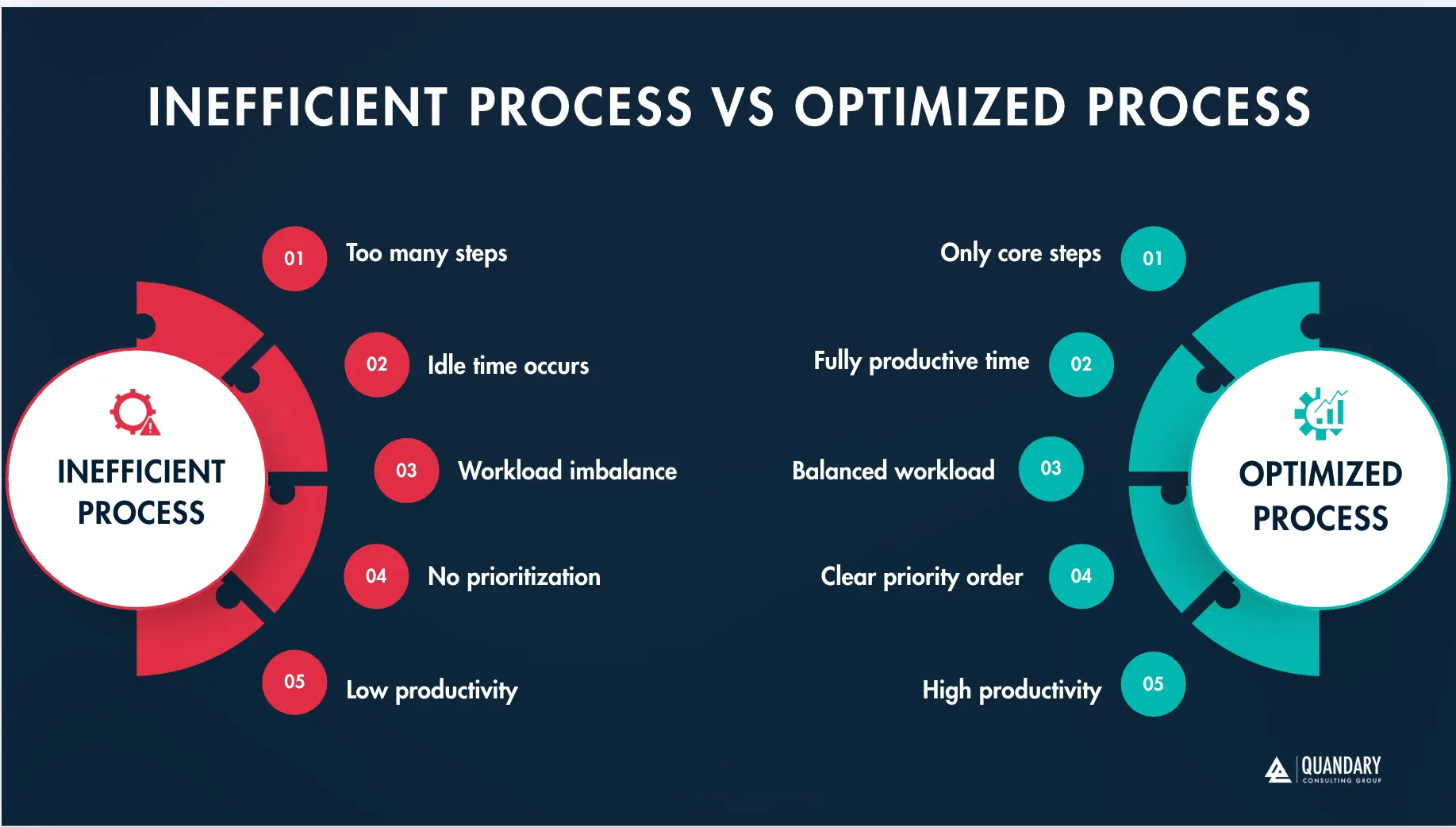
- Reduced Operational Inefficiencies: Workflow optimization helps identify redundant steps, unnecessary approvals, manual handoffs, duplicate data entry, and other bottlenecks that slow execution and consume employee capacity.
- Lower Operating Costs: Streamlining processes and automating repetitive work can reduce the time and resources required to complete routine activities while minimizing rework, errors, and process delays.
- Faster Cycle Times: Connected systems, automated routing, business rules, and intelligent workflows can move work between employees and applications faster, accelerating processes such as approvals, onboarding, procurement, billing, customer service, and reporting.
- Improved Employee Productivity: Employees spend less time entering data, searching for information, following up on approvals, and moving information between systems, giving them more capacity for strategic, customer-facing, and higher-value work.
- Better Customer Experiences: Faster workflows and improved access to accurate information can reduce response times, improve service consistency, accelerate resolution, and create a more seamless experience for customers.
- Greater Data Visibility and Accuracy: Integrating applications and establishing reliable data flows helps eliminate information silos, reduce duplicate records, and give employees and leaders better visibility into operational performance.
- Increased Scalability: Optimized workflows allow organizations to support higher transaction volumes, more customers, and business growth without requiring manual workloads and operating costs to increase at the same rate.
- Greater Business Agility: Modular workflows, reusable integrations, and configurable automation make it easier to respond to new business requirements, regulatory changes, customer expectations, acquisitions, and evolving market conditions.
- Stronger Process Governance: Standardized workflows create clearer ownership, approval rules, access controls, exception handling, and audit trails, helping organizations improve accountability while reducing operational and compliance risk.
- A Stronger Foundation for AI and AI Agents: AI delivers greater value when it operates within well-defined processes supported by connected systems and trusted data. Workflow optimization creates the operational foundation AI agents need to retrieve information, make context-aware recommendations, execute approved actions, and coordinate work across enterprise applications.
Ultimately, workflow optimization management turns fragmented processes into connected operational systems. When combined with integration, data orchestration, intelligent automation, and AI, it can help organizations reduce costs, increase productivity, improve customer experiences, and scale more efficiently.
Quandary Case Study: CipherWave Cuts Manual Revenue Operations by 60% with Custom Quickbase Automations
Key Challenges in Workflow Optimization Management
Workflow optimization can create significant improvements in efficiency, cost, employee productivity, and customer experience, but identifying what to automate is only part of the challenge.
Most enterprise workflows have evolved over years. They often span multiple departments, applications, data sources, approval structures, and business rules. Employees develop workarounds to compensate for gaps, while exceptions and changing requirements gradually add complexity.
As a result, organizations must address the underlying operational issues before they can build workflows that scale effectively.
1. Excessive Manual Work
One of the most common workflow challenges is the continued reliance on employees for repetitive, low-value activities.
Employees may spend significant portions of their day:
- Entering information into multiple systems
- Copying and pasting data
- Searching for documents or records
- Routing requests
- Sending status updates
- Following up on approvals
- Reconciling conflicting information
- Creating recurring reports
- Updating spreadsheets
- Processing routine exceptions
Every manual touchpoint introduces additional time, cost, and opportunity for error.
Employees provide greater value when they can focus on analysis, customer relationships, problem-solving, exception management, strategic decisions, and work requiring judgment rather than acting as the connection between disconnected systems.
2. Disconnected Applications and Data Silos
Modern organizations operate across dozens or even hundreds of applications, and many critical workflows cross several systems before they are completed.
A customer onboarding workflow, for example, may involve a CRM, contract management platform, ERP, billing system, identity platform, document repository, email, and customer service application.
When those systems are disconnected, employees frequently become the integration layer.
They manually transfer information between applications, reconcile conflicting records, monitor status across platforms, and notify other departments when something changes.
Enterprise integration and data orchestration can reduce this friction by allowing systems to exchange information automatically and providing workflows with access to consistent, trusted data.
3. Poor Data Quality
Automation depends on reliable data.
Duplicate records, missing fields, inconsistent naming conventions, outdated information, and conflicting systems of record can make even well-designed workflows unreliable.
Poor data quality becomes even more consequential when AI is introduced. AI agents may be able to analyze information and initiate actions faster than employees, but those capabilities provide limited value if the underlying information is incomplete or inaccurate.
Workflow optimization should therefore address data quality, ownership, validation, accessibility, and system-of-record decisions alongside automation.
4. Unnecessary Approvals and Handoffs
Many workflows contain steps that exist because of historical policies rather than current business requirements.
An approval may have been introduced years ago because a particular system lacked controls. A report may still be manually reviewed even though validation rules now exist. Information may pass through several employees simply because that is how the process has always operated.
Each unnecessary handoff increases cycle time.
Organizations should evaluate whether every approval and review remains necessary and determine whether business rules, thresholds, automated validation, or exception-based review could provide the same control more efficiently.
5. Exception-Heavy Processes
Automation works particularly well when the standard path is clearly defined, but real business processes rarely follow the standard path every time.
Invoices fail to match purchase orders. Customer information is incomplete. Projects change scope. Vendors submit incorrect documents. Employees require unusual approvals. Systems return errors. If exceptions are not intentionally designed into the workflow, employees often manage them through email, spreadsheets, messaging platforms, or institutional knowledge.
Modern workflow optimization must therefore define both:
- The standard path: What should happen when everything works as expected?
- The exception path: What should happen when it does not?
AI can increasingly help classify, summarize, prioritize, and route exceptions, while employees retain responsibility for situations requiring judgment or consequential decisions.
6. Lack of Clear Workflow Ownership
Complex workflows frequently cross departmental boundaries.
When no one owns the end-to-end process, each department may optimize its individual responsibilities without considering the impact on the overall workflow.
Finance may optimize its approval process while creating additional work for operations. Sales may improve data capture without considering downstream billing requirements. IT may automate a task without understanding why employees created a workaround in the first place.
Effective workflow optimization requires end-to-end ownership.
Someone must be accountable for how the entire process performs, including its systems, data, handoffs, exceptions, controls, and business outcomes.
7. Automating a Broken Process
Automation can increase efficiency, but it cannot compensate for poor process design. If a workflow contains unnecessary approvals, duplicate steps, inconsistent data, unclear ownership, or outdated business rules, automating those activities can simply execute an inefficient process faster.
Organizations should first ask:
- Can this step be eliminated?
- Can the process be simplified?
- Can data be captured once instead of repeatedly?
- Can systems exchange the information directly?
- Does this approval still provide meaningful control?
- Does a person actually need to perform this activity?
Only after answering those questions should organizations determine where automation belongs.
8. Legacy Systems and Integration Constraints
Critical workflows often depend on legacy applications that were never designed for modern integration.
These systems may lack robust APIs, rely on batch processes, contain proprietary data structures, or require manual interaction.
Replacing every legacy platform is rarely practical. Instead, organizations may need a combination of APIs, integration platforms, data pipelines, low-code applications, middleware, automation, and modernization layers to connect legacy systems with newer technology while minimizing operational disruption.
9. Introducing AI Without Workflow Governance
AI and AI agents create new opportunities for workflow optimization, but they also introduce new management requirements.
Organizations need to determine what information AI can access, which systems an agent can interact with, what actions it can perform, when human approval is required, how exceptions are escalated, and how actions are monitored.
For example: Request Received → AI Interprets Request → Relevant Data Retrieved → Business Rules Evaluated → Approved Action Executed → Exception Escalated to Human → Outcome Recorded
Without governance, organizations risk creating another layer of disconnected automation and shadow AI.
AI-enabled workflows should therefore include identity and access controls, defined permissions, approved data sources, human-in-the-loop requirements, testing, monitoring, auditability, and lifecycle management.
10. Measuring the Wrong Outcomes
Organizations sometimes measure workflow optimization by the number of tasks automated rather than the business results produced.
Automating 20 steps provides limited value if the customer still waits five days for resolution. Workflow performance should instead be evaluated through metrics such as:
- End-to-end cycle time
- Processing versus waiting time
- Cost per transaction
- Error and rework rates
- Exception volume
- Throughput
- Backlog
- Employee capacity
- Customer effort
- First-contact or first-time resolution
- Revenue acceleration
- Time from service delivery to billing
- Automation and AI intervention rates
- Human escalation rates
The objective is not simply to automate more work. It is to improve how the business performs.
From Workflow Challenges to Intelligent Operations
The most effective workflow optimization strategies address the entire operational environment: People + Processes + Data + Applications + Integrations + Automation + AI + Governance
When organizations evaluate these elements together, they can move beyond isolated task automation and begin redesigning how work operates across the enterprise.
The result is a more connected operating model where routine work moves automatically, systems exchange reliable data, AI assists with increasingly complex activities, exceptions reach the right people, and employees can focus their attention where human expertise creates the greatest value.
How Do Organizations Typically Manage Workflows?
Organizations typically manage workflows through a combination of people, spreadsheets, email, business applications, workflow automation platforms, integrations, and increasingly, AI.
The challenge is that workflow management often evolves reactively.
A process that begins with a few employees, a shared spreadsheet, and email approvals may work perfectly well at first. As transaction volumes increase, teams expand, applications multiply, and business requirements become more complex, organizations often continue adding steps and workarounds to the original process rather than redesigning it.
Eventually, employees spend more time managing the workflow than completing the work the workflow was designed to support.
Stage 1: Manual Workflow Management
In smaller organizations or newly established processes, workflows are often managed informally.
Employees may rely on:
- Spreadsheets
- Shared documents
- Messaging platforms
- Calendar reminders
- Individual task lists
- Manual data entry
- Institutional knowledge
An employee may receive a request by email, enter the information into a spreadsheet, forward it to a manager for approval, update another system, notify another department, and manually follow up until the process is complete.
For low-volume workflows, this approach can be sufficient and problems emerge when the volume or complexity of the work increases.
Stage 2: Application-Based Workflow Management
As organizations grow, individual departments typically adopt applications to manage specific business functions.
Sales implements a CRM. Finance uses an ERP or accounting platform. HR introduces an HRIS. Operations deploys project management or field applications. Customer service adopts a ticketing or contact center platform.
These systems improve individual functions, but they can also create a new challenge: the workflow now spans multiple applications. Employees may still need to transfer information between systems, reconcile records, monitor status, and communicate changes manually.
The organization has digitized individual activities without necessarily connecting the end-to-end process.
Stage 3: Integrated Workflow Management
The next stage is connecting those applications so data and work can move automatically across the organization. Enterprise integration and workflow automation can coordinate activities between systems without requiring employees to manually transfer information.
For example: CRM Opportunity Closed → Customer Record Created → Contract Data Transferred → ERP Updated → Billing Workflow Initiated → Customer Onboarding Triggered → Internal Teams Notified
Instead of employees coordinating each transition, integrations and automation manage the movement of information and trigger the appropriate next steps. This creates a more connected operating model while allowing departments to continue using the applications designed for their specific needs.
Stage 4: Intelligent Workflow Management
Organizations are increasingly moving beyond rules-based automation toward intelligent workflows that incorporate AI, AI agents, enterprise data, and human decision-making.
Traditional automation works well when the logic is predictable: If X happens, perform Y. AI becomes valuable when the workflow requires interpretation, context, or interaction with unstructured information.
For example, AI can:
- Interpret incoming requests
- Extract information from documents
- Classify and prioritize work
- Retrieve relevant enterprise knowledge
- Summarize records and communications
- Identify anomalies or potential exceptions
- Recommend next-best actions
- Draft communications
- Assist employees during decision-making
AI agents can potentially coordinate multiple approved actions across connected applications, while human-in-the-loop controls ensure consequential decisions or unusual exceptions reach the appropriate employee.
A modern intelligent workflow might operate like this: Request Received → AI Interprets Request → Enterprise Data Retrieved → Business Rules Applied → Workflow Executed → Exception Detected → Human Review Requested → Action Completed → Systems Updated → Outcome Measured
This represents a significant shift from employees manually managing every stage of a workflow.
The Problem With Extending Manual Workflows Too Far
Spreadsheets, email, and other productivity tools are extremely useful, and they do not need to disappear from the enterprise.
The problem occurs when they become the primary infrastructure for processes they were never intended to manage at scale.
An organization might use spreadsheets to manage employee training when it has 20 employees. The same approach becomes significantly more difficult when the organization has 2,000 employees across multiple locations with different roles, certifications, training requirements, expiration dates, and compliance obligations.
Similar problems appear when spreadsheets and email become the primary tools for:
- Purchase approvals
- Vendor onboarding
- Project controls
- Financial tracking
- Employee credentialing
- Field operations
- Inventory management
- Customer onboarding
- Contract management
- Billing
- Compliance activities
As complexity increases, organizations become increasingly dependent on employees to remember what happens next, locate missing information, reconcile records, follow up on approvals, and keep the process moving.
The Hidden Risk of People Becoming the Workflow
One of the clearest indicators of an inefficient workflow is when employees themselves become the mechanism connecting the process.
- They know which spreadsheet contains the correct information.
- They know who needs to approve a particular request.
- They remember which customer requires an exception.
- They know which system needs to be updated next.
- They know who to email when something goes wrong.
- This creates key-person dependency and institutional knowledge risk.
When those employees are unavailable, change roles, or leave the organization, critical operational knowledge can disappear with them. Optimized workflows move that knowledge into documented processes, business rules, connected systems, automated routing, governed data, and measurable controls.
From Manual Workflows to Intelligent Operations
Workflow management generally progresses through a recognizable maturity curve: Manual → Digitized → Integrated → Automated → Intelligent → Continuously Optimized
The goal is not to automate every activity or eliminate spreadsheets and email. Instead, organizations should determine which workflows have outgrown their current management approach and redesign them around the appropriate combination of people, applications, integration, automation, data, AI, and governance.
When routine work can move automatically, data can flow reliably between systems, AI can assist with interpretation and exceptions, and employees can intervene where judgment is genuinely required, workflow management becomes significantly more scalable.
That transition allows organizations to move away from people managing processes manually and toward systems helping people manage outcomes intelligently.
Quandary Case Study: Google Modernizes Global Construction Planning Across 2,500+ Data Center Projects
Five Essential Techniques for Effective Workflow Optimization
Effective workflow optimization requires more than automating individual tasks. Organizations need to examine how data, people, applications, business rules, approvals, integrations, and increasingly AI agents work together across the entire process.
The strongest optimization strategies remove unnecessary complexity while creating an operational foundation that can adapt as transaction volumes, systems, regulations, and business requirements change.
The following five techniques provide a practical framework for building workflows that are faster, more accurate, scalable, and increasingly intelligent.
1. Anchor Workflows in Trusted Data for Accuracy and Control
One of the most important principles of workflow optimization is ensuring that processes operate from reliable, governed data.
Consider a purchase requisition workflow. Employees may need information about vendors, products, departments, budgets, contracts, cost centers, approval thresholds, and previous purchases before submitting or approving a request. When that information is distributed across spreadsheets and disconnected applications, employees often need to search for it, validate it, or manually enter it into multiple systems.
A better approach connects the workflow directly to authoritative enterprise data. For example, an optimized procurement workflow might automatically:
- Surface approved vendors
- Retrieve standardized product or service information
- Populate department and cost-center data
- Validate accounting codes
- Display available budget information
- Check purchasing thresholds
- Retrieve relevant contract information
- Validate required fields before submission
- Update downstream procurement and financial systems
Instead of asking employees to find and validate information manually, the workflow provides the correct information at the point of decision.
This concept extends well beyond procurement.
Customer workflows can reference CRM and billing data. Employee workflows can retrieve information from HR systems. Field operations can use project, equipment, employee, and location records. Healthcare workflows can reference approved patient, provider, scheduling, and operational data subject to appropriate access controls.
Trusted data becomes even more important when AI enters the workflow.
An AI agent can retrieve information, summarize records, recommend actions, and potentially execute approved tasks, but its effectiveness depends heavily on the quality and accessibility of the underlying information. Better Data → Better Workflows → Better Automation → Better AI Outcomes
For organizations building AI-enabled operations, data quality is therefore part of workflow architecture, not a separate initiative.
2. Use Business Rules, Conditional Logic, and AI to Manage Process Variability
Very few enterprise workflows follow exactly the same path every time. Transaction value, customer type, risk level, geography, regulatory requirements, product category, employee role, or other business conditions may determine how work should proceed.
For predictable situations, organizations can use business rules and conditional logic to dynamically route work.
For example:
- Purchase Under $5,000 → Manager Approval
- Purchase Between $5,000 and $50,000 → Director Approval
- Purchase Above $50,000 → Executive + Finance Review
This prevents every transaction from being subjected to the same approval structure. Conditional logic can also allow related processes to share common workflow components while branching when requirements differ.
A marketing content workflow, for example, might begin with the same intake, planning, and review process before branching into separate execution paths for:
- Blog posts
- Landing pages
- Case studies
- Email campaigns
- Social content
- Paid advertising
Each path can follow its own requirements before reconnecting with common publishing, reporting, or analytics workflows.
AI adds another layer of flexibility; some decisions cannot be reduced easily to simple if/then rules. AI can help interpret unstructured information, classify requests, summarize supporting documents, identify anomalies, assess context, and recommend the appropriate next step.
A modern workflow might therefore combine: Business Rules + Conditional Logic + AI Interpretation + Human Judgment
The key is using the appropriate mechanism for the decision. Predictable decisions can be automated through rules and context-heavy activities may benefit from AI; but, high-risk, sensitive, or consequential decisions may require human review. This creates workflows that are both efficient and appropriately governed.
3. Integrate Workflows Across the Enterprise Technology Ecosystem
Most important business processes do not exist inside a single application.
Customer onboarding might involve CRM, contract management, billing, ERP, identity management, project management, and customer service systems.
Employee onboarding might span HR, payroll, identity, IT service management, training, credentialing, and communication platforms. Procurement can involve sourcing, vendor management, ERP, accounts payable, banking, document management, and operational systems.
If those systems cannot communicate, employees become responsible for moving information between them, this creates one of the most common sources of workflow inefficiency: manual system handoffs.
Modern integration and orchestration platforms such as Workato, combined with operational platforms such as Quickbase and other enterprise applications, can connect workflows across the technology ecosystem.
- Instead of: Employee Receives Information → Employee Re-enters Data → Employee Emails Another Department → Employee Updates Another System
- The process can become: Business Event → Integration Triggered → Data Validated → Systems Updated → Workflow Initiated → Stakeholders Notified → Outcome Recorded
This can significantly reduce manual work while improving data consistency and process visibility.
Integration also provides critical infrastructure for AI agents: An AI agent becomes much more useful when it can securely access the systems and tools required to accomplish an approved objective. Depending on its permissions, an agent might retrieve customer information, examine an order, review documentation, update a record, initiate a workflow, or prepare an exception for human review.
The goal is to create a connected environment where:
- Applications provide capabilities.
- Integrations move data.
- Workflows coordinate processes.
- AI interprets context and assists with decisions.
- People provide judgment and oversight.
Together, these capabilities create the foundation for intelligent operations.
4. Modularize Workflows to Improve Scalability and Reuse
One of the most common workflow design mistakes is building a single massive process that attempts to manage every possible activity, exception, approval, and system interaction and these workflows can become difficult to understand, modify, test, troubleshoot, and scale.
A more sustainable approach is to divide complex processes into modular, reusable workflow components. Instead of designing one enormous sales lifecycle workflow, for example, an organization might create separate workflows for: Lead Qualification → Opportunity Management → Quote/SOW → Contracting → Customer Onboarding → Billing → Customer Success
Each workflow performs a defined function while exchanging information with the others through integrations, events, APIs, or automated triggers.
The same concept can be applied to procurement: Vendor Onboarding → Purchase Request → Approval → Purchase Order → Receiving → Invoice Processing → Payment
Modularity creates several advantages; organizations can update individual workflows without redesigning the entire process. Problems are easier to isolate. Components can be reused across departments. New systems can be introduced more easily. Automation can be expanded incrementally.
This architecture also supports AI adoption.
Instead of giving an AI agent unrestricted access to an enormous end-to-end process, organizations can expose specific approved tools, actions, workflows, or agent skills.
For example, an agent might have permission to:
- Retrieve Vendor Information
- Check Purchase Order Status
- Summarize an Invoice Exception
- Initiate an Approval Workflow
- Draft a Vendor Notification
Modular architecture makes those capabilities easier to govern, test, monitor, and reuse.
5. Replace Unnecessary Approvals With Exception-Based Governance
Approvals are an important control mechanism, but more approvals do not automatically create better governance and in many organizations, approval structures accumulate over time.
A workflow that originally required one approval eventually requires three. Senior leaders become involved in routine transactions. Requests wait in queues even when they meet predefined policies.
The result is often approval debt: layers of authorization that increase cycle time without meaningfully reducing risk. A better approach is to design governance around risk, thresholds, exceptions, and visibility.
Routine transactions that meet established criteria may be processed automatically while stakeholders receive notifications or maintain dashboard visibility.
For example:
- Standard Transaction + Within Policy → Automatically Process
- Transaction Approaching Threshold → Notify Manager
- Policy Exception → Require Approval
- High-Risk Transaction → Escalate for Human Review
This allows employees and executives to focus their attention where their involvement provides meaningful value. AI can strengthen this model by helping identify unusual activity, summarize exceptions, retrieve supporting documentation, or provide reviewers with the information necessary to make faster decisions.
Human oversight remains essential, particularly for high-risk financial transactions, sensitive customer situations, regulatory requirements, or other consequential actions.
The objective is therefore not to eliminate approvals. It is to place human judgment at the points where human judgment actually matters.
Quandary Case Study: Eagle Telemedicine Deploys a Quickbase Medical Billing System With HyperCare Support
Next Step: Embed Continuous Workflow Optimization
Workflow optimization should not end when a new process goes live. Business requirements change. Transaction volumes increase. Employees discover new exceptions. Regulations evolve. Applications are replaced. Customer expectations shift. New AI capabilities become available.
Even highly automated workflows can gradually become inefficient if they are not monitored and refined. Organizations should therefore treat workflow optimization as a continuous operating discipline: Measure → Identify Friction → Analyze → Improve → Automate → Monitor → Repeat
Key performance indicators can include:
- End-to-end cycle time
- Processing versus waiting time
- Error and rework rates
- Approval time
- Exception volume
- Backlog
- Cost per transaction
- Throughput
- Employee capacity
- Customer effort
- Data quality
- Automation success rates
- Human escalation rates
- AI task completion and exception rates
Modern analytics and AI can make this process increasingly proactive; instead of waiting for employees to report that a workflow is struggling, organizations can analyze operational data to identify recurring delays, unusual exceptions, changing demand patterns, bottlenecks, and opportunities for further automation.
This creates a continuous improvement loop: Operational Data → Performance Insight → Workflow Improvement → Measured Outcome → Continuous Optimization
A Structured Approach to Workflow Optimization
Successful workflow optimization starts with understanding how work actually moves through the organization.
Organizations should begin by documenting the current process, including the unofficial workarounds, spreadsheets, emails, manual handoffs, exceptions, and institutional knowledge that traditional process documentation often misses.
From there, they can identify the areas creating the greatest business impact and determine the appropriate combination of process redesign, data engineering, enterprise integration, workflow automation, application development, AI, and human oversight.
A practical optimization framework is:
1. Discover: Understand the existing process, stakeholders, applications, data, business rules, and pain points.
2. Measure: Establish baseline metrics for cycle time, cost, errors, throughput, exceptions, employee effort, and customer outcomes.
3. Prioritize: Identify opportunities based on business value, feasibility, risk, data readiness, and potential ROI.
4. Redesign: Eliminate unnecessary steps, clarify ownership, simplify approvals, and define the desired future-state process.
5. Connect: Integrate the applications and data required for end-to-end execution.
6. Automate: Apply workflow automation and business rules to predictable, repetitive activities.
7. Add Intelligence: Introduce AI and AI agents where interpretation, knowledge retrieval, exception handling, or contextual decision support can improve the process.
8. Govern: Establish access controls, permissions, human-in-the-loop requirements, testing, monitoring, auditability, and escalation paths.
9. Measure and Improve: Compare results against the baseline and continuously optimize the workflow as business requirements evolve.
The objective is not simply to automate existing work. It is to redesign how work should operate and then use technology to make that future state possible.
Quandary Case Study: Advance Funds Integrates RingCentral to Automate Customer Communications
How Quandary Consulting Group Helps Optimize Enterprise Workflows
At Quandary Consulting Group, we help organizations move from fragmented, manually intensive processes toward connected, intelligent operations.
Our teams combine business process expertise, enterprise integration, intelligent automation, data engineering, application development, AI, and AI governance to address the underlying operational challenges that prevent organizations from scaling efficiently.
We help clients:
- Discover and map complex workflows
- Identify high-value automation and AI opportunities
- Eliminate unnecessary manual work and process friction
- Connect disconnected enterprise applications and data
- Modernize legacy and spreadsheet-dependent processes
- Design scalable workflow applications
- Implement intelligent automation
- Build governed AI and AI agent workflows
- Establish human-in-the-loop controls
- Measure operational and financial outcomes
- Continuously improve workflows as the business evolves
Rather than beginning with a particular technology, we begin with the business outcome. This might mean reducing invoice processing time, accelerating customer onboarding, improving field-to-office operations, shortening the time between service delivery and billing, eliminating repetitive administrative work, or creating the operational foundation required to deploy AI at scale.
From there, we design the combination of process, data, integration, automation, applications, and AI needed to deliver measurable results. The result is workflow optimization that extends beyond incremental efficiency gains and helps organizations build faster, more connected, scalable, and AI-ready operations.
Schedule your discovery call with us today!
Additional Resources:
- 7 Top Workflow Automation Benefits for Modern Businesses (Workato, June 2026)
- Enterprise Workflow Automation in Indonesia: When Local SaaS Ecosystems Stop Scaling (Workato, August 2026)
- Workflow Automation for Singapore Enterprises: Tools, Governance, and What Changes at Scale (Workato, September 2026)
- Next best experience: How AI can power every customer interaction (McKinsey)
- The Logic of Conditionals (Stanford Encyclopedia of Philosophy)
- Predictably Irrational: The Hidden Forces That Shape Our Decisions (Center for Health Decision Science; Harvard C.H. Chan School of Public Health)
Top FAQs About Workflow Optimization and Automation
What is workflow optimization?
Workflow optimization is the process of analyzing and improving how work moves across people, applications, data, and departments. It typically involves eliminating unnecessary steps, reducing manual work, improving data quality, integrating disconnected systems, and using automation or AI where appropriate. The goal is to create workflows that are faster, more accurate, scalable, and easier to manage.
What is the difference between workflow optimization and workflow automation?
Workflow optimization focuses on improving the overall design and performance of a workflow, while workflow automation uses technology to execute specific tasks or move work between steps automatically.
Optimization should generally come first. Organizations should identify unnecessary approvals, redundant activities, data problems, bottlenecks, and inefficient handoffs before automating the process. Otherwise, automation can simply make an inefficient workflow operate faster.
What are the three main types of business workflows?
The three primary types are process workflows, project workflows, and case workflows.
Process workflows are structured and repeatable, such as invoice processing or employee onboarding. Project workflows follow defined stages but vary depending on the individual project. Case workflows are more dynamic and depend on evolving information, such as insurance claims, customer escalations, or compliance investigations.
Many enterprise processes combine elements of all three.
What are the most common causes of workflow bottlenecks?
Common workflow bottlenecks include manual data entry, excessive approvals, disconnected applications, poor data quality, unclear ownership, repetitive handoffs, spreadsheet-dependent processes, high exception volumes, and limited visibility into work in progress.
Identifying the root cause is important because the right solution may involve process redesign, system integration, automation, data engineering, AI, or a combination of these approaches.
How do you identify which workflows should be optimized first?
Organizations should prioritize workflows based on business impact, transaction volume, manual effort, cycle time, error rates, customer impact, scalability constraints, and potential ROI.
High-volume processes that require employees to repeatedly enter data, move information between systems, follow up on approvals, reconcile records, or manage recurring exceptions are often strong candidates for optimization.
Which business processes are best suited for workflow automation?
Common candidates include accounts payable, procurement, employee onboarding, customer onboarding, purchase approvals, vendor management, billing, order processing, credentialing, sales operations, customer service, compliance, field operations, and recurring reporting.
The strongest candidates typically involve repeatable activities, clearly defined business rules, predictable data requirements, and substantial manual effort.
How does system integration improve workflow automation?
System integration allows data and actions to move automatically between enterprise applications such as CRM, ERP, HR, finance, procurement, project management, and customer service platforms.
Instead of employees manually transferring information between systems, integrations can synchronize records, trigger downstream workflows, validate information, initiate actions, and maintain consistent data across the business. This reduces manual work while improving speed, accuracy, and visibility.
How can AI improve business workflows?
AI can enhance workflows by handling activities that require interpretation rather than simple rules. This can include classifying requests, extracting information from documents, summarizing records, retrieving enterprise knowledge, identifying anomalies, prioritizing work, recommending next steps, and assisting employees with decisions.
When combined with workflow automation and enterprise integration, AI can help organizations create more adaptive and context-aware processes.
How are AI agents different from traditional workflow automation?
Traditional workflow automation generally follows predefined triggers, conditions, and actions. AI agents can interpret context, determine appropriate next steps, use approved tools, retrieve information, and potentially coordinate multiple actions toward a defined objective.
For example, an AI agent could investigate an invoice exception by retrieving the invoice, purchase order, vendor record, and receiving information before summarizing the discrepancy and routing it to the appropriate employee.
AI agents still require appropriate permissions, governance, testing, monitoring, escalation paths, and human oversight.
Can AI agents fully automate enterprise workflows?
AI agents can automate or assist with increasingly complex portions of enterprise workflows, but full autonomy is not appropriate for every process.
Organizations should maintain human involvement when workflows include significant financial decisions, regulatory requirements, sensitive customer situations, unusual exceptions, or other consequential actions. The appropriate model often combines deterministic automation, AI agents, and human-in-the-loop oversight.
What role does data play in workflow optimization?
Reliable data is fundamental to effective workflow optimization. Automated processes depend on accurate information to apply business rules, route work, update records, and make decisions.
Connecting workflows to trusted enterprise data can reduce duplicate entry, improve consistency, and provide employees with better information at the point of decision. Strong data foundations are also increasingly important for AI and AI agents, which need reliable context to operate effectively.
How can businesses reduce approval bottlenecks without sacrificing governance?
Organizations can use approval thresholds, conditional routing, automated validation, notifications, and exception-based review to reduce unnecessary approvals.
Routine transactions that satisfy established policies may move automatically, while unusual, high-value, or high-risk transactions are escalated for human review. This preserves governance while preventing senior employees from becoming bottlenecks for routine work.
What does it mean to modularize a business workflow?
Workflow modularization means breaking a large end-to-end process into smaller, connected components.
For example, a customer lifecycle could include separate workflows for lead qualification, quoting, contracting, customer onboarding, billing, service, and renewal. These components can communicate through integrations and automated triggers while remaining independently maintainable.
Modular workflows are generally easier to update, troubleshoot, reuse, govern, and scale.
How do you measure workflow optimization success?
Organizations should measure workflow optimization against business outcomes rather than simply counting the number of automated tasks.
Important workflow optimization KPIs can include cycle time, processing time, cost per transaction, error rates, rework, approval time, exception volume, backlog, throughput, employee capacity, customer satisfaction, revenue acceleration, and automation success rates.
Establishing baseline metrics before optimization makes it easier to demonstrate ROI after changes are implemented.
How often should organizations optimize their workflows?
Workflow optimization should be treated as a continuous business discipline rather than a one-time project.
Organizations should monitor critical workflows regularly and reassess them when transaction volumes, applications, regulations, staffing models, customer expectations, or business requirements change. Performance data can also reveal emerging bottlenecks and opportunities for additional automation.
What is the future of workflow automation?
The future of workflow automation is increasingly connected, intelligent, and agentic.
Traditional rules-based automation will continue to manage predictable activities, while AI and AI agents will support work requiring interpretation, knowledge retrieval, exception management, and contextual decision-making. Enterprise integration and data orchestration will connect these capabilities to the systems where business activity occurs.
The result is a shift from automating individual tasks toward building intelligent operations where people, applications, data, automation, and AI work together across end-to-end business processes.
How can Quandary Consulting Group help with workflow optimization and automation?
Quandary Consulting Group helps organizations identify, redesign, integrate, and automate complex business workflows using intelligent automation, enterprise integration, data engineering, application development, AI, and AI agents.
Quandary begins with the business process and desired outcome, then determines where workflows can be simplified, systems connected, data improved, repetitive work automated, and AI introduced responsibly. This approach helps organizations reduce operational friction, increase employee capacity, improve visibility, and build scalable, AI-ready operations.