
Knowledge Base
Articles In This Section
How to Create a Code Page in Quickbase What is QuickbaseHow to Manage and Delete Reports in QuickbaseHow to Use Application Diagram in Quickbase Copying Quick Base App ComponentUsing Combined Text Summary Field in Quickbase | INTERMEDIATEHow to Create Cross-App Relationships in QuickbaseChanging The Record Title Seen On Forms BeginnerMany-to-Many Relationships in QuickbaseHow to Set Up Reminders in Quickbase | BEGINNERSections
How to Navigate and Manage Apps from the Quickbase 'My Apps' Page
Overview
The My Apps page is your central dashboard for accessing and managing applications within your Quickbase environment (also known as a realm)
Learning how to navigate this page is an essential first step in becoming comfortable with Quickbase.
Two Key Concepts
- Realm: Your organization’s Quickbase environment containing all apps
- App: A collection of related tables used to manage a specific process (e.g., CRM, project tracking, accounting)
Organizations may:
- Store everything in a single app, or
- Use multiple apps to manage different business functions
1. How to Access the My Apps Page in Quickbase
1. Log into Quickbase
2. Click the “My Apps” icon in the upper-left corner of the screen (in the top navigation bar)
Once selected, you’ll be taken to your My Apps dashboard.
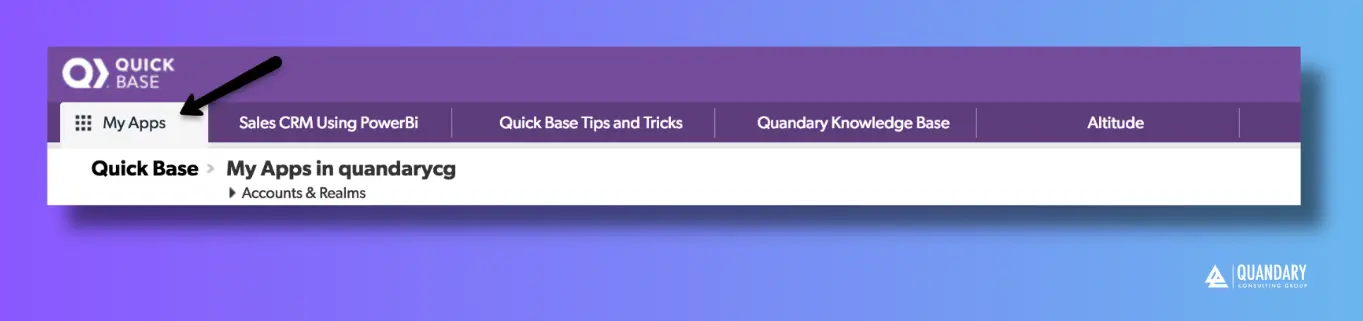
The My Apps page allows you to:
- View all apps you have access to
- Switch between display formats
- Organize apps using categories
- Search and filter apps
- Add new apps
- Remove apps from your view
- Access account-level settings (if permitted)
When you open the My Apps page, you’ll see a grid of applications.
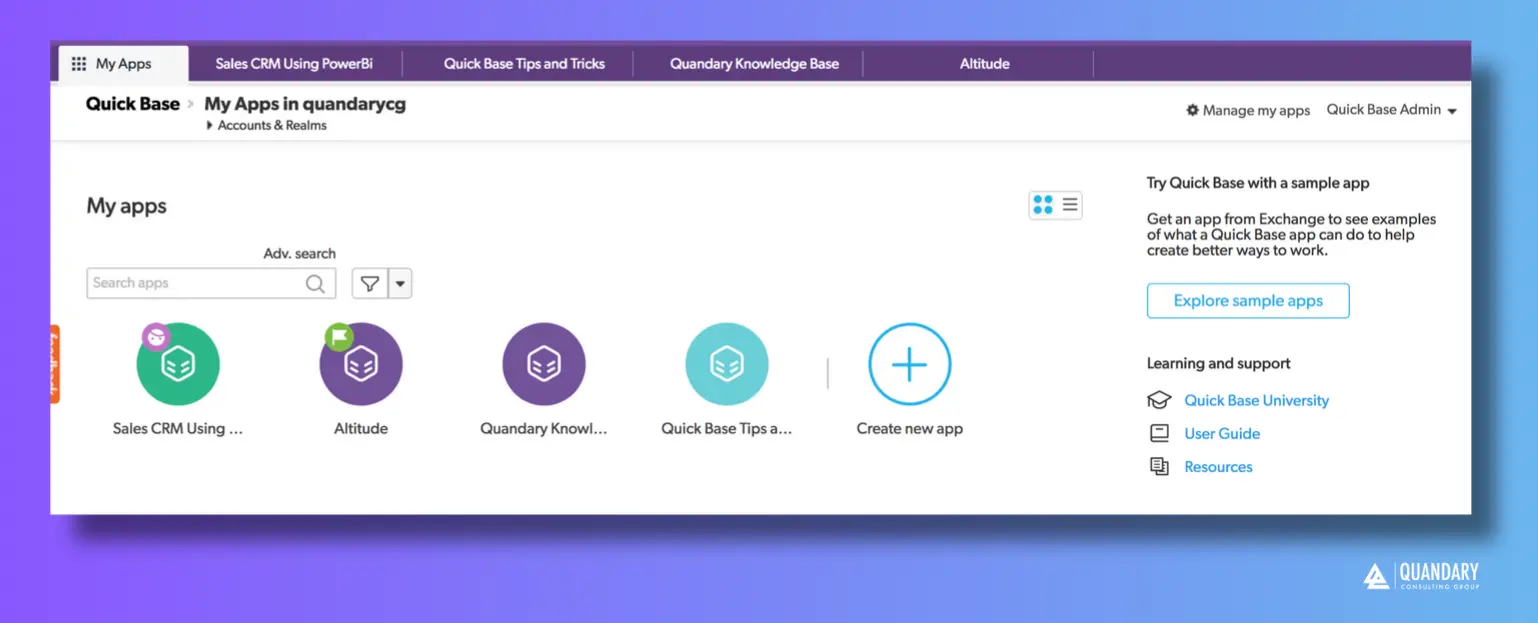
1. Grid View (default view)
- Displays app names and icons
- May include an access indicator showing your permission level
– Note: You will only see apps you have access to. Restricted apps will not appear.
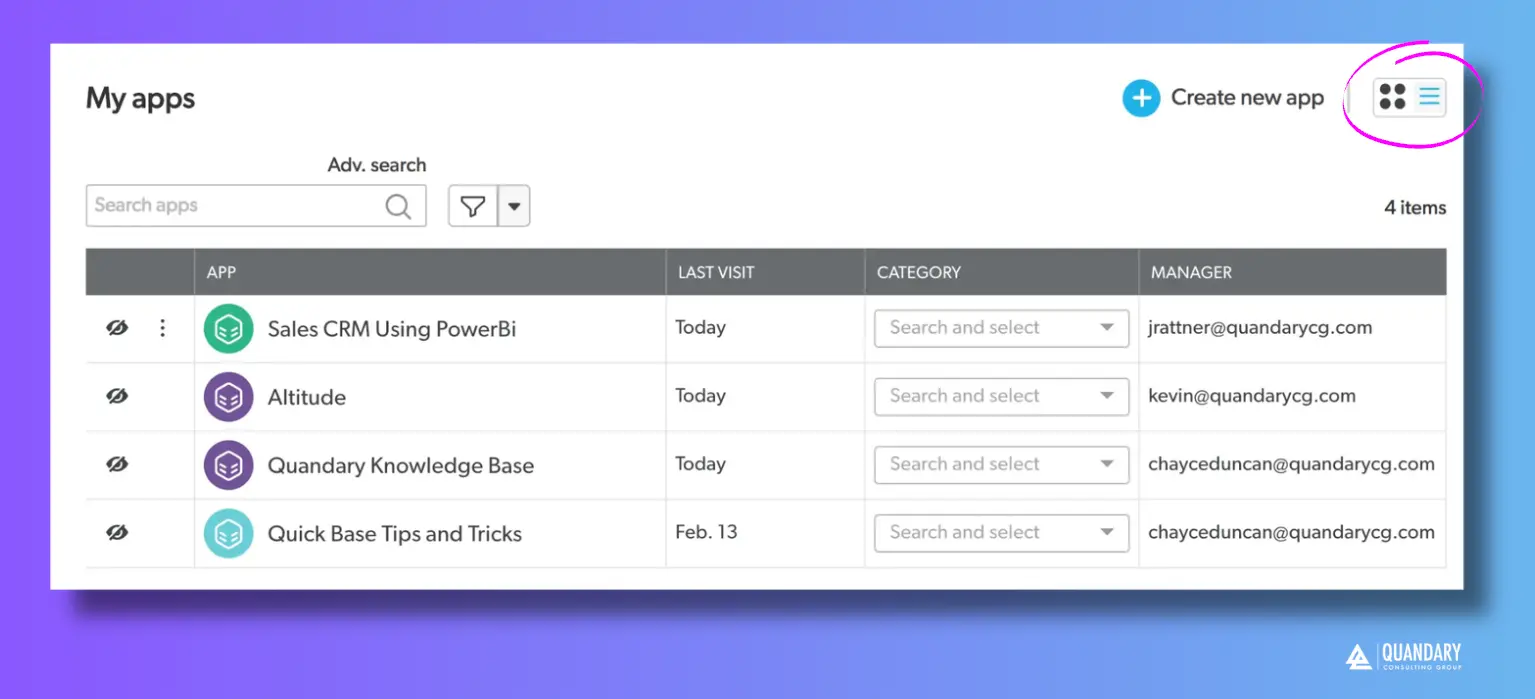
2. List View (Custom View)
If you would prefer to change the layout, you can switch to List View; to do so:
- Click the list icon (in the image directly Above, reference the three horizontal lines that is circled by a bright pink circle)
List view provides additional details, including:
- Last visited date
- App category
- App manager
Note: you currently have access to. Apps which do you do not have access to will not appear in your ‘My Apps’ page.
2. How to Organize Quickbase Apps into Categories
If your organization has many apps, categories make them easier to manage.
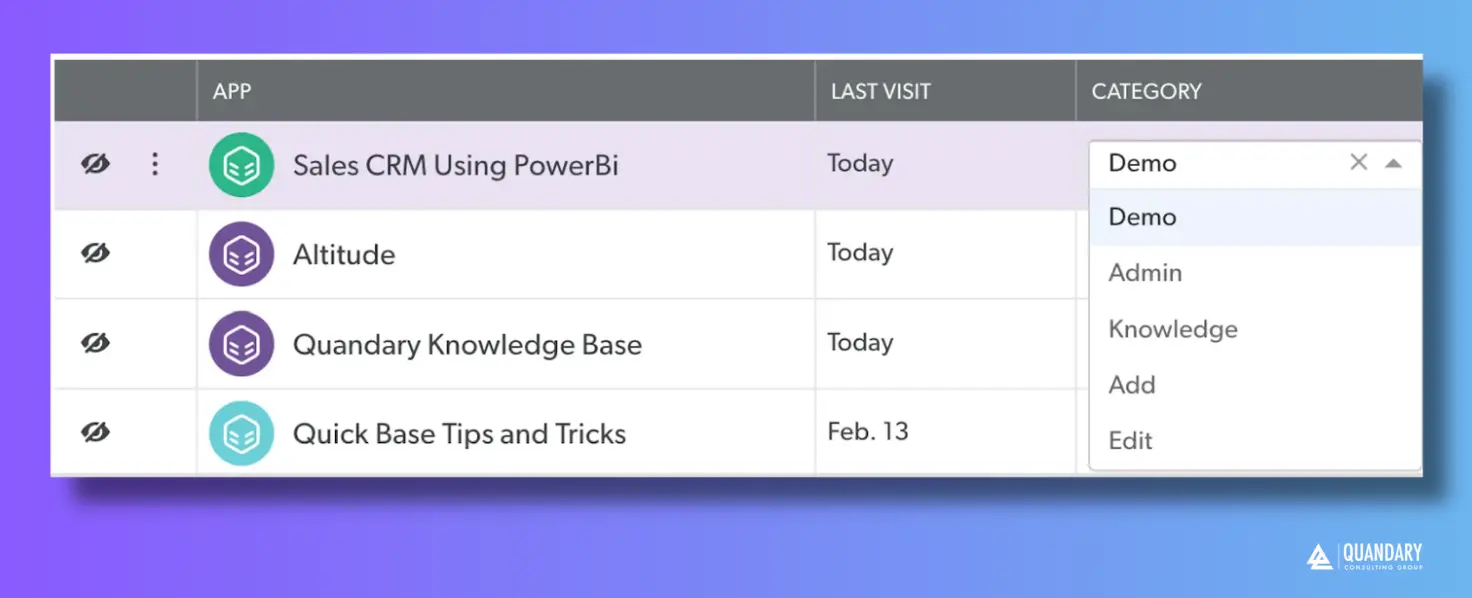
To assign or edit a category:
- Locate the Category column (in list view)
- Click the dropdown for an app
- Select an existing category or choose:
- Add to create a new category
- Edit to modify existing categories
Using categories helps group apps by function (e.g., Sales, Finance, Operations).
3. How to Find an App in your Quickbase Realm
Quickbase provides two ways to quickly locate apps:
1. Filter by Category
- Click the filter (funnel) icon next to the search bar
- Select one or more categories
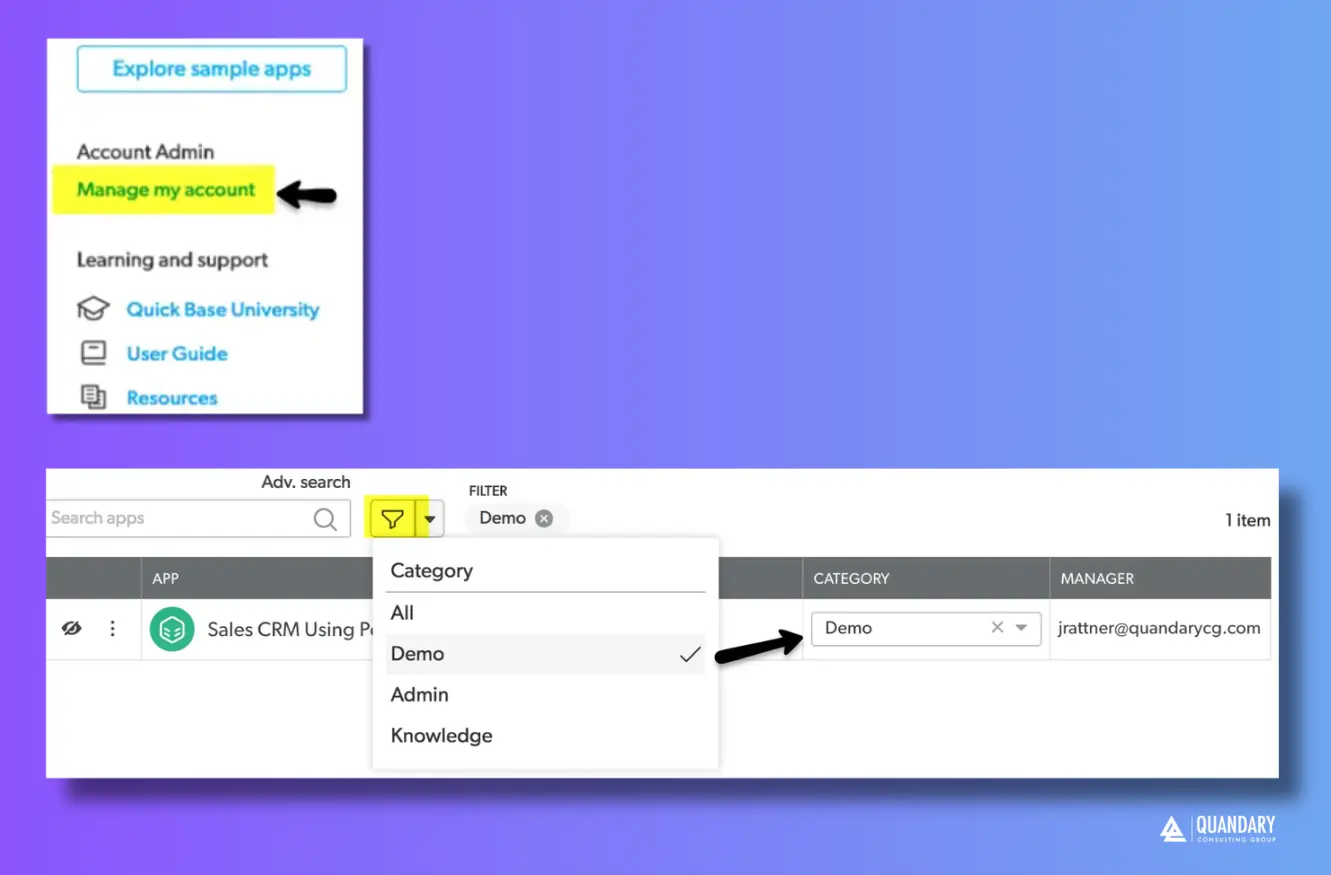
2. Search by Name
- Use the search bar to type the name of the app
These tools are especially useful in environments with many applications.
4. How to Add an App to your Quickbase Realm
You can create or explore apps directly from the My Apps page.
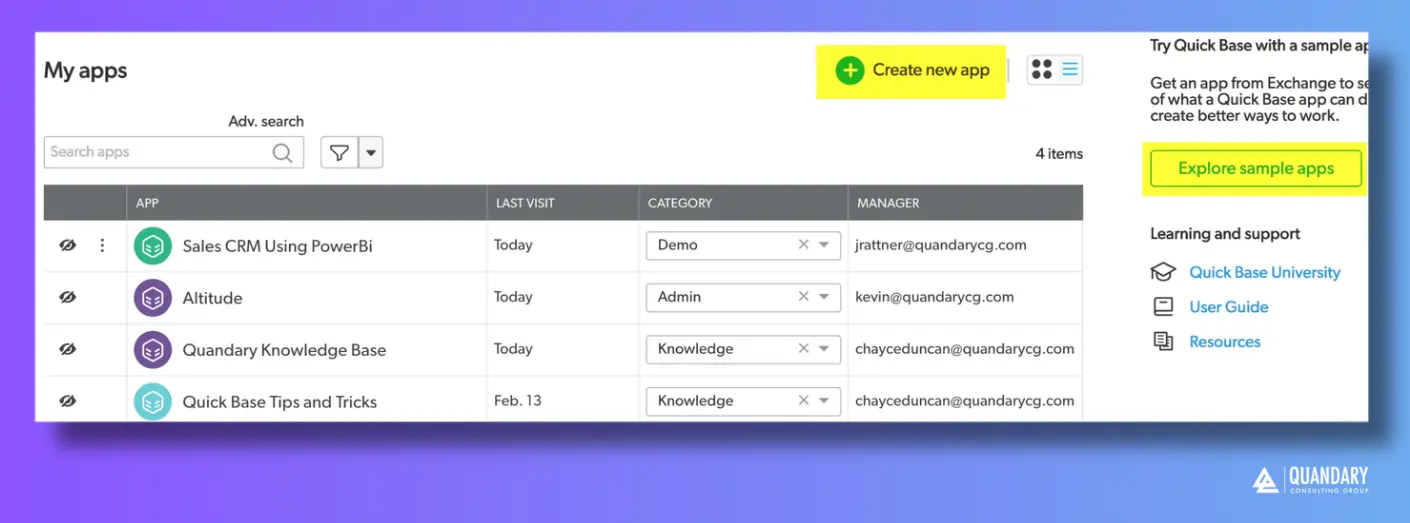
To add an app:
- Click Add App
- Choose to:
- Create a new app
- Use a template
- Explore sample applications
5. Remove Apps from Your View
If your My Apps page feels cluttered, you can remove apps from your personal view (without deleting them).
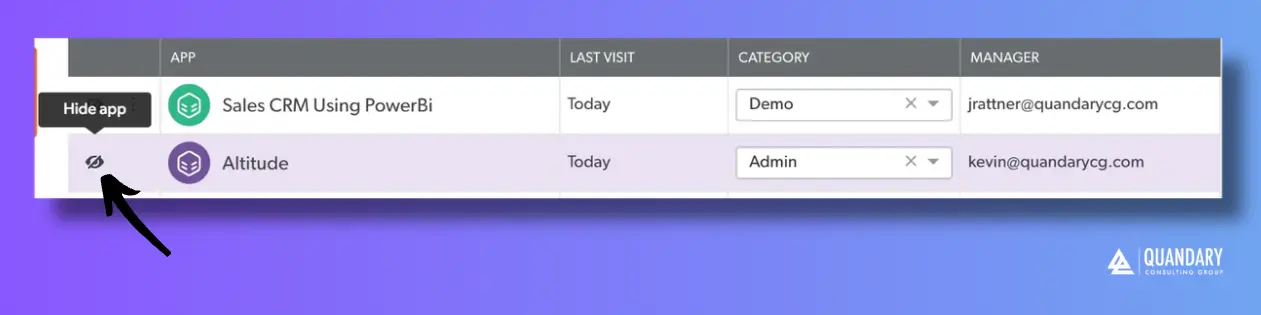
To remove an app:
- Find the app you want to hide
- Click the eye icon next to the app
This helps keep your dashboard focused on the apps you actively use.
6. How to Manage Your Quickbase Account (Realm Managers Only)
If you are a Realm Manager, you’ll see a Manage My Account option.
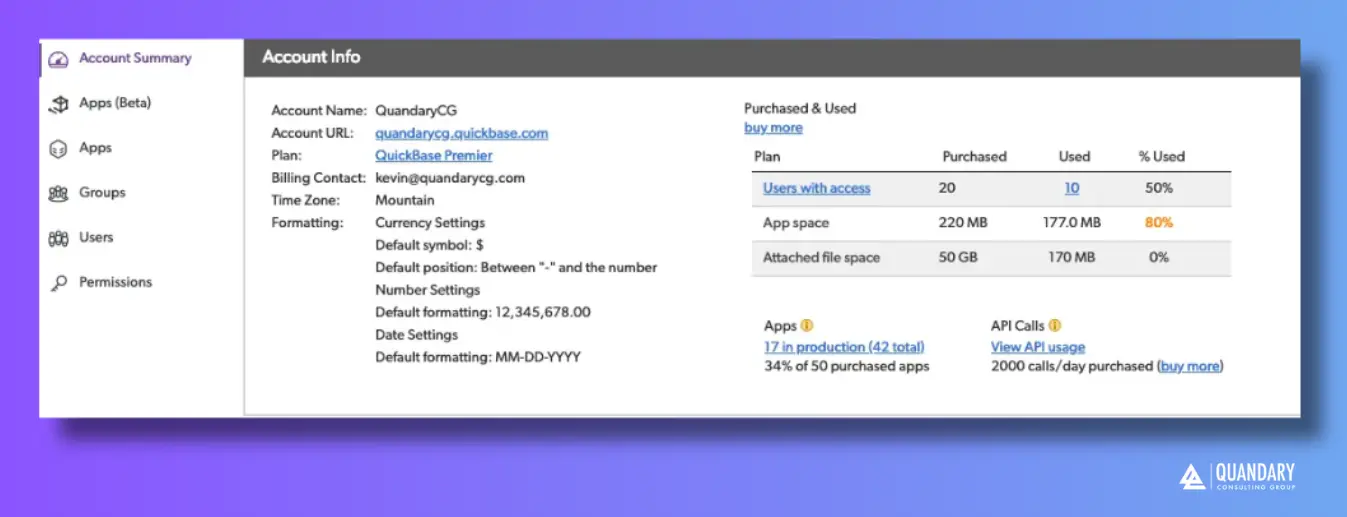
From this page, you can:
- View all apps in the realm
- Manage users and groups
- Configure permissions
- Oversee account-level settings
Best Practices
- Use categories to keep apps organized
- Regularly remove unused apps from your view
- Use list view for better visibility into app details
- Leverage search and filters to quickly find what you need
Additional Resources
For more information on app navigation and administration, refer to your Quickbase help documentation or visit our Quickbase Knowledge Base
- Author: Alistair Marsden
- Email: amarsden@quandarycg.com
- Date Updated: 10/01/2025


Resources


© 2026 Quandary Consulting Group. All Rights Reserved.
Privacy Policy