
Knowledge Base
Articles In This Section
How to Create User Groups in QuickbaseAdding a new User Role in QuickbaseHow to Archive Records in Quickbase Using Role PermissionsHow to Use and Adjust Roles in Quickbase | BeginnerHow to Switch a Client to a New Quickbase Developer How to Display Information for Certain Roles in QuickbaseHow to Use Conditional Filters in Quickbase for Role-Based Record PermissionsHow to Add New Users to your Quickbase ApplicationHow to Modify or Deny a User's Access in QuickbaseSections
How to Share with Everyone on the Internet
Opening your application to Everyone On The Internet (EOTI) allows users to access your application without signing into Quick Base. Users can view and add records, view reports and interact with data just like registered users. Similar to other groups, you can create a role and set permissions to limit access to your data. Some common use cases for the EOTI group may include:
✓ Allowing non-user customers to access work order histories
✓ Sending actionable communications to non-users
✓ Sending surveys
How to share with Everyone On The Internet:
- Navigate to Users and click + Share app with new user.
- Search for Everyone On The Internet or select it using the Address Book icon. If you do not see this choice then it has not been enabled by your Billing Account Administrator.
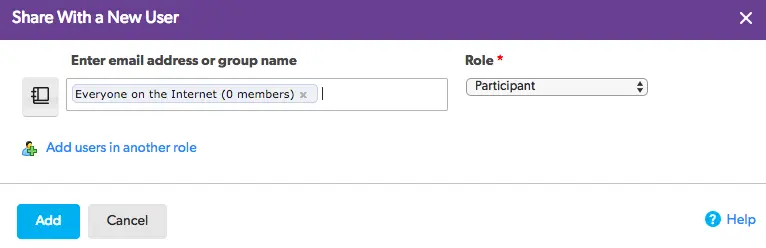
- Select the Role you would like to assign and click Add.
- Congratulations! Your app is now visible to the world wide web!
Now that you’ve opened up access to the entire internet, you are going to want to learn how to control access to your application. To learn how to customize roles for your new Everyone On The Internet group, check out my article about Adding a new User Role.
- Author: QCG Development Team
- Email: dev@quandarycg.com
- Date Submitted: 1/29/2019


Industries
Resources


© 2026 Quandary Consulting Group. All Rights Reserved.
Privacy Policy