Healthcare
Quickbase EHR Integration: A Guide to Connected Healthcare Operations


TL;DR:
- EHR systems centralize clinical information but may not manage every administrative workflow surrounding patient care.
- Quickbase can serve as an operational layer that turns approved EHR data into tasks, work queues, notifications, escalations, and dashboards.
- Connecting Quickbase with EHR data can streamline referrals, prior authorizations, scheduling readiness, credentialing, care coordination, and denial management.
- EHR integration with laboratory, radiology, pharmacy, nursing, hospital, patient portal, and health information exchange systems creates a more connected healthcare environment.
- Successful integration requires data minimization, clear system ownership, appropriate access controls, human oversight, and strong security and compliance governance.
Healthcare organizations have invested heavily in electronic health record systems to centralize clinical information, document care, support billing, and maintain a longitudinal record of the patient journey - Yet many of the operational processes surrounding patient care still happen somewhere else.
Referral coordinators track missing documents in spreadsheets. Prior authorization specialists move between payer portals, email inboxes, and internal task lists. Provider onboarding teams maintain separate credentialing databases. Scheduling departments rely on phone calls and manual status updates. Leaders wait for reports assembled from multiple systems before they can understand where patients, claims, or administrative requests are being delayed.
The EHR may contain the clinical record, but it does not always manage every operational process that depends on that information - This is where Quickbase can play an important role.
By connecting approved EHR data with administrative workflows, Quickbase can give healthcare organizations a configurable operational layer for coordinating work across departments, systems, and locations. Rather than replacing the EHR, Quickbase can extend its value by making relevant information actionable within the processes that support patient care.
The result is a more connected healthcare operation—one in which clinical data can trigger administrative workflows, employees can see what needs attention, and leaders can monitor performance without relying on disconnected spreadsheets or manual reporting.
What Is an Electronic Health Record, and Why Is It Important?
An electronic health record (EHR) is a digital, longitudinal record of a patient’s health information. It can contain medical histories, diagnoses, medications, allergies, laboratory results, imaging reports, treatment plans, provider notes, orders, and billing information.
Unlike a paper chart or a record limited to one encounter, an EHR is designed to give authorized healthcare professionals a more complete view of the patient’s care over time. Depending on the system and integration environment, information may also be shared across departments, facilities, laboratories, pharmacies, specialists, and other approved healthcare organizations.
EHR systems are important because accurate and accessible information supports safer, more coordinated, and more efficient care. They help providers document treatment, review patient histories, place orders, monitor results, support billing, and meet regulatory requirements within a centralized clinical system.
However, the EHR does not always manage every operational process surrounding patient care. Work such as referral follow-up, prior authorization, insurance verification, scheduling readiness, provider onboarding, and document collection may still occur in spreadsheets, email inboxes, payer portals, and separate databases.
This creates an important distinction: the EHR may contain the clinical information, but healthcare organizations still need effective workflows that turn that information into timely action. Connecting approved EHR data with a configurable platform such as Quickbase can help close that gap while allowing the EHR to remain the authoritative clinical system of record.
Why EHR Data and Administrative Operations Remain Disconnected
EHR systems were primarily designed to support clinical documentation, patient records, orders, results, medication histories, and revenue cycle functions. Although many EHR platforms include administrative capabilities, healthcare organizations frequently operate processes that extend beyond the boundaries of the core system.
These processes may involve:
- Referral intake and review
- Prior authorization
- Provider credentialing
- Patient scheduling
- Insurance verification
- Care coordination
- Document collection
- Denial management
- Equipment and facility requests
- Compliance monitoring
- Community provider communication
- Operational reporting
These workflows often involve people who do not need full access to the EHR, data from several external systems, or organization-specific business rules that are difficult to configure within the clinical platform.
As a result, employees create workarounds.
A referral coordinator may export a patient list into Excel. A clinical reviewer may receive documents through email. A prior authorization specialist may manually enter EHR information into a payer portal. A regional manager may ask each location to submit a weekly status report. An operations team may build a separate database because the EHR does not provide the workflow flexibility it needs.
Each workaround solves an immediate problem, but collectively they create a fragmented operating environment. Patient information is duplicated. Status updates become inconsistent. Employees reenter the same data. Managers cannot see where work is stalled. Compliance teams have difficulty reconstructing who completed an action and when.
The problem is not necessarily a lack of data. The problem is that the data is not connected to the work that needs to happen next.
Quickbase as an Operational Coordination Layer
Quickbase is a configurable application platform that organizations can use to create workflow applications, connect data sources, automate processes, and build operational dashboards.
Within healthcare, Quickbase can sit between the EHR and the administrative teams responsible for moving work forward.
The EHR continues to serve as the authoritative clinical system of record. Quickbase receives only the approved data needed to support a defined operational process. That information can then initiate tasks, populate work queues, apply business rules, trigger notifications, and provide visibility into the status of each case.
When appropriate, completed actions or updated statuses can also be returned to the EHR or another designated enterprise system.
A connected workflow may look like this:
- A referral, order, encounter, or status change is entered into the EHR.
- Approved data is securely transmitted to Quickbase.
- Quickbase creates or updates the appropriate operational record.
- Workflow rules assign tasks to the correct employees or departments.
- Teams complete documentation, verification, review, approval, or scheduling steps.
- Automated reminders and escalations address missing information or delayed actions.
- Dashboards show volume, status, aging, bottlenecks, and outcomes.
- Relevant status information is returned to the EHR or another system when required.
This model allows healthcare organizations to improve administrative operations without attempting to rebuild the clinical functionality of the EHR.
How Quickbase Can Connect with EHR Data
The right integration method depends on the EHR, the use case, the sensitivity of the information, and the organization’s technical environment.
Quickbase can participate in an integration architecture that uses APIs, healthcare interoperability interfaces, integration platforms, secure file exchanges, or approved database connections. Technologies such as HL7 and FHIR may be used when supported by the source system and appropriate for the workflow.
FHIR (which stands for, Fast Healthcare Interoperability Resources) provides a standardized way for healthcare applications to exchange certain categories of health information through APIs. HL7 interfaces are also widely used to exchange admission, discharge, transfer, order, result, and other healthcare messages.
Integration platforms such as Workato can add another orchestration layer. For example, Workato can receive information from an EHR or integration engine, transform the data, apply routing logic, and create or update the appropriate Quickbase record. It can also coordinate activity across document repositories, payer systems, communication tools, and other enterprise applications.
The goal is not to move every field from the EHR into Quickbase. A well-designed integration should transfer the minimum information necessary to support the approved administrative process.
That distinction matters for usability, security, compliance, and data governance.
What Are the Benefits of Connecting Quickbase With EHR Data?
Connecting Quickbase with EHR data can help healthcare organizations transform clinical and administrative information into structured, trackable workflows. The EHR remains the primary clinical system of record, while Quickbase provides an operational layer for coordinating the people, tasks, deadlines, and systems surrounding patient care.
Key benefits include:
- Less manual data entry: Approved EHR data can automatically populate operational records, reducing duplicate entry and the risk of transcription errors.
- More efficient administrative workflows: Quickbase can coordinate referrals, prior authorizations, scheduling readiness, credentialing, care transitions, denial management, and other processes that may not fit neatly within the EHR.
- Greater operational visibility: Real-time dashboards can show case volume, workflow status, aging, missing information, approaching deadlines, employee workload, and process bottlenecks.
- Faster task assignment and follow-up: Business rules can route work to the appropriate employee or department, trigger notifications, and escalate delayed or high-priority cases.
- Fewer disconnected spreadsheets and email chains: Teams can manage operational work within a shared, structured application instead of relying on separate tracking tools and inconsistent status updates.
- Improved patient access: Staff can identify unresolved authorizations, missing documents, eligibility issues, and other barriers before they delay scheduling or treatment.
- Better accountability and auditability: Quickbase can record task ownership, status changes, completion dates, approvals, and workflow history, helping organizations understand who completed an action and when.
- More consistent processes across locations: Standardized workflows, requirements, and escalation rules can help departments and facilities follow the same operating procedures.
- Stronger reporting and decision-making: Leaders can identify recurring delays, denial patterns, referral trends, resource constraints, and other opportunities for operational improvement.
- A stronger foundation for automation and AI: Once data and workflows are connected, healthcare organizations can introduce approved automation and AI tools for targeted activities such as document extraction, request classification, case summarization, and missing-information detection.
A well-designed Quickbase EHR integration does not require transferring every clinical field into another platform. Instead, it uses the minimum approved information needed to support a specific administrative process. This approach can improve efficiency and visibility while preserving clear system ownership, appropriate access controls, and responsible data governance.
High-Value Use Cases for Connecting Quickbase with EHR Data
1. Referral Management
Referrals frequently arrive through multiple channels, including EHR interfaces, hospital systems, secure email, fax, provider portals, and call centers. Each referral may require demographic information, insurance details, diagnosis information, clinical documentation, provider orders, and scheduling instructions.
Without a centralized workflow, employees may spend hours reviewing documents, entering information, identifying missing materials, and asking other departments for updates. Quickbase can create a structured referral record when information is received from the EHR or an integrated intake channel. The application can then move the referral through defined stages, such as:
- Referral received
- Documentation review
- Insurance verification
- Clinical eligibility review
- Prior authorization
- Scheduling
- Patient outreach
- Admission readiness
- Referral completed or closed
Each department can see its assigned work without relying on email chains or shared spreadsheets. Missing information can trigger reminders, and aging referrals can be escalated before they affect patient access.
Leadership dashboards can show referral volume, conversion rates, turnaround times, incomplete referral reasons, referring provider patterns, and delays by location or department.
2. Prior Authorization
Prior authorization requires coordination among clinical teams, administrative staff, payers, patients, and external providers. Employees must collect patient information, verify benefits, determine payer requirements, assemble clinical documentation, submit requests, monitor responses, and manage denials or requests for additional information.
EHR data can be used to initiate a prior authorization case in Quickbase when a qualifying order, procedure, medication, or referral is entered. Quickbase can then manage the administrative lifecycle around that request. Payer-specific rules can determine which forms and documents are required. Tasks can be assigned automatically. Status changes can trigger notifications. Requests approaching scheduled service dates can be prioritized and escalated.
Instead of checking multiple portals and spreadsheets, staff can work from a centralized authorization queue that shows what has been submitted, what is missing, how long each request has been pending, and which cases require immediate attention.
This type of interoperability is becoming increasingly important as healthcare organizations respond to evolving federal requirements surrounding electronic prior authorization and payer data exchange. The CMS Interoperability and Prior Authorization Final Rule establishes API and process requirements for affected payers, reinforcing the broader shift toward more connected authorization workflows.
3. Provider Credentialing and Onboarding
Provider information may begin in an HR platform, credentialing system, EHR, recruitment application, or medical staff office. The onboarding process then spans licensing, background verification, training, payer enrollment, system access, facility privileges, and departmental approvals.
Quickbase can coordinate these activities through a shared onboarding application. Once a provider is created or approved in a source system, Quickbase can generate a standardized onboarding plan based on role, specialty, location, employment type, and required privileges. Each responsible department receives its assigned tasks, while leadership gains a consolidated view of progress.
Automated reminders can flag expiring licenses, missing documents, incomplete attestations, or approaching start dates. When onboarding is complete, the final status can be communicated to the relevant source systems. The organization gains operational visibility without forcing every department to manage its portion of the process inside the EHR.
4. Patient Intake and Scheduling Readiness
A scheduled appointment does not necessarily mean a patient is ready to receive care. Insurance verification may be incomplete. Clinical records may be missing. A referral order may require clarification. Consent forms may remain unsigned. Prior authorization may still be pending.
Quickbase can combine approved EHR scheduling data with these administrative readiness requirements. Each patient or appointment can be evaluated against a standardized checklist, allowing teams to distinguish between scheduled patients and truly service-ready patients.
Dashboards can identify appointments at risk because of missing documentation, unresolved authorization, eligibility issues, or incomplete intake steps. Staff can focus their attention on exceptions instead of manually reviewing every scheduled case. This improves operational preparation and may reduce preventable cancellations, delays, and last-minute administrative work.
5. Care Coordination and Transitions
Care transitions often require activity across hospitals, outpatient practices, rehabilitation facilities, home healthcare providers, community organizations, and payer teams. The EHR may record the clinical event, but the operational follow-up can involve dozens of tasks: obtaining documentation, confirming eligibility, coordinating transportation, arranging equipment, assigning staff, contacting the patient, and verifying that services began.
Quickbase can create a shared coordination workflow around an admission, discharge, referral, or transition event. Authorized participants can see the current status, assigned responsibilities, unresolved barriers, and next required action. This provides a structured process for moving the patient from one stage of care to another while preserving the EHR as the clinical record.
6. Denial and Revenue Cycle Operations
Denial management requires information from clinical documentation, coding, claims systems, payer correspondence, and internal work queues. When those details are scattered, organizations may struggle to identify recurring denial causes or prioritize high-value cases.
Quickbase can centralize the operational management of denials while receiving relevant data from the EHR, billing platform, or claims system. Cases can be categorized by payer, facility, provider, service line, denial reason, financial value, deadline, and appeal stage. Business rules can route each case to the correct specialist and escalate approaching filing deadlines.
Dashboards can reveal patterns that are difficult to see within individual claims, helping leaders identify documentation problems, authorization gaps, coding issues, or payer-specific trends.
Creating Real-Time Operational Visibility With Quickbase
One of the greatest advantages of connecting EHR data with Quickbase is the ability to turn individual transactions into a broader operational picture. Traditional reports often describe what happened after a process is complete. Operational dashboards should also show what is happening now and what requires intervention.
A healthcare operations dashboard built in Quickbase could display:
- New cases received
- Open work by department
- Cases approaching deadlines
- Average processing time
- Aging by workflow stage
- Missing-document trends
- Authorization approval rates
- Referral conversion rates
- Workload by employee or location
- Denial volume and financial exposure
- Patients at risk of scheduling delays
- Tasks requiring escalation
These insights allow managers to intervene before an administrative issue becomes a patient access problem, a delayed payment, or a compliance concern.
Core Healthcare Systems That Should Integrate With Your EHR
An electronic health record delivers greater value when it can exchange information with the other systems supporting patient care. Although integration requirements vary by organization, connecting the EHR with core clinical, administrative, and patient-facing platforms can reduce data silos, improve care coordination, and give authorized users more timely access to accurate information.
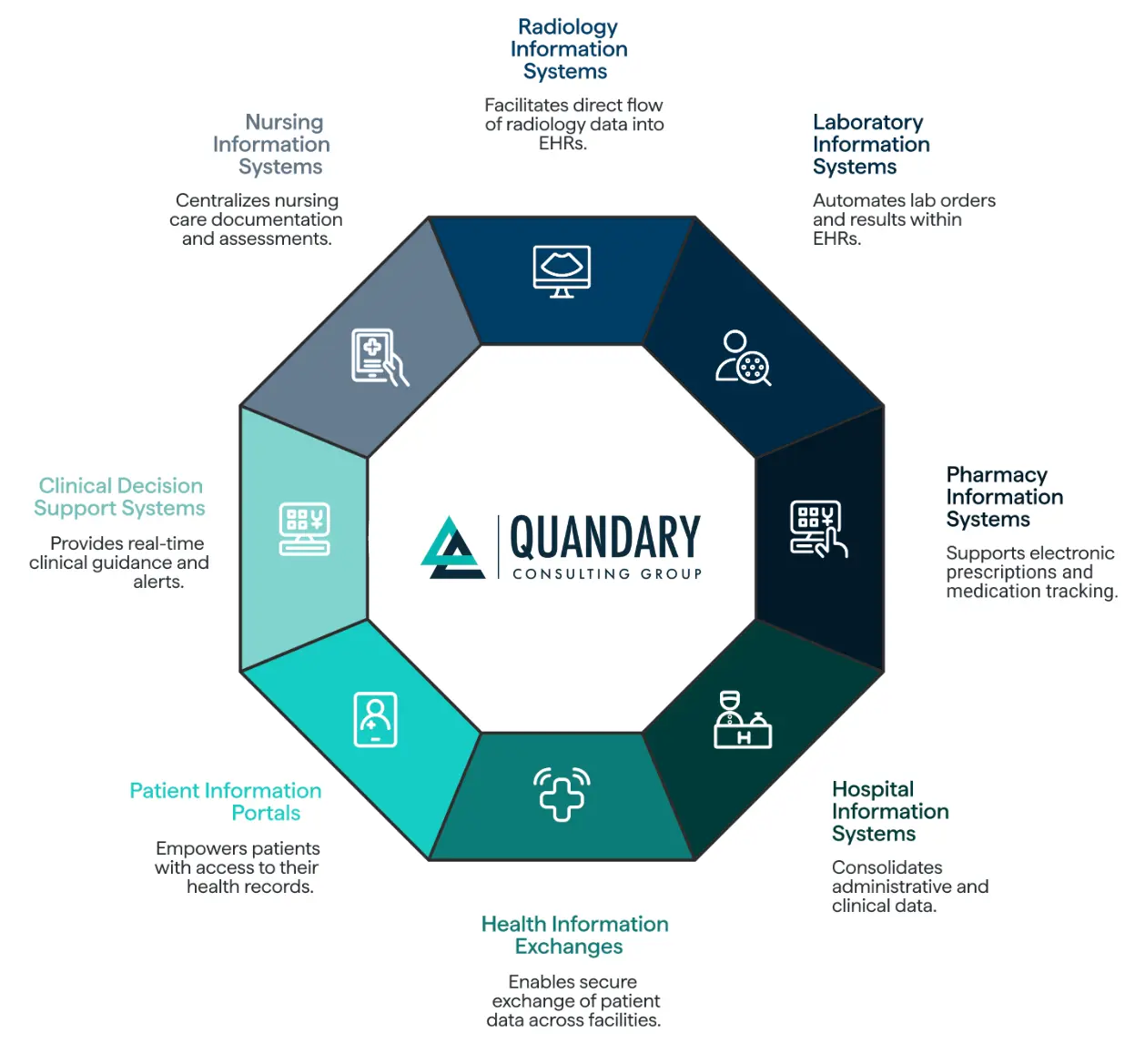
The most important systems to consider include:
- Radiology Information Systems: A radiology information system manages imaging orders, scheduling, examination status, reports, and related radiology workflows. Integrating it with the EHR allows imaging orders and results to move more efficiently between radiology teams and care providers. This helps clinicians access relevant findings without searching across disconnected systems.
- Laboratory Information Systems: A laboratory information system manages lab orders, specimens, testing workflows, and results. EHR integration can transmit orders to the laboratory and return verified results to the patient record. This reduces manual entry, improves result visibility, and supports faster clinical follow-up.
- Pharmacy Information Systems: Pharmacy information systems support electronic prescriptions, medication dispensing, inventory, formulary requirements, and medication tracking. Connecting these platforms with the EHR can give authorized clinicians a more complete medication history while supporting prescription accuracy, interaction checking, and medication reconciliation.
- Hospital Information Systems: Hospital information systems consolidate administrative and operational information such as admissions, discharges, transfers, billing, bed management, and departmental activity. Integrating these systems with the EHR helps keep clinical and administrative events aligned throughout the patient journey.
- Health Information Exchanges (HIE): A health information exchange, or HIE, enables approved patient information to move securely between participating healthcare organizations. EHR connectivity with an HIE can give authorized providers access to relevant records from hospitals, specialists, laboratories, and other facilities, improving care continuity when patients receive services across multiple organizations.
- Patient Information Portals: Patient portals give individuals secure access to portions of their health records, test results, appointment information, prescriptions, educational materials, and communications. When a portal is integrated with the EHR, updates can be shared more efficiently while patients gain a clearer and more active role in managing their care.
- Clinical Decision Support Systems: Clinical decision support systems analyze patient information and defined clinical rules to deliver alerts, reminders, guidance, or recommendations at appropriate points in the care process. EHR integration provides the timely data these tools need to support activities such as medication safety checks, preventive care reminders, and evidence-based clinical guidance. Clinical decisions should always remain subject to qualified professional review.
- Nursing Information Systems: Nursing information systems support nursing documentation, assessments, care plans, medication administration, staffing, and other bedside workflows. Connecting these systems with the EHR helps nursing information become part of the broader patient record and improves coordination among nurses, physicians, and other members of the care team.
Integrating these core healthcare systems creates a more connected information environment, but clinical interoperability is only part of the equation. Healthcare organizations must also coordinate the administrative work triggered by that information. Quickbase can provide an operational layer around the connected EHR ecosystem by creating tasks, routing cases, tracking deadlines, escalating exceptions, and presenting cross-system data through actionable dashboards.
The goal is not to move every piece of information into every platform. Effective EHR integration establishes a clear source of truth for each data element and transfers only the information required for an authorized clinical or administrative purpose. This approach supports better usability, stronger data governance, and more coordinated healthcare operations.
Adding AI to Connected Healthcare Operations
Once information and workflows are connected, healthcare organizations can introduce AI in a more practical and controlled way. AI is most valuable when it has a defined role within an established process. Instead of asking an AI tool to operate independently across disconnected systems, organizations can use it to support targeted tasks inside a governed workflow.
For example, an approved AI solution such as Claude could help:
- Extract structured information from referral packets
- Summarize lengthy clinical or administrative documents
- Classify incoming requests
- Identify potentially missing documentation
- Draft case summaries for employee review
- Compare submitted information against defined requirements
- Prioritize work based on urgency or risk
- Summarize authorization or denial histories
- Prepare communications for human approval
Quickbase can provide the application, workflow state, permissions, and audit structure around these AI-supported activities. Workato or another integration platform can orchestrate the exchange between systems and invoke the approved AI service.
Human review should remain part of the process wherever outputs could affect patient care, coverage, compliance, or financial decisions. AI-generated information should be treated as assistance—not unquestioned clinical or administrative truth.
Connected data creates the foundation for AI, but governance determines whether that AI can be used responsibly.
Security, HIPAA, and Shared Responsibility
Connecting administrative operations with EHR data requires careful attention to protected health information, access controls, data minimization, auditability, and vendor agreements.
Quickbase states that its annual SOC 2 Type II examination includes an independent attestation addressing applicable HIPAA Security Rule safeguards. It also states that eligible customers that upload or process protected health information may enter into a Business Associate Agreement.
However, Quickbase operates under a shared-responsibility model: the platform provider protects the underlying environment, while customers remain responsible for designing, configuring, and maintaining compliant applications and workflows. Quickbase compliance information
Healthcare organizations should evaluate:
- Whether protected health information needs to enter the application
- Which fields are required for the operational purpose
- Which users and roles may access each category of information
- Whether a Business Associate Agreement is required
- How information will be encrypted and transmitted
- How user activity and workflow changes will be logged
- How long records should be retained
- How users will be provisioned and deactivated
- Whether integrations introduce additional vendors or sub-processors
- How incidents, exceptions, and unauthorized access will be addressed
Quickbase provides capabilities such as user roles, permissions, administrative controls, single sign-on, two-step authentication, and IP filtering.
Still, compliant technology does not automatically produce a compliant application. The configuration, integration architecture, operating procedures, and user behavior must all be evaluated together.
What a Successful Implementation Requires
Connecting Quickbase with an EHR is not simply a technical integration project. It is an operational transformation initiative. The strongest implementations begin with the workflow rather than the software.
Healthcare organizations should first identify:
- Where work enters the process
- Which employees and departments participate
- What information each person needs
- Which system is authoritative for each data element
- Where delays and rework occur
- Which decisions can be automated
- Which exceptions require human review
- What should be written back to the EHR
- Which metrics define a successful outcome
From there, the organization can design an integration architecture that limits unnecessary duplication and maintains clear system ownership.
The EHR might remain authoritative for patient identity, encounters, orders, diagnoses, and clinical documentation. Quickbase might become authoritative for administrative task ownership, workflow status, escalations, operational notes, and performance reporting. A payer system might remain authoritative for coverage decisions. An HR or credentialing platform might own provider employment and licensing data.
Defining those boundaries early helps prevent competing records and inconsistent information.
A More Connected Healthcare Operating Model
Healthcare organizations do not always need another large system replacement. In many cases, they need a better way to connect the systems they already have and coordinate the work that happens between them.
Quickbase can help close the operational gaps surrounding the EHR by turning approved clinical and administrative data into structured workflows, accountable tasks, automated escalations, and actionable reporting.
The EHR remains the clinical foundation. Quickbase becomes the operational layer that helps people act on the information it contains. When thoughtfully designed, this approach can help healthcare organizations reduce manual data entry, improve patient access, increase administrative visibility, strengthen process consistency, and create a more dependable foundation for automation and AI.
How Quandary Helps Connect Healthcare Operations
Quandary Consulting Group helps healthcare organizations connect systems, data, workflows, and people through Quickbase application development, enterprise integration, intelligent automation, and responsible AI enablement.
As a Quickbase Elite Partner, Workato Gold Partner, and Anthropic Claude Certified Partner, Quandary can design the complete operating model around a healthcare workflow—from process assessment and application architecture to EHR integration, automation, AI assistance, governance, and long-term optimization.
Our goal is not to introduce technology for its own sake. We help healthcare organizations create connected operational environments where information moves securely, employees understand what needs to happen next, and leaders gain the visibility required to improve performance.
By connecting EHR data with the administrative work surrounding patient care, healthcare organizations can move beyond fragmented tools and manual coordination toward a more intelligent, scalable, and responsive operation.
Additional Resources:
- 2024 CMS Interoperability and Prior Authorization Final Rule
(CMS-0057-F) - Quickbase Compliance Standards 2026
- Summary of the HIPAA Security Rule
- What SOC 2 Type II Certification Means (American Bae Association)
- Electronic Health Records (CMS)
- HIPAA for Professionals
- Interoperability: What Is It, How Can We Make It Work for Clinicians, and How Should We Measure It in the Future? (NIH)
- What Is Health Information Exchange? (ONC)
Frequently Asked Questions About Connecting Quickbase With EHR Data
What is Quickbase EHR integration?
Quickbase EHR integration connects approved data from an electronic health record system with configurable administrative workflows in Quickbase. The EHR remains the clinical system of record, while Quickbase coordinates tasks, approvals, notifications, escalations, and operational reporting around processes such as referrals, prior authorizations, scheduling, credentialing, and denial management.
Can Quickbase integrate with an EHR system?
Yes. Quickbase can integrate with an EHR through APIs, integration platforms, HL7 or FHIR interfaces, secure file transfers, and approved database connections. The appropriate method depends on the EHR vendor, available interfaces, data sensitivity, workflow requirements, and the healthcare organization’s security architecture.
Does Quickbase replace an electronic health record?
No. Quickbase should complement—not replace—an EHR. The EHR remains responsible for clinical documentation, orders, results, diagnoses, medications, and patient records. Quickbase provides an operational coordination layer for administrative processes that cross departments, locations, and systems or require more configurable workflows.
What healthcare workflows can Quickbase automate?
Quickbase can automate referral management, prior authorization, patient intake, scheduling readiness, provider credentialing, care coordination, denial management, document collection, compliance monitoring, and operational reporting. It can assign work, apply business rules, send reminders, escalate delays, and display real-time workflow status.
How does Quickbase improve referral management?
Quickbase can create a centralized referral workflow that tracks each case from intake through documentation review, insurance verification, clinical review, authorization, scheduling, and completion. Automated reminders identify missing documents, while dashboards reveal referral volume, aging, conversion rates, bottlenecks, and delays by department or location.
How can Quickbase streamline prior authorization?
Quickbase can create a prior authorization case when a qualifying order, procedure, or referral enters the EHR. The platform can apply payer-specific requirements, assign tasks, track documentation, monitor responses, prioritize urgent cases, and escalate requests approaching service dates. This gives staff one operational view instead of disconnected portals and spreadsheets.
CMS now requires affected payers to meet certain prior authorization process requirements that began in 2026, with specified FHIR API requirements generally beginning in 2027.
What is the difference between an EHR and a healthcare workflow platform?
An EHR primarily manages clinical and patient-record information. A healthcare workflow platform such as Quickbase coordinates the administrative work surrounding that information. It can manage task ownership, deadlines, exceptions, approvals, escalations, and cross-department reporting without duplicating the EHR’s core clinical capabilities.
Can Quickbase use HL7 and FHIR healthcare data?
Quickbase can participate in an integration architecture that exchanges HL7 or FHIR data when those standards are supported by the EHR and integration environment. Middleware or an integration platform may receive, transform, validate, and route the healthcare data before creating or updating the appropriate Quickbase record.
Is Quickbase HIPAA compliant?
Quickbase enables eligible customers to build applications that comply with applicable HIPAA Security Rule requirements, but compliance depends on how each application and integration is designed and operated. Organizations processing protected health information may need a Business Associate Agreement and must properly configure access, data minimization, retention, auditing, and security controls.
Quickbase describes this as a shared-responsibility model: Quickbase secures the underlying platform, while customers remain responsible for their applications, configurations, and use of data.
Should protected health information be stored in Quickbase?
PHI should enter Quickbase only when it is necessary for an approved healthcare workflow. Organizations should transfer the minimum data required, restrict access by role, document system ownership, establish retention rules, audit user activity, and evaluate every connected vendor. A security, privacy, and legal review should precede implementation.
What healthcare data should be transferred from an EHR to Quickbase?
Only the minimum data needed to complete the administrative process should be transferred. Depending on the workflow, that could include a patient or case identifier, referral status, appointment information, payer details, order type, responsible department, and relevant deadlines. Unnecessary clinical information should remain in the EHR.
How does Quickbase create real-time healthcare operational visibility?
Quickbase dashboards can show new cases, open work, aging by workflow stage, missing documentation, upcoming deadlines, employee workload, authorization outcomes, referral conversion, scheduling risks, and denial exposure. This allows leaders to address operational problems before they cause patient-access delays, missed deadlines, or lost revenue.
Can Quickbase support AI in healthcare operations?
Yes. Within a governed workflow, approved AI tools can help extract information from documents, classify requests, summarize case histories, identify missing materials, prioritize work, and draft communications for human review. Quickbase can provide the workflow state, permissions, task structure, and audit trail surrounding those AI-assisted activities.
AI output should not be treated as unquestioned clinical, coverage, compliance, or financial truth. Human review remains essential whenever an output could materially affect a patient or business decision.
How long does a Quickbase EHR integration take?
Implementation time depends on the workflow, EHR access, interface availability, data complexity, security review, and number of connected systems. A narrowly defined workflow can usually be delivered faster than an enterprise-wide program. Starting with one high-value process also makes it easier to validate security, adoption, and measurable results before expansion.
What is required for a successful Quickbase healthcare implementation?
A successful implementation requires clearly defined workflows, system ownership, data requirements, access controls, integration rules, exception handling, performance metrics, and governance. Healthcare organizations should determine which system owns each data element, what Quickbase will manage, what information may be written back, and where human review is required.
What are the benefits of connecting Quickbase with EHR data?
Connecting Quickbase with EHR data can reduce duplicate entry, replace spreadsheet-based tracking, improve accountability, shorten administrative turnaround times, expose bottlenecks, and strengthen operational reporting. The primary benefit is converting approved EHR information into organized, trackable work without replacing the clinical system.
What should healthcare organizations automate first?
The best starting point is a high-volume workflow with repeatable steps, visible delays, manual handoffs, and measurable outcomes. Referral management, prior authorization, scheduling readiness, and provider onboarding are common candidates because they involve multiple teams and often depend on spreadsheets, email, portals, and manual status updates.
How can Quandary help connect Quickbase with EHR data?
Quandary Consulting Group helps healthcare organizations design and implement connected operations using Quickbase application development, EHR integration, Workato automation, and governed AI assistance. Engagements can include process assessment, workflow design, integration architecture, application development, security planning, dashboards, governance, and long-term optimization.