
Knowledge Base
Articles In This Section
How to Create User Groups in QuickbaseHow to Add a New User Role in QuickbaseHow to Share your Quickbase Application with Everyone On The Internet (EOTI)How to Archive Records in Quickbase Using Role PermissionsHow to Adjust User Roles in QuickbaseHow to Display Information for Certain Roles in QuickbaseHow to Use Conditional Filters in Quickbase for Role-Based Record PermissionsHow to Add New Users to your Quickbase ApplicationHow to Modify or Deny a User's Access in QuickbaseSections
How to Switch Quickbase Developers and Admin User Roles in Quickbase
You’ll eventually work with a new client who has existing projects in Quickbase. That’s the nature of development. Regardless, you should follow best practices to transition the client from the current developer to the new one.
Sometimes, the existing developer still works with the client and can help expedite the process, removing obstacles that would negatively impact new Quickbase users. Other times, you’ll need to walk your client through the process of finding the relevant items to ensure you can continue your work with minimal delays.
Understanding Quickbase Architecture and Logic
You need to understand the architecture and logic of the process before making any changes to a new client’s existing Quickbase applications.
When a client retires a developer, you’ll need to transfer ownership of crucial elements to prevent delays and code issues that could render the application unusable. These include:
- Pipelines
- Webhooks
- Notifications
- User Tokens
- Code Pages
- Table Syncs
Once you address these transfers, you can focus on "nice-to-have" elements. These items will provide insight into the client's development status and highlight existing issues:
- Technical Documentation
- User Guides
- Defect Lists
- Manual Processes
- Recent and Upcoming Changes
- Key Stakeholders
- Knowledge Transfers
You’ll ensure a smooth transition for the Quickbase application to the new developer by addressing these aspects of the project. This knowledge-base article will walk you through that process.
How to Get Started with the Quickbase Client Transfer?
The transition process consists of multiple levels of transferring. The client can provide three levels of access and three additional access levels to be aware of. You’ll need to consider these elements during the transfer process.
The six levels of access are:
- Realm Access
- Account Level Access
- Application Level Access
- Table Level Access
- Record Level Access
- Field Level Access
Depending on the client's needs, they can grant the consultant access at the realm, account, or application level. Ideally, the only access needed is the full account level access.
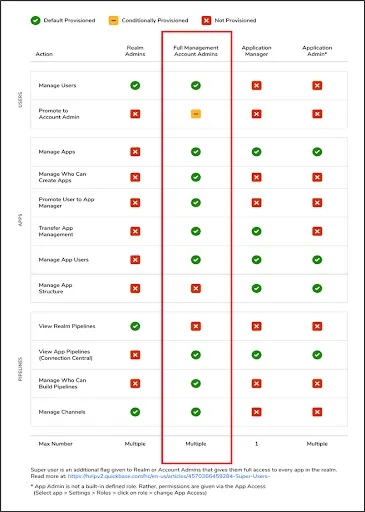
1. Quickbase Realm-Level Access
This is the highest level of access control in Quickbase. Realm-level access controls apply to the entire Quickbase realm (i.e., the entire account).
Users with realm-level access can manage account-wide settings, users, roles, and permissions. They can create, delete, and manage applications within the realm.
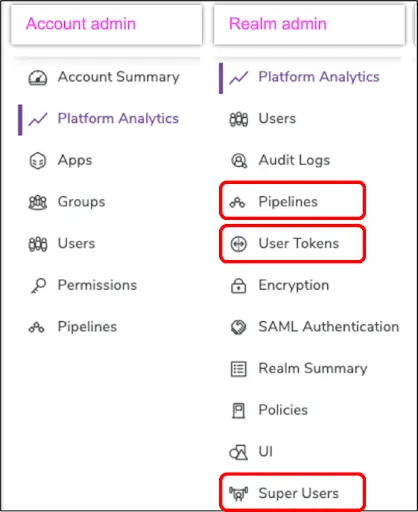
Typically, the client will not need to provide Realm Access to the consultant. However, access can provide useful insight into the transfer items over to the user like reviewing Quickbase pipelines and web hooks.
2. Quickbase Account-Level Access
Technically this is not a separate level of access. Still, specific users with administrative roles may manage account-wide settings and privileges. Account administrators can manage billing, subscription plans, and other account-related settings.
Note: Consultants do not necessarily need access to billing and subscription for development.
3. Quickbase Application-Level Access
Within Quickbase, applications serve as containers for organizing and managing data.
Clients may grant users access to specific applications based on their roles and permissions.
Application-level access controls include the ability to create, modify, and delete records within the application.
4. Quickbase Table-Level Access
In Quickbase, applications are composed of tables that hold specific types of data.
Access to individual tables within an application can be controlled separately, and users may have various levels of access to different tables within the same application.
5. Quickbase Record-Level Access
Quickbase allows for fine-grained control over who can view, edit, or delete individual records within a table.
You can base record-level access on criteria such as field values or user roles. Users may have various levels of access to different records within the same table.
6. Quickbase Field-Level Acces
Quickbase also supports access control to specific fields within a table. You can restrict users from viewing or editing certain fields based on their roles or permissions.
Field-level access control helps enforce data privacy and security policies.
How to do Quickbase App Transfer Process?
You can find the app transfer under the app settings → app properties and under the manager's name.
The user can choose to transfer the application to the person who needs control. The intended user will receive a notification and control over the new application once this is done.
With access granted at the application level, the user can transfer the needed pieces (including web hooks, pipelines, emails, and table syncs.)
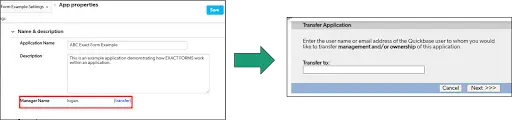
Note: These items will continue to work until you remove the owner from the application.
Understanding the Quickbase Pipelines Transfer Process
Pipeline ownership happens at the administrative level. You must grant users permission to access pipelines.
- Previous users should refresh the schema and Fix any issues that occur.
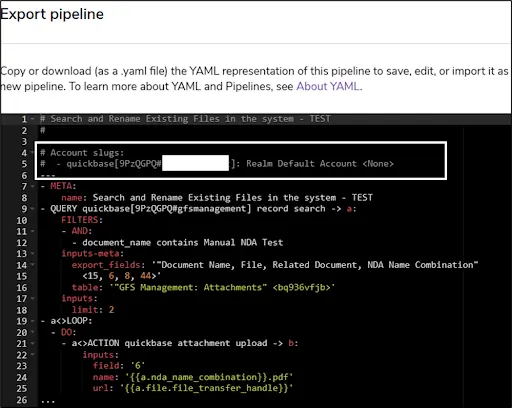
- Export the pipeline as a YAML.
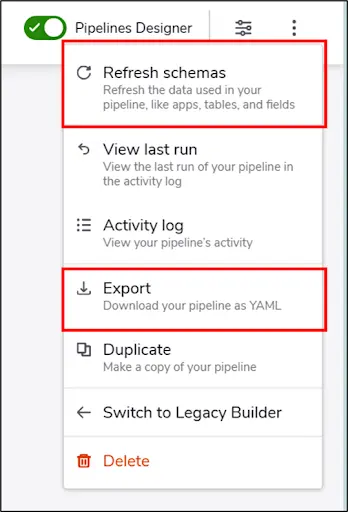
- The new user should create a new pipeline to capture the account slug
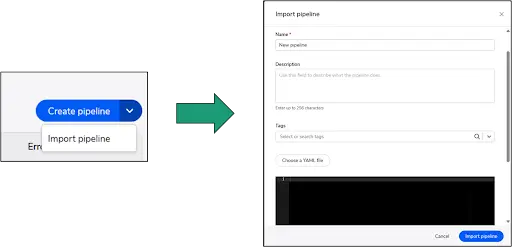
- Importing the Pipeline consists of selecting the Import pipeline on the Pipeline’s screen and then uploading a YAML File.
- If any issues exist in the uploaded YAML File, the import will not work.
- If a correct YAML has been downloaded from Quickbase and then re-uploaded, this tool will correctly identify the existing name and tags associated with the pipeline so one does not need to rename it.
- Once completed, you should run the process of turning off and turning on the new pipeline in a meeting in case any issues arise.

Note: Pipelines are user-based, so Realm access may be necessary to view all pipelines
Documentation of pipelines is helpful for coordinating transition efforts. Additionally, it can serve as a general guide to anyone using the application.
Utilizing another table for storing the pipelines YAML and providing details that describe the process flow is useful for maintaining pipelines because it creates a backup in case there are issues with Quickbase and creates version control.
- This does not currently doesn’t exist inside the Quickbase Pipeline page.
Some pipelines may need to call a webhook or another application. To do so, the user would need to update the alias/user token and have sufficient permission control to run the pipeline.
Understanding the Quickbase Webhooks Transfer Process
Webhooks are like pipelines in the sense that they need to have an updated alias or user token to work.
Once the new token is in place, then ownership and has been updated in the webhook code or the pipeline callable webhook code, then it has been transferred to the new user.
Connected Tables/Sync in Quickbase
You may transfer tables connected to another application.
This is under → “Settings” → “Quickbase Connection”→ “Use Different Connection”.
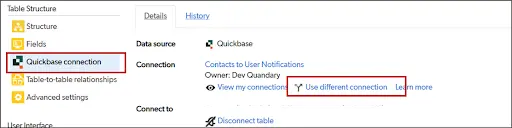
It will show the existing table owner and require the new user to have a table connection in place before connecting to their ownership.
This is set up in “My Preferences” and under → “My Connections” to see if a connection exists.
Next, it is advisable to refresh the table to see if any issues exist when using the new connection.

Key Items to Consider when Transitioning Quickbase Access
1. Quickbase Technical Documentation
If technical documentation exists or you can request it, then it would be helpful to have. This technical documentation can be from a user's viewpoint and/or administrative level.
At the administrative level, the details should include:
- Pipelines
- Webhooks
- Permissions
- Dashboards
- Notifications
- Access
- How the System Works
- Logical Processes
- Descriptions of Tables
- Use Cases
- Important Formula Queries (if they exist)
At the user level, it could include:
- How to navigate the system
- What process to follow and who to contact if issues arise
2. Quickbase Notification Access
You can transfer notifications via the notification setting at the bottom of the screen. This will change ownership. That is all that is required.
3. Quickbase User Guides
This falls under technical documentation, but you should request and review any user guides that exist before the transition process.
4. Quickbase Defect List
A defect list can consist of outstanding items or issues at the time of transition. These items can be considered bugs (or bugs that result from incorrectly using a process).
5. Quickbase Manual Processes
Any existing manual processes used by the user or business process should be documented as part of the documentation.
6. Upcoming/Future Expected Changes in Your Quickbase App
You should document any future development changes or expected app development that is needed or to be developed by the new user.
7. Explanation of Quickbase Processes/Knowledge Transfers
Asking the existing team for knowledge transfers is incredibly useful. These should be recorded with notes taken at the meetings. You should request additional meetings, as necessary.
8. Quickbase Reverse Knowledge Transfers:
Once the general knowledge transfer is complete, the new users should recite the new information back to the original owners to make sure the information transfer was successful and no clarifying questions remain.
9. Your Key Quickbase Stakeholders and Points of Contact
You should document stakeholders and points of contact (most notably super users and billing account managers). Should the user need additional needs for Quickbase, these users could provide access.
Transitioning Quickbase Access to New Developers
Switching a client to a new Quickbase developer can improve scalability, security, support quality, and long-term operational efficiency when handled correctly. A successful transition depends on clear documentation, proper access management, careful system reviews, and strong communication between stakeholders.
Whether your organization is upgrading Quickbase capabilities, restructuring internal teams, or moving to a new consulting partner, a strategic developer transition helps ensure continuity, stability, and future growth.
- Author: Logan Lott
- Title: Solution Consultant | Quickbase
- Email: llott@quandarycg.com
- Date Updated: May 24, 2026
Top FAQs About How to Switch a Client to a New Developer in Quickbase
1. How Do You Switch a Client to a New Developer in Quickbase?
Switching a client to a new Quickbase developer typically involves:
- Transferring app administration access
- Updating user permissions
- Reviewing pipelines and integrations
- Sharing documentation
- Migrating ownership of connected services
- Conducting knowledge transfer sessions
The process ensures the new developer can fully manage the Quickbase environment without disrupting business operations.
2. Why Would a Company Change Quickbase Developers?
Organizations may switch Quickbase developers for several reasons, including:
- Business growth
- Need for advanced expertise
- Faster support requirements
- Workflow optimization
- Cost reduction
- Developer availability
- Strategic consulting needs
Many businesses transition developers when moving from basic app management to enterprise-level automation and integrations.
3. What Access Does a New Quickbase Developer Need?
A new developer typically needs access to:
- Quickbase applications
- App administration settings
- Pipelines
- Connected integrations
- APIs
- User roles and permissions
- Documentation
- Sandbox environments
In some cases, access to third-party systems may also be required:
- Salesforce
- NetSuite
- SharePoint
- Azure
- Google Workspace
Best practice: Grant access gradually and follow least-privilege security principles.
4. How Do You Transfer Ownership of a Quickbase App?
To transfer ownership:
- Add the new developer as an admin
- Verify permissions and access
- Reassign app ownership if necessary
- Review connected pipelines and automations
- Remove former developer access when transition is complete
Quickbase administrators can update ownership and app management settings inside application administration controls.
5. What Should Be Reviewed Before Transitioning to a New Developer?
Before switching developers, organizations should review:
- Existing automations
- Pipelines
- APIs
- Security settings
- User roles
- Custom code
- Integrations
- Technical documentation
- Governance policies
A full system audit helps prevent disruptions and uncovers hidden dependencies.
6. Can a New Developer Modify Existing Quickbase Applications?
Yes. Once assigned appropriate permissions, a new developer can:
- Update tables
- Modify forms
- Build automations
- Adjust permissions
- Create reports
- Enhance workflows
- Optimize integrations
However, changes should be tested carefully to avoid breaking existing functionality.
Best practice: Use sandbox environments before deploying major updates.
7. What Are Common Challenges When Switching Quickbase Developers?
Common transition challenges include:
- Missing documentation
- Unclear business logic
- Broken integrations
- Legacy workflows
- Security gaps
- Hardcoded automations
- Lack of governance standards
Organizations often experience smoother transitions when documentation and app architecture are well maintained.
8. How Long Does It Take to Transition to a New Quickbase Developer?
The timeline depends on:
- Application complexity
- Number of integrations
- Workflow sophistication
- Documentation quality
- Number of apps involved
Typical transitions range from:
- A few days for small apps
- Several weeks for enterprise Quickbase ecosystems
Larger organizations often perform phased transitions to minimize operational risk.
9. Should You Remove the Previous Developer’s Access Immediately?
Usually, no. Most organizations maintain temporary overlap during transition periods to:
- Resolve questions
- Validate workflows
- Confirm integrations
- Avoid downtime
Once the new developer fully assumes responsibility:
- Remove admin rights
- Rotate API credentials if needed
- Audit security permissions
This improves security and governance.
10. What Are Best Practices for a Smooth Quickbase Developer Transition?
Our recommended best practices that we extend to our clients are the following:
- Conduct a full app audit
- Document workflows and automations
- Review integrations carefully
- Use sandbox testing
- Schedule knowledge transfer meetings
- Maintain temporary overlap
- Audit security settings
- Establish governance standards
- Create long-term support documentation
Organizations using Quickbase for mission-critical operations benefit significantly from structured transition planning.


Industries
Resources


© 2026 Quandary Consulting Group. All Rights Reserved.
Privacy Policy