
Knowledge Base
Articles In This Section
How to Change a Table Key in Quickbase and When to Use It How to Import Data into QuickbaseHow to do a Table-to-Table Import in QuickbaseHow to Create Tables, Fields, and Records in QuickbaseSections
Quickbase Knowledge Center
Getting Started in QuickbaseFields & Formulas Reporting & DashboardsNotifications & Subscriptions Roles & PermissionsTablesFormsQuickbase PipelinesQuickbase APIMaintenance & Monitoring
WorkatoOutside of the Quickbase BoxQuickbase NewsPipefy NewsWorkato NewsAI Knowledge CenterPipefy Knowledge CenterHow to Set Up Reverse Relationship in Quickbase
November 26, 2022
Occasionally, you might want to see specific child data reflected in the parent (not a summary).
For example, in a system where “Work Orders” is the child of both “Vendors” and “Locations”, you might want to show details from the most recent “Work Order” in the Location.
In this situation, you may want to add the following:
- Which “Vendor” serviced this particular Location last?
- What are the notes from the last “Work Order”?
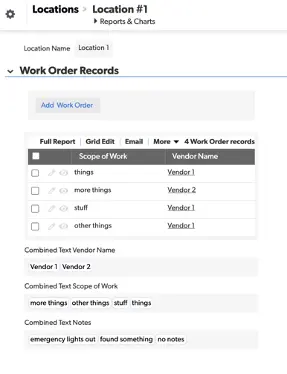
“Summary Combined Text” fields aren’t a big help in this case. We cannot tell which “Vendor” was on the last “Work Order” or which “Note” is most recent.
- A reverse relationship is the answer and here’s how to do it:
How to Set Up Reverse Quickbase Relationships
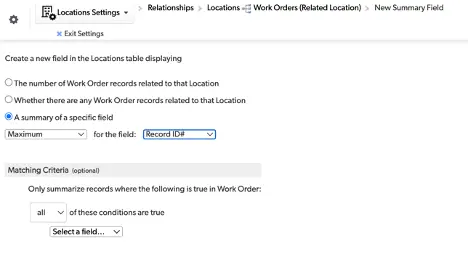
- Create a summary field in “Locations” that gives the maximum related “Work Order”.
- This will be named “Maximum WO Record ID#” by default.
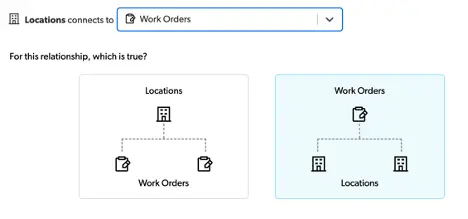
- Create a reverse relationship where "Work Order" is the parent of Locations
- Make sure to use the “Maximum WO Record ID#” we just created.
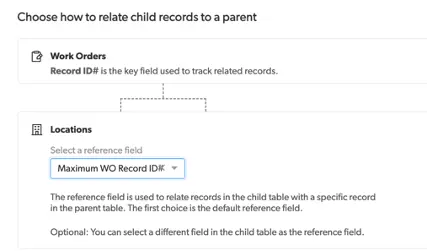
- In this walkthrough, we used the original relationship, ”Location” with many “Work Orders”, to get a summary. In this case, it was a maximum of the related “Work Orders”.
- Each “Location” will have a different value for this. the maximum Record ID# for that “Location”.
- Afterward, we created another relationship where the “Work Order” is the “Parent of Locations”.
- Now, you can pull data from the most recent “Work Order” into the Location as Lookup fields:
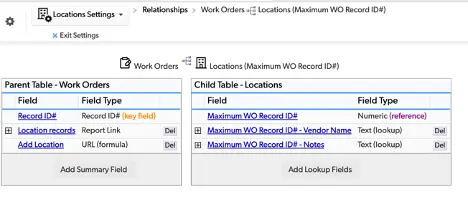
- Plus, you can easily see from a list of “Locations” which “Vendor” serviced the “Location” last and what the “Notes” were.

- In addition, you may wish to filter out certain Work Orders from the [Maximum WO Record ID#] field
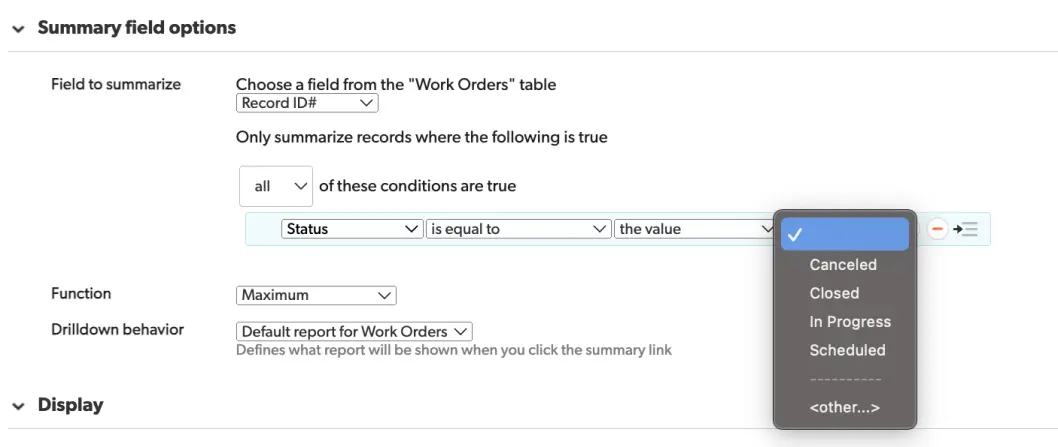
- A canceled, recently scheduled, or currently in progress “Work Order” may not be relevant at this time.
To learn more about Quickbase and tips for Quickbase Development, visit our Knowledge Base
- Author: Tom Shannon
- Email: tshannon@quandarycg.com
- Date Submitted: 11/24/2022


Resources


© 2026 Quandary Consulting Group. All Rights Reserved.
Privacy Policy