
Knowledge Base
Articles In This Section
How to Change Your Primary Key from Record ID# in QuickbaseHow to do a Table-to-Table Import in QuickbaseHow to Create Tables, Fields, and Records in Quickbase How to Set Up Reverse Relationship in QuickbaseSections
How to Import Data into Quickbase
You’ve just created an amazing application, and now all of your table data is sitting somewhere outside of Quick Base. You just can’t wait to click + New Record a couple hundred times and tediously enter similar field information over and over…I’m guessing this second part isn’t you. Fortunately, Quick Base offers an Import feature that allows for mass creation and updating of fields and records to save you time and get your application loaded with data and ready for your users.
Use Cases for Importing Data
Import functionality can save you time and headache in a variety of ways: ✓ Bulk upload of new records. ✓ Bulk update of existing records. ✓ Bulk field creation. What? ✓ Multiple ways to import data.
Navigating to the Import/Export page
Before we can do anything, we need to get to the correct page and explore the available options.
- From any table home page (though you’ll save a step by being on the table you’d like to import to), navigate to the right side of the table bar, click More ▾ and select Import/Export from the dropdown list.
- The Import/Export/Copy page provides six options. This article will focus on importing into a table using a file or the clipboard.

Importing new data from a File (or the Clipboard)
EDITORS NOTE: This example will demonstrate using a file (TSV, CSV or XLS) to import data. If you choose to paste from your clipboard, the only difference will be a text area rather than a file selection. Please note that your pasted data will need to be tab or comma delimited.
- Select the “Import into a table from a file” action to expand your import options.
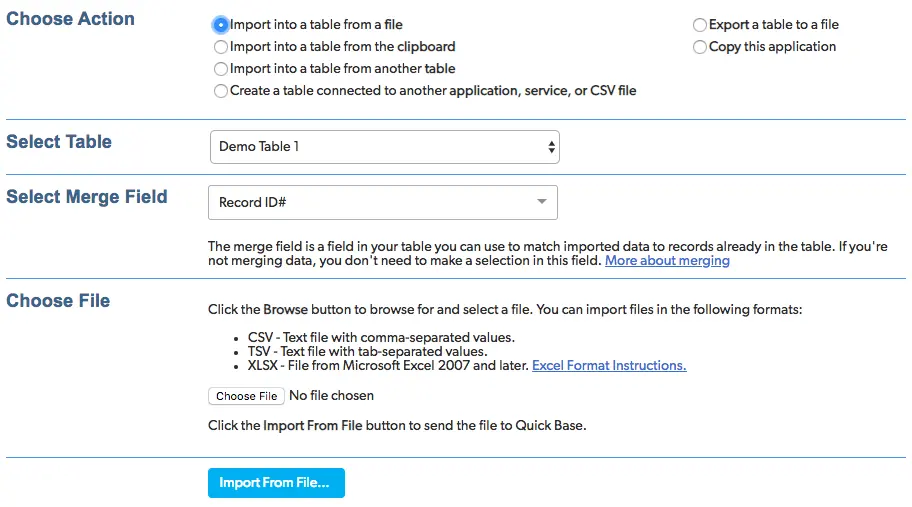
- Select the Table you would like to import into. This will default to the table you were previously on.
- Select the Merge Field. This is used to update existing records and will be either Record ID# or another field with a unique value.
- To upload your data, click Choose File to load your data, then click Import From File… to continue.
- Now it’s time to finalize your import. To make things easy on myself, I typically include Field Names at the top of each column. This lets Quick Base intuitively determine how your data will be mapped. You can always change these using the dropdown options.
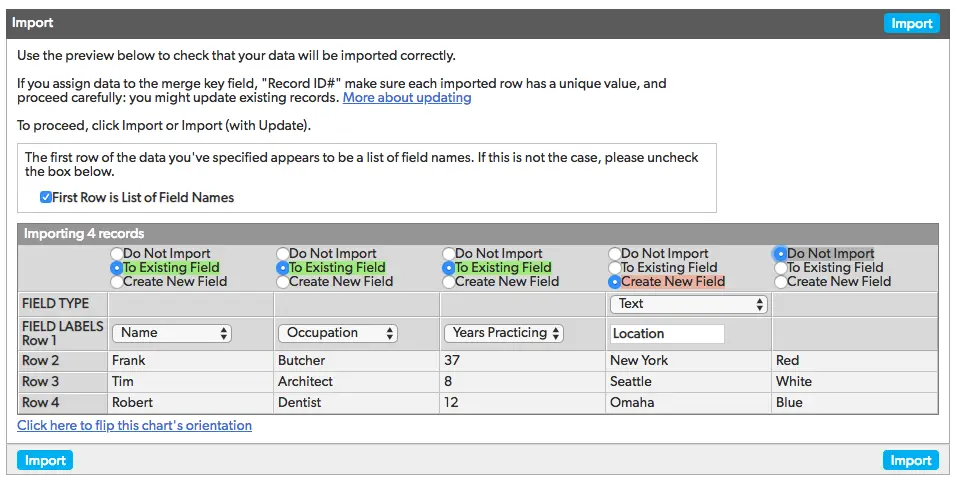
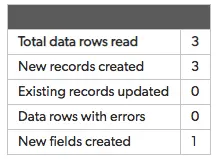
- Once you’ve finalized your options, click Import. A small table will appear on the next window with the output of everything that just occurred. In our case, we’ve created three new records and one new field.
Updating data from a File (or the Clipboard)
This scenario is almost identical to importing new records, but with one caveat…you’ll need to have the key field value of all records that you wish to update. I’ve found it easiest to export a table report that is ordered identically to the data you wish to update and includes the key field of each record.
- After adding the appropriate key field values to the data you wish to update and importing the file, you will be taken to the same finalization page.
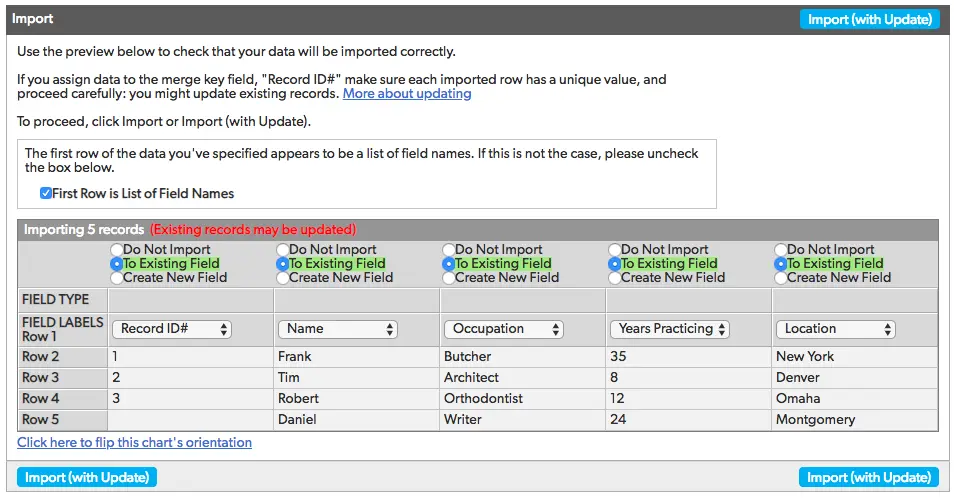
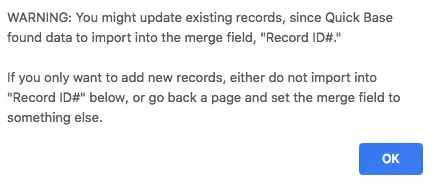
- In the image above, we’re updating the records that we previously imported and also adding a fourth record. You may choose to assign it a Record ID# but use caution as you may overwrite another record. We’ll leave it blank. A message will appear letting you know that your import may be updating existing records (which is exactly what we want to do).
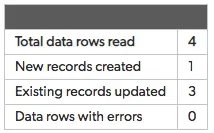
- Click Import (with Update) to upload your records to Quick Base. On the next screen you’ll see that we’ve created one new record and updated our three existing records from the previous import.
Using Import to create fields.
Using the standard + New Fields option, you can add up to twelve fields at a time. This sounds great until you’ve got a table that requires 400 fields…thankfully we can just import them! We’re going to assume you’ve read the above examples and jump straight to the point.
- Create a file with a single line of all the fields you want to create, then import it.
- In the finalization screen, select Create New Field for every column. Field Labels populate automatically from your file, but you can still change them if you’d like.
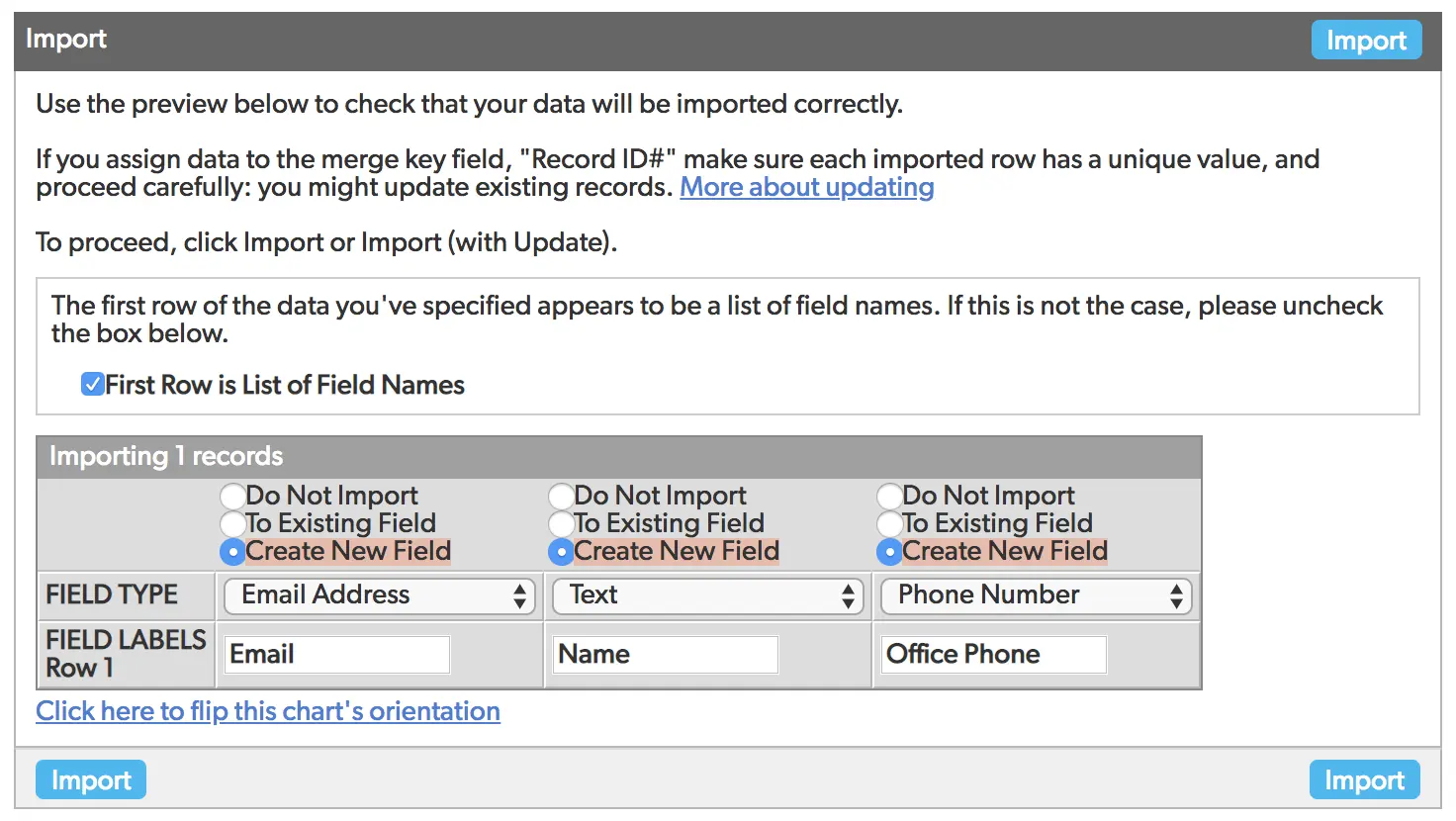
- Click Import and bask in the glory of Quick Base efficiency!
Now that you’ve learned how to import data into Quick Base via a file or your clipboard, check out how to load data using a Table-to-Table import.
- Author: Kevin Shuler
- Email: kevin@quandarycg.com
- Date Submitted: 2/27/2019


Industries
Resources


© 2026 Quandary Consulting Group. All Rights Reserved.
Privacy Policy