
Knowledge Base
Articles In This Section
Understanding Tables, Fields, and Relationships in Quickbase How to Add a File Download Button in Quickbase Understanding Conditional Drop Downs in QuickbaseUsing Combined Text Summary Field in Quickbase | INTERMEDIATEUsing a Formula-URL Field in Quickbase - INTERMEDIATEUsing Report Formulas as a Filter in a Report in QuickbaseSections
How to Use Application Variables (Global Params) in Quickbase
What are Application Variables?
Application Variables are simply a piece of information that is available anywhere in your application. Application variables can be used in two places: Quick Base formulas and when using XML to make API calls.
Why should I use Application Variables?
A great use case for Application Variables would be sharing a deadline date across your application that may need to be referenced by any record at any time. By using an Application Variable, you can enter this date in once place and allow for it to be used anywhere in your app. If the date needs to be changed, you can update from one place and your changes will propagate across the app.
How do I create an Application Variable?
- From your app’s homepage, navigate to Settings > Variables and click New Variable. A popup will appear prompting you to enter your new variable’s Name and Value.
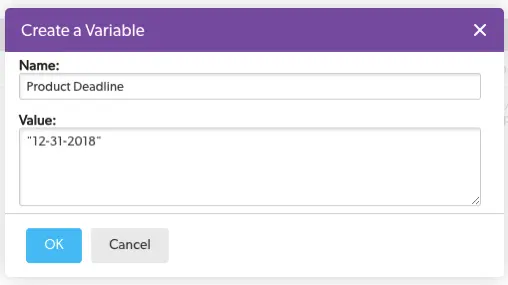
- The Name value will be what you use to reference the variable elsewhere in your application. The syntax would be Product Deadline] and its value would be “12-31-2018”. Be default, an Application Variable’s value is treated as Text within a formula unless you convert it to another data type using functions.
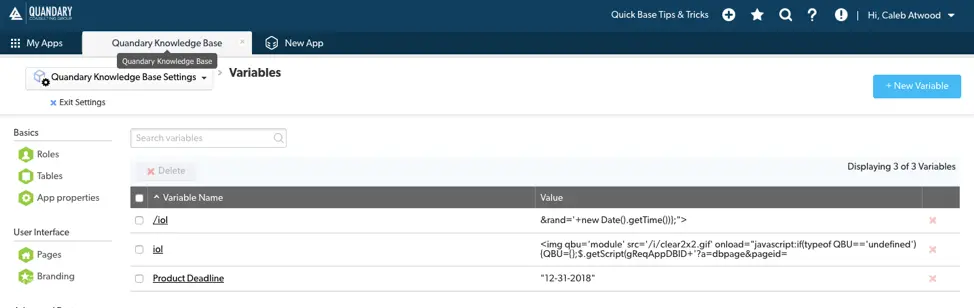
- Once you are happy with your variable’s Name and *Value, click OK to save your new Application Variable. Upon doing so, you will be directed back to your Variables home page where you will see your new variable along with any others that had been created previously.
Deleting an Application Variable
There are two ways to delete an Application Variable:
✓ Click on the red “X” to the very right of its table row.
✓ Select the checkbox to the very left of the table row and click Delete. This is also the method for deleting multiple variables at once.
Referencing an Application Variable
- To reference an Application Variable in a formula, use the same bracket notation you would any standard Quick Base field.
[Product Deadline]
- Application Variables are always text. You must convert them within your formula if you wish to change their data type.
ToDate([Product Deadline])
To get a better understanding of Formulas and how to use them, Using the CASE function is a great place to get started creating conditions using your new Application Variable!
- Author: QCG Development Team
- Email: dev@quandarycg.com
- Date Submitted: 1/2/2019


Resources


© 2026 Quandary Consulting Group. All Rights Reserved.
Privacy Policy