
Knowledge Base
Articles In This Section
How to Edit Records Using an API in QuickbaseHow to Use API_CopyMasterDetail in QuickbaseHow to use API ImportFromCSV in QuickbaseHow to use API_PurgeRecords in QuickbaseHow to Utilize API AddRecord in QuickbaseSections
How to Set Up a API_DoQuery in Quickbase
API_DoQuery is a Quickbase API function used to retrieve specific records from a table—similar to performing a filtered search or running a report within Quickbase.
At its core, API_DoQuery allows you to request a subset of table data by sending either:
- a Query ID (qid) tied to a saved report, or
- a custom query string that defines your own filters.
The API then returns only the records that match your criteria.
How Does API_DoQuery Work
API_DoQuery functions much like a Quickbase report. You can control:
- Fields: Select which columns (fields) to return
- Filters: Define conditions to narrow your dataset
- Sorting: Specify how results are ordered
This makes it a flexible tool for extracting structured data programmatically.
Key Benefits of API_DoQuery
- Efficient data retrieval from large Quickbase tables
- Customizable queries using either saved reports or dynamic filters
- Consistent with Quickbase reporting logic, making it easy to understand for existing users
When to Use API_DoQuery in Quickbase
Use API_DoQuery when you need to:
- Pull filtered Quickbase data into external systems
- Automate reporting or integrations
- Replicate Quickbase reports via API calls
Why Use API_DoQuery vs. a Regular Quickbase Report?
When working in Quickbase, you can retrieve data using either standard reports or the API_DoQuery endpoint. While reports are useful for everyday users, API_DoQuery provides significantly more flexibility, scalability, and control—especially for integrations and automation.
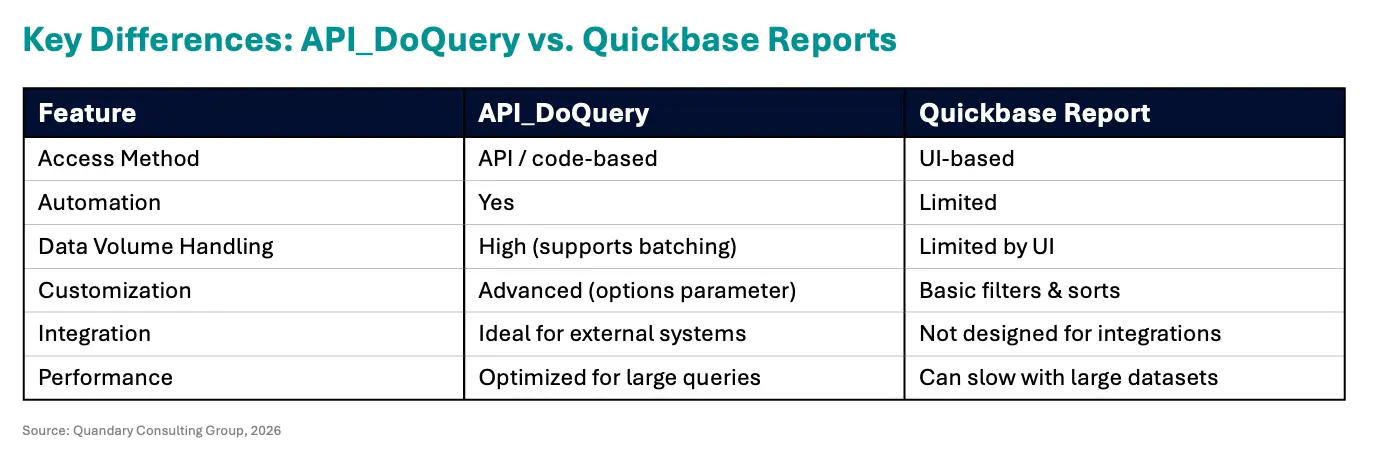
When to Use API_DoQuery in Quickbase
1. For Automation and Integrations
API_DoQuery is designed for developers and technical teams who need to connect Quickbase with other systems like CRMs, ERPs, or data warehouses. Use it when:
- Building integrations
- Syncing data between platforms
- Automating workflows
2. To Handle Large Datasets Efficiently
Unlike standard reports, API_DoQuery allows you to control how much data is returned and process it in batches
Benefits:
- Avoids timeouts
- Improves performance
- Enables scalable data processing
3. For Advanced Query Control
With API_DoQuery, you can fine-tune how data is returned using parameters like:
- Record limits
- Skipping records (pagination)
- Sorting
- Returning only updated records
This level of control is not available in standard Quickbase reports.
4. For Real-Time Data Access
API_DoQuery allows you to retrieve live data on demand, making it ideal for:
- Real-time dashboards
- External applications
- Data pipelines
5. For Custom Applications and Reporting
If you're building a custom front end, analytics layer, or middleware, API_DoQuery gives you the flexibility to shape the data exactly how you need it.
When a Quickbase Report Is Better Suited for the Job
Standard Quickbase reports are still useful and are faster to set up (and require no code), use a Quickbase Standard Report when
- Internal users viewing data
- Simple filtering and sorting
- Dashboards within Quickbase
- Non-technical users
They are faster to set up and require no coding.
For organizations across the U.S. and globally using Quickbase for operations, API_DoQuery is essential for:
- Scaling business processes
- Supporting enterprise integrations
- Enabling cloud-based automation strategies
Teams in industries like construction, healthcare, financial services, and SaaS often rely on API-based querying to manage high-volume, real-time data workflows.
Two Ways to Set Up API_DoQuery in Quickbase
API_DoQuery in Quickbase allows you to retrieve filtered records from a table using either a saved report (QID) or a custom query string. Both methods return the same data but differ in flexibility and maintenance.
1. Using a Pre-Defined QID (Saved Report)
The simplest way to use API_DoQuery is by referencing a Query ID (qid) from an existing Quickbase report.
How It Works
- Create or use an existing Quickbase report
- Identify its qid
- Pass that qid into your API request
Example: If you have a report showing records created today (e.g., qid=18), your API call would look like (see image below):

What Happens
This request returns the exact same records you would see if you ran report qid 18 directly inside Quickbase.
Why Use QIDs (Best Practice)
Using saved reports is recommended because:
- Easier to maintain and update filters
- No need to modify code for small changes
- Keeps logic centralized in Quickbase
2. Using a Manual (Custom) Query
Instead of using a saved report, you can define your own filters using the query parameter.
How It Works
- Use
query=in your API request - Build conditions using Quickbase query syntax
- Define filters directly in the API call
Example Use Case: To return records created today, you would construct a query string that filters by the Date Created field.
Key Insight
Both QID-based queries and custom queries return the same results when configured identically.
When to Use Custom Queries
- Dynamic filtering requirements
- External systems generating queries
- Advanced integrations
QID vs Custom Query: Which Should You Use?
Use QIDs when possible.
They are easier to maintain and reduce development overhead.
Use custom queries when needed for flexibility or dynamic filtering.
Additional API_DoQuery Parameters (Optimization Features)
Once you define what records to return, you can further optimize your response using additional parameters.
clist in Quickbase (Select Fields)
The clist parameter defines which fields (columns) are returned.
Example: See image below

This returns:
- Date Created
- Date Modified
- Record ID#
- Record Owner
- Last Modified By
Key Notes
- Uses field ID numbers
- If omitted → defaults to table’s default columns
Sorts by:
- Date Created
- Record Owner
Key Notes
- Uses field ID numbers
- If omitted → defaults to table’s default sort
What Are Quickbase Option Features?
Quickbase option features are advanced parameters used in API calls like API_DoQuery to control how data is returned.
They allow you to:
- Limit results
- Skip records
- Sort data
- Optimize performance
Why Quickbase Option Features Matter
Option features are essential for:
- Quickbase integrations
- Automation workflows
- Large dataset processing
- Improving API performance
How Quickbase Option Features Work
The options parameter combines multiple instructions using a period (.) separator.
Example Structure

List of Quickbase Option Features
1. Limit Records (num-n)
Returns a maximum number of records.
Best for:
- Performance optimization
- Reducing payload size
2. Skip Records (skp-n)
Skips a number of records before returning results.
Best for:
- Pagination
- Batch processing
3. Return Only New or Updated Records (onlynew)
Returns recently added or modified records only.
Best for:
- Incremental data sync
- Efficient integrations
4. Sort Ascending (sort-A)
Sorts results in ascending order.
5. Sort Descending (sort-D)
Sorts results in descending order.
How to Combine Option Features in Quickbase
You can combine multiple features in a single request:

This allows you to:
- Control dataset size
- Manage offsets
- Define sort behavior
Authentication Requirements for API_DoQuery
To use Quickbase API_DoQuery and option features, your request must be authenticated.
Supported Methods
- User Token (recommended)
- App Token
- Ticket
Without authentication, the API request will fail.
Top FAQs for Quickbase API_DoQuery
What is API_DoQuery in Quickbase?
API_DoQuery is a Quickbase API call used to retrieve filtered records from a table using either a saved report (QID) or a custom query string. It functions similarly to running a report but allows programmatic access to data.
What is a QID in Quickbase API_DoQuery?
A QID (Query ID) is the unique identifier of a saved Quickbase report. When used in API_DoQuery, it returns the same records and filters defined in that report.
What is the difference between QID and a custom query in API_DoQuery?
- QID: Uses a saved report; easier to maintain
- Custom query: Built directly in the API call; more flexible
Both return the same data if configured identically.
When should I use a QID instead of a custom query?
Use a QID when:
- You want easier maintenance
- Filters may change frequently
- Non-developers manage reports
Use custom queries for dynamic or programmatic filtering.
What does the clist parameter do in API_DoQuery?
The clist parameter defines which fields (columns) are returned in the API response using field ID numbers. If omitted, Quickbase returns default table fields.
What does the slist parameter do in API_DoQuery?
The slist parameter controls the sort order of returned records based on field IDs. If not included, the default table sort is applied.
How do I limit the number of records returned in API_DoQuery?
Use the options parameter with num-n, such as:
options=num-100
This limits the response to 100 records.
How do I paginate results in Quickbase API_DoQuery?
Use:
num-nto limit resultsskp-nto skip records
Example:
options=num-100.skp-100
This returns the second page of results.
What are Quickbase option features?
Option features are parameters in API_DoQuery that control how data is returned, including limiting, skipping, sorting, and filtering records.
How do I return only new or updated records in Quickbase?
Use the onlynew option in your API call:
options=onlynew
This returns recently added or modified records.
How do I sort records in API_DoQuery?
Use:
slistfor field-based sortingoptions=sort-A(ascending) orsort-D(descending)
What authentication is required for API_DoQuery?
You must authenticate using:
- User Token (recommended)
- App Token
- Ticket
Without authentication, the request will fail.
Why is API_DoQuery not returning expected results?
Common causes include:
- Incorrect QID or query syntax
- Missing permissions or authentication
- Incorrect field IDs in clist or slist
- Filters not matching expected data
Is API_DoQuery the same as running a Quickbase report?
Yes. API_DoQuery replicates Quickbase reports, including filters, fields, and sorting, but allows access via API for integrations and automation.
How can I optimize API_DoQuery performance?
To improve performance:
- Limit fields using clist
- Limit records using num-n
- Use QIDs instead of complex queries
- Avoid returning unnecessary data
- Author: Jeff Richey
- Title: Senior Solution Consultant | Quickbase
- Email: jrichey@quandarycg.com
- Date: 04/12/2026


Services
Industries




© 2026 Quandary Consulting Group. All Rights Reserved.
Privacy Policy