
Knowledge Base
Articles In This Section
Quickbase Login Issues: Common Causes and Troubleshooting GuideStrategies for Slow Quickbase PerformanceSections
Effective Storage & Archiving Methods for Heavy Quickbase Usage
As organizations scale their use of Quickbase, data growth accelerates rapidly, often in ways that outpace initial platform design assumptions. While increased data volume introduces real challenges around memory consumption, performance degradation, and maintainability, these challenges are both predictable and solvable.
With the right architectural patterns and governance practices in place, Quickbase can continue to operate efficiently, reliably, and at scale.
This guide introduces a practical, experience-driven framework for optimizing storage and archiving in high-usage Quickbase environments that is designed to help organizations preserve performance, control costs, and extend the long-term viability of their applications.
Understanding Heavy Quickbase Usage
First, we recommend defining what “heavy Quickbase usage” looks like in practice for you, your organization and your Quickbase application. The following list below are key common characteristics that typically indicate a high-usage Quickbase environment:
- Multi-year Quickbase implementations
- Supporting 5–15+ years of operational data.
- High-Volume Quickbase Datasets
- Comprising hundreds of thousands to millions of records.
- High-Volume Attachment
- Utilization throughout the application, including rich media and document-based files, such as:
- Images: JPG, PNG, GIF, SVG
- ideal for logos, photos, and icons used in within formula fields.
- Video & Audio: MP4, MOV, MP3
- Streamable via iframe in formula fields
- Documents: PDF, DOCX, XLSX, PPTX
- Attached to file attachment fields
- Interactive/Embedded Content: Links to YouTube, Vimeo, or third-party hosted content (via embed codes).
- Images: JPG, PNG, GIF, SVG
- Utilization throughout the application, including rich media and document-based files, such as:
- Pipelines, Automations, and Integrations
- Frequently used throughout your application.
- Critical Operational Workflows
- These workflows are directly tied to your Quickbase's application health and overall system performance.
Quickbase Ecosystem Storage Constraints
As organizations scale their Quickbase usage, storage constraints become an increasingly critical consideration. Over time, growing record volumes, large attachments, and complex data structures can impact application performance, reliability, and maintainability.
Understanding the realities of table- and application-level storage limits, the implications of high-volume attachments, and the sensitivity of reports, formulas, and automation pipelines is essential for sustaining performance and supporting long-term growth.
Some of the most common realities customers eventually face:
- Table storage limits and record growth
- App-level storage considerations
- Attachment size and volume impact
- Performance implications of large tables
- Reporting, formula, and pipeline sensitivity to data volume
Data Lifecycle Management: Differentiating Active and Historical Data in Quickbase
Data lifecycle management in Quickbase focuses on intentionally separating active data (or sometimes called, 'operational data') from historical data as records progress through their lifecycle:
- Active Data (or ‘Operational Data’): Data that is frequently accessed and actively updated to support day-to-day business processes.
- Historical Data: Data that is no longer needed for daily operations; retained primarily for reference, compliance, record-keeping mandates, audits, or analytical purposes.
Internal Quickbase Archiving Methods
Internal Quickbase archiving methods provide a structured way to manage data growth within the platform by relocating inactive or closed records out of primary operational tables. Outlined below are some common methods to archive data that you have identified and classified as 'historical data' that leverages only native Quickbase capabilities:
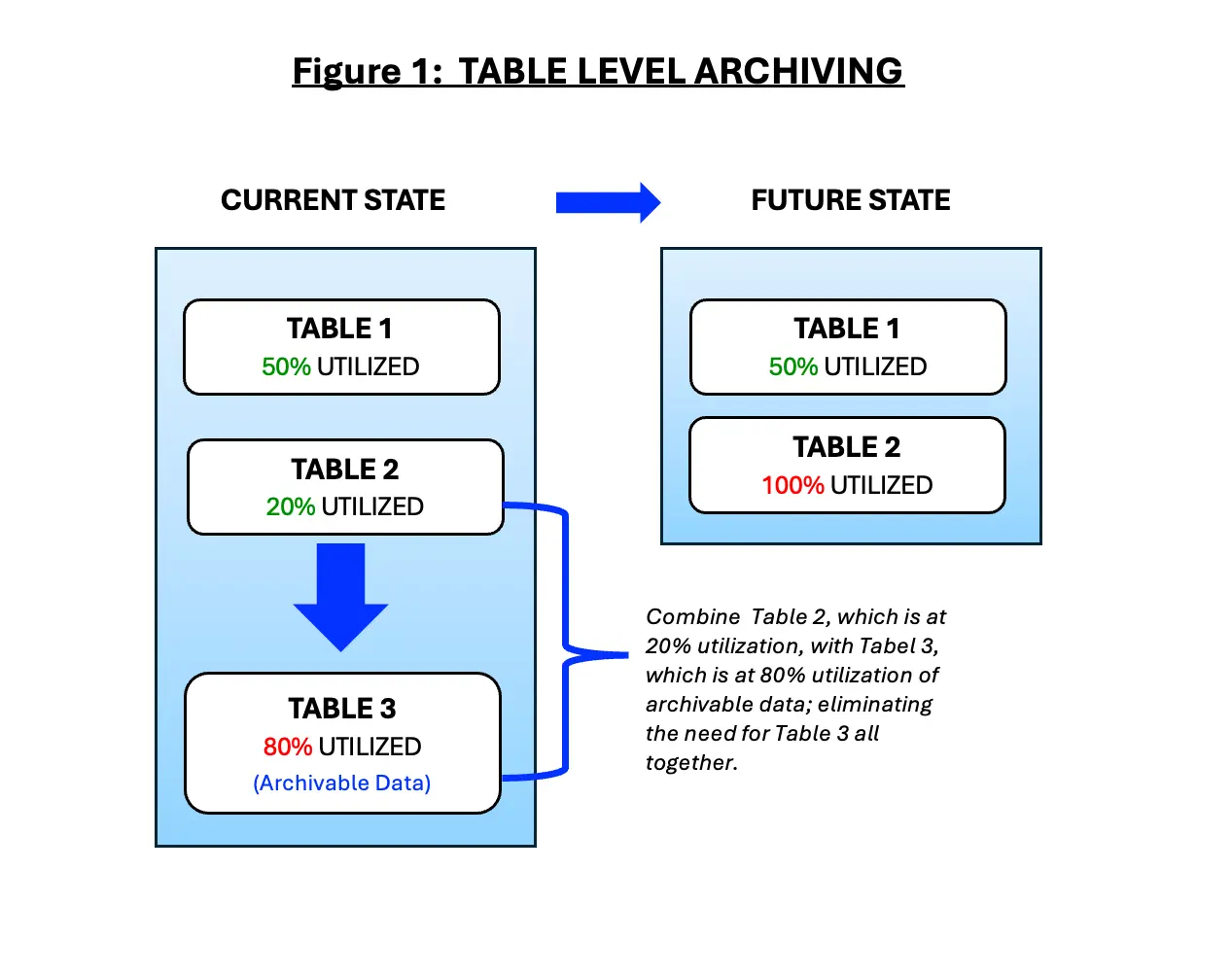
1. Table-Level Archiving (figure 1)
- Moving closed or inactive records to archive tables
- Best for moderate growth scenarios
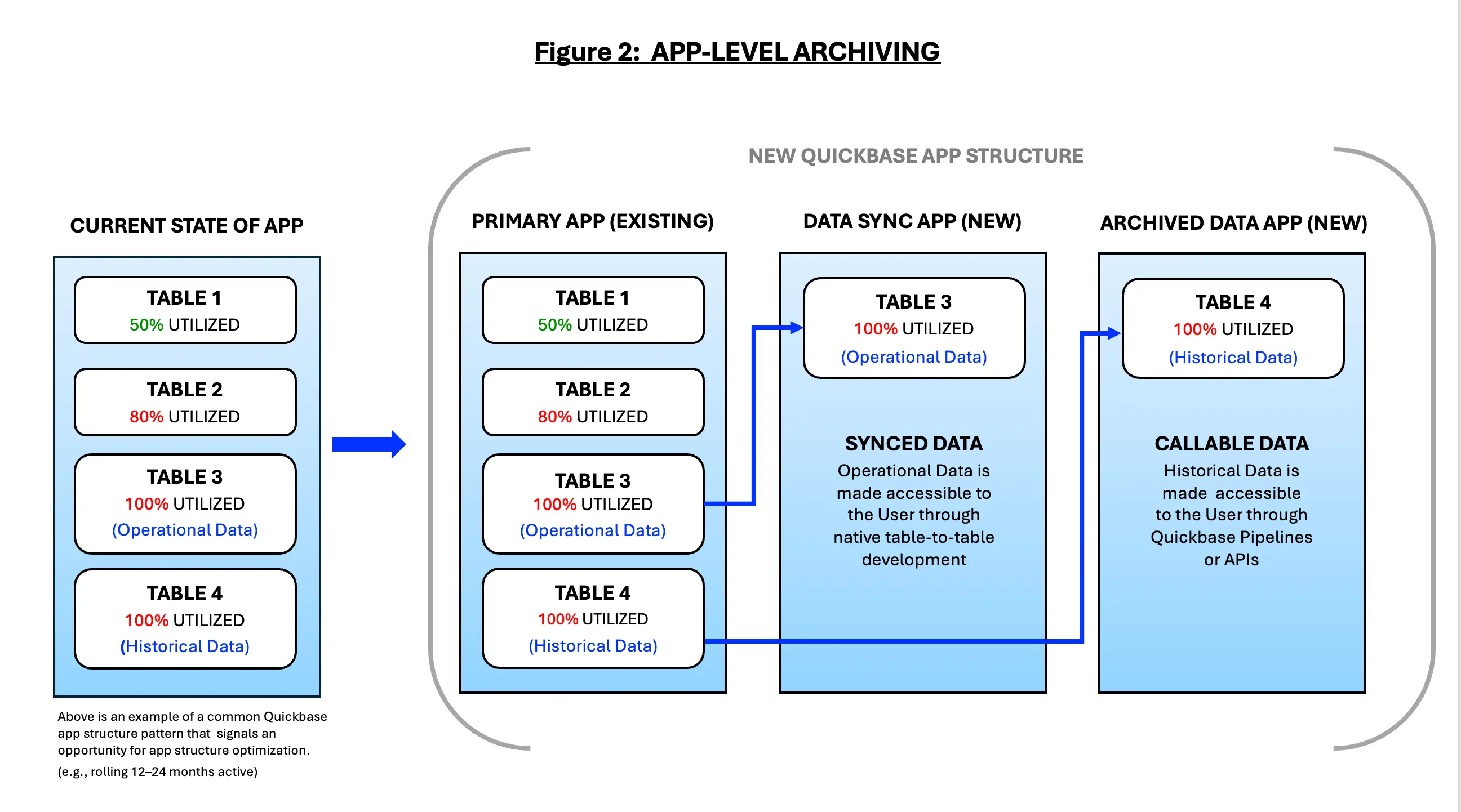
2. App-Level Archiving (figure 2)
- Separating active and historical data into distinct apps
- Read-only historical apps
- Security, permissions, and performance benefits
Automate your Data Archiving with Quickbase Pipelines
Automation enables organizations to proactively manage data growth by systematically moving inactive or completed records out of operational tables without disrupting business processes. By using rule-based logic—such as record age, status, lifecycle stage, or activity history—Pipelines can continuously enforce data lifecycle policies in the background, reducing table size, improving performance, and preserving system responsiveness.
This approach will allow you and your teams to retain historical data for compliance, audit, and reporting purposes while ensuring that day-to-day users interact only with the data that is actively needed, creating a scalable and sustainable foundation for long-term Quickbase application health. Outlined below are various methods we have used to automate data storage using Quickbase Pipelines:
- Volume-based archiving triggers
- Automatically archive records when a table exceeds a defined record count or growth threshold, helping prevent performance degradation before it becomes noticeable to end users.
- Inactivity-driven archiving
- Move records to archive tables when they have not been viewed or modified within a specified time period (e.g., 12–24 months), ensuring only actively used data remains in operational tables.
- Process-completion archiving
- Archive records once all downstream processes are completed (e.g., billing issued, integrations finalized, approvals closed), reducing clutter without risking operational disruption.
- Multi-stage archiving workflows
- Transition records through stages such as: Active → Read-Only → Archived, allowing for controlled retention periods and audit windows before full archival.
- Selective field preservation
- Retain only essential metadata (eg., IDs, dates, financial totals, audit fields, etc. ) in archived records while stripping non-critical or high-volume fields to reduce storage consumption.
- Cross-table archival coordination
- Automatically archive parent and child records together to preserve relational integrity and reporting accuracy in historical datasets.
- Conditional attachment offloading
- Route large or infrequently accessed attachments to external storage (e.g., cloud file repositories, etc.) while maintaining reference links within archived Quickbase records.
- Compliance-driven retention logic
- Apply different archiving rules based on regulatory or contractual requirements (e.g., retain financial records for seven years, operational logs for three).
- Automation scheduled batch archiving
- Execute archiving jobs during off-peak hours to minimize impact on system performance and user experience.
- Audit logging and traceability
- Automatically log archival actions (date, rule applied, pipeline execution ID) to support governance, audits, and troubleshooting.
Governance, Security, and Compliance Considerations for Quickbase Storage
As your Quickbase environments grow, storage decisions directly impact not only performance and cost, but also governance maturity, data protection, and regulatory compliance.
A deliberate storage strategy ensures that data is retained appropriately, access is controlled, and risks are managed across the full data lifecycle, whether data resides inside Quickbase or in external systems.
Governance Considerations
- Data ownership and stewardship
- Clearly define who owns operational data, archived data, and externally stored assets to avoid orphaned records and unmanaged growth.
- Data classification and tiering
- Classify data by sensitivity, business value, and usage frequency to determine where it should live (active tables, archive tables, or external storage).
- Lifecycle and retention policies
- Establish formal policies for how long data remains active, when it is archived, and when it is eligible for deletion—aligned with legal and business requirements.
- Change management and oversight
- Govern pipelines, automations, and integrations that move or archive data to ensure changes are reviewed, documented, and tested.
- Auditability and traceability
- Maintain logs of archival actions, data movements, and deletions to support internal reviews and external audits.
Security Considerations
- Access control alignment
- Ensure permissions in Quickbase align with those in external storage platforms to prevent unauthorized access to archived or offloaded data.
- Least-privilege enforcement
- Limit user access to only the data and attachments required for their role, especially for historical or sensitive records.
- Encryption standards
- Validate that data is encrypted both in transit and at rest, including attachments stored outside of Quickbase.
- Secure integration patterns
- Use approved connectors, service accounts, and credential management practices when integrating Quickbase with external storage systems.
- Data loss prevention (DLP)
- Monitor and restrict the movement of sensitive data, particularly when files are transferred to or accessed from external repositories.
Compliance Considerations
- Regulatory retention requirements
- Align storage and archiving practices with regulations such as SOX, HIPAA, GDPR, or industry-specific mandates
- For Healthcare Users - for additional guidance for your specific industry requirements, please see our Quickbase Knowledge Base article, Quickbase:, 'Quickbase Governance, Security, and Compliance Considerations for the Healthcare Industry."
- For Financial Service Users, we strongly suggest you check with your firm's Compliance Officer regarding how your firm handles 'Electronic Recordkeeping & Repository Requirements' before moving any historical data or records, to ensure you remain compliant with FINRA Rule 4511 and SEC Rules 17a-3/17a-4.
- Align storage and archiving practices with regulations such as SOX, HIPAA, GDPR, or industry-specific mandates
- Right-to-access and right-to-erasure
- Ensure archived and externally stored data can be retrieved or deleted in response to legal or regulatory requests.
- Data residency and sovereignty
- Understand where data is physically stored, especially when using cloud-based external storage across regions.
- Legal hold support
- Implement processes that prevent deletion or modification of records subject to litigation or investigation.
- Third-party risk management
- Assess and document the compliance posture of external storage providers, including certifications, SLAs, and incident response procedures.
Quickbase Performance and Cost Optimization Benefits
As outlined throughout this guide, a thoughtful archiving strategy is not simply a technical cleanup exercise—it is a performance, cost, and risk-management initiative that directly supports business outcomes.
When data is intentionally managed across its lifecycle, organizations see improvements that are immediately visible to both end users and system owners; here are a few positive outcomes we have seen by implementing a well-thought out data management plan:
- Faster reports and dashboards
- By removing inactive and historical records from operational tables, Quickbase can process queries, formulas, and aggregations more efficiently.
- This has resulted in noticeably faster report load times and more responsive dashboards, enabling users to access insights without delays that erode confidence and productivity.
- More reliable pipelines and integrations
- Lean, well-structured tables reduce the strain on pipelines, APIs, and third-party integrations. With fewer records to scan and sync, automations run more predictably, error rates decline, and integration performance becomes easier to monitor and support.
- Reduced operational risk
- Uncontrolled data growth increases the likelihood of hitting table limits, attachment thresholds, or performance bottlenecks at critical moments.
- Archiving mitigates these risks by proactively managing record volume, reducing the chance of unexpected outages, failed automations, or emergency remediation efforts.
- Controlled storage growth
- Separating active and historical data allows organizations to slow storage consumption and plan capacity more intentionally.
- This will not only help manage Quickbase licensing and storage (eg., save money), but also avoids reactive decisions driven by sudden growth or platform constraints.
- Improved user trust and adoption
- When applications are fast, reliable, and intuitive, users are more likely to trust the system and fully adopt it as part of their daily workflows.
- Archiving removes clutter, keeps interfaces focused on relevant data, and reinforces the perception that Quickbase is a dependable system of record—not a data dumping ground.
External Storage Strategies for Heavy Quickbase Usage
As Quickbase applications scale, attachments and high-volume files often become the primary drivers of storage consumption and performance constraints.
External storage strategies address this challenge by separating transactional data from large or infrequently accessed files, allowing Quickbase to remain optimized for structured records and workflows.
By offloading documents, images, and other heavy assets to purpose-built storage platforms—while maintaining secure references and metadata within Quickbase—organizations can significantly reduce table bloat, improve load times, and establish a more cost-effective and scalable data architecture without sacrificing accessibility or compliance. Outlined below are the external storage options that we recommend to our clients and use internally at Quandary Consulting Group:
- Amazon S3
- Highly scalable object storage for large volumes of documents, images, and exports, with lifecycle policies for cost optimization and long-term retention.
- Microsoft SharePoint / OneDrive
- Well-suited for organizations already using Microsoft 365, providing version control, permissions alignment, and seamless document collaboration.
- Google Drive
- A flexible option for teams needing easy access and sharing, often paired with automation tools to manage folder structures and permissions.
- Azure Blob Storage
- Ideal for enterprises operating within the Azure ecosystem, offering strong security controls and integration with analytics and archiving workflows.
- BOX
- Common in regulated industries due to robust governance, access controls, and compliance certifications.
- Enterprise File Servers or Network Drives
- Used when regulatory or internal policies require data to remain within corporate infrastructure, often combined with access logging and retention controls.
- Content Management Systems (CMS)
- Platforms such as Alfresco or OpenText for organizations needing advanced document lifecycle management and compliance capabilities.
Common Quickbase Data Storage Archiving Pitfalls to Avoid
As Quickbase applications mature and data volumes grow, many organizations attempt to address performance and storage constraints through ad hoc archiving approaches. While well-intentioned, these efforts often introduce new risks, ranging from broken Quickbase data relationships to reporting gaps to compliance and data access issues, just to name a few.
Understanding the most common Quickbase data storage and archiving pitfalls is essential to designing a strategy that preserves performance, data integrity, and long-term scalability, here are some of the most common pitfalls we have seen in the past:
- Treating Archiving as a One-Time Cleanup
- One of the most common mistakes organizations make is viewing archiving as a single, corrective action rather than an ongoing operational discipline.
- A large cleanup may temporarily relieve storage pressure or performance issues, but without a repeatable process, the same challenges inevitably resurface as record volumes continue to grow.
- This is critical for Quickbase environments that support core business processes—projects, tickets, assets, transactions—data growth is constant and predictable.
- Archiving should therefore be designed as a lifecycle practice, aligned with business rules (such as record status, age, or fiscal periods), rather than an emergency response when limits are approached. Sustainable archiving requires governance, ownership, and scheduled execution—not periodic panic-driven efforts.
- Over-Archiving Data Still Needed Operationally
- In an effort to reduce storage quickly, teams sometimes archive too aggressively, removing data that users still rely on for day-to-day operations, reporting, or compliance-related lookups.
- This often results in broken reports, incomplete dashboards, and frustrated users who suddenly lose access to context they depend on.
- Always remember: Not all “older” data is inactive - Many Quickbase applications rely on historical records for trend analysis, year-over-year comparisons, audits, or customer history.
- Effective archiving strategies distinguish between inactive data and low-frequency access data. When this distinction is not made, organizations trade storage relief for operational friction, eroding trust in the system and increasing support overhead.
- Ignoring Attachments Until Storage Limits Are Reached
- Attachments are one of the fastest-growing—and most commonly overlooked—contributors to Quickbase storage consumption; because, attachment storage is often less visible than record counts, organizations may focus on archiving rows while leaving large volumes of files untouched until limits are already near.
- By the time attachment storage becomes an urgent issue, options are often limited and remediation becomes disruptive. A proactive archiving strategy accounts for attachments explicitly, defining where they should live long-term and when they should be moved. This may include relocating files to external document management systems or cloud storage while preserving links or metadata within Quickbase.
- Ultimately, Ignoring attachments effectively undermines otherwise well-designed data archiving efforts.
- Lack of Rollback or Recovery Planning
- Perhaps the most risky pitfall is archiving data without a clear rollback or recovery plan. If archived records are removed or relocated incorrectly—due to flawed criteria, automation errors, or changing business needs—organizations may find themselves unable to restore critical data quickly.
- Without proper backups, validation steps, or reversible processes, archiving becomes a high-risk activity rather than a controlled operation.
- Mature Quickbase archiving strategies include safeguards such as staging tables, retention windows before deletion, and documented recovery procedures.
- These controls provide confidence that archiving can be executed safely, even as requirements evolve or mistakes occur.
The Importance of Building a Long-Term Quickbase Archiving Roadmap
- Building a long-term Quickbase archiving roadmap is essential for maintaining performance, scalability, and data governance as applications mature and data volumes grow.
- Without a clear archiving strategy, tables can become bloated with historical records, leading to slower performance, increased storage costs, and higher risk during enhancements or platform upgrades.
- A well-defined roadmap ensures that operational data remains fast and usable, while historical data is retained in the right format and location to meet reporting, audit, and compliance needs.
- More importantly, it shifts archiving from a reactive cleanup effort to a proactive data lifecycle practice—allowing organizations to scale their Quickbase environment confidently without sacrificing reliability or user experience.
In Conclusion: Design Quickbase for Longevity
- Designing Quickbase for longevity requires recognizing that heavy usage is not a problem to solve, but a signal of success!
- As adoption grows and applications become deeply embedded in day-to-day operations, data volumes naturally expand.
- Without intentional storage, retention, and archiving strategies, that success can quietly introduce drag—slower performance, increased complexity, and heightened risk to scalability and compliance.
- Over time, what once enabled agility can begin to constrain it.
- A thoughtful, layered approach to data management ensures this does not happen. By clearly distinguishing operational data from historical data, applying purpose-built archiving methods, and aligning retention practices with business and regulatory needs, organizations can preserve application performance while maintaining confidence in their data.
- This approach supports long-term compliance, simplifies enhancements, and allows Quickbase to continue delivering value as the organization grows.
- Quandary Consulting Group helps organizations design and implement these long-term data management systems within Quickbase.
- By combining platform expertise with practical governance and lifecycle planning, Quandary ensures that Quickbase environments remain performant, compliant, and resilient—so growth continues to feel like progress, not a burden.
By: Logan Lott
Email: llott@quandarycg.com
Date: 01/27/2026


Resources


© 2026 Quandary Consulting Group. All Rights Reserved.
Privacy Policy