
Knowledge Base
Articles In This Section
How to Automatically Import CSV Files into Quickbase Using SyncHow to Use Google Maps for Data VisualizationHow to use the Quickbase Power BI connectorHow to Create High-Quality Quickbase Forms10 Quickbase Application Best Practices How to Set Up Notifications in Quickbase How to Log Quickbase Emails using WorkatoHow to Automate PDF Data Extraction into Quickbase Using Docparser & WorkatoQuickbase Developers’ Guide: Webhooks 101 | BEGINNERQuickbase Home Pages: Uses and Functionality | INTERMEDIATE TO ADVANCEDHow to Implement a Custom Import in QuickbaseSections
How to Use Formulas + Webhooks for Dynamic Quickbase Record Creation
Imagine your company uses Quickbase to manage PTO requests and employee timecards. When an employee submits a PTO request, you want a timecard automatically created for every day they’ll be out.
Or consider another scenario: when creating a new project, users select the number of milestones required (between 1–25). Once the project is saved, you want all milestone records generated automatically so the team can immediately jump into Grid Edit instead of creating milestones one at a time.
Both scenarios introduce the same technical challenge:
You don’t know ahead of time how many child records need to be created.
- PTO duration varies by request
- Projects may have anywhere from 1 to 25 milestones
- The number of records is determined dynamically at runtime
Common Approaches
When faced with this problem, most teams typically choose one of the following options:
- Manual entry by users via forms or Grid Edit
- Custom code that evaluates the parent record and creates child records
- An integration platform such as Workato or Make to dynamically generate records
While all of those approaches work, there’s another option that requires no external services and no custom code.
By combining Quickbase formula fields with Webhooks, you can dynamically generate child records using a pseudo-CSV approach.
The Core Idea
At its core, a CSV is simply:
- Values separated by commas
- Records separated by line breaks
That means you can generate CSV data directly inside a Formula-Text field using standard Quickbase formulas.
Once generated, the CSV can be passed into an API_IMPORTFROMCSV webhook to create records dynamically.
Example: Auto-Generating Milestones
Let’s say a Project record contains a numeric field called:
[# of Milestones]
If the user enters 17, we want Quickbase to automatically create:
- Milestone 1
- Milestone 2
- Milestone 3
- …
- Milestone 17
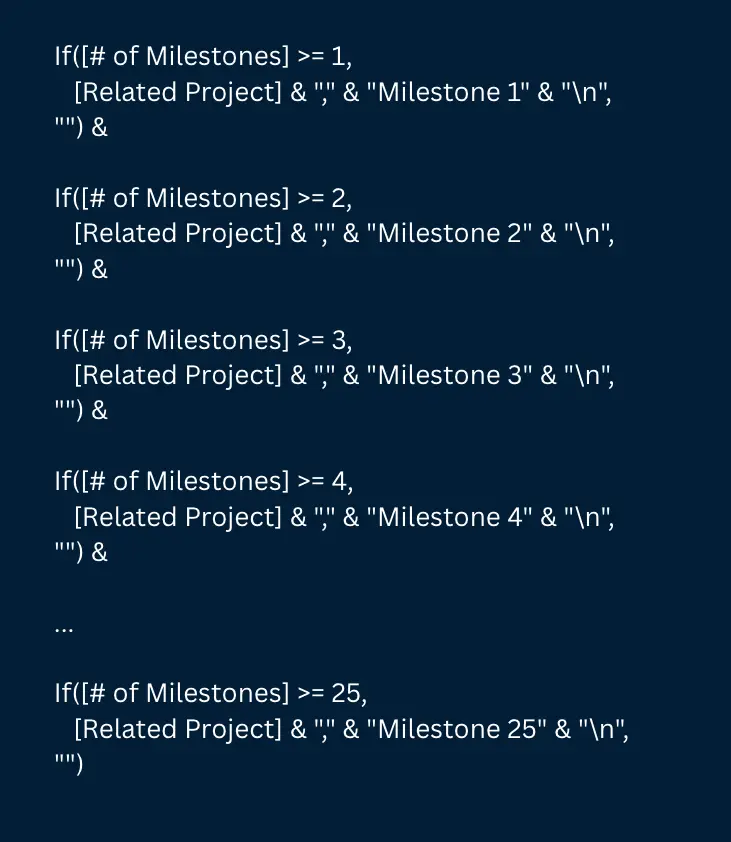
To accomplish this, create a Formula-Text field that builds the CSV dynamically.
A great example:
Important Notes
Use a Formula-Text field specifically.
This is important because Formula-Text fields properly support:
- Comma-separated values
- Line breaks (
"\n")
Other field types such as Rich Text or Numeric formulas may introduce formatting issues that break the CSV structure.
Example Output
If:
[Related Project] = 1111[# of Milestones] = 17
The formula generates:

Each comma separates column values.
Each "\n" creates a new CSV row.
Importing the CSV with a Webhook
Now that the CSV is dynamically generated, you can send it directly into Quickbase using an API_IMPORTFROMCSV webhook.
This is the key piece of the solution.
Why use API_IMPORTFROMCSV instead of API_AddRecord or API_EditRecord?
Because API_IMPORTFROMCSV allows you to create or update multiple records in a single request.
Your webhook payload would include the formula field like this:
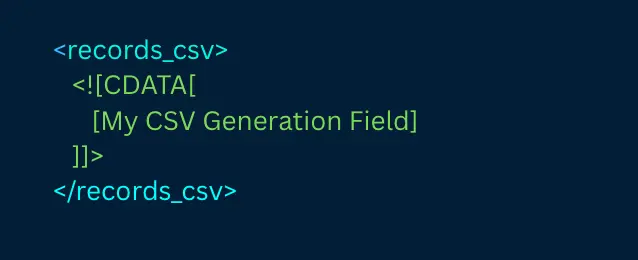
Once triggered, Quickbase processes the generated CSV and creates all child records automatically.
Why This Technique Is Powerful
This approach allows Quickbase to dynamically generate records without:
- Custom code
- Pipelines
- External middleware
- Third-party integrations
Better yet, maintaining the logic is simple — updating behavior is often as easy as modifying the formula.
Additional Use Cases
This technique can be adapted to many other dynamic record-generation scenarios.
Dynamic Task Templates
Generate different task sets based on Project Type.
Example:
- Project Type A → Tasks A, B, C
- Project Type B → Tasks D, E, F
Forecast Schedules
Automatically generate monthly forecast records for:
- 12 months
- 18 months
- 24 months
starting from the current month.
User Assignments
Create assignment records automatically for every user selected in a List-User field.
Final Thoughts
The real flexibility of this approach comes from the formula itself.
If you can represent the logic in a Quickbase formula, you can dynamically generate the corresponding child records.
For teams looking to avoid unnecessary complexity, this provides a lightweight and highly maintainable alternative to custom development or external automation tools.
- By: Jeff Richey
- Title: Senior Development Consultant | Quickbase
- Email: jrichey@quandarycg.com
- Date Updated: May 25, 2026
FAQ: Dynamically Generating Child Records in Quickbase Using Formula Fields and Webhooks
1. How do you automatically create child records in Quickbase?
You can automatically create child records in Quickbase by combining a Formula-Text field with an API_IMPORTFROMCSV webhook. The formula dynamically generates CSV-formatted data, and the webhook imports that data to create multiple related records automatically.
This approach is commonly used for:
- PTO timecard generation
- Project milestone creation
- Dynamic task templates
- Forecast schedules
- User assignment records
Unlike manual entry or custom code, this method works natively inside Quickbase without requiring external automation tools.
2. What is API_IMPORTFROMCSV in Quickbase?
API_IMPORTFROMCSV is a Quickbase API action that allows you to create or update multiple records in a single request using CSV-formatted data.
It is especially useful when:
- The number of records is unknown ahead of time
- Records must be generated dynamically
- You want to avoid multiple API calls
- You need bulk record creation from formulas or webhooks
Compared to API_AddRecord, API_IMPORTFROMCSV is significantly more scalable for dynamic child record generation.
3. Can Quickbase formulas generate CSV data dynamically?
Yes. Quickbase Formula-Text fields can dynamically generate properly formatted CSV data using:
- Commas (
",") for column separation - Line breaks (
"\n") for row separation - Conditional
If()logic for dynamic record counts
For example, you can generate:
- 5 milestones
- 17 PTO timecards
- 24 monthly forecast records
all from a single formula field based on user input.
This technique is often referred to as a “pseudo-CSV” method in Quickbase development.
4. Do you need Pipelines, Workato, or custom code for dynamic record creation in Quickbase?
No. One of the biggest advantages of this method is that it works without:
- Quickbase Pipelines
- Workato
- Make.com
- JavaScript
- External middleware
- Custom APIs
Everything can be handled natively inside Quickbase using:
- Formula-Text fields
- Webhooks
API_IMPORTFROMCSV
This makes the solution lightweight, maintainable, and easier for administrators to update over time.
5. What are the best use cases for dynamic child record generation in Quickbase?
Some of the most common Quickbase automation use cases include:
- Automatically creating PTO timecards
- Generating project milestones
- Building onboarding task lists
- Creating recurring forecast schedules
- Assigning records from List-User fields
- Generating inspection checklists
- Creating phase-based project templates
Any workflow where the number of child records changes dynamically is a strong candidate for this technique.
Because the logic is formula-driven, the possibilities are limited only by what you can represent in Quickbase formulas.


Industries
Resources




© 2026 Quandary Consulting Group. All Rights Reserved.
Privacy Policy