
Knowledge Base
Articles In This Section
How to Create User Groups in QuickbaseHow to Add a New User Role in QuickbaseHow to Archive Records in Quickbase Using Role PermissionsHow to Adjust User Roles in QuickbaseHow to Switch Quickbase Developers and Admin User Roles in QuickbaseHow to Display Information for Certain Roles in QuickbaseHow to Use Conditional Filters in Quickbase for Role-Based Record PermissionsHow to Add New Users to your Quickbase ApplicationHow to Modify or Deny a User's Access in QuickbaseHow to Configure Field-Level Permissions in QuickbaseSections
How to Share your Quickbase Application with Everyone On The Internet (EOTI)
Opening your Quickbase application to Everyone On The Internet (EOTI) allows users to access your application without signing into Quickbase.
Users can view and add records, view reports and interact with data just like registered users. Similar to other groups, you can create a role and set permissions to limit access to your data. Some common use cases for the EOTI group may include:
- Allowing non-user customers to access work order histories
- Sending actionable communications to non-users
- Sending surveys
How to Share your Quickbase Application with Everyone On The Internet (EOTI)?
- Choose Users from the sidebar.
- Select + Share app with new user.
- Select the address book icon.
- Choose Groups from the dropdown.
- From the list of groups, choose Everyone on the Internet.Note: If you do not see this choice, your Account admin has turned off the ability to open an app to everyone on the Internet
- Select OK. The group appears in the Share With a New User dialog.
- Select Add.
- To test access, copy the URL for your app, then sign out of Quickbase, or use a different browser where you have not signed in to Quickbase.
- Paste the app URL into the browser, and you should see the app without having to sign in.
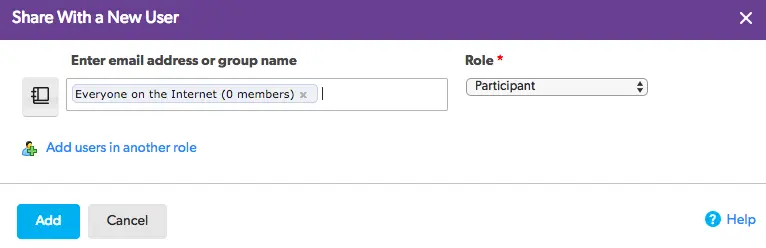
How to Assign a Role to the Quickbase EOTI Group?
The Everyone on the Internet group is like any other user entity in Quickbase.
You can create a role for Everyone on the Internet or assign this group an existing role.
Revoke access for the EOTI group
- Return to the Manage Users page.
- Select the Everyone on the Internet checkbox.
- Select Remove User at the top of the table, then select Remove to confirm.
Settings affecting the EOTI group
- IP filtering. If your app or realm is set to limit access by IP, this setting will also affect access to the Everyone on the Internet group. Read how using IP filtering can help mitigate risk when using
- Permissions. Users in the Everyone on the Internet group who do not have a Quickbase username cannot access the admin-level permissions to "manage all users and share the app" or "edit app structure and permissions".
Opening a Quickbase application to Everyone On The Internet (EOTI) can be a powerful way to streamline external collaboration, reduce licensing costs, and simplify public-facing workflows. When implemented correctly, EOTI supports scalable intake forms, customer portals, vendor management, and operational efficiency.
However, security and permission management are critical. Businesses should carefully design public roles, restrict access appropriately, and regularly audit configurations to ensure sensitive data remains protected.
- Author: April Barragan
- Title: Solution Consultant | Quickbase
- Email: abarragan@quandarycg.com
- Date Updated: May 3, 2026
Top FAQs About Quickbase EOTI Access
1. What Does “Everyone On The Internet (EOTI)” Mean in Quickbase?
EOTI in Quickbase allows public users to access parts of your application without needing a Quickbase login.
This means anyone with the correct link can:
- View forms
- Submit records
- Access public-facing workflows
- Interact with limited application components
Quickbase administrators commonly use EOTI for external data collection, customer portals, and public submissions.
2. Why Would a Business Enable EOTI in Quickbase?
Organizations enable EOTI to simplify external engagement without requiring user licenses or account creation.
Common use cases include:
- Customer intake forms
- Vendor registration portals
- Event registrations
- Support request submissions
- Public surveys
- Construction field reporting
- Community data collection
A great example: A construction company in Denver may allow subcontractors to submit safety reports without giving them full Quickbase accounts.
3. Is Opening Quickbase to the Internet Secure?
It can be secure when configured properly.
Quickbase provides controls such as:
- Public role permissions
- Form restrictions
- Record-level access rules
- Hidden fields
- HTTPS encryption
- Conditional access settings
However, poorly configured EOTI access can expose sensitive data.
Best practice: Only expose the minimum functionality required.
4. What Are the Most Common EOTI Use Cases?
Popular Quickbase EOTI scenarios include:
- Lead capture forms
- Public applications
- Vendor onboarding
- Warranty registration
- Customer service requests
- Job applications
- Asset inspections
- Field service updates
Industries frequently using EOTI:
- Construction
- Manufacturing
- Healthcare
- Nonprofits
- Government
- Logistics
5. Can Public Users See All My Quickbase Data?
No — unless permissions are configured incorrectly.
Administrators can limit public users to:
- Submit-only access
- Specific forms
- Limited reports
- Single-table interactions
Most EOTI implementations restrict users from:
- Viewing sensitive records
- Editing internal data
- Accessing admin functions
- Downloading reports
Best practice: Create a dedicated public-facing role with minimal permissions.
6. Do EOTI Users Need a Quickbase License?
No. That is one of the biggest advantages of EOTI! Public users can interact with approved Quickbase components without:
- Creating accounts
- Logging in
- Consuming paid licenses
This makes EOTI highly cost-effective for large-scale external interactions.
7. What Are the Risks of Enabling EOTI in Quickbase?
Potential risks include:
- Unauthorized data exposure
- Spam submissions
- Public link sharing
- Compliance violations
- Poorly configured permissions
- Data integrity issues
To reduce risk:
- Use least-privilege access
- Add CAPTCHA tools when possible
- Restrict editable fields
- Monitor audit logs
- Review permissions regularly
Organizations handling HIPAA, financial (FINRA or SEC), or sensitive customer data should carefully evaluate EOTI configurations.
8. Can EOTI Be Used for Customer Portals?
Yes. Many businesses use EOTI to create lightweight customer-facing portals.
Examples include:
- Service request portals
- Project update forms
- Inspection submissions
- Warranty claims
- Order tracking requests
For more advanced portals requiring authentication, companies often combine Quickbase with:
- Single Sign-On (SSO)
- Custom web portals
- Middleware integrations (like, Workato)
9. How Do I Safely Configure EOTI in Quickbase?
Recommended Quickbase EOTI best practices include:
- Create dedicated public roles
- Limit table access
- Hide sensitive fields
- Use form rules
- Disable unnecessary reports
- Test permissions extensively
- Conduct regular security audits
- Separate public and internal workflows
Depending on the client and the specific requirements, we sometimes, also, recommend using a sandbox app before enabling public internet access in production.
10. Should You Use EOTI or Full User Accounts?
Honestly - It all really depends on the business need.
Use EOTI when:
- Users only need simple interactions
- Public submissions are required
- Licensing costs must stay low
- External access is temporary or limited
Use full Quickbase accounts when:
- Users need dashboards
- Security is critical
- Data visibility is complex
- Collaboration is ongoing
- Advanced workflows are required
Many organizations use a hybrid model:
- EOTI for public intake
- Licensed users for internal operations


Industries
Resources




© 2026 Quandary Consulting Group. All Rights Reserved.
Privacy Policy