
Knowledge Base
Articles In This Section
What Are Quickbase Dashboards How to Set Up Personalized Dashboards in QuickbaseHow to add a Webpage Widget (embedded iFrame) to your Quickbase DashboardHow and When to Use Calculated Columns for Quickbase Reports How to Create a Summary Report in QuickbaseHow to Utilize the Dashboard Side Bar in QuickbaseHow to Build an Operations Dashboard in Quickbase How to Color-Coding Rows for Quickbase Reports Using Automations to Log Approval Time and User in QuickbaseHow to Create External Stakeholder Forms, Reports, and Dashboards in QuickbaseHow to Update the Default Table and Report Columns in QuickbaseHow to Organize & Assign Groups to Quickbase ReportsHow to Link Dashboards Together in QuickbaseHow to Create Reports and Charts in QuickbaseHow to use Rich Text to Make your Quickbase Dashboard Dynamic Using Report Formulas as a Filter in a Report in QuickbaseHow to Create a Kanban Report in QuickbaseHow to Automate Approval Tracking in QuickbaseHow to Organize and Assign Groups to Quickbase ReportsHow to Use Report Formulas as a Filter in a Quickbase ReportHow to Create Subscription Emails in QuickbaseHow to Create an Audit or Change Logs with Automations How to Create a Pie Chart in QuickbaseHow to Build Standard Reports in QuickbaseHow to Add a Report to your Quickbase DashboardSections
How to Create a Dashboard in Quickbase
For information about what/why to use Dashboards, please reference the article titled What are Dashboards.
As you refine/expand your app, you’ll want to maintain functionality by creating and managing new Dashboards. Early on – you may only have one dashboard for everyone, but as roles and responsibilities diversify, you will need to create new ones to tailor each roles’ dashboard to meet their specific needs.
Some common scenarios that you might encounter where a new Dashboard would be beneficial are:
✓ You have several roles that need specific views and reports for when they log in
✓ Setting up Executive / Admin only reporting views
✓ Tailor more advanced workflows for specific users and roles
To set up a new Dashboard,
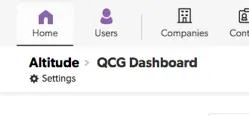
- Navigate to the application home page, select the ‘Settings’ gear icon from the upper left corner under the ‘Home’ icon
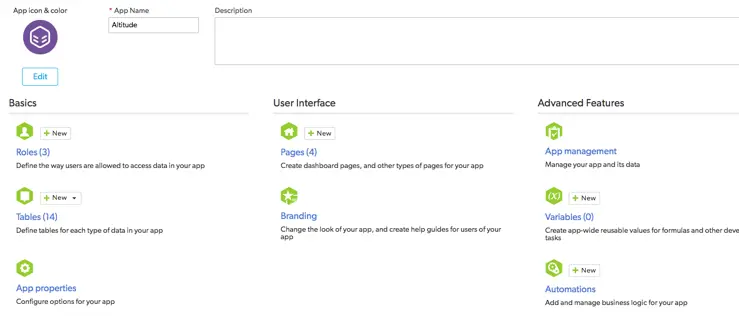
- Select the link for ‘Pages’ in the middle column.
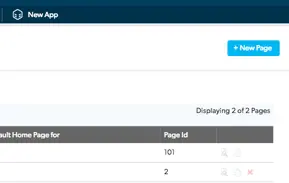
- SFrom ‘Pages’, select the ‘New Page’ button from the upper right corner
- You will be presented a modal window confirming what ‘type’ of page you want to create. In Quick Base – Dashboards are synonymous with ‘Home Page’, which is the default option selected when this modal pops up.
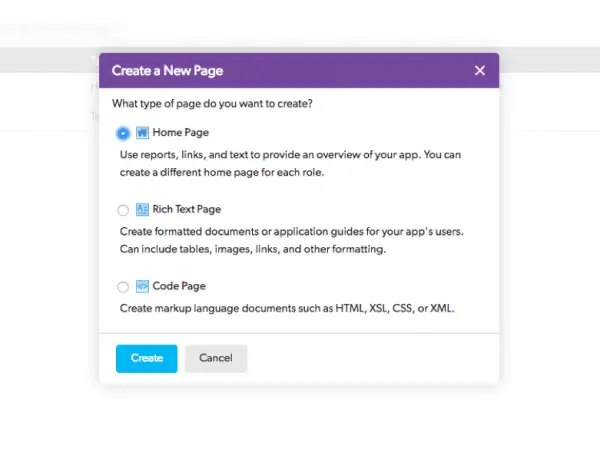
- By hitting create, a new dashboard will be created, you will be re-directed to the set-up page for your new dashboard, and you can start configuring what you want on your brand-new dashboard
Click here to read about adding reports and charts to your new dashboard to start making it functional
- Author: Chayce Duncan
- Email: chayceduncan@quandarycg.com
- Date Submitted: 12/9/2018


Industries
Resources




© 2026 Quandary Consulting Group. All Rights Reserved.
Privacy Policy