
Knowledge Base
Articles In This Section
How to Use Quickbase Pipelines to Elevate Your Quickbase Notifications How to Turn Quickbase Webhooks into PipelinesSections
How to Connect Quickbase Pipelines + Salesforce
Quickbase purchased a product called CloudPipes and released a built-in tool called Quickbase Pipelines. It’s a great way to integrate multiple systems and automate different actions in sequence once certain conditions are met.
In this article, we will be looking at how to connect Pipelines with the Salesforce CRM platform.
From creating a Pipeline that will update data in both Salesforce and Quickbase to search out the correct Opportunity or Contact in Salesforce from Quickbase, using both Salesforce and Quickbase together is now better than ever!
How to Connect Quickbase Pipelines + Salesforce?
To connect your Quickbase to Salesforce, you start by going into “Manage my account” on your My Apps main page and go to the Pipelines tab.

Once an open channel has been confirmed, go to the Pipelines tab at the top of your window
- Select “Create new Pipeline”.
- Next, scroll down the list of channels on the right-hand side of your screen and select Salesforce.
- Then, click the “Connect to Salesforce” button.
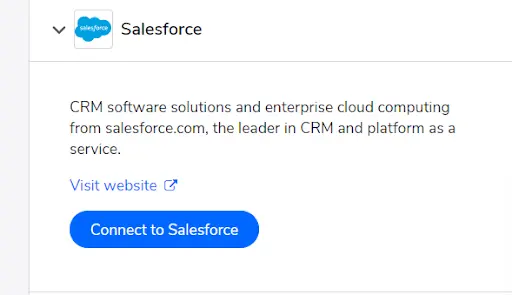
If you are not already logged into the Salesforce account, you will be prompted to log in.
From there, you'll need to authorize the connection to the Pipelines.
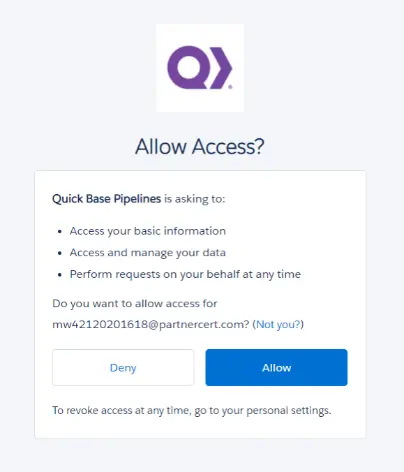
After a connection has been authorized the list of options for creating the pipeline will appear.
- These are similar to other pipeline actions and triggers for a Quickbase connection with one major difference.
When querying several objects, or a filtered single object, all queries must be written out in the SOQL format in order for the Salesforce org to properly read the data.
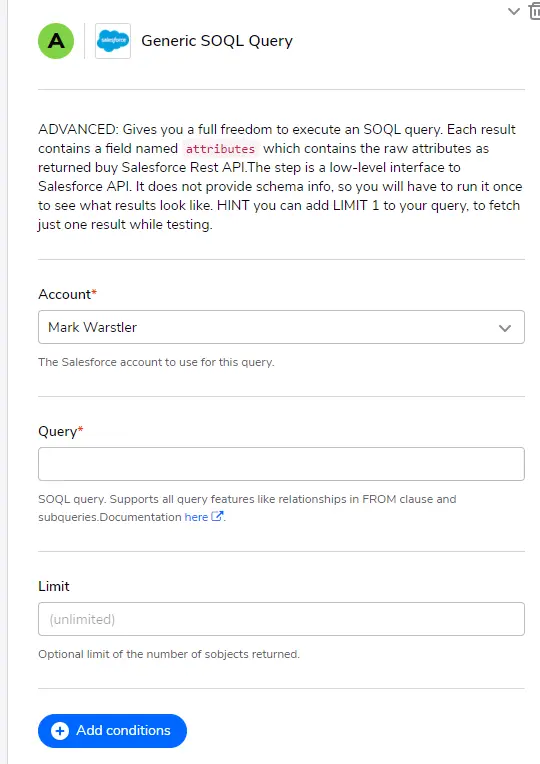
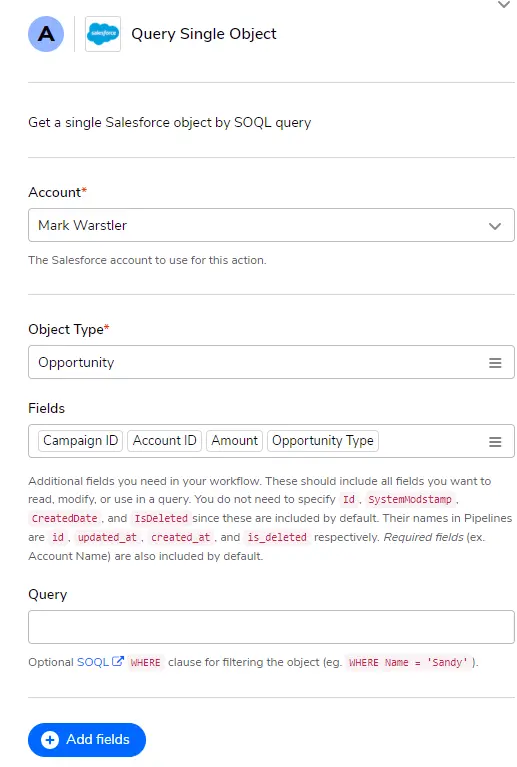
For more information about how to correctly write out SOQL queries, follow the links below!
Once the proper queries have been declared, you are ready to go on into more steps of the Pipeline and configure nearly any kind of automation that you like!
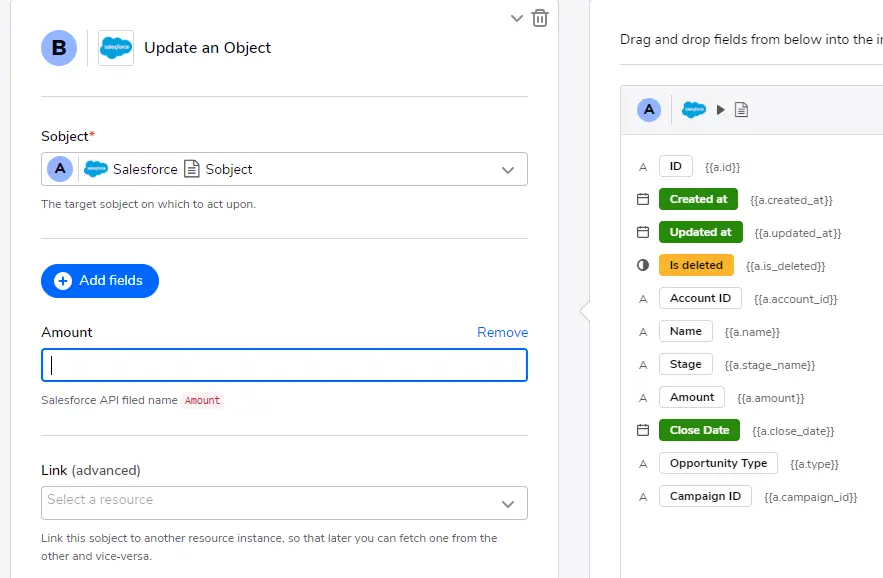
Why Use Quickbase Pipelines?
There is a multitude of possibilities on how to use Pipelines to streamline your workflow using Quickbase connected to your Salesforce org.
A good use case would be in using a Pipeline in conjunction with a Quickbase connected table that is getting data from a Salesforce org. The Pipeline could read the data and any updates from the connected table, then update the records in Salesforce accordingly.
Another example would be having a Pipeline that would automatically update any Knowledge articles about Salesforce into Quickbase as help files or training tips.
Being able to search records in both Salesforce and Quickbase just became much more efficient with Quickbase Pipelines.
- Author: Jeff Richey
- Title: Senior Solution Consultant | Quickbase
- Email: jrichey@quandarycg.com
- Date updated: May 1, 2026
Top FAQs about Quickbase + Salesforce Integration
1. What is Quickbase Pipelines and how does it work with Salesforce?
Quickbase Pipelines is an automation and integration tool built into Quickbase that allows businesses to connect Quickbase applications with external systems like Salesforce. Originally developed from the CloudPipes acquisition in 2020, Pipelines helps automate workflows between platforms without requiring custom code.
When connected to Salesforce, Quickbase Pipelines can:
- Create or update Salesforce records automatically
- Sync Salesforce Opportunities, Contacts, Accounts, and Leads with Quickbase
- Trigger actions when records change
- Automate multi-step workflows between systems
Quickbase Pipelines uses triggers and actions to automate processes. For example, when a record changes in Quickbase, a Pipeline can automatically update the matching Opportunity in Salesforce.
This integration helps organizations reduce manual data entry, improve reporting accuracy, and streamline CRM operations.
2. How do I connect Quickbase Pipelines to Salesforce?
To connect Quickbase Pipelines to Salesforce:
- Log into Quickbase
- Navigate to “Manage My Account”
- Open the Pipelines tab
- Select “Create New Pipeline”
- Choose Salesforce from the available channels
- Click “Connect to Salesforce”
- Log into your Salesforce account if prompted
- Authorize Quickbase access to Salesforce
Once authenticated, Quickbase will establish a secure Salesforce connection that can be used across your Pipelines.
It’s important to note that Quickbase Pipelines currently supports connection to only one Salesforce org at a time. Switching orgs may interrupt previously configured integrations.
3. Can Quickbase connect to Salesforce automatically?
Yes, Quickbase can automatically connect and synchronize with Salesforce using Quickbase Pipelines.
After the integration is configured, Pipelines can:
- Automatically create Salesforce records
- Update Opportunities and Contacts
- Trigger notifications and approvals
- Sync CRM data with Quickbase tables
- Move information between systems in real time
Businesses commonly use this automation to eliminate duplicate data entry, maintain consistent customer records, and improve operational efficiency.
Quickbase Salesforce automation is especially useful for sales operations, project management, customer onboarding, and reporting workflows.
4. What is SOQL and why is it required in Quickbase Pipelines?
SOQL, or Salesforce Object Query Language, is Salesforce’s query language used to retrieve data from Salesforce objects.
In Quickbase Pipelines, SOQL is required when searching or filtering Salesforce records. For example, if you want a Pipeline to locate a specific Opportunity or Contact, the query must be written using SOQL syntax.
- A basic SOQL query example: SELECT Id, Name FROM Opportunity WHERE StageName = 'Closed Won'
Quickbase uses SOQL to communicate directly with Salesforce APIs and return accurate results from the CRM platform.
Learning basic SOQL syntax is highly recommended for building advanced Quickbase Salesforce integrations.
5. Can Quickbase Pipelines update Salesforce records automatically?
Yes, Quickbase Pipelines can automatically update Salesforce records based on changes in Quickbase.
For example:
- Updating Salesforce Opportunities when a Quickbase project changes status
- Syncing customer contact information
- Updating Salesforce custom fields from Quickbase data
- Creating follow-up tasks automatically
Pipelines can also perform bi-directional updates, meaning Salesforce can trigger updates inside Quickbase as well.
This automation reduces manual work and ensures that teams always have access to current CRM data.
6. Can Quickbase Pipelines connect to multiple Salesforce orgs?
No, Quickbase Pipelines currently supports only one authenticated Salesforce org connection at a time. Once a Salesforce connection is established and authorized, all Pipelines in that Quickbase environment use the same Salesforce org.
If you reconnect Pipelines to a different Salesforce org:
- Existing Pipelines may stop working
- Integrations may break
- Data synchronization could fail
Organizations managing multiple Salesforce environments should carefully plan their integration architecture before deployment.
7. What are the best use cases for Quickbase and Salesforce integration?
Quickbase and Salesforce integrations are commonly used to automate workflows and centralize business data.
Popular use cases include:
- Syncing sales and project management data
- Automating customer onboarding workflows
- Updating Salesforce Opportunities from Quickbase projects
- Managing support tickets and service requests
- Syncing Salesforce Knowledge articles into Quickbase
- Automating approval processes
- Creating executive dashboards with real-time CRM data
By integrating Quickbase with Salesforce, organizations can improve visibility, reduce operational delays, and scale automation across departments.
8. Why is my Quickbase Salesforce connection not working?
Common reasons a Quickbase Salesforce integration may fail include:
- Incorrect Salesforce login credentials
- Missing Salesforce API permissions
- Expired authentication tokens
- Invalid SOQL queries
- Reconnecting to a different Salesforce org
- Insufficient user permissions in Salesforce
To troubleshoot:
- Reauthorize the Salesforce connection
- Verify API access permissions
- Review Pipeline error logs
- Validate SOQL query syntax
- Confirm object and field access in Salesforce
Keeping both Quickbase and Salesforce permissions properly configured is essential for reliable automation.
9. What Salesforce objects can Quickbase Pipelines access?
Quickbase Pipelines can interact with many standard and custom Salesforce objects, including:
- Accounts
- Contacts
- Leads
- Opportunities
- Cases
- Tasks
- Knowledge Articles
- Custom Salesforce Objects
Depending on your Salesforce permissions and API access, Pipelines can:
- Search records
- Create records
- Update records
- Trigger workflows
- Retrieve filtered data using SOQL
This flexibility allows organizations to build highly customized CRM automation workflows.
10. What are the benefits of using Quickbase Pipelines with Salesforce?
Using Quickbase Pipelines with Salesforce provides several business benefits:
- Reduces manual data entry
- Automates repetitive CRM tasks
- Improves data accuracy
- Connects teams across departments
- Enables real-time workflow automation
- Enhances visibility into sales and operations
- Improves reporting and analytics
- Accelerates business processes
Organizations using Quickbase + Salesforce integrations can create scalable automation solutions without extensive custom development.
The result is a more connected business ecosystem that improves productivity, collaboration, and customer experience.


Industries
Resources



© 2026 Quandary Consulting Group. All Rights Reserved.
Privacy Policy