
Knowledge Base
Articles In This Section
How to Set Up a API_DoQuery in QuickbaseHow to Edit Records Using an API in QuickbaseHow to Use API_CopyMasterDetail in QuickbaseHow to use API ImportFromCSV in QuickbaseHow to use API_PurgeRecords in QuickbaseSections
How to Utilize API AddRecord in Quickbase
The API_AddRecord call in Quickbase is one of the most basic API calls in Quickbase. In short, it empowers a user to create a single record based on pre-defined conditions.
Use Cases for API_AddRecord in Quickbase
- Creating a custom button in Quickbase that creates a new record with one click
- Implement in Quickbase Webhooks to add a record once certain changes occur
- Custom Scripting (either client or server-side)
Let’s picture a scenario where you have a system where users ‘vote’ on a particular item or issue. In this example, you want them to click a button to ‘vote’. And by doing so, a record is added that logs their user and a ‘yes’ response on whatever topic is being discussed.
An easy solution would be putting an API_AddRecord into a button to save several steps.
6 Steps to Setting up an API_Add Record in Quickbase
Let’s start with the example provided in the Quickbase API Documentation: https://target_domain/db/target_dbid?a=API_AddRecord&_fnm_second_year=1776&_fid_8=changed&ticket=auth_ticket&apptoken=app_token
Step 1: The Target
- The target is the Quickbase table you want to add a record in. The colored text below represents the target.
https://target_domain/db/target_dbid?a=API_AddRecord&_fnm_second_year=1776&_fid_8=changed&ticket=auth_ticket&apptoken=app_tokenThe target_domain is your Quickbase realm. In my case, my Quickbase realm is quandarycg.quickbase.com. So, the first part of my URL would look like this:https://quandarycg.com/db/- The target_dbid is the table you want to add a record in. Every table in Quickbase is uniquely identified by a table id. To find your unique table id, navigate your browser to the table where you are trying to add a record.
- Once there, take a look at your browser's URL. The text you are looking for is the string of characters that immediately follow after the “/db/”, and stops before the “?a”.
- In the case of the Quandary CG Knowledge Base, we have a table for ‘External Records’ to hold test data from Knowledge Base users.
- That table is found via the following link for us: https://quandarycg.quickbase.com/db/bn6wwekqv?a=td
- The Target DBID then, is bn6wwekqv.
- Once you have your Quickbase realm and your target DBID, you bring it all together to build your Target for this API call. From the above examples: https://quandarycg.quickbase.com/db/bn6wwekqv
Step 2: The API Call
- The API call is how you tell Quickbase what you are trying to do. It is the core piece that determines how Quickbase interprets everything else and what it needs from you.
- Everything in the API call should start with ?a=API_.
- Since this document is about adding records, your full API call should read as “?a=API_AddRecord”. Make sure you do not forget the “API_” piece.
- The updated URL will be as follows: https://quandarycg.quickbase.com/db/bn6wwekqv?a=API_AddRecord
Step 3: Using App Tokens
- Depending on your app, Application Tokens may or may not be required. For more info on how to use app tokens, please reference the Application Tokens article.
- If they are required, then your URL needs to call out that essential piece. Doing so requires that you add &apptoken= as the next part of your URL.
- The updated URL would be as follows: https://quandarycg.quickbase.com/db/bn6wwekqv?a=API_AddRecord&apptoken=itgoeshere
Step 4: Authentication/Ticket
- A requirement of an API call is that the user or process making the call be logged in or authenticated in some form. For simplicity, go with User Tokens. For an explanation of user tokens, please reference the User Tokens article.
- Incorporating a user token is similar to using apptokens, whereby you add an additional URL param to your API call for Quickbase to read. That string is &usertoken=
- The updated URL will be as follows: https://quandarycg.quickbase.com/db/bn6wwekqv?a=API_AddRecord&apptoken=itgoeshere&usertoken=usertokengoeshere
Step 5: Setting Field Valuse
- Setting field values means that when your new record is created, you can set certain field values to automatically fill and save.
- From the example at the beginning with voting on a topic, we want to pre-define fields to capture who the user is and what their answer is on a certain topic.
- Setting different field values is just a matter of rinse and repeat using fid#=. Make sure the field ID of the various inputs you want to set in the target table.
- Before you actually set up your API call, you should identify the various inputs you want to set and their associated Field IDs.
- With those identified, you will append fid#=value to your URL string for each field you want a value set for __fid_6=value1&_fid_7=value2&fid_8=value3
- Notice each new field value is separated by &, but the general format is the same. That string should be appended to what you have set up from Parts 1-4.
- To set up our button to vote on a topic described in the very beginning.
It would look something like this:
https://quandarycg.quickbase.com/db/bn6wwekqv?a=API_AddRecord&apptoken=itgoeshere&usertoken=usertokengoeshere&_fid_6=_curuser_&_fid_7=I’m voting Yes&_fid_8=The Topic I’m voting on is this Article being awesome
Step 6: Test it!
- To see a simple example in action, click the link below:
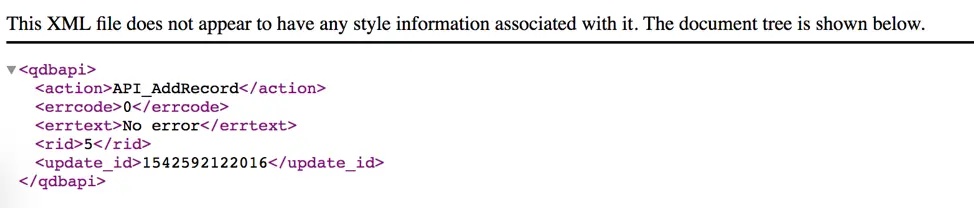
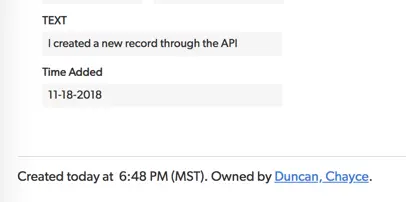
- https://quandarycg.quickbase.com/db/bn6wwekqv?a=API_AddRecord&_fid_6=I created a new record through the API&_fid_10=today
- You should see a result like this (see image below)
You can also try it out in the Quandary Knowledge Base to see it live in Quickbase.
- Author: Logan Lott
- Title: Solution Consultant | Quickbase
- Email: llott@quandarycg.com
- Date Published: June 19, 2026
Top 10 FAQs About Quickbase API_AddRecord
1. What is API_AddRecord in Quickbase?
API_AddRecord is a Quickbase XML API call that creates a single new record in a Quickbase table. Instead of manually entering data through a form, developers can automatically insert records by passing field values directly in a URL or API request. It is commonly used for buttons, integrations, automations, webhooks, and custom applications that need to create records programmatically.
2. What are the most common use cases for API_AddRecord?
API_AddRecord is frequently used to automate record creation across many business processes. Popular use cases include:
- Creating one-click action buttons
- Logging approvals or votes
- Automatically generating child records
- Creating audit history records
- Adding support tickets
- Receiving data from external applications
- Triggering records from webhooks
- Creating records through custom JavaScript
- Capturing user activity
- Automating workflow processes
Because it requires minimal configuration, API_AddRecord remains one of the simplest ways to automate Quickbase.
3. How do I create a record using API_AddRecord?
Creating a record requires six basic components:
- Your Quickbase realm
- The target table DBID
- The
API_AddRecordaction - Authentication using a User Token
- Optional Application Token (if required)
- The field IDs and values you want to populate
A typical request follows this structure: https://yourrealm.quickbase.com/db/yourdbid?a=API_AddRecord&usertoken=YOURTOKEN&_fid_6=John&_fid_7=Approved
Each _fid_#= parameter corresponds to a field within the target table.
4. Where can I find my Quickbase Table DBID?
Every Quickbase table has a unique Database ID (DBID).
To locate it:
- Open the table.
- Look at your browser's address bar.
- Find the characters immediately after
/db/. - Stop reading when you reach
?a=.
For example: https://company.quickbase.com/db/bn6wwekqv?a=td
- The table DBID is: bn6wwekqv
This value tells Quickbase exactly where the new record should be created.
5. Should I use Field IDs or Field Names in API_AddRecord?
Field IDs are considered the best practice. Although Quickbase allows developers to reference field names, field names can be renamed by administrators at any time. Field IDs never change, making integrations much more reliable over time.
- For example, this is recommended: &_fid_12=Approved
- Instead of &Status=Approved
Using Field IDs helps prevent broken automations after application updates.
6. Do I need a User Token or Application Token?
Most modern Quickbase implementations use User Tokens for authentication. Application Tokens are optional and are only required if your Quickbase application has Application Tokens enabled. In general:
- User Token = identifies the authenticated user
- Application Token = provides an additional security layer when enabled
For new development, Quickbase recommends using User Tokens rather than older authentication methods such as tickets.
7. Can API_AddRecord populate multiple fields at once?
Yes. One of the biggest advantages of API_AddRecord is that it can populate as many fields as needed during record creation.
- For example: &_fid_6=John Smith&_fid_7=Approved&_fid_8=Finance&_fid_10=Today&_fid_15=High Priority
Each additional field simply becomes another URL parameter.
This allows developers to fully populate records without requiring users to complete additional forms.
8. Can API_AddRecord be used with Quickbase buttons?
Absolutely. One of the most popular uses of API_AddRecord is creating custom Formula URL buttons.
For example, a button might:
- Submit an approval
- Cast a vote
- Create a follow-up tasks
- Generate a child record
- Create an invoice
- Add a project milestone
- Create an audit log
Users simply click the button, and Quickbase creates the new record automatically.
9. What happens if a required field is missing?
If a required field is not supplied—or contains invalid data—Quickbase will reject the API request and return an error message explaining why the record could not be created.
Common issues include:
- Missing required fields
- Invalid field IDs
- Incorrect table DBID
- Invalid User Token
- Insufficient permissions
- Incorrect data type (such as entering text into a numeric field)
Testing API calls thoroughly before deploying them into production is always recommended.
10. Is API_AddRecord still supported by Quickbase?
Yes. Although Quickbase encourages developers to use its modern RESTful APIs for new integrations, the XML API—including API_AddRecord—remains supported and is still widely used.
Many existing Quickbase applications rely on API_AddRecord because it is:
- Simple to implement
- Easy to troubleshoot
- Compatible with Formula URL buttons
- Ideal for lightweight automations
- Well suited for legacy Quickbase applications
Organizations continue to use API_AddRecord successfully for countless internal workflows and business processes.
11. What is the difference between API_AddRecord and the Quickbase REST API?
API_AddRecord belongs to Quickbase's legacy XML API, while the REST API is the newer interface designed for modern application development.
The XML API is ideal for:
- Formula URL buttons
- Legacy applications
- Quick automations
- Simple integrations
The REST API offers additional advantages, including:
- JSON payloads
- OAuth authentication
- Bulk record operations
- Improved error handling
- Enhanced security
- Better support for modern development framework
For organizations building new enterprise integrations, the REST API is generally the preferred approach. However, API_AddRecord remains an excellent choice for straightforward record creation and many existing Quickbase solutions.


Industries
Resources




© 2026 Quandary Consulting Group. All Rights Reserved.
Privacy Policy