
Knowledge Base
Articles In This Section
2026 Scheduled Quickbase Updates & MaintenanceQuickbase Release Notes: September 2020Sections
Quickbase Pave: AI-Powered App Builder for Enterprise Operations
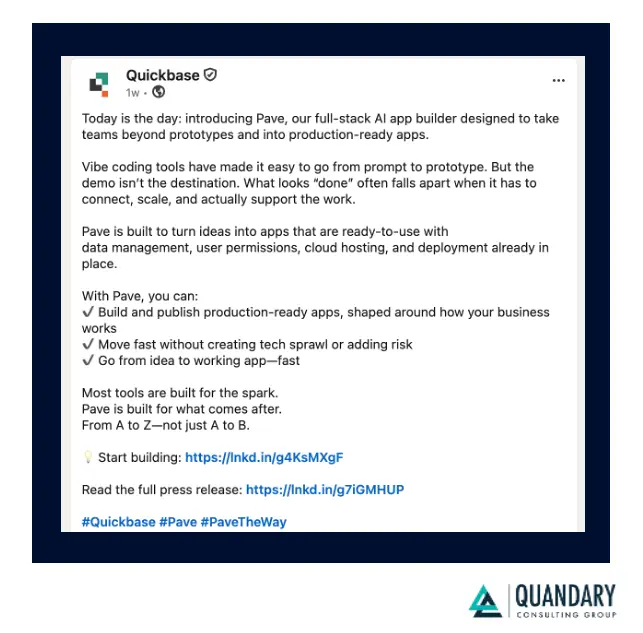
Quickbase’s new AI product, Pave, is essentially their attempt to turn “vibe coding” into something enterprises can actually run in production without the usual chaos that follows...
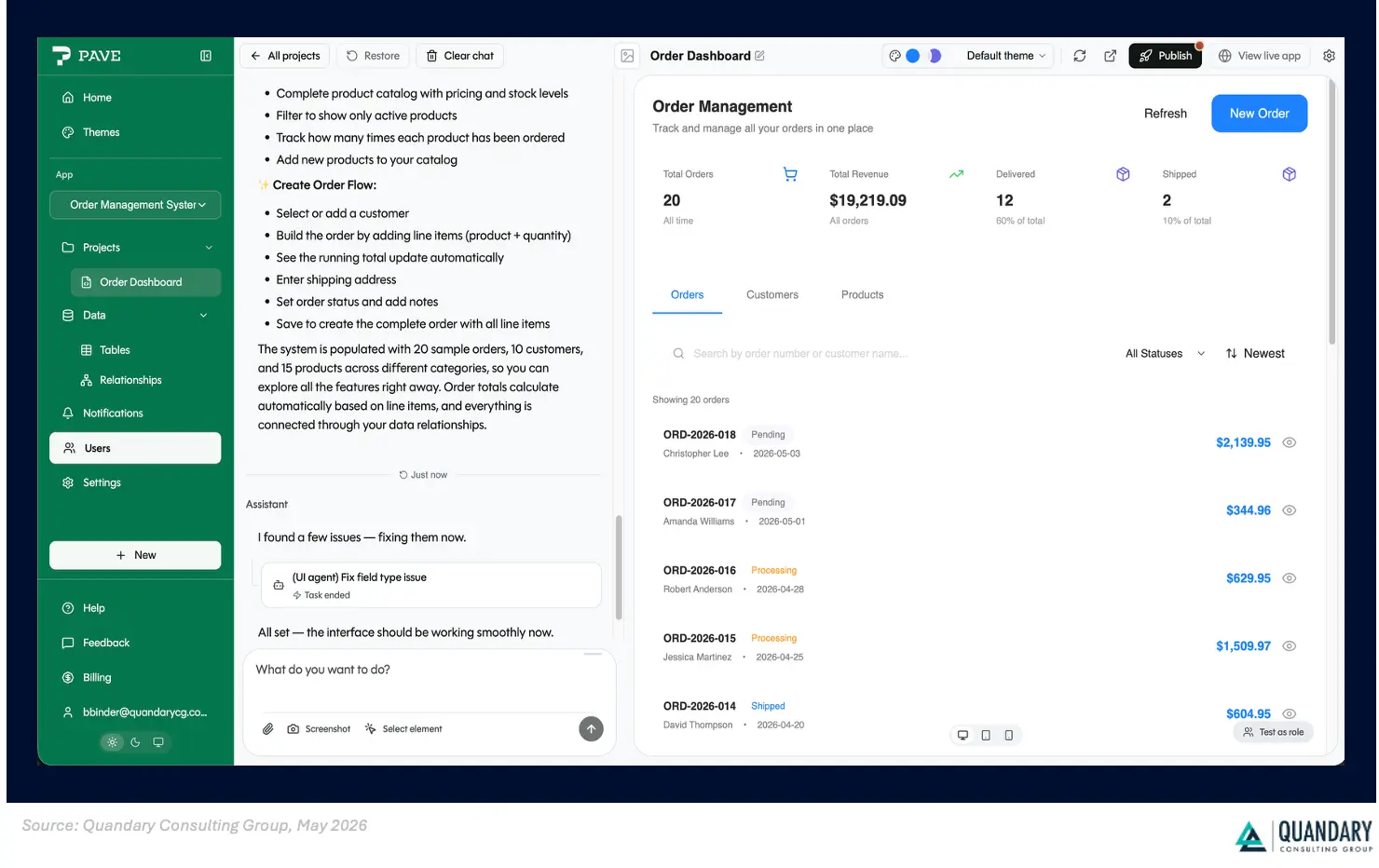
In practical terms, Pave is an AI-powered app builder where you describe a workflow or business problem in plain English, and it generates a working internal application — including the data model, UI, permissions, workflows, dashboards, notifications, and hosting infrastructure.
What makes it different from a lot of AI app builders is that Quickbase is positioning it less as a prototype toy and more as a governed operational platform. Their pitch is basically:
- Most AI builders get you from “idea → demo”
- Pave aims to get you from “idea → deployed enterprise app”
Quickbase announced Pave on April 28, 2026.
What does Pave actually do?
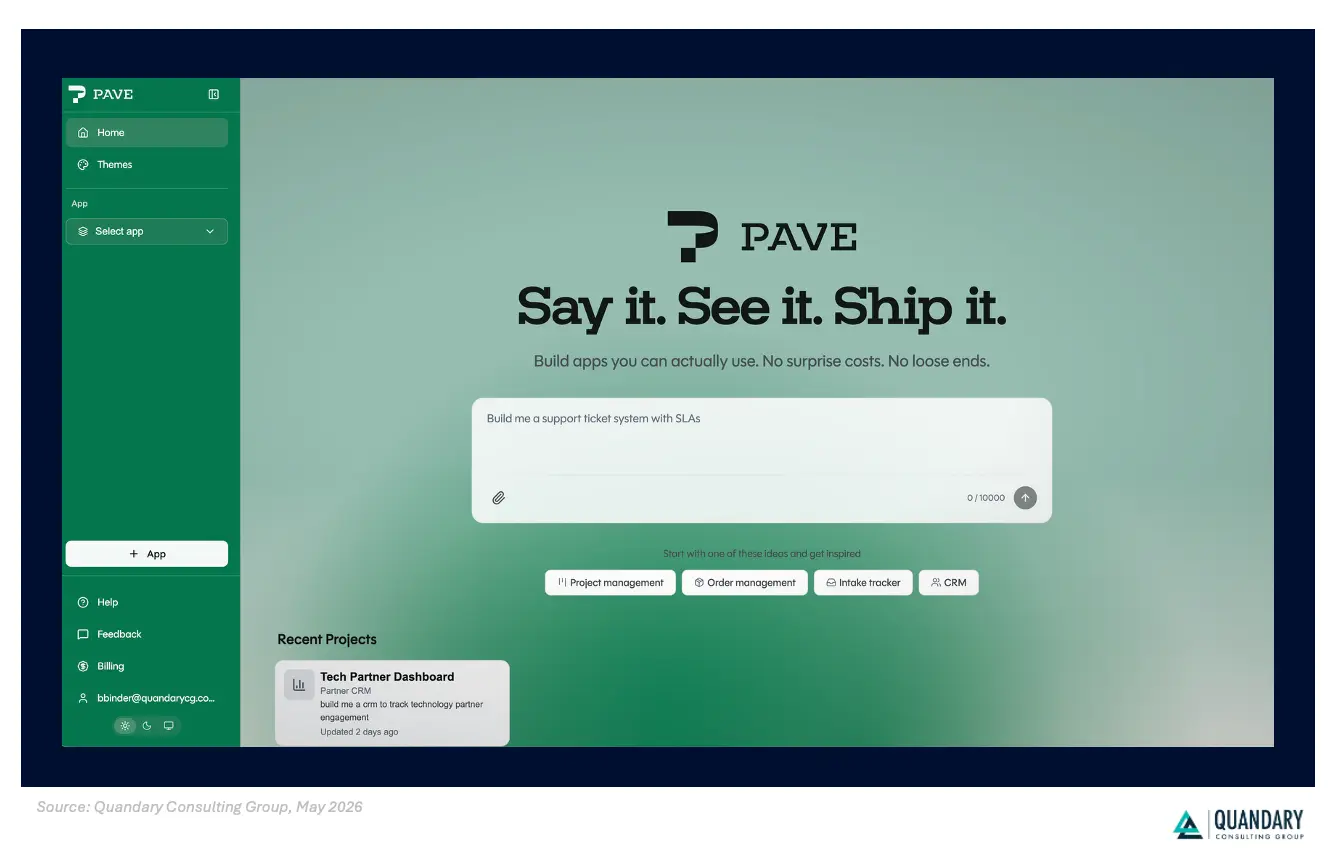
Pave lets you describe a business workflow or app in plain English and then automatically generates a working application, including its data structure, interface, and logic.
Here's a great example of what this means:
- You type a prompt like: “Build an intake request tracker with approvals, dashboards, and notifications.”
- Pave generates:
- tables/data relationships
- forms and dashboards
- business logic
- permissions and roles
- workflows and alerts
- You refine it conversationally or edit it visually through a no-code interface.
- Then you deploy it directly on Quickbase's infrastructure (aka your Quickbase realm).
What makes Pave different than other "vibe code" platforms?
One notable thing that is really cool is that Pave accepts more than text prompts. You can upload spreadsheets, process diagrams, PDFs, or images to help generate the app structure.
Another awesome feature (which is more of a 'strategic angle') is the governance and enterprise IT control. Quickbase is leaning heavily into the idea that current AI app generators often fall apart after the prototype stage — what some people call the “last 20% problem.”
So Quickbase developers created Pave to include:
- SSO/authentication
- audit logs
- rollback/version control
- role-based permissions
- managed hosting
- deployment tooling
- centralized oversight for IT teams
This matters because many AI-generated apps today are basically disconnected stacks glued together with:
- a frontend generator
- a separate database
- third-party auth
- cloud hosting
- workflow tools
- APIs
- manual deployment
Quickbase is trying to collapse everyone into one managed platform and their argument is that Pave reduces hidden infrastructure costs and governance headaches as apps scale.
How does Pave compare to other Vibe Coding Tools on the Market?
Pave sits in an interesting middle ground between classic low-code platforms and the new wave of AI-first “vibe coding” tools.
Most competitors optimize for either speed and creativity (like Lovable or Bolt) or enterprise governance and integrations (like Microsoft Power Apps and Retool).
Pave is trying to combine both: fast AI-generated app creation with the controls, permissions, hosting, and operational stability large companies need.
Here’s the simplest way to think about the landscape: comparison including some of the biggest AI-assisted development and “vibe coding” platforms currently shaping the market.
Here’s the simplest way to think about the landscape:
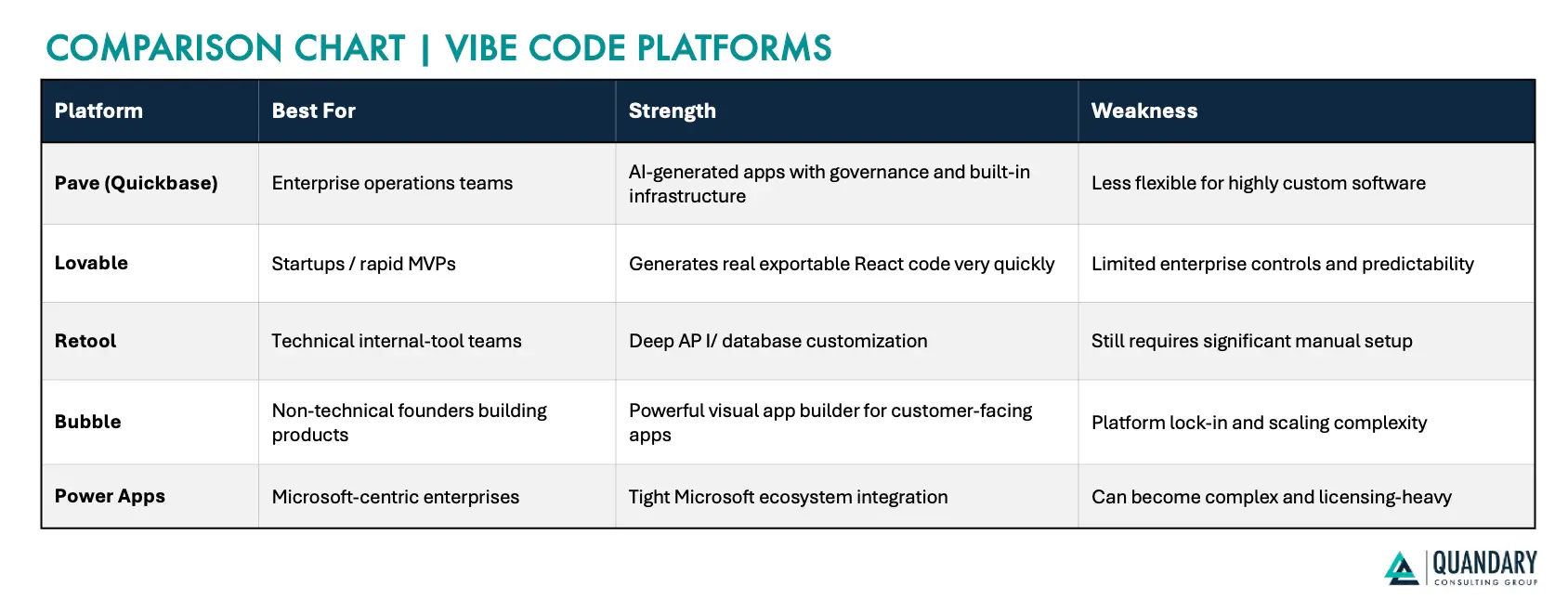
In short, the easiest way to remember is:
- Lovable and Bolt = fastest experimentation
- Retool = most developer control for internal tools
- Bubble = strongest no-code product builder
- Power Apps = strongest Microsoft enterprise ecosystem play
- Pave = strongest “AI-generated operational software with enterprise governance” positioning
The major divide in the market right now is between:
- "Need to generate an app quickly” tools
- “Need to operate a real business system safely” platforms.
Pave is clearly positioning itself in the second category. Quickbase’s messaging repeatedly emphasizes governance, permissions, deployment, auditability, and infrastructure management rather than just fast prototyping.
Who will Benefit the Most from Pave?
In our opinion, Pave will probably resonate most:
- operations teams
- PMOs
- construction/manufacturing workflows
- internal tooling
- process-heavy mid-market enterprises
- teams already using Quickbase
Where I’d still be cautious [when it comes to Pave]
- highly custom consumer-grade apps
- complex engineering-heavy products
- advanced backend architectures
- apps requiring deep custom code ownership
The marketing language around “full-stack AI app builder” sounds ambitious, but under the hood this is still a managed low-code platform with AI generation layered on top — not autonomous software engineering magic. This distinction matters when evaluating what it can realistically replace.
How much does Pave cost and How to Get Started with Pave?
Pave currently has four pricing tiers, ranging from a free plan for experimentation to custom enterprise pricing for large organizations. The pricing is 'workspace-based' rather than traditional 'per-seat' enterprise software pricing.
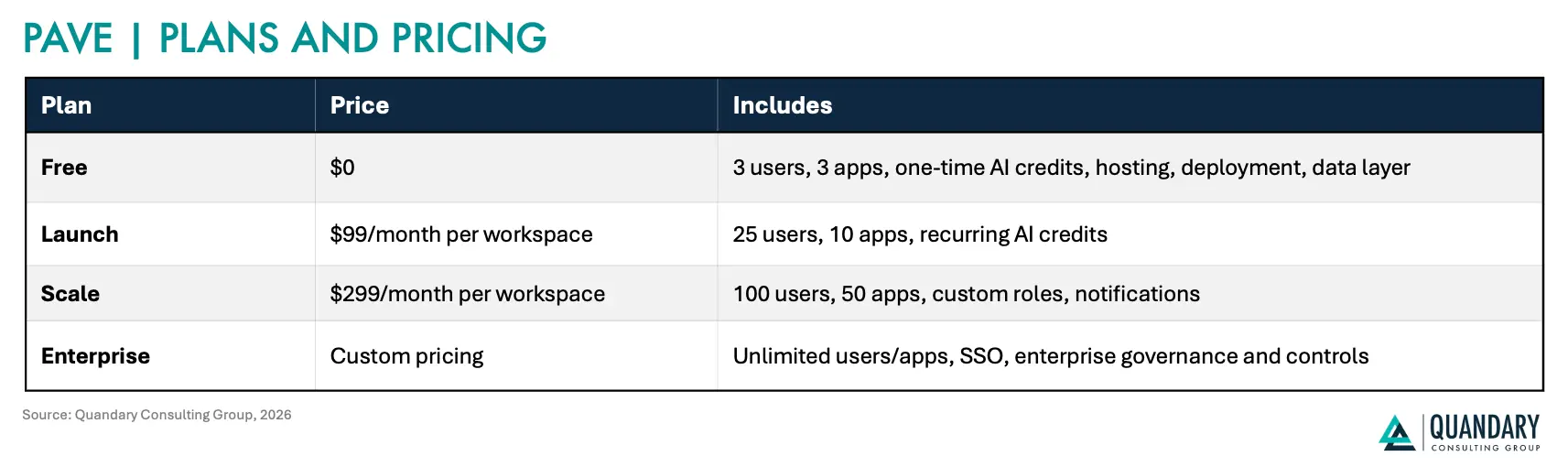
A few notable things about their pricing strategy:
- Hosting and deployment are included.
- The database/data layer is included.
- Permissions and governance are built in.
- They’re specifically marketing against the “hidden infrastructure cost” problem common with other AI app builders.
Quickbase is positioning this as more predictable than tools where costs scale unpredictably with API calls, cloud hosting, external databases, or collaborator seats.
How to Get Access to Pave:
You can start immediately through the public site.
- No credit card is required for the free tier.
- Existing Quickbase customers can also use Pave within the broader Quickbase ecosystem.
Here’s a Quick TL;DR of Everything we just covered:
What Pave is:
An AI-powered app builder from Quickbase that turns plain-English prompts (or files like spreadsheets/diagrams) into fully functional internal business apps—complete with data models, workflows, dashboards, permissions, and hosting.
What it actually does:
It goes beyond prototyping by generating apps you can deploy immediately, with built-in infrastructure, governance, and enterprise controls already handled.
How it compares:
- Faster builders (Lovable, Base44, v0) = great for MVPs and experimentation
- Developer tools (Cursor, Claude Code) = boost engineers, not replace them
- Enterprise tools (Power Apps, Retool) = powerful but more manual
- Pave = middle ground → AI speed + enterprise-ready structure
Who it’s best for:
- Operations teams (PMOs, field ops, supply chain, etc.)
- Business teams building internal tools without engineering
- IT teams trying to reduce shadow IT while keeping control
- Mid-market companies needing custom software without big dev teams
Pricing:
- Free → small teams/testing
- $99–$299/month → growing teams
- Enterprise → custom
- Includes hosting, database, permissions, and deployment
Top FAQs about Pave
1. What is Pave?
Pave is Quickbase’s AI-powered full-stack app builder designed for enterprises. It lets users describe a business problem in natural language and generates deployable business applications with workflows, permissions, dashboards, hosting, and governance built in.
2. How is Pave different from other vibe coding tools?
Most vibe coding tools focus on rapid prototyping. Pave is specifically positioned for production-ready enterprise deployment with governance, SSO, audit trails, permissions, rollback, and infrastructure included.
3. Who is Pave designed for?
Pave is aimed at:
- Operations teams
- PMOs
- Business process owners
- Mid-market enterprises
- IT teams managing shadow IT
- Nontechnical users building internal operational apps
4. Does Pave require coding knowledge?
No. Pave uses plain-language prompting and a no-code interface so nontechnical users can build apps conversationally. However, technical users can still customize workflows and logic more deeply.
5. What kinds of apps can Pave build?
Pave is best suited for:
- Intake/request systems
- Approval workflows
- Project tracking
- Field operations
- Scheduling
- Operational dashboards
- Workflow automation
- Internal business tools
6. Is Pave only for Quickbase customers?
No. New users can sign up directly for Pave, including a free tier. Existing Quickbase customers can also integrate it into their current Quickbase environments.
7. Does Pave include hosting and infrastructure?
Yes. Quickbase emphasizes that Pave includes:
- Cloud hosting
- Data management
- Deployment infrastructure
- Permissions
- Governance
- Runtime environment
The company is positioning this as a simpler alternative to stitching together multiple vendors and services.
8. What enterprise governance features does Pave include?
Pave includes:
- SSO authentication
- Granular permissions
- Audit trails
- Version rollback
- Centralized IT oversight
- Secure infrastructure inherited from Quickbase’s platform
9. What is the “80% problem” Pave is trying to solve?
Many AI app builders can quickly generate prototypes but struggle to turn them into stable production systems. Industry commentary around Pave says Quickbase is specifically targeting this “last mile” problem by combining AI generation with operational infrastructure and governance.
10. How much does Pave cost?
Current pricing includes:
- Free tier
- Launch tier: $99/month
- Scale tier: $299/month
- Enterprise pricing: custom
Pricing is workspace-based and includes infrastructure.
11. How does Pave compare to Cursor or Claude Code?
Cursor and Claude Code primarily help software engineers write code faster. Pave is more focused on helping business users and operational teams generate governed business applications without traditional software engineering workflows.
12. Is Pave replacing software developers?
Probably not. Pave is much better suited for operational workflows and internal business tooling than highly custom engineering-heavy applications. It’s more accurately viewed as an enterprise low-code platform enhanced with AI generation rather than fully autonomous software engineering.
13. Can IT still maintain control if business users build apps?
That’s actually one of Pave’s main selling points. Quickbase repeatedly emphasizes centralized governance and IT oversight so organizations can enable faster app creation without losing security and operational control.


Industries
Resources


© 2026 Quandary Consulting Group. All Rights Reserved.
Privacy Policy