
Knowledge Base
Articles In This Section
Mastering Pipefy Interfaces: A Comprehensive How-To Guide | BEGINNERSections
How to Build a Mini-App with Pipefy AI Automation
Pipefy is a workflow automation and business process management (BPM) platform used by companies to organize, automate, and track their internal operations.
Think of Pipefy as a tool that helps teams standardize how work gets done—like onboarding employees, approving expenses, handling support tickets, or running marketing campaigns—without needing to code.
What Does Pipefy Do?
- Automates processes: Reduces manual work by automating repetitive tasks and approvals
- Visual workflows (“pipes”): Breaks processes into stages so you can see progress clearly
- No-code setup: You can build workflows using a visual interface instead of programming
- Centralizes work: Keeps tasks, data, and communication in one place
- Integrates with other tools: Connects with systems like Slack, Google Workspace, CRMs, etc.
What is Pipefy Commonly Used For?
Companies use Pipefy across departments, for example:
- HR: Hiring, onboarding, employee requests
- Finance: Invoice approvals, procurement workflows
- Marketing & sales: Campaign tracking, lead management
- IT & operations: Service requests, incident management
Why Companies Use Pipefy?
- Improves efficiency and productivity
- Reduces errors and delays from manual work
- Gives visibility into what’s happening across processes
- Helps teams scale operations without adding complexity
How to Use Pipefy's AI Automation Tool
The Pipefy AI Automation tool is an out-of-the-box solution you can use to build applications. It is included with all Pipefy licenses, including the free Starter program. This means you can experiment with it freely. (Just remember to be specific in your prompts.)
In this walkthrough, we will show how to build a mini-app using Pipefy AI and provide actionable tips (best practices) for future application builds.
How to Build a Mini-App with Pipefy AI in 45 Minutes
For this exercise, we will build an automated process to analyze customer satisfaction from online testimonials.
What are the Key Pipefy Basics
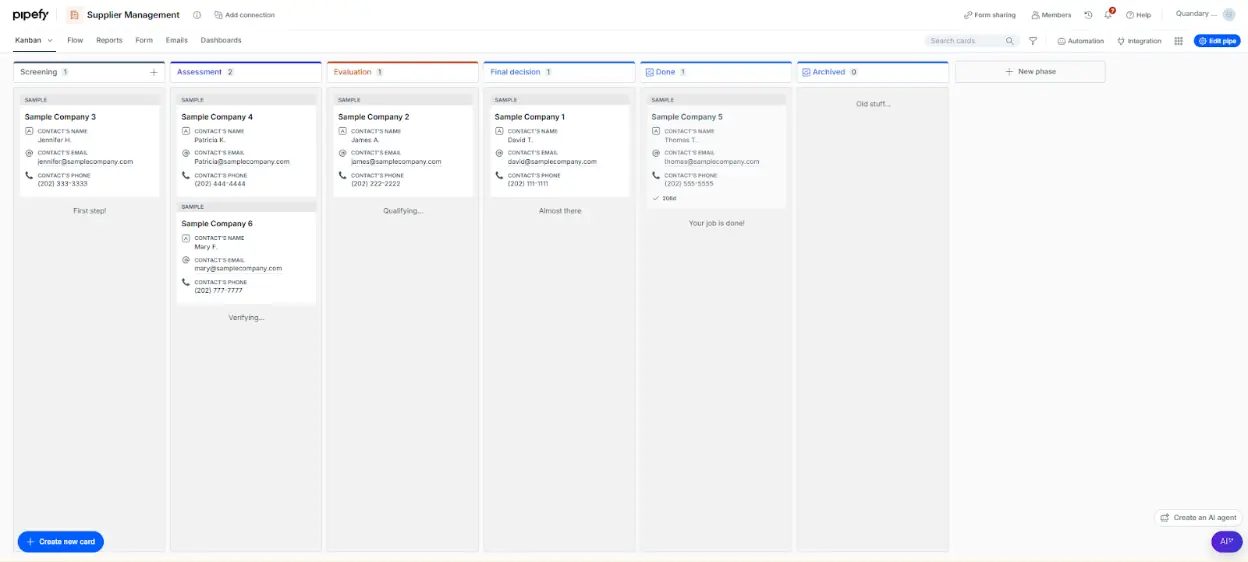
The graphic above shows a typical Pipe in Pipefy.
- Pipes are Kanbanized processes, with cards (i.e. “Sample Company 1”), moving to different Phases (i.e. “Final Decision”) to gather data.
- Typically, you receive initial data via a “Start Form”, which creates a card on the Kanban board.
In the following use case, we will use a public Start Form to collect Customer Testimonial data, then, we will use Pipefy’s AI Automation to gather data.
How to Create a New Pipe in Pipefy
- Select New pipe from the home page.
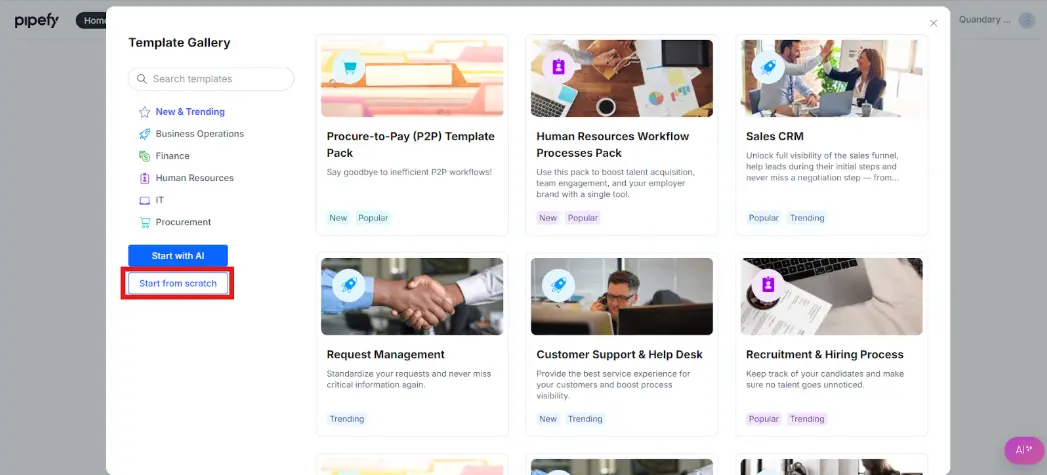
- Please select “Start from Scratch” from the template gallery.
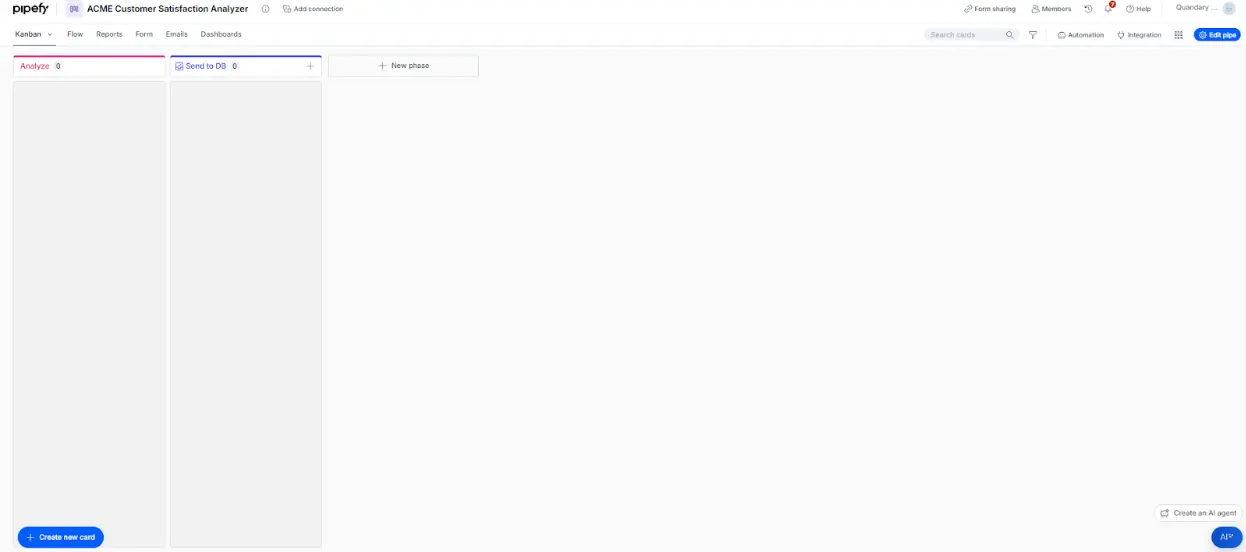
Give your Pipe a descriptive name. (I’ve named mine ACME Manufacturing Customer Satisfaction Analyzer.)
How to Set Up a New Application in Pipefy
Follow these steps to ensure your application is as clean as possible.
- Delete the middle Phase. For any implementation, keep your workspace clean. In this mini-use case, we only need one process phase before the pipe finishes, so deleting the middle phase makes sense.
- Rename Phase 1 to Analyze.
- Rename Phase 2 to Send to DB or keep it as Done.
- I like to archive my data and use it for reporting, so a logical next step is to send the finished cards to a Database. However, we won’t be using it.
Your Pipe should look like the picture below.
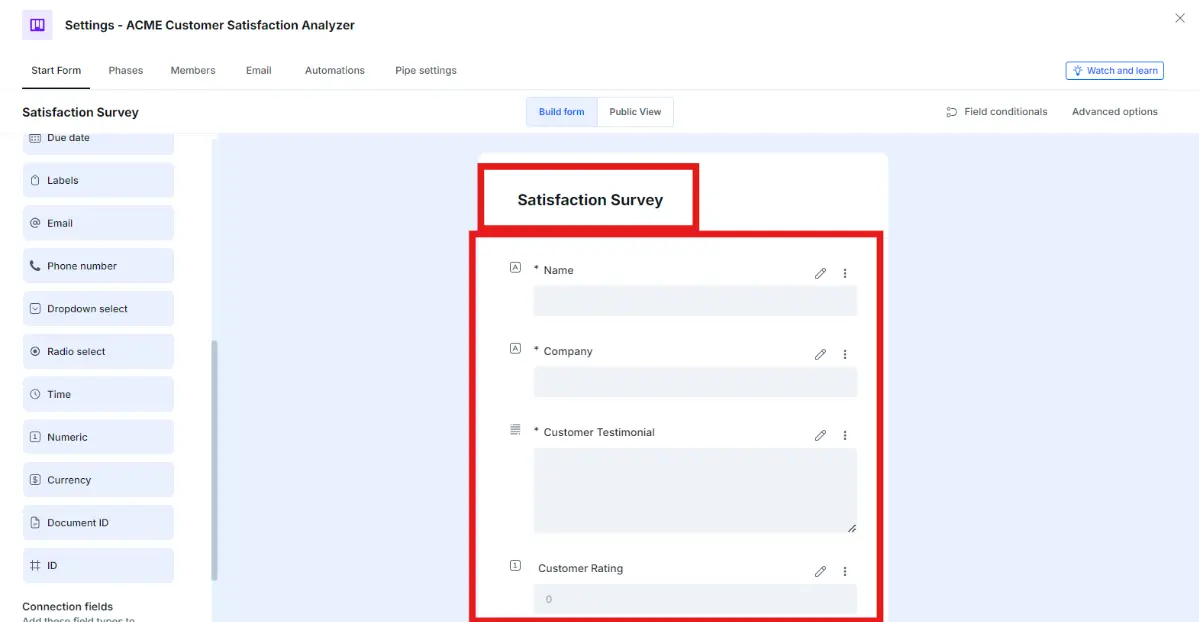
How to Edit Pipefy's Start Form
- Rename the Start form to Satisfaction Survey.
- Create two short text fields: a. Customer Name (Required) b. Company (Required)
- Create one long text field: a. Customer Testimonial (Required)
- Create one numeric field: a. Customer Rating
- Check your work with the screenshot below.
How to Edit the Pipefy Analyze Phase
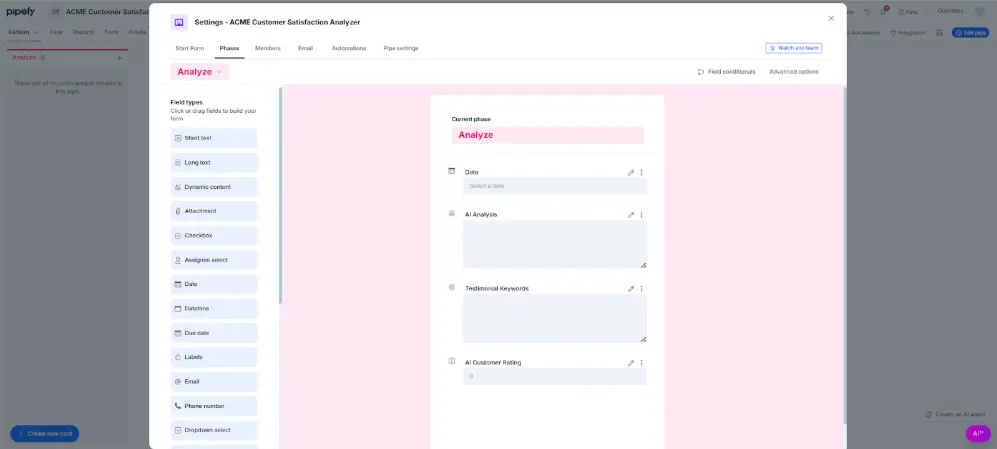
First, let’s create fields to store Pipefy’s AI analysis.
- Go to phase settings.
- Edit the Analyze Phase.
- Create a long text field: a. Analysis Output
- Create a numeric field: a. AI Rating
- Check your work with the screenshot below.
How to Build with Automation in Pipefy
You will create an automation to analyze the text string collected in “Customer Testimonial.” The output will be an analysis and a numeric rating of the testimonial.
- Navigate to Phase Settings.
- Create a new automation (under the Automations) tab.
- Select a trigger. (In this case, we want to trigger when a new testimonial or “card” is created. (See Screenshot under “Write the AI Prompt”)
- Select “Generate with AI”
How to Write the Best AI Prompt
The Pipefy AI tool is a powerful automation tool, but clear and specific prompts are still necessary.
To succeed, you must iterate over multiple prompts and configurations to ensure the best possible outcome. You will likely need additional setup, especially as a beginner user of the AI tool.
Attempting large, complicated AI prompts is not recommended until you have experience with the tool.
- Instead, consider breaking large prompts with many attempted functions into a series of smaller automations until you gain experience.
Follow These Steps to Create the AI Prompt in Pipefy
- Copy and paste this prompt template for AI Analysis of a customer testimonial:
Key Analysis Goals:
- Determine overall sentiment (positive, negative, neutral).
- Extract specific benefits and drawbacks mentioned.
- Suggest actionable insights for marketing and product development.
- Provide a rating of 1-5 based on the customer’s satisfaction
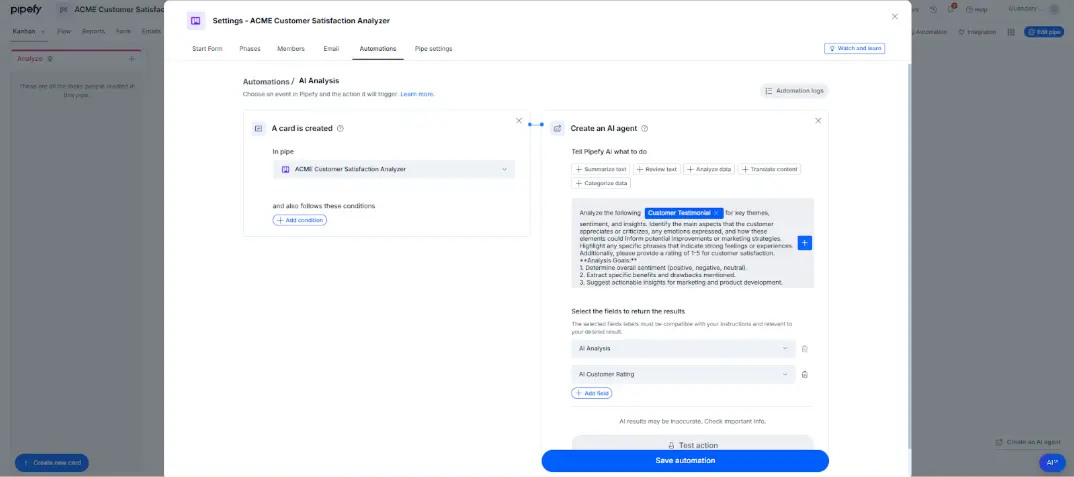
- Replace “Customer Testimonial” with the field tag. (See Below).
- Additionally, you can map the fields; as seen below the prompt.
Three Sample Testimonials for This Exercise
These are a few AI-generated testimonials with names from ChatGPT you can use to test the application.
Positive Testimonial:
"I've been working with ACME Manufacturing for over five years, and I can honestly say they are one of the best suppliers in the industry. Our company, GlobalTech Solutions, has demanding production schedules, and ACME has consistently provided the quality materials we need, right on time.
The team at ACME goes above and beyond to understand our specific requirements and has even customized some of their processes to better fit our needs. This flexibility has been a huge asset for us, especially as we've grown and had to scale up production. The quality control at ACME is top-notch, and we rarely, if ever, find defects or issues with their products.
I also want to mention how great their customer service team is – any time we've had a question or needed to make adjustments to an order, they've responded quickly and professionally. ACME Manufacturing has become a trusted partner for us, and I look forward to many more years of successful collaboration."
– Sarah J., Procurement Manager, GlobalTech Solutions
Neutral Testimonial:
"Our experience with ACME Manufacturing has been mostly satisfactory, though there have been a few hiccups along the way. We chose ACME because of their reputation and competitive pricing, and they’ve generally lived up to that.
Their products meet our specifications, and the quality is what we expected – no complaints there. The order processing and delivery have been reliable, although there was one instance where a shipment was delayed. The customer service team was responsive, but we didn't receive a clear explanation for the delay, which left us a little frustrated at the time.
Overall, we continue to use ACME because they deliver solid products at a fair price, and we've only had one minor issue in the year we've been working with them. They might not be exceptional in all areas, but they get the job done well enough for us to keep coming back."
– Michael R., Operations Director, BlueWave Components
Negative Testimonial:
"Our experience with ACME Manufacturing was, unfortunately, disappointing.
We initially chose them for a large project at InnoSteel Industries because they offered competitive pricing and appeared to have a solid reputation. However, several aspects of our dealings fell short. Our first order was delayed by over two weeks, which caused major disruptions to our own timelines.
When we contacted customer service to get updates, it was difficult to get a clear answer, and we were passed around to multiple representatives before anyone could provide us with real information.
Additionally, when the materials finally arrived, we noticed several pieces did not meet the quality standards we’d specified. While ACME did eventually replace the defective items, this took additional time and cost us further delays.
The experience as a whole was stressful and put us in a tough position with our own clients. Although ACME might work well for some, I would advise caution and make sure you have a backup plan in case things don’t go smoothly."
– Daniel T., Project Manager, InnoSteel Industries
Key Actionable Tips for Future Builds in Pipefy
- Keep your automations simple, then begin testing and adding other desired functionality.
- Consider data integrity: Provide your AI with a clear prompt that highlights any constraints needed. Consider using a different automation when a strict rule is needed for field updates.
- Filter data inputs to ensure AI success. Consider the integrity of your data intake method and apply constraints to ensure data is well structured for AI consumption.
- Don’t fully trust the AI (yet). The AI might have been trained on the entire internet, but sometimes you need to monitor it, especially when running the Automation extensively.
- I like to use the test action provided by Pipefy, which allows for easy observation of outputs and prompt tweaking.
Useful Pipefy Resources
Starter Account Pipefy Licensing Breakdown with Link to Free Starter Account
Beginner Certification (Free with account) Pipefy Process Manager Certification
Pipefy AI Course (Free with account) Artificial Intelligence with Pipefy AI
FAQs about Pipefy AI Automation
1. What is Pipefy and how does it work?
Pipefy is a no-code workflow automation platform that helps businesses streamline processes like HR onboarding, finance approvals, and customer support. It works by organizing tasks into customizable workflows (called “pipes”), where each stage represents a step in a process, allowing teams to track, automate, and manage work efficiently in one place.
2. What are the benefits of using Pipefy for businesses?
Pipefy helps businesses improve efficiency, reduce manual errors, and gain visibility into operations. Companies use it to automate repetitive tasks, standardize workflows, and scale processes without needing technical expertise, making it especially valuable for growing teams and operations-heavy organizations.
3. How does Pipefy compare to tools like Asana or Monday?
Pipefy focuses more on process management and automation, while tools like Asana and Monday.com are primarily project management platforms. Pipefy is better suited for structured workflows like approvals and service requests, whereas Asana and Monday.com are often used for task tracking and team collaboration.
4. Is Pipefy suitable for small businesses or only large enterprises?
Pipefy is designed for businesses of all sizes, including small and mid-sized companies. Its no-code interface makes it accessible for smaller teams, while its automation and scalability features support larger enterprises with complex workflows and higher volumes of tasks.
5. What industries use Pipefy the most?
Pipefy is commonly used in industries such as finance, healthcare, marketing, HR, and IT services. In the U.S. and globally, companies use it to manage procurement, employee onboarding, customer support, and operational workflows that require consistency and compliance.
- Author: John Orsak
- Email: jorsak@quandarycg.com
- Date updated: 2/14/2026






© 2026 Quandary Consulting Group. All Rights Reserved.
Privacy Policy