Automation
Top 5 Workflow Automation Software for Business Process Management

TL;DR
- Workflow automation software connects people, processes, data, and business systems to automate repetitive tasks, eliminate manual handoffs, and streamline end-to-end operations.
- AI-powered workflow automation goes beyond rules-based automation, using AI and intelligent agents to interpret information, process unstructured data, support decisions, and manage complex workflows.
- Platforms such as Workato, Quickbase, Pipefy, Kissflow, Zapier, and ProcessMaker offer different strengths in integration, low-code development, process management, customization, and scalability.
- The right workflow automation strategy can reduce manual work, accelerate cycle times, improve data accuracy, lower operating costs, and increase productivity while maintaining governance and human oversight.
- Modern workflow automation combines AI, integration, data orchestration, low-code development, and human-in-the-loop processes to help organizations build more intelligent and adaptable operations.
Workflow automation software helps organizations design, run, and monitor repeatable business processes with less manual work. The best platform depends on what you need to automate: Workato is strongest for enterprise integration and orchestration, Quickbase for custom operational applications, Pipefy for structured no-code processes, Kissflow for business-led app and workflow development, and Zapier for fast automation across a broad app ecosystem.
In 2026, this category extends beyond basic “if this, then that” rules. Leading products now combine integrations, workflow logic, data, governance, analytics, and AI agents. That makes platform selection more consequential: the right system can become an operational layer across departments, while the wrong one can create new silos, unpredictable costs, or difficult-to-govern automations.
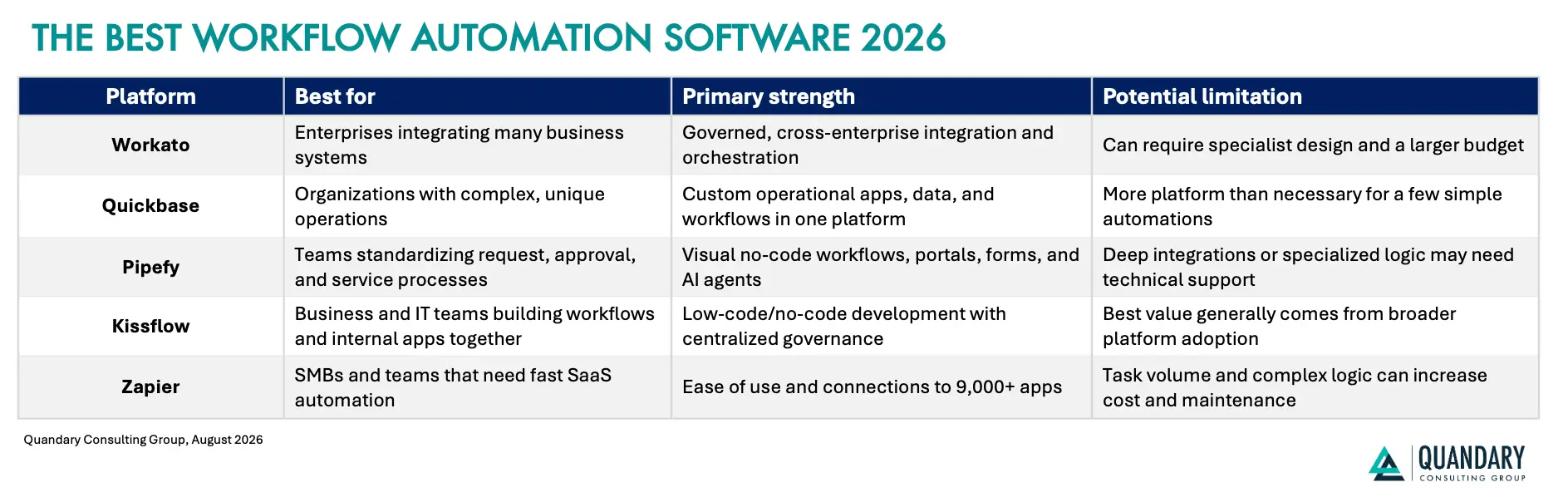
This guide compares five leading workflow automation platforms, explains where each fits, and provides a practical framework for choosing the right software.
How Quandary Evaluated The Platforms
This is a best-fit comparison, not a universal ranking. We evaluated each product using criteria that matter during real-world selection and implementation:
- Workflow design, forms, rules, approvals, and exception handling
- Integration breadth, APIs, webhooks, and data connectivity
- Low-code or no-code usability for business teams
- Governance, security, auditability, and administrative controls
- Reporting, monitoring, error handling, and process visibility
- AI-assisted building and agentic automation capabilities available in 2026
- Scalability for multi-team and enterprise use
- Likely implementation effort and total cost of ownership
What Is Workflow Automation Software?
Workflow automation software is technology that moves tasks, information, decisions, and approvals through a defined business process. It typically uses three building blocks:
- Trigger: An event starts the workflow, such as a submitted form or signed contract.
- Conditions: Business rules determine what should happen, such as routing a high-value purchase to a finance leader.
- Actions: The platform completes steps, such as updating a CRM, generating a document, notifying a manager, or creating an ERP record.
Modern platforms may also provide forms, portals, databases, dashboards, application builders, process intelligence, AI-assisted development, and AI agents. However, AI does not eliminate the need for process design. High-impact or irreversible decisions still need clear guardrails, permissions, monitoring, and human review.
The 5 Best Workflow Automation Software Platforms in 2026
1. Workato
Best for Enterprise Integration and Orchestration
Best for: Mid-market and enterprise organizations that need to connect core systems and govern automations across departments.
Workato is an enterprise automation and integration platform. Its workflows, called recipes, connect triggers and actions across cloud applications, databases, APIs, and supported on-premises systems. This makes Workato particularly relevant when a process crosses systems such as Salesforce, NetSuite, Workday, ServiceNow, Slack, or Microsoft applications.
Workato’s advantage is not merely moving data from one app to another. It is designed to orchestrate multi-step processes, apply business logic, transform data, handle exceptions, and give IT teams centralized control.
Common use cases include lead-to-cash, employee onboarding, order-to-cash, support operations, identity processes, and embedded customer integrations.
Standout Workato Capabilities in 2026
- Visual recipe building for triggers, actions, conditions, loops, and reusable logic
- Broad prebuilt connector ecosystem plus API and custom-connector options
- Enterprise administration, role-based access, auditability, and lifecycle controls
- On-premises connectivity for supported enterprise and legacy environments
- Embedded integration capabilities for software providers
- AI-agent and Model Context Protocol (MCP) capabilities through Agent Studio and MCP Gateway
Workato’s June 2026 product update added greater observability for AI-agent conversations, programmatic knowledge-base management, and more prebuilt MCP servers. Those additions reflect a wider market shift: enterprises increasingly need to govern what AI agents can access and do, not simply connect more apps.
Where Workato Performs Best: Workato is a strong choice when integrations are business-critical, processes span several departments, and failures must be visible and recoverable. It also suits organizations that want business technologists to participate in automation while IT retains architectural and security control.
Workato Limitations and Considerations: Workato may be more platform—and more implementation effort—than a small team needs for a handful of straightforward workflows. Complex recipes still require disciplined architecture, testing, naming standards, error handling, and ownership. Workato uses usage-based platform pricing, so buyers should model expected workflow and connectivity usage instead of comparing subscription prices alone.
Workato Verdict: Choose Workato when integration depth, enterprise governance, and cross-system orchestration are more important than having the lowest-cost or simplest entry point.
2. Quickbase
Best for Custom Operational Applications
Best for: Operations-intensive organizations that need a custom application, shared operational data, and automated workflows in one environment.
Quickbase is a low-code platform for building operational applications. Unlike tools focused primarily on app-to-app triggers, Quickbase can serve as the working system where teams collect data, manage records, coordinate tasks, automate actions, and view dashboards.
That distinction matters for organizations running critical operations through spreadsheets, email chains, and disconnected point solutions. A Quickbase application can replace those fragments with a governed data model and interfaces designed around the actual process.
Typical use cases include project delivery, field operations, construction management, compliance, asset tracking, resource planning, vendor management, and complex customer onboarding.
Standout Quickbase Capabilities in 2026
- Low-code application builder with relational data and role-specific interfaces
- Pipelines and automations that move data and trigger actions across systems
- Dashboards, reports, notifications, approvals, and operational insights
- Mobile capabilities for distributed and field teams
- Administrative and governance features for scaling citizen development
- AI-assisted capabilities positioned around operational intelligence and eliminating “gray work”—manual coordination outside systems of record
Quickbase emphasize native workflow automation, APIs, webhooks, integration channels, and governed connectivity. Its 2026 direction also places more emphasis on agentic AI and operational governance, especially for complex, changing work.
Where Quickbase Performs Best: Quickbase is strongest when the business needs more than integration. If a team needs a tailored system of engagement around data from an ERP, CRM, or other source, Quickbase can provide the application layer without requiring conventional software development for every change. It is especially useful when packaged software handles most of a process but the remaining operational requirements are unique and strategically important.
Quickbase Limitations and Considerations: Quickbase requires thoughtful application and data design. Citizen development without governance can lead to redundant apps, inconsistent fields, and unclear ownership. Organizations should define development standards, environments, access roles, and maintenance responsibilities before expanding adoption. It may also be excessive for teams that only want to synchronize two SaaS applications.
Quickbase Verdict: Choose Quickbase when you need to build a flexible operational solution around your process—not simply automate a few steps between existing apps.
3. Pipefy
Best for Structured No-Code Process Automation
Best for: Operations, finance, HR, procurement, and shared-services teams that want to standardize request-driven processes quickly.
Pipefy is a no-code process orchestration platform built around visual workflows, forms, portals, rules, approvals, data, analytics, and integrations. Its board-style experience makes each request or work item easy to track, which is valuable for processes that currently disappear into inboxes or spreadsheets.
Teams can use Pipefy to create intake forms, validate information, route requests, enforce service-level rules, request approvals, communicate with stakeholders, and report on cycle times.
Common uses include purchase requests, accounts payable, employee onboarding, service requests, customer onboarding, claims, and vendor management.
Standout Pipefy capabilities in 2026
- No-code workflow and AI-agent building with natural-language assistance
- Forms and portals for structured internal or external requests
- Business rules, approvals, SLAs, notifications, and conditional routing
- Data tables, reports, process visibility, and usage monitoring
- Native automation plus iPaaS-style integration options, APIs, and webhooks
- Enterprise messaging connections and governance controls
Pipefy’s 2026 platform positioning combines AI Studios with end-to-end process orchestration. The vendor highlights governed agents, built-in assistants, portals, forms, messaging, analytics, integrations, and real-time consumption visibility within one platform.
Where Pipefy Performs Best: Pipefy is compelling when a process follows recognizable stages and begins with a request, document, case, or approval. Business teams can understand and improve the workflow visually, making it easier to establish ownership and spot bottlenecks.
Pipefy Limitations and Considerations: Organizations should test integration requirements early. A polished visual process does not guarantee that legacy systems, complex data transformations, or unusual transaction patterns will be easy to connect. Teams should also establish standards for when AI may recommend, route, or act—and where a human must approve the outcome.
Pipefy Verdict: Choose Pipefy when process standardization, request management, and business-team usability are the primary goals.
4. Kissflow
Best for Business-Led Workflow and App Development
Best for: Organizations that want business users and IT to collaborate on workflows, case management, and internal applications.
Kissflow combines workflow automation with low-code application development. Teams can build approval workflows and forms, but they can also create more complete applications for operational processes that do not fit neatly inside standard software.
Kissflow is often considered for procurement, HR, finance, IT service delivery, project-related processes, and industry-specific applications. Its broader platform approach is useful when an organization wants one governed environment for several types of business-led development.
Standout Kissflow capabilities in 2026
- Visual workflow design, forms, rules, approvals, and process tracking
- Low-code tools for custom applications and interfaces
- Case management for processes that require flexible rather than strictly linear paths
- Integration, reporting, mobile access, governance, and administrative controls
- AI-assisted workflow development and no-code AI agents with defined boundaries
In June 2026, Kissflow described no-code agents that can find information, execute tasks, and retain context across steps while people remain responsible for decisions and IT controls system access. That human-led, governed model is more realistic for enterprise adoption than unrestricted autonomy.
Where Kissflow Performs Best: Kissflow fits organizations that want to reduce the IT backlog while retaining centralized visibility. It can support a portfolio of departmental solutions instead of forcing every workflow into a standalone tool.
Kissflow Limitations and Considerations: The platform’s breadth can introduce a learning curve, particularly when teams progress from basic approval flows to custom applications. Governance, integration architecture, and support ownership should be planned before citizen development expands. Buyers should confirm whether required capabilities are included in the proposed package and whether the economics make sense for the expected number of users and applications.
Kissflow Verdict: Choose Kissflow when you need a governed platform for both workflow automation and business-led application development.
5. Zapier
Best for Fast, Accessible SaaS Automation
Best for: Small and midsize businesses, marketing and revenue teams, and departments that want to connect cloud applications quickly.
Zapier is one of the most accessible automation platforms for connecting software without conventional development. A Zap starts with a trigger and performs one or more actions. More advanced workflows can include filters, paths, formatting, webhooks, schedules, and other logic.
Zapier’s greatest strength is connectivity and time to value. As of August 2026, Zapier advertises integrations with more than 9,000 applications. Its platform also includes Tables for workflow data, Forms for intake, Canvas for planning, Chatbots, Agents, Copilot, and MCP connectivity.
Standout Zapier capabilities in 2026
- More than 9,000 app integrations advertised by the vendor
- Fast, no-code workflow building and extensive templates
- Multi-step workflows with filters, branching, schedules, and data formatting
- Tables and Forms for lightweight data storage and intake
- AI Agents, AI-assisted building, and MCP connections that let supported AI clients take actions across apps
- Run history and error-handling features for monitoring automations
Zapier’s June 2026 guidance emphasizes AI-agent orchestration: specialized agents can share context and coordinate tasks, while run history and permissions help teams monitor what happens. This expands Zapier’s role beyond simple SaaS handoffs, although governance and architecture still matter as automation volume grows.
Where Zapier Performs Best: Zapier is ideal for quickly automating common SaaS processes such as lead routing, campaign operations, notifications, contact synchronization, support triage, and administrative handoffs. It is often the fastest way to test an automation concept before investing in a more complex solution.
Zapier Limitations and Considerations: Task-based pricing can become material when workflows run frequently or include many actions. Large collections of individually built Zaps may also become difficult to document, test, and govern. Mission-critical processes with complex transactions, extensive on-premises connectivity, or strict enterprise architecture requirements may be better served by an enterprise integration platform.
Zapier Verdict: Choose Zapier when breadth of SaaS connectivity, ease of use, and rapid deployment matter more than deep custom application development.
Which Workflow Automation Tool Should You Choose?
Use the shape of the problem, not the longest feature list, to narrow the field:
- Choose Workato if the primary challenge is integrating and governing many enterprise systems.
- Choose Quickbase if you need a custom operational application and shared data layer.
- Choose Pipefy if you need to standardize request, approval, or service workflows quickly.
- Choose Kissflow if business teams need to build workflows and internal applications under IT governance.
- Choose Zapier if you want the fastest route to automating common SaaS tasks.
For a fair evaluation, build the same representative workflow in two shortlisted products. Include at least one exception, one approval, one integration failure, one reporting requirement, and one permission boundary. A simple “happy path” demo will not expose the differences that affect long-term cost and reliability.
8 Factors to Evaluate Before Buying Workflow Automation Software
1. Process fit
Map the workflow before selecting a platform. Identify triggers, decisions, exceptions, owners, inputs, outputs, service levels, and systems of record. Automating a poorly designed process makes the problem move faster.
2. Integration and data architecture
Inventory every application, database, API, file transfer, and manual data source involved. Confirm whether each connection is native, custom, or unavailable. Ask how the platform handles authentication, data transformation, rate limits, retries, duplicate records, and failed transactions.
3. Ease of use
Test the platform with the people who will actually build, administer, and use it. “No-code” does not mean “no learning,” and an interface that works for a technical analyst may not work for an occasional approver.
4. Security and governance
Review identity management, role-based access, encryption, audit logs, data retention, data residency, environment separation, secrets management, vendor risk, and relevant compliance attestations. For AI features, ask which models process data, whether prompts or outputs are retained, and how agents are limited and monitored.
5. Scalability and reliability
Estimate transaction volume, peak loads, concurrency, users, applications, storage, and data history over several years. Review service commitments, monitoring, retry behavior, rate limits, and recovery procedures.
6. Reporting and observability
The platform should reveal more than whether a workflow ran. Look for cycle time, queue depth, error rates, exception categories, bottlenecks, ownership, and business outcomes. These metrics are necessary for continuous improvement and ROI measurement.
7. Support and operating model
Decide who will own architecture, development, testing, releases, documentation, training, and ongoing maintenance. Compare vendor and partner support levels, response times, enablement resources, and the skills required to troubleshoot production workflows.
8. Total cost of ownership
Model licensing plus implementation, integrations, premium connectors, environments, usage, AI consumption, support, training, and internal administration. Ask vendors to price realistic growth scenarios, not only the first proof of concept.
Key Benefits of Workflow Automation
Faster cycle times: Automated routing and notifications reduce the time work spends waiting in inboxes or spreadsheets. The largest gains often come from eliminating handoff delays rather than making an individual task faster.
Fewer manual errors: Validation rules, required fields, standardized calculations, and system integrations reduce rekeying and inconsistent data. Exceptions should still be routed to an accountable person.
Better visibility and accountability: A shared workflow can show what is pending, who owns the next action, how long it has been waiting, and where service levels are at risk.
More scalable operations: Standardized workflows allow teams to handle more volume without increasing administrative work at the same rate. Capacity gains depend on process quality, adoption, and the percentage of work that can be automated safely.
Improved employee and customer experiences: Employees spend less time chasing status or copying data. Customers and vendors receive clearer requests, faster updates, and more consistent service.
Top Business Processes You Can Automate
Finance: invoice intake, purchase approvals, reconciliations, collections, and expense reviews
Human resources: recruiting handoffs, onboarding, access requests, policy acknowledgments, and off-boarding
Sales: lead routing, enrichment, quote approvals, follow-ups, contracting, and order handoffs
Marketing: campaign intake, content approvals, lead synchronization, reporting, and budget controls
Customer service: ticket classification, escalation, status communication, and resolution follow-up
Operations: work orders, quality checks, incident management, vendor onboarding, and inventory exceptions
IT: access provisioning, service requests, incident routing, change approvals, and asset management
Legal and compliance: contract intake, review routing, evidence collection, renewals, and audit trails
The best candidates are high-volume, repeatable processes with clear inputs and decision rules. Processes involving safety, employment, credit, legal rights, or other high-impact decisions require additional review and human oversight.
How to Maximize Workflow Automation ROI
Start with one process that has meaningful volume, measurable friction, and an engaged owner. Document the baseline before implementation:
- Total cycle time and hands-on time
- Number of transactions per month
- Error and rework rate
- Cost per transaction
- SLA performance
- Employee or customer satisfaction
- Revenue delayed or lost because of process friction
Then redesign the process before automating it. Remove redundant approvals, clarify decision rights, standardize data, and define exception paths. After launch, compare outcomes against the baseline and optimize continuously.
A useful ROI model is: Annual benefit = labor capacity recovered + errors avoided + cycle-time value + incremental revenue − annual operating cost
Avoid presenting all time saved as direct payroll savings. In many organizations, the real return comes from additional capacity, faster service, reduced risk, and the ability to grow without proportional headcount.
Why Work With a Workflow Automation Consultant?
Software alone does not define the process, integrate every system, establish governance, or drive adoption. An experienced workflow automation partner can help your organization:
- Discover and prioritize automation opportunities
- Map the current process and design a better future state
- Select the right platform using representative use cases
- Build secure integrations and exception handling
- Establish governance for low-code development and AI agents
- Train users and create operational documentation
- Measure results and maintain a continuous-improvement roadmap
Quandary Consulting Group helps businesses design, integrate, and improve workflow automation solutions that align technology with measurable operational outcomes.
Additional Resources:
- Workato Product Scoop — June 2026
- Workato pricing documentation
- Quickbase: The Future Is Agentic—AI Predictions for 2026
- Quickbase integration and workflow capabilities
- Pipefy platform overview
- Kissflow: No-Code AI Agents for Enterprise Workflow Automation (2026)
- Zapier: What Is AI Agent Orchestration?
- If-this-then-that rules and why they matter now (Tallyfly)
Top FAQs about Workflow Automation Software
What is workflow automation software?
Workflow automation software is technology that automates, manages, and orchestrates repeatable business processes across people, applications, and data. It can automatically trigger actions, route tasks, manage approvals, synchronize data, enforce business rules, and track processes from start to finish.
Modern workflow automation platforms can also incorporate AI, intelligent document processing, low-code development, system integrations, and AI agents to automate more complex business processes.
What are the benefits of workflow automation software?
Workflow automation software helps organizations reduce manual work, accelerate processes, improve data accuracy, eliminate repetitive tasks, and create more consistent operations.
For enterprises, workflow automation can also improve visibility across departments, reduce process bottlenecks, strengthen governance, and connect fragmented applications and data. The greatest value often comes from automating an end-to-end business process, rather than automating isolated tasks.
What business processes can be automated with workflow automation software?
Organizations can automate thousands of workflows across finance, operations, sales, customer service, healthcare, HR, IT, procurement, construction, and other business functions.
Common workflow automation examples include invoice processing, purchase approvals, employee onboarding, customer onboarding, lead routing, contract approvals, service requests, IT ticket management, compliance workflows, credentialing, prior authorization, field service management, data synchronization, and reporting.
The best candidates are typically high-volume, repetitive, rules-driven, cross-system, or time-consuming processes.
What is AI workflow automation?
AI workflow automation combines traditional business process automation with artificial intelligence to automate tasks that require interpretation, classification, summarization, content generation, or decision support.
For example, an AI-powered workflow can read an incoming document, extract relevant information, determine what type of request it represents, update enterprise systems, trigger the appropriate workflow, and escalate exceptions to a human when necessary.
This allows organizations to automate processes that cannot be handled effectively with rigid rules alone.
How is AI changing workflow automation software?
AI is expanding workflow automation beyond predefined rules. Traditional automation excels when organizations know exactly what should happen under specific conditions. AI can help when workflows involve unstructured documents, natural language, variable inputs, contextual interpretation, or complex exceptions.
Modern architectures increasingly combine deterministic automation with AI where reasoning is valuable, while retaining human approval and governance for higher-risk decisions. Deloitte's 2026 workflow automation outlook similarly emphasizes AI-ready architecture built on integrated systems and trustworthy AI.
What is the difference between workflow automation and RPA?
Workflow automation coordinates an entire business process across applications, people, rules, approvals, and data. Robotic process automation (RPA) typically automates specific repetitive tasks by mimicking actions a person performs within a software interface.
RPA can therefore be one component of a larger automated workflow. An enterprise process might combine APIs, RPA bots, AI agents, business rules, automated integrations, and human approvals within the same end-to-end workflow.
What is the difference between workflow automation and business process automation?
Workflow automation focuses on automating the tasks, decisions, routing, and handoffs within a workflow. Business process automation (BPA) is a broader strategy for automating and improving complete business processes.
In practice, organizations often use workflow automation software as part of a larger BPA or digital transformation initiative.
Can workflow automation software integrate with existing business systems?
Yes. Enterprise workflow automation software can connect with existing systems through APIs, webhooks, integration platforms, connectors, and other integration technologies.
Organizations can automate processes across platforms such as ERP, CRM, HRIS, financial, customer service, collaboration, database, and industry-specific applications without necessarily replacing those systems.
This is particularly important for enterprises because workflow automation can create an orchestration layer across an existing technology ecosystem.
What is enterprise workflow automation?
Enterprise workflow automation is the use of automation technology to coordinate complex business processes across multiple departments, applications, data sources, users, and decision points.
Unlike simple task automation, enterprise workflow automation must support requirements such as security, scalability, role-based permissions, auditability, exception management, integrations, governance, and human approvals.
What should companies look for in workflow automation software?
Organizations should evaluate workflow automation platforms based on their ability to support:
- Enterprise application and API integrations
- Low-code or no-code workflow development
- AI and intelligent automation
- Complex business rules and approvals
- Human-in-the-loop workflows
- Security and role-based access controls
- Audit trails and governance
- Real-time monitoring and analytics
- Exception handling
- Scalability across departments and use cases
For larger organizations, the ability to orchestrate people, data, systems, automation, and AI within one governed architecture is becoming particularly important.
How do you choose the best workflow automation software?
The best workflow automation software depends on the complexity of your processes, existing technology stack, integration requirements, security needs, industry, internal technical capabilities, and long-term automation strategy.
Rather than selecting software based solely on the number of features or integrations, organizations should first identify the business processes they want to improve and determine whether the platform can support those processes end to end and at enterprise scale.
How much does workflow automation software cost?
Workflow automation software pricing varies significantly based on the platform, number of users, workflows, integrations, transaction volume, AI usage, implementation requirements, and enterprise security features.
Organizations should evaluate total cost of ownership, including software licensing, implementation, integrations, maintenance, governance, and ongoing optimization—not simply the initial subscription price.
How do you calculate ROI from workflow automation?
Workflow automation ROI can be measured by comparing implementation and operating costs against improvements such as employee hours saved, reduced processing costs, faster cycle times, fewer errors, increased throughput, reduced compliance risk, and improved customer or employee experiences.
Organizations should establish baseline performance metrics before implementation so improvements can be measured after automation goes live.
Is workflow automation software secure?
Enterprise workflow automation software can support secure and regulated environments when implemented with appropriate controls. Organizations should evaluate capabilities such as encryption, role-based access controls, authentication, audit logs, data retention policies, environment separation, monitoring, and compliance requirements.
Companies operating in regulated industries should also evaluate requirements related to frameworks and regulations such as HIPAA, SOC 2, GDPR, and industry-specific data governance standards.
Can workflow automation software be used in healthcare?
Yes. Healthcare organizations can use workflow automation software to streamline patient intake, referral management, prior authorization, provider onboarding, credentialing, revenue cycle management, contact center operations, scheduling, document processing, and data exchange between healthcare systems.
Healthcare workflow automation should be designed around appropriate security, HIPAA requirements, interoperability standards, governance, and human oversight.
Can workflow automation software automate processes across multiple applications?
Yes. This is one of the most important uses of enterprise workflow automation.
A single business process can span CRM, ERP, HR, financial, collaboration, document management, databases, and industry-specific applications. Workflow automation and integration technologies can orchestrate information and actions across those systems so employees do not have to manually transfer data or manage every handoff.
Can workflow automation replace manual processes?
Workflow automation can eliminate many repetitive manual tasks, but the goal is not necessarily to remove people from every process.
The strongest automation strategies determine which activities should be automated, which require human judgment, and where AI can assist employees. Human-in-the-loop automation keeps people involved for exceptions, approvals, sensitive decisions, and situations requiring expertise or accountability.
What is intelligent workflow automation?
Intelligent workflow automation combines workflow automation, system integration, artificial intelligence, business rules, data orchestration, and human decision-making to automate more sophisticated business processes. Instead of simply moving information from one application to another, intelligent automation can interpret information, determine the appropriate next action, execute tasks across systems, and escalate exceptions when human involvement is required.
What is the difference between workflow automation and intelligent automation?
Traditional workflow automation generally executes predefined rules: when X happens, perform Y. Intelligent automation adds technologies such as AI and machine learning that can interpret information and support decisions when the input or process is less predictable. Many modern enterprise architectures use both: deterministic automation for predictable actions and AI for steps requiring interpretation or reasoning.
Can workflow automation software use AI agents?
Yes. AI agents can increasingly operate as components within enterprise workflows, performing tasks such as retrieving information, interpreting documents, preparing responses, analyzing data, or determining appropriate next actions.
However, enterprise AI agents should operate within clearly defined permissions, governance policies, system access controls, audit trails, escalation rules, and human approval requirements rather than functioning independently of the broader workflow.
How can Quandary Consulting Group help with workflow automation?
Quandary Consulting Group helps organizations design, integrate, automate, and modernize complex business processes across their existing technology environments.