
Knowledge Base
Articles In This Section
How to Resolve Quickbase Login IssuesHow to Optimize your Quickbase for Faster PerformanceSections
How to Optimize High-Volume Quickbase Environments
As organizations scale their use of Quickbase, data volume grows quickly—often exceeding original application design assumptions. In high-usage Quickbase environments, this rapid growth can lead to increased memory consumption, slower performance, and reduced system maintainability.
The good news is these challenges are common, predictable, and solvable with the right approach. By implementing proven Quickbase storage optimization and data archiving strategies, organizations can maintain strong application performance, reduce infrastructure costs, and ensure long-term scalability.
This guide provides a practical, experience-driven framework for optimizing storage and archiving in large-scale Quickbase deployments. You’ll learn how to manage growing datasets, improve performance, and extend the lifecycle of your Quickbase applications without compromising reliability.
What Is Considered Heavy Quickbase Usage?
Heavy Quickbase usage typically refers to applications that manage large volumes of data, support complex workflows, and operate as critical systems within an organization. As Quickbase environments scale—especially in enterprise and high-growth organizations—usage patterns can place increasing demands on performance, storage, and system reliability.
While definitions may vary by organization, the following characteristics are strong indicators of a high-usage Quickbase environment:
Long-Term Quickbase Implementations
Applications that store and manage multi-year datasets (5–15+ years of operational data), often without regular archiving or data lifecycle management.
High-Volume Quickbase Data
Databases containing hundreds of thousands to millions of records, which can impact query speed, reporting performance, and overall application responsiveness.
Extensive File Attachment Usage
Frequent use of Quickbase file attachments and embedded content, including:
- Images (JPG, PNG, GIF, SVG): Used for logos, photos, and UI elements in formula fields
- Video & Audio (MP4, MOV, MP3): Embedded or streamed within applications
- Documents (PDF, DOCX, XLSX, PPTX): Stored in file attachment fields for operational use
- Embedded Content: Integrations with platforms like YouTube, Vimeo, or other third-party tools via links or iframe embeds
Automations, Pipelines, and Integrations
Heavy reliance on Quickbase Pipelines, APIs, and third-party integrations, often running frequently and across multiple applications.
Business-Critical Workflows
Applications that support core operational processes, where performance issues directly impact business outcomes, user productivity, and system reliability.
What Are Quickbase's Ecosystem Storage Constraints
Quickbase storage constraints refer to the practical limits and performance considerations that emerge as applications scale in data volume, complexity, and usage.
In high-usage Quickbase environments—especially within growing U.S. enterprises and data-intensive organizations—these constraints can directly impact application speed, reliability, and long-term scalability.
As record counts increase, file attachments accumulate, and workflows become more complex, Quickbase applications may experience slower performance, increased load times, and reduced maintainability if storage is not actively managed.
Understanding how Quickbase handles data at both the table and application level is essential for optimizing performance and preventing system bottlenecks.
Key Quickbase Storage Constraints to Consider
Table Storage Limits and Record Growth
As Quickbase tables grow to hundreds of thousands or millions of records, performance can degrade—particularly in queries, form loads, and relationships between tables. Without proper data management or archiving, large tables can slow down even well-designed applications.
Application-Level Storage Considerations
At the app level, cumulative data—including records, attachments, and relationships—can strain overall system performance. Large, complex Quickbase applications require intentional architecture and data segmentation to remain scalable and efficient.
Attachment Size and Volume Impact
Heavy use of file attachments in Quickbase—including documents, images, and embedded media—can significantly increase storage consumption. High attachment volume not only affects storage limits but can also slow down record retrieval and user experience.
Performance Impact of Large Datasets
Large datasets can affect:
- Report load times
- Form rendering speed
- API response performance
- User experience across the application
As data volume increases, even small inefficiencies in design can compound into noticeable performance issues.
Reporting, Formulas, and Pipeline Sensitivity
Quickbase reports, formula fields, and Pipelines become more resource-intensive as data grows. Complex formulas, large reports, and frequently triggered automations may:
- Take longer to execute
- Fail under heavy load
- Create bottlenecks in business-critical workflows
Data Lifecycle Management in Quickbase: Active vs. Historical Data
Data lifecycle management in Quickbase is the practice of organizing, managing, and optimizing data as it moves through different stages of its lifecycle.
In high-usage Quickbase environments—particularly in enterprise and data-driven organizations—this typically involves separating active (operational) data from historical data to maintain performance, reduce storage costs, and support long-term scalability.
As Quickbase applications grow, failing to distinguish between these data types can lead to slower performance, increased storage consumption, and unnecessary complexity. Implementing a clear data lifecycle strategy ensures that applications remain efficient, compliant, and easy to maintain.
Key Data Types in Quickbase Lifecycle Management
Active Data (Operational Data)
Active data refers to frequently accessed and regularly updated records that support day-to-day business operations. This data is critical for real-time workflows, reporting, and user interactions.
Common characteristics of active Quickbase data:
- Frequently viewed, edited, or updated
- Powers core business processes and workflows
- Used in reports, dashboards, and automations
- Requires fast performance and low latency
Historical Data
Historical data consists of records that are no longer needed for daily operations but must be retained for compliance, auditing, reporting, or long-term analysis.
Common characteristics of historical Quickbase data:
- Rarely accessed or modified
- Stored for regulatory compliance or internal policies
- Used for audits, trend analysis, or record-keeping
- Ideal candidates for archiving or offloading to external storage
Why Quickbase Data Distinction Matters
Separating active and historical data in Quickbase helps organizations:
- Improve application performance by reducing dataset size
- Optimize storage usage and costs
- Simplify reporting and data management
- Maintain compliance with data retention policies
What are Quickbase's Internal Storage Options for Archiving?
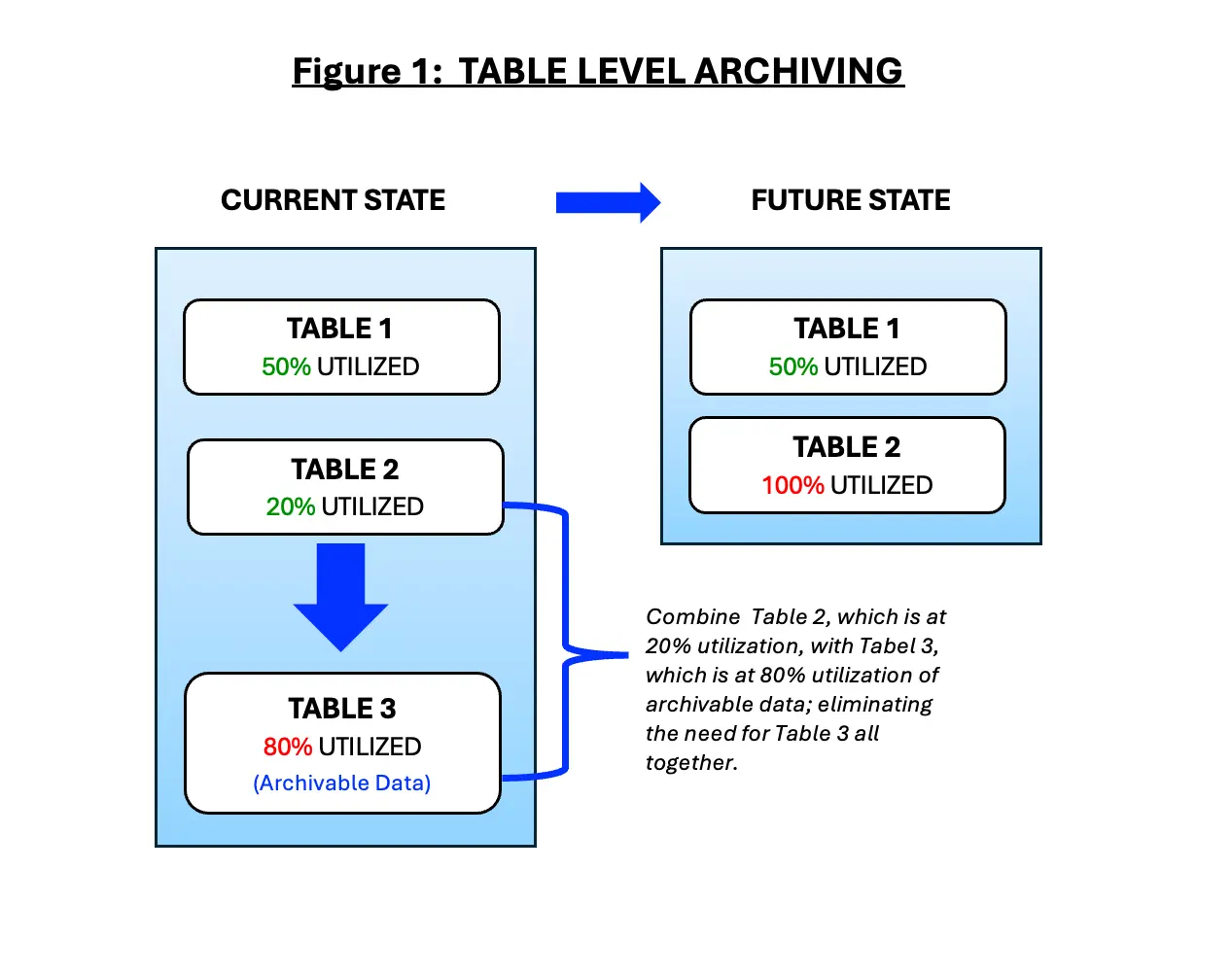
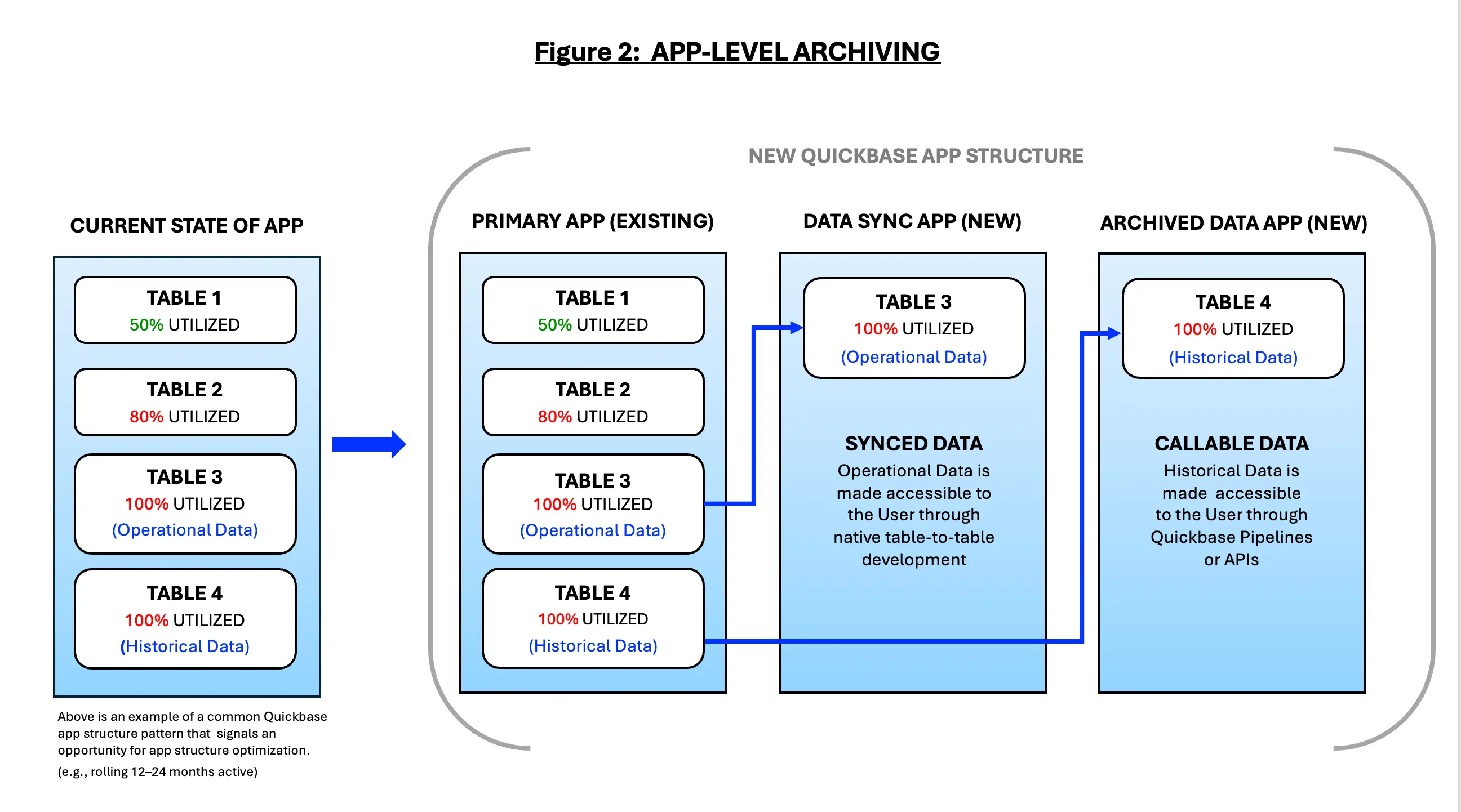
Internal Quickbase archiving methods provide a structured way to manage data growth within the platform by relocating inactive or closed records out of primary operational tables. Outlined below are some common methods to archive data that you have identified and classified as 'historical data' that leverages only native Quickbase capabilities:
Table-Level Archiving (figure 1)
- Moving closed or inactive records to archive tables
- Best for moderate growth scenarios
App-Level Archiving (figure 2)
- Separating active and historical data into distinct apps
- Read-only historical apps
- Security, permissions, and performance benefits
Automating Data Archiving in Quickbase with Pipelines
Automating data archiving in Quickbase using Pipelines allows organizations to efficiently manage data growth, maintain application performance, and enforce data lifecycle policies at scale. In high-usage Quickbase environments—especially across enterprise and data-intensive organizations—manual data management quickly becomes unsustainable.
By leveraging Quickbase Pipelines automation, organizations can automatically move inactive or completed records out of operational tables based on predefined rules such as record age, status, lifecycle stage, or activity history. This reduces table size, improves performance, and ensures users only interact with relevant, active data.
Automation not only preserves system responsiveness but also supports compliance, auditing, and long-term data retention strategies—without disrupting day-to-day business operations.
Key Benefits of Automated Archiving in Quickbase
- Improves application performance by reducing active dataset size
- Optimizes storage usage and costs
- Ensures consistent data lifecycle management
- Supports compliance and audit requirements
- Reduces manual administrative effort
Key Quickbase Pipeline Archiving Strategies
- Volume-Based Archiving Triggers: Automatically archive records when a table exceeds a defined record count or growth threshold, preventing performance degradation before it impacts users.
- Inactivity-Driven Archiving: Move records that have not been viewed or updated within a set timeframe (e.g., 12–24 months) to archive tables, ensuring operational tables contain only active data.
- Process-Completion Archiving: Archive records once workflows are complete (e.g., billing finalized, approvals closed, integrations completed), reducing clutter without interrupting active processes.
- Multi-Stage Archiving Workflows: Implement staged transitions such as (Active → Read-Only → Archived). This allows for controlled retention periods and audit windows before full archival.
- Selective Field Preservation: Retain only essential data (e.g., record IDs, dates, financial totals, audit fields) while removing high-volume or non-critical fields to reduce storage consumption.
- Cross-Table Archival Coordination: Archive parent and related child records together to maintain relational integrity and ensure accurate historical reporting.
- Conditional Attachment Offloading: Move large or infrequently accessed file attachments to external storage solutions (e.g., cloud repositories) while maintaining reference links in Quickbase.
- Compliance-Driven Retention Rules: Apply archiving logic based on regulatory or contractual requirements, such as retaining financial records for seven years or operational logs for shorter periods.
- Scheduled Batch Archiving: Run archiving Pipelines during off-peak hours to minimize impact on system performance and user experience.
- Audit Logging and Traceability: Automatically log archiving actions (e.g., date, rule applied, Pipeline execution ID) to support governance, compliance audits, and troubleshooting.
Quickbase Storage Considerations for Governance, Security, and Compliance
As Quickbase environments scale, storage decisions impact more than just performance and cost—they play a critical role in data governance, security, and regulatory compliance.
In high-usage Quickbase environments, especially within enterprise and regulated industries (e.g., healthcare, financial services, and SaaS), improper storage management can introduce risk, limit visibility, and create compliance gaps.
A well-defined Quickbase storage strategy ensures that data is properly classified, securely managed, and retained in accordance with business and regulatory requirements—whether stored within Quickbase or in external systems.
Key Governance Considerations for Quickbase Storage
- Data Ownership and Stewardship: Clearly define ownership of operational data, archived data, and externally stored assets to prevent orphaned records, inconsistent management, and uncontrolled data growth.
- Data Classification and Tiering: Classify data based on sensitivity, business value, and usage frequency to determine appropriate storage locations (e.g., active tables, archive tables, external storage).
- Data Lifecycle and Retention Policies: Establish formal policies that define: How long data remains active? When it is archived? When it is eligible for deletion? These policies should align with legal, regulatory, and internal business requirements.
- Change Management and Oversight: Govern Quickbase Pipelines, automations, and integrations that move or archive data. Ensure all changes are reviewed, tested, and documented to minimize risk.
- Auditability and Traceability: Maintain detailed logs of data movement, archiving actions, and deletions to support internal governance and external audits.
Key Security Considerations for Quickbase Storage
- Access Control Alignment: Ensure user permissions in Quickbase are consistent with access controls in external storage platforms to prevent unauthorized access to sensitive or archived data.
- Least-Privilege Access: Apply least-privilege principles, granting users access only to the data necessary for their role—especially for historical or sensitive datasets.
- Encryption Standard: Verify that all data is encrypted in transit and at rest, including files and attachments stored outside of Quickbase.
- Secure Integration Patterns: Use approved connectors, service accounts, and credential management practices when integrating Quickbase with external storage systems.
- Data Loss Prevention (DLP): Implement monitoring and controls to detect and prevent unauthorized data movement, particularly when transferring files to external repositories.
Key Compliance Considerations for Quickbase Data Storage
Organizations using Quickbase should establish data storage and retention strategies that align with both internal governance policies and applicable regulatory requirements. Proper data management helps reduce legal risk, strengthen security, and support long-term operational resilience.
Follow Industry-Specific Compliance Requirements
Different industries have unique regulatory obligations that directly impact how data should be stored, retained, archived, and deleted.
- Healthcare Organizations: Ensure Quickbase applications handling protected health information (PHI) follow HIPAA security and privacy requirements, including appropriate access controls, audit logging, encryption, and retention policies.
- Financial Services Organizations: Work closely with legal and compliance teams to ensure record retention practices align with FINRA Rule 4511, SEC Rules 17a-3 and 17a-4, and any additional regulatory obligations governing electronic records.
- Government and Public Sector: Verify compliance with applicable state and federal records management laws, public records requirements, and agency-specific retention schedules.
- Manufacturing, Construction, and Other Regulated Industries: Establish retention policies that satisfy contractual obligations, quality standards, safety requirements, and industry regulations.
Develop a Comprehensive Data Retention Strategy
Your Quickbase environment should include documented policies that define:
- How long different types of records are retained
- When records should be archived versus permanently deleted
- Who is authorized to manage retention policies
- How archived information can be restored if needed
Retention policies should be aligned with regulations such as:
- HIPAA (Healthcare)
- Sarbanes-Oxley (SOX) (Financial Reporting)
- GDPR (European Union Data Protection)
- CCPA/CPRA (California Privacy)
- FINRA and SEC recordkeeping requirements
- Any industry-specific compliance mandates applicable to your organization
Support Data Privacy Rights
Modern privacy regulations require organizations to maintain control over personal data throughout its lifecycle.
Your Quickbase solution should support the ability to:
- Retrieve information quickly during audits or investigations
- Export records upon request
- Correct inaccurate information
- Delete data when legally required
- Document actions taken to satisfy regulatory requests
These capabilities help organizations comply with GDPR, CCPA, and other evolving privacy regulations.
Understand Data Residency and Sovereignty Requirements
Many organizations must know exactly where business data is physically stored. When evaluating Quickbase deployments and connected cloud storage solutions, consider:
- Geographic location of stored data
- Cross-border data transfer restrictions
- Regional privacy laws
- Customer contractual obligations
- Government data residency requirements
Organizations operating internationally should verify that storage practices meet all applicable jurisdictional requirements.
Prepare for Legal Hold and eDiscovery
Organizations should establish procedures that preserve records involved in litigation, audits, or regulatory investigations. Best practices include:
- Preventing deletion of records under legal hold
- Maintaining immutable audit trails
- Preserving document versions
- Supporting eDiscovery requests
- Documenting chain of custody for critical records
These controls reduce legal risk and improve defensibility during investigations.
Evaluate Third-Party Storage Providers Carefully
If your Quickbase applications integrate with external storage platforms or cloud services, evaluate vendors for security, reliability, and compliance. Key considerations include:
- SOC 2 Type II certification
- ISO/IEC 27001 certification
- Encryption at rest and in transit
- Multi-factor authentication support
- Service Level Agreements (SLAs)
- Disaster recovery and business continuity capabilities
- Incident response procedures
- Breach notification timelines
- Backup and restoration processes
- Independent security audits and penetration testing
Implement Strong Data Governance
Compliance extends beyond technology—it also requires effective governance. Organizations should establish policies for:
- Data ownership and stewardship
- Role-based access controls (RBAC)
- Least-privilege security principles
- Regular access reviews
- Data classification
- Audit logging and monitoring
- Change management
- Employee security awareness training
A well-defined governance framework helps ensure Quickbase remains secure, compliant, and scalable as your organization grows.
Conduct Regular Compliance Reviews
Compliance is not a one-time initiative. Regulations, security threats, and business requirements evolve over time. Organizations should regularly:
- Review retention schedules
- Audit user permissions
- Validate backup and recovery procedures
- Test disaster recovery plans
- Assess third-party vendors
- Review integrations for compliance risks
- Update governance documentation
- Monitor changes to applicable regulations
Routine compliance assessments help identify gaps before they become costly security or regulatory issues.
Key Quickbase Performance and Cost Optimization Benefits
As Quickbase applications grow, so does the volume of operational data they manage. While retaining historical information is often necessary for compliance, reporting, and business intelligence, allowing every record to remain in active production tables can gradually reduce application performance, increase administrative complexity, and consume valuable system resources.
Implementing a strategic data lifecycle management strategy—including data archiving, storage optimization, and ongoing maintenance—helps organizations maximize the performance, scalability, and cost-effectiveness of their Quickbase environment.
Rather than treating data storage as a one-time administrative task, leading organizations view it as an ongoing governance initiative that supports operational excellence, business agility, and long-term platform sustainability.
Accelerate Reports, Dashboards, and User Performance
Large datasets require more processing power to generate reports, evaluate formulas, execute searches, and refresh dashboards. As active tables continue to grow, users may begin experiencing slower response times that negatively impact productivity and decision-making.
By archiving inactive or historical records while keeping frequently accessed information readily available, organizations can significantly improve overall application responsiveness.
Benefits include:
- Faster report generation and dashboard refresh times
- Improved search performance across large applications
- More efficient formula calculations and summary fields
- Reduced latency during daily operations
- Faster access to business-critical insights
Improved performance enables employees to spend less time waiting for information and more time making informed business decisions.
Improve the Reliability of Pipelines, APIs, and Integrations
Many organizations rely on Quickbase Pipelines, REST APIs, webhooks, and third-party integrations to automate business processes across multiple systems.
As production datasets increase in size, integrations often require additional processing time, increasing the likelihood of delays, synchronization issues, or automation failures. A well-managed data environment helps ensure integrations continue operating efficiently as the business grows.
Key advantages include:
- Faster Quickbase Pipeline execution
- Reduced API processing times
- More reliable synchronization between connected systems
- Fewer automation failures and timeout errors
- Simplified monitoring and troubleshooting
Organizations with optimized datasets often experience more predictable automation performance and reduced operational disruption.
Reduce Operational Risk Before Performance Issues Occur
Unchecked data growth can introduce unnecessary operational risk by placing additional strain on application performance and automation workflows.
Without a proactive storage strategy, organizations may encounter:
- Performance bottlenecks during peak business activity
- Slower application response times
- Failed automation processes
- Increased maintenance requirements
- Challenges scaling applications as business needs evolve
Implementing routine archiving and data lifecycle management allows organizations to proactively address these risks before they affect users or business operations.
Optimize Storage Utilization and Control Long-Term Costs
Data growth is inevitable, but uncontrolled storage growth can lead to increased administrative overhead and higher platform costs.
Separating active operational data from historical records enables organizations to manage storage more efficiently while preserving access to valuable business information.
Benefits include:
- Slower consumption of available storage resources
- More predictable capacity planning
- Better visibility into long-term storage needs
- Reduced need for emergency data cleanup projects
- Improved return on Quickbase investment
A proactive storage strategy helps organizations avoid reactive scaling decisions while supporting sustainable platform growth.
Enhance the User Experience and Increase Platform Adoption
Application performance directly influences user satisfaction. Employees are more likely to adopt and consistently use Quickbase when applications remain fast, intuitive, and focused on current business operations.
Removing outdated or inactive records from production environments helps create a cleaner, more efficient user experience. Organizations often experience:
- Simplified forms and reports
- Less clutter within applications
- Faster navigation between records
- Improved data accuracy and usability
- Higher employee confidence in the platform
When users can quickly locate relevant information without navigating years of historical data, overall productivity and adoption naturally improve.
Strengthen Data Governance and Information Quality
Storage optimization is not solely about improving performance—it also supports stronger enterprise data governance. A structured data lifecycle strategy helps organizations establish clear standards for how information is created, maintained, archived, and ultimately retired.
Benefits include:
- Improved data quality and consistency
- Reduced duplicate or obsolete records
- Clear retention and archival policies
- Better audit readiness
- Easier compliance with internal governance standards
Well-governed data is more reliable, easier to manage, and significantly more valuable for analytics and business intelligence initiatives.
Build a Scalable Foundation for Future Growth
Organizations frequently begin with a single Quickbase application before expanding into enterprise-wide deployments supporting dozens of departments, hundreds of users, and millions of records.
Without a scalable storage strategy, application performance can gradually decline as data volumes increase.
By implementing storage optimization early, organizations can confidently scale their Quickbase environment while maintaining consistent performance and reliability. Long-term advantages include:
- Greater application scalability
- Easier onboarding of new departments and users
- Improved enterprise-wide reporting
- Reduced technical debt
- Lower long-term administrative effort
A scalable data architecture ensures Quickbase continues supporting organizational growth without sacrificing speed or usability.
Maximize the Return on Your Quickbase Investment
Quickbase is designed to help organizations streamline operations, automate workflows, and improve decision-making. However, these benefits depend on maintaining a healthy and well-managed application environment.
Organizations that actively optimize storage, archive historical data, and implement sound data governance practices consistently realize greater value from their Quickbase investment.
By combining performance optimization with strategic data management, organizations can:
- Increase overall system responsiveness
- Improve automation reliability
- Enhance reporting performance
- Strengthen compliance and governance
- Reduce operational risk
- Control long-term storage costs
- Deliver a better experience for end users
- Create a scalable platform that supports future business growth
Ultimately, data optimization transforms Quickbase from simply a low-code application platform into a high-performing, enterprise-ready operational system capable of supporting complex business processes for years to come.
Key External Storage Strategies for Heavy Quickbase Usage
As Quickbase applications mature, storage requirements often grow beyond structured business data. Documents, images, engineering drawings, invoices, videos, PDFs, medical records, inspection photos, contracts, and other large file attachments frequently become the primary drivers of storage consumption.
While Quickbase is exceptionally well suited for managing business processes and structured operational data, it is not intended to function as an enterprise document management system or long-term file archive.
For organizations managing millions of records or terabytes of supporting documentation, a hybrid storage architecture often provides the best balance of performance, scalability, security, and cost efficiency.
Rather than storing every file directly inside Quickbase, organizations can store large files within dedicated enterprise storage platforms while maintaining secure references, metadata, and business workflows inside Quickbase. This approach allows Quickbase to remain highly responsive while providing seamless access to supporting documentation.
Why Use External Storage with Quickbase?
Separating structured application data from large binary files offers significant operational and financial benefits.
Organizations can:
- Improve Quickbase application performance
- Reduce storage consumption within Quickbase
- Lower long-term infrastructure costs
- Simplify backup and disaster recovery
- Improve document governance
- Support enterprise-scale file management
- Enhance compliance with industry regulations
- Create a more scalable application architecture
This strategy is particularly valuable for organizations managing large numbers of file attachments across multiple departments or business units.
Recommended External Storage Solutions for Quickbase
Choosing the right storage platform depends on an organization's technology ecosystem, compliance requirements, security standards, and collaboration needs.
Amazon Simple Storage Service (Amazon S3)
Amazon S3 is one of the most widely adopted cloud object storage platforms for enterprise applications. It provides virtually unlimited scalability while offering exceptional durability, security, and cost efficiency.
Organizations commonly use Amazon S3 to store:
- Large file attachments
- Images and videos
- System exports
- Historical documents
- Backup archives
- Engineering drawings
- Medical imaging files
Key benefits include:
- Virtually unlimited storage capacity
- Lifecycle policies that automatically move files to lower-cost storage tiers
- High durability and availability
- Encryption at rest and in transit
- Fine-grained access controls through AWS Identity and Access Management (IAM)
- Seamless integration with automation platforms such as Workato and Quickbase Pipelines
Amazon S3 is an excellent choice for organizations with large-scale storage requirements or cloud-native architectures.
Microsoft SharePoint and OneDrive
Organizations standardized on Microsoft 365 often benefit from storing business documents within SharePoint or OneDrive while managing workflows inside Quickbase.
This approach enables employees to collaborate on documents without sacrificing Quickbase performance.
Advantages includes:
- Native Microsoft 365 integration
- Version history and document recovery
- Enterprise permission management
- Microsoft Teams collaboration
- Co-authoring capabilities
- Built-in document approval workflows
- Strong compliance and retention capabilities
SharePoint is particularly well suited for organizations managing contracts, policies, project documentation, and operational procedures.
Google Drive
Google Drive provides a flexible cloud storage platform that integrates well with organizations using Google Workspace.
It is frequently used for collaborative environments where teams regularly create and share documents across departments.
Benefits include:
- Real-time collaboration
- Simple file sharing
- Flexible permission management
- Easy integration with automation tools
- Cross-platform accessibility
- Strong search capabilities
Organizations often automate folder creation and document management through Quickbase Pipelines or third-party integration platforms.
Microsoft Azure Blob Storage
Azure Blob Storage is Microsoft's enterprise-scale object storage solution designed for organizations operating within the Azure ecosystem.
It is particularly valuable for businesses requiring secure storage for large volumes of unstructured data.
Capabilities include:
- Enterprise-grade security
- Geographic redundancy
- Tiered storage for cost optimization
- Lifecycle management policies
- Advanced monitoring
- Integration with Microsoft Fabric, Power BI, and Azure AI services
Azure Blob Storage is commonly used by healthcare organizations, financial institutions, and large enterprises with existing Microsoft cloud investments.
Box
Box has become a preferred enterprise content management platform for organizations operating within highly regulated industries.
Its governance capabilities extend beyond traditional file storage by incorporating sophisticated compliance and security controls.
Key features include:
- Enterprise document management
- Granular permission controls
- Advanced audit logging
- Workflow automation
- Electronic signatures
- Legal hold capabilities
- Records management
- Extensive compliance certifications
Healthcare providers, life sciences organizations, government agencies, and financial institutions frequently use Box as their primary enterprise content repository.
Enterprise File Servers and Network Attached Storage (NAS)
Some organizations continue to maintain on-premises storage infrastructure due to regulatory requirements, security policies, or operational preferences. Enterprise file servers remain appropriate when organizations require complete control over their storage environment.
Benefits include:
- Full administrative control
- Internal security management
- Local performance
- Custom backup strategies
- Integration with legacy applications
- Support for specialized compliance requirements
While cloud storage continues to grow, on-premises infrastructure remains important for many regulated industries.
Enterprise Content Management Platforms
Organizations with mature document governance requirements often implement dedicated Enterprise Content Management (ECM) systems alongside Quickbase. Solutions such as OpenText, Alfresco, Hyland OnBase, and Laserfiche provide advanced capabilities for managing the complete document lifecycle.
These platforms typically include:
- Records management
- Document versioning
- Metadata management
- Workflow automation
- Retention scheduling
- Legal hold management
- Electronic discovery (eDiscovery)
- Audit trails
When integrated with Quickbase, ECM platforms allow organizations to maintain robust governance without sacrificing application performance.
Best Practices for Integrating External Storage with Quickbase
A successful external storage strategy should be designed around security, usability, and operational efficiency. Organizations should consider the following best practices:
- Store only file references, URLs, or metadata within Quickbase whenever practical.
- Maintain a single source of truth for documents to eliminate duplication.
- Apply role-based access controls consistently across both Quickbase and external storage platforms.
- Encrypt files both in transit and at rest.
- Automate file uploads, synchronization, and archival using Quickbase Pipelines, Workato, or other enterprise integration platforms.
- Implement lifecycle policies that automatically archive or delete files based on business rules.
- Monitor storage utilization and access patterns to optimize costs over time.
- Regularly audit permissions, retention policies, and compliance controls.
Choosing the Right External Storage Strategy
There is no single storage solution that fits every organization. The best architecture depends on your business requirements, existing technology investments, regulatory obligations, and long-term growth plans.
For many organizations, the optimal solution combines Quickbase with one or more enterprise storage platforms to create a hybrid architecture:
- Quickbase manages structured business data, workflows, automations, and reporting.
- Enterprise storage platforms manage large documents, images, videos, engineering files, contracts, and other unstructured content.
- Integration platforms such as Quickbase Pipelines or Workato securely connect the two environments, providing users with seamless access to files without compromising application performance.
This hybrid approach enables organizations to maximize the strengths of Quickbase while leveraging specialized storage solutions designed for enterprise-scale document management, resulting in a more secure, cost-effective, and scalable operational environment.
Most Common Quickbase Data Storage and Archiving Pitfalls to Avoid
As Quickbase data grows, many organizations attempt quick fixes for storage and performance issues. However, poorly designed archiving strategies can introduce data integrity risks, reporting gaps, and compliance issues.
Treating Archiving as a One-Time Cleanup
Archiving should be an ongoing data lifecycle process, not a one-time effort. Without continuous governance, data growth will quickly recreate the same performance and storage challenges.
Over-Archiving Active or Needed Data
Aggressive archiving can remove data still required for reporting, audits, or daily operations, leading to broken dashboards and user frustration. Not all older data is inactive—distinguishing between inactive vs. low-frequency data is critical.
Ignoring Attachment Growth
Attachments are one of the fastest-growing storage drivers in Quickbase. Focusing only on record counts while ignoring files can undermine archiving efforts and lead to late-stage, disruptive remediation.
Lack of Rollback or Recovery Planning
Archiving without a recovery strategy introduces significant risk. Mature approaches include:
- Staging tables
- Retention windows before deletion
- Backup and rollback procedures
These safeguards ensure data can be restored if needed.
How to Build a Long-Term Quickbase Archiving Strategy
A long-term Quickbase archiving roadmap is essential for maintaining performance, scalability, and governance as data volumes grow. Without a clear strategy, applications can become bloated, slow, and costly to maintain.
A well-designed approach ensures:
- Active data remains fast and accessible
- Historical data is retained appropriately for reporting and compliance
- Storage growth is controlled and predictable
Most importantly, it shifts archiving from a reactive cleanup effort to a proactive data lifecycle strategy, enabling organizations to scale confidently.
Designing Quickbase for longevity requires proactive data management, including archiving, external storage, and governance. This ensures performance, scalability, and compliance as data volumes grow.
- Author: Logan Lott
- Title: Solution Consultant | Quickbase
- Email: llott@quandarycg.com
- Date Published: June 5, 2026
Top FAQs about Quickbase Storage, Archiving, and Performance Optimization
1. What is the best way to manage large data volumes in Quickbase?
The best way to manage large data volumes in Quickbase is to implement a data lifecycle management strategy that separates active data from historical data.
This includes using archiving techniques, external storage solutions (like Amazon S3 or SharePoint), and automation via Quickbase Pipelines. These practices improve performance, reduce storage costs, and ensure scalability in high-usage Quickbase environments.
2. When should you archive data in Quickbase?
You should archive data in Quickbase when records are no longer actively used in daily operations but still need to be retained for reporting, compliance, or audit purposes.
Common triggers include record age (e.g., 12–24 months), process completion, or inactivity thresholds. Proactive archiving helps maintain performance and prevent storage-related issues.
3. How do Quickbase storage limits affect performance?
Quickbase storage limits—such as large record counts, high attachment volumes, and complex data relationships—can slow down reports, dashboards, pipelines, and API performance.
As data grows, applications may experience longer load times and reduced responsiveness. Optimizing storage through archiving and external file management helps maintain consistent performance.
4. What are the benefits of using external storage with Quickbase?
Using external storage with Quickbase allows organizations to offload large files and attachments to platforms like Amazon S3, Microsoft SharePoint, or Azure Blob Storage.
This reduces table size, improves application speed, lowers storage costs, and supports scalable architecture—especially for enterprise and data-intensive organizations.
5. What is considered “heavy” Quickbase usage?
Heavy Quickbase usage typically includes applications with hundreds of thousands to millions of records, multi-year data retention (5–15+ years), high attachment usage, and frequent pipelines or integrations. These environments require proactive performance optimization and storage management to remain efficient and scalable.
6. How do Quickbase Pipelines help with data archiving?
Quickbase Pipelines automate data archiving by moving records based on rules like age, status, or inactivity. This reduces manual effort, ensures consistent data lifecycle management, and improves system performance by keeping operational tables lean and efficient.
7. What are common mistakes when archiving Quickbase data?
Common Quickbase archiving mistakes include:
- Treating archiving as a one-time cleanup instead of an ongoing process
- Archiving data that is still needed for operations or reporting
- Ignoring attachment storage growth
- Not having a rollback or recovery plan
Avoiding these pitfalls ensures better performance, data integrity, and long-term scalability.
8. How can you reduce Quickbase storage costs?
To reduce Quickbase storage costs, organizations should:
- Archive inactive records regularly
- Offload large attachments to external storage
- Remove unnecessary or duplicate data
- Implement lifecycle-based retention policies
These strategies help control storage growth and optimize licensing usage.
9. How do you ensure compliance when archiving Quickbase data?
Compliance in Quickbase archiving requires aligning data practices with regulations such as HIPAA, GDPR, SOX, and FINRA.
This includes implementing data retention policies, access controls, encryption, audit logging, and legal hold processes. Organizations in regulated industries should also validate external storage providers for compliance certifications.
10. What is the difference between active and historical data in Quickbase?
Active data in Quickbase is frequently accessed and updated for daily operations, while historical data consists of older records retained for audits, reporting, or compliance. Separating these data types improves performance, reduces storage usage, and supports scalable application design.
11. How often should Quickbase data be archived?
Quickbase data should be archived on a regular, automated schedule—such as monthly, quarterly, or based on real-time triggers (e.g., inactivity or process completion).
The exact frequency depends on data growth, business needs, and compliance requirements.
12. Can archiving data in Quickbase improve user experience?
Yes. Archiving improves user experience by reducing clutter, speeding up reports and dashboards, and ensuring users interact only with relevant data. Faster, more responsive applications increase user trust and adoption across the organization.
13. What industries benefit most from Quickbase storage optimization?
Industries with high data volume and compliance requirements benefit most, including:
- Healthcare (HIPAA compliance)
- Financial services (FINRA, SEC regulations)
- Construction and project management
- SaaS and technology companies
These organizations rely on scalable, secure data management to maintain performance and meet regulatory standards.
14. What is a Quickbase archiving strategy?
A Quickbase archiving strategy is a structured approach to moving inactive data out of operational tables while preserving access for reporting and compliance. It typically includes automation (Pipelines), external storage, retention policies, and governance controls to ensure long-term scalability and performance.
15. Why is data lifecycle management important in Quickbase?
Data lifecycle management in Quickbase ensures that data is stored, archived, and deleted according to its usage and business value. This improves performance, reduces costs, enhances compliance, and allows organizations to scale their Quickbase applications efficiently.


Industries
Resources




© 2026 Quandary Consulting Group. All Rights Reserved.
Privacy Policy