
Knowledge Base
Articles In This Section
How to Use Sync to Automatically Import CSV Files into Quickbase How to use the Quickbase Power BI connectorHow to Create High-Quality Quickbase FormsTop 10 Quickbase Development Best Practices for 2025How to Automate CSV Imports into Quickbase Using WebhooksHow to Log Quickbase Emails using WorkatoHow to Use Automate PDF Data Extraction into Quickbase How to Create a Quickbase WebhooksHow to Customize a Quickbase Home Page (Legacy Guide)How to Implement a Custom Import in QuickbaseSections
How to Use Google Maps for Data Visualization
Maps are a very useful way to convey location details in your applications. Quick Base offers a native Map Report option which can be great for doing this, however, it does have some drawbacks.
- Limited to 100 locations. Will default to first 100 based on sorting filter.
- Only display data from a single table.
- Provide limited record details.
- Cannot drive workflow.
Using the Google Maps API in a Code Page removes these limitations and allows you to create awesome maps with more detail and workflow power. Including but not limited to the following:
- Unlimited number of locations can be displayed (use at your discretion, crowded maps tend to overwhelm the users).
- Display data from any table.
- Display any fields from any record.
- Drive workflow by allowing users to add/edit/delete data using the map UI.
EXAMPLE: Custom map using Quickbase data
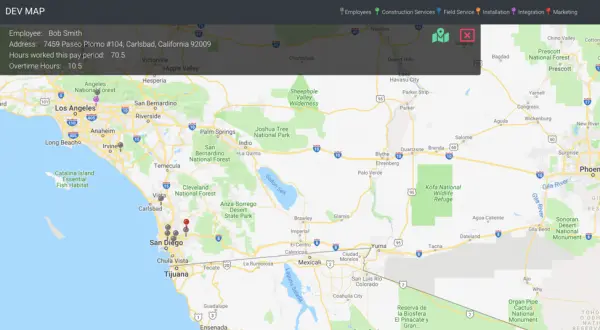
The map above combines data from an Employees table and a Projects table. Address fields are converted to lat/long values allowing the Quickbase records to become pins on the map.
- Project Managers can view locations and detailed information and assign Employees to Projects directly from the map interface.
- This is just one of the many ways custom maps can provide data visualization and drive workflow from a single interface.
Quickbase dashboards allow you to add Code Page widgets, meaning you can easily place a custom map on any user’s Home page.
- Check out our article on Adding Reports to Dashboards to learn how to get started.


Industries
Resources




© 2026 Quandary Consulting Group. All Rights Reserved.
Privacy Policy