
Knowledge Base
Articles In This Section
How to Use Sync to Automatically Import CSV Files into Quickbase How to Use Google Maps for Data VisualizationHow to use the Quickbase Power BI connectorHow to Create High-Quality Quickbase FormsTop 10 Quickbase Development Best Practices for 2025How to Automate CSV Imports into Quickbase Using WebhooksHow to Log Quickbase Emails using WorkatoHow to Use Automate PDF Data Extraction into Quickbase How to Customize a Quickbase Home Page (Legacy Guide)How to Implement a Custom Import in QuickbaseSections
How to Create a Quickbase Webhooks
Quickbase Webhooks are a useful way to connect different web applications and services. Quickbase supports webhooks to trigger actions in response to events in the platform (usually an action performed by a user.)
Using Quickbase Webhooks, you can automate workflows and streamline processes easily. As a Quickbase developer, knowing how to use webhooks will significantly enhance and expand the solutions you can create.
By the end of this article, you will know what a webhook is, why they’re important, and how to set one up.
What is a Quickbase Webhook
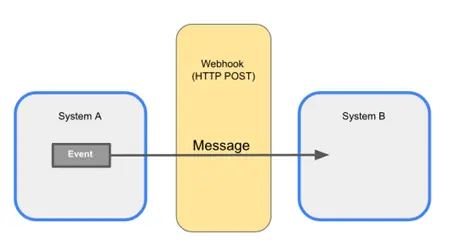
Quickbase Webhooks are event-driven integrations that automatically send data from Quickbase to another application or service whenever a specified event occurs. Rather than relying on scheduled data transfers or manual updates, Webhooks communicate changes in near real time, helping organizations keep systems synchronized and business processes moving efficiently.
A Webhook is triggered when a predefined event occurs within Quickbase, such as:
- Creating a new record
- Updating an existing record
- Deleting a record
- Changing the value of a specific field
- Completing a workflow or business process
Once triggered, the Webhook sends an HTTP request containing relevant data to another application, API, or web service. The receiving system can then process that information automatically and, if configured, return a response confirming that the request was successfully received.
Unlike manual exports or scheduled integrations, Webhooks provide immediate communication between systems, making them ideal for organizations that require real-time data synchronization and workflow automation.
How Do Quickbase Webhooks Work?
At a high level, Quickbase Webhooks follow a simple event-driven process:
- A user or automation performs an action in Quickbase.
- The action triggers a predefined Webhook.
- Quickbase packages the selected record data into an HTTP request.
- The request is securely transmitted to the destination system.
- The receiving application processes the information and may return a response confirming success or reporting an error.
This process typically occurs within seconds, allowing connected systems to remain synchronized without manual intervention.
What Can a Quickbase Webhook Do?
Quickbase Webhooks enable organizations to automate communication between Quickbase and virtually any application that supports HTTP-based APIs.
Common capabilities include:
- Creating records in another system
- Updating customer or project information
- Sending notifications to collaboration platforms
- Triggering business workflows
- Synchronizing data across multiple applications
- Initiating document generation
- Launching approval processes
- Connecting cloud applications and enterprise systems
Because Webhooks are event-driven, they only execute when a specific business event occurs, making them an efficient and scalable integration method.
Common Quickbase Webhook Integrations
Quickbase Webhooks can integrate with hundreds of cloud and on-premises applications, including:
- Salesforce
- Microsoft Dynamics 365
- HubSpot
- Workato
- Slack
- Microsoft Teams
- Asana
- Trello
- Jira
- ServiceNow
- DocuSign
- SharePoint
- Amazon Web Services (AWS)
- Custom REST APIs
- Internal business applications
This flexibility allows organizations to build connected business ecosystems without requiring users to manually transfer data between systems.
Data Formats Supported by Quickbase Webhooks
Quickbase Webhooks communicate using standard web technologies, making them compatible with most modern applications and APIs.
Common data formats include:
- JSON (JavaScript Object Notation): The most widely used format for modern REST APIs due to its lightweight structure and ease of use.
- XML (Extensible Markup Language): Often used by legacy enterprise applications and certain third-party systems.
Most modern integrations use JSON because it is simpler to process, more efficient to transmit, and broadly supported across cloud platforms.
Why Use Quickbase Webhooks?
Quickbase Webhooks help organizations eliminate manual processes by enabling systems to communicate automatically whenever business data changes.
Key benefits include:
- Real-time data synchronization
- Reduced manual data entry
- Improved data accuracy
- Faster business processes
- Fewer integration delays
- Greater workflow automation
- Enhanced scalability
- Easier integration with cloud applications and enterprise platforms
By enabling event-driven communication, Webhooks allow Quickbase to serve as a central operational platform while ensuring connected systems always have access to the most current information.
The Importance of Webhooks in Quickbase
One of the primary benefits of Quickbase Webhooks is their ability to eliminate duplicate data entry across multiple systems. Instead of requiring users to manually enter the same information into several applications, Webhooks automatically send data from Quickbase to connected systems in real time whenever a specified event occurs.
This automation ensures that business-critical information remains consistent across your technology ecosystem without requiring additional user intervention.
By replacing manual data entry with automated data synchronization, organizations can:
- Eliminate duplicate data entry
- Reduce human error and inconsistent records
- Ensure data is synchronized across systems in real time
- Improve data accuracy and integrity
- Increase employee productivity by eliminating repetitive tasks
- Accelerate business processes and downstream workflows
- Reduce operational costs associated with manual updates
For example, when a new customer, project, work order, or service request is created in Quickbase, a Webhook can instantly notify another application—such as Salesforce, Microsoft Dynamics, HubSpot, Slack, DocuSign, or an ERP system—without requiring anyone to re-enter the same information.
This real-time communication not only improves operational efficiency but also helps ensure every connected system is working from the same, up-to-date data.
Ultimately, Quickbase Webhooks enable organizations to build more connected, automated, and scalable business processes while reducing the risk of missed updates, duplicate records, and costly manual errors.
When Should You Use a Webhook in Quickbase?
Quickbase Webhooks are best suited for event-driven integrations where information needs to be transmitted automatically whenever a specific action occurs within Quickbase. Rather than relying on scheduled data synchronization or manual updates, Webhooks enable systems to communicate in near real time, improving efficiency and reducing operational delays.
Organizations commonly use Webhooks when they need to automate business processes, eliminate duplicate data entry, or trigger workflows across multiple applications.
Quickbase Webhooks are an excellent choice when:
You Have an API Available
Webhooks require a destination capable of receiving HTTP requests. If the target application provides a REST API or Webhook endpoint, Quickbase can automatically send information whenever the configured event occurs.
Examples include:
- Salesforce
- Microsoft Dynamics 365
- HubSpot
- Slack
- Microsoft Teams
- Asana
- Trello
- ServiceNow
- Custom applications
- Internal APIs
You Need to Synchronize Data Across Multiple Systems
One of the most common uses for Webhooks is eliminating duplicate data entry. Instead of requiring employees to manually enter the same information into multiple applications, users enter the data once in Quickbase, and Webhooks automatically distribute it to connected systems.
This helps organizations:
- Improve data accuracy
- Reduce manual work
- Eliminate duplicate records
- Keep systems synchronized
- Improve employee productivity
You Need Real-Time Notifications
Webhooks are ideal for situations where another application should be notified immediately after an event occurs.
For example, organizations frequently use Webhooks to:
- Notify Slack or Microsoft Teams when a project is approved
- Alert managers when high-priority records are created
- Trigger customer notifications
- Launch downstream approval workflows
- Update CRM or ERP systems instantly
Because Webhooks are event-driven, notifications occur automatically without waiting for scheduled synchronization.
You Need a Lightweight Alternative to Quickbase Pipelines
While Quickbase Pipelines provide powerful workflow automation with built-in logic and connectors, Webhooks offer a lightweight alternative when you simply need to send data to another application.
Webhooks are often appropriate when:
- The workflow is straightforward
- Minimal business logic is required
- An external application handles the remaining processing
- You are integrating with a custom API
For more complex, multi-step workflows involving multiple systems, Pipelines or integration platforms such as Workato may provide greater flexibility.
When Should You Avoid Using Quickbase Webhooks?
Although Webhooks are highly effective, they are not the ideal solution for every integration scenario. Understanding their limitations helps organizations design more reliable and scalable integrations.
Your Table Has Reached the Webhook Limit
Quickbase limits each table to 10 Webhooks.
If your application requires additional integrations, consider consolidating Webhooks where possible or implementing Quickbase Pipelines or an enterprise integration platform to manage more complex workflows.
Your Application Generates a High Volume of Events
Applications that create or update records at extremely high volumes may overwhelm downstream systems if every event immediately triggers a Webhook.
In these scenarios, organizations may benefit from:
- Scheduled API synchronization
- Batch processing
- Message queues
- Enterprise integration platforms
These approaches can reduce processing overhead while improving reliability.
Your Payload Exceeds Size Limits
Quickbase currently limits individual Webhook payloads to 4 MB.
If your integration requires transmitting large documents, images, or complex datasets, consider:
- Sending only metadata
- Storing files externally
- Passing secure file references instead of attachments
This approach improves performance while reducing network overhead.
Individual Records Are Too Large
Quickbase limits the size of records that can trigger a Webhook to approximately 1 MB.
Applications containing large file attachments or exceptionally large text fields may require an alternative integration strategy or external document storage.
Your Integration Requires an Immediate Response
Quickbase Webhooks operate asynchronously, meaning they send requests without waiting for the receiving system to complete processing.
This makes Webhooks ideal for background automation but less suitable for workflows requiring immediate validation or user interaction.
Examples include:
- Payment processing
- Real-time inventory verification
- Authentication services
- Immediate pricing calculations
In these cases, direct API integrations are often more appropriate.
Guaranteed Message Delivery Is Required
Webhooks depend on network connectivity and the availability of the receiving endpoint. If the destination system is temporarily unavailable, message delivery may fail unless additional retry mechanisms are implemented.
Organizations requiring guaranteed delivery should consider technologies that provide:
- Automatic retry logic
- Message queuing
- Delivery confirmation
- Error recovery
- Transaction management
Enterprise integration platforms such as Workato or messaging services like Amazon SQS, Azure Service Bus, or RabbitMQ offer these capabilities for mission-critical workflows.
Key Benefits of Using Quickbase Webhooks
Quickbase Webhooks provide a simple yet powerful method for connecting business applications and automating repetitive tasks.
Instead of requiring users to manually update multiple systems, Webhooks automatically transmit information whenever business data changes.
Key benefits include:
- Real-Time Data Synchronization: Connected systems receive updates almost immediately after changes occur in Quickbase, helping ensure information remains accurate and consistent across the organization.
- Reduced Manual Data Entry: Users enter information once, eliminating repetitive work while reducing the likelihood of human error and inconsistent records.
- Faster Business Processes: Automating data transfers accelerates approvals, notifications, customer communications, and downstream workflows without requiring manual intervention.
- Lower System Overhead Than Polling: Unlike polling, which repeatedly checks for updates whether changes have occurred or not, Webhooks transmit information only when a defined event takes place. This event-driven approach:
- Reduces unnecessary API requests
- Minimizes server traffic
- Conserves computing resources
- Improves overall integration efficiency
- Improved Data Accuracy: Automatic synchronization ensures connected systems are working with the same information, reducing discrepancies between applications.
- Greater Scalability: As organizations expand their technology ecosystems, Webhooks provide an efficient method for connecting Quickbase with cloud applications, internal systems, and enterprise platforms without requiring extensive custom development.
- Enhanced Business Automation: Webhooks serve as the foundation for many event-driven workflows, enabling organizations to automate approvals, notifications, document generation, customer communications, AI-driven processes, and system integrations.
How to Choose the Right Integration Approach
Quickbase Webhooks are an excellent solution for lightweight, real-time integrations that respond to business events. However, the most effective integration strategy depends on your organization's technical requirements, workflow complexity, and reliability needs.
A general guideline:
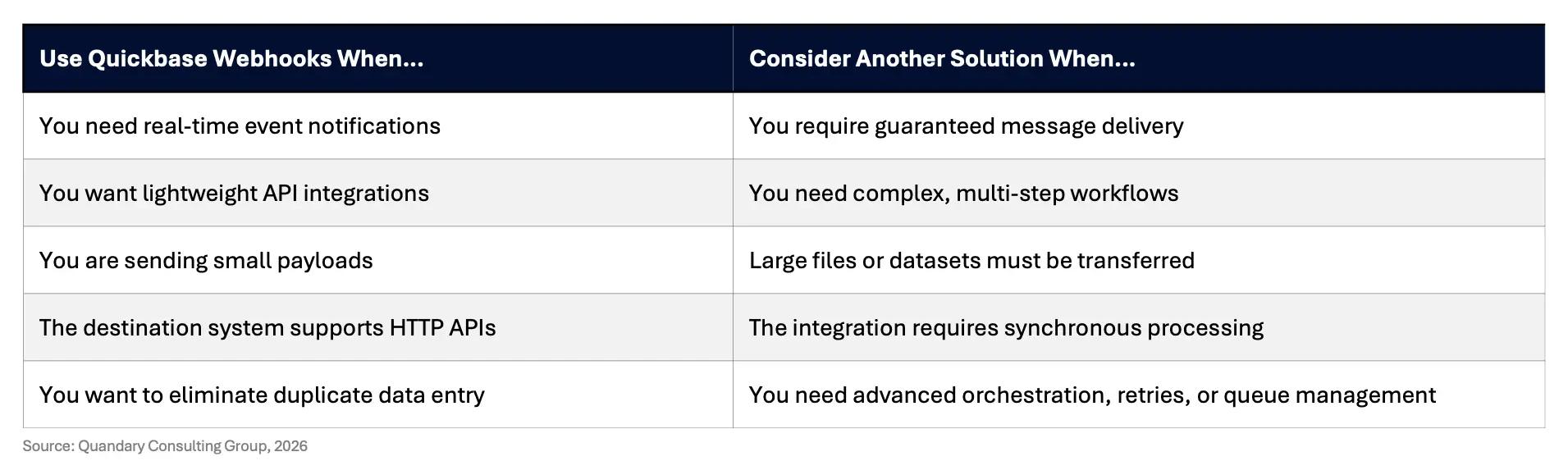
By selecting the right integration method for each use case, organizations can build reliable, scalable, and high-performing automation solutions that maximize the value of their Quickbase investment.
How to Create a Webhook in Quickbase
Here is a step-by-step guide for creating a webhook in Quickbase. Follow these steps to create a successful webhook automation every time.
Step 1: Create a +New Webhook
Go to the Table Settings for the table where the user will trigger the webhook. Look for the Webhooks section and click the +New button
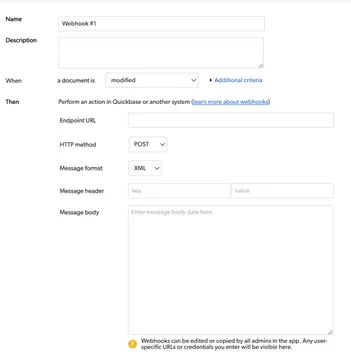
Step 2: Name the Webook
Give your webhook a concise and meaningful name so you will remember what it does. Your future self and any developers who follow you will be grateful for a detailed description.
Step 3: Set the Trigger
You need to be specific with the webhook trigger. Do you want the webhook to fire when a record is modified, added, or deleted? Some combination of those or all three?

If you want the trigger to be when a record is modified: Will it be when there are any field changes or just a particular field? Think carefully about what causes your webhook to trigger > Then, set the trigger accordingly.
Step 4: Set the Endpoint URL
Set the endpoint URL your webhook will hit. For example, if you want to create a record in another table in Quickbase, enter the full URL, including the tableID (without any additional modifiers).

You can add dynamic data to your URL based on fields and markers from the application and table.
Step 5: Select the HTTP Method
Select the HTTP Method you want to use. For example, you will use POST for Adding, Modifying, or Deleting records in Quickbase.

You will most often use POST. Still, you should know what kind of method your endpoint requires.
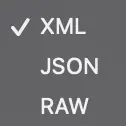
Step 6: Select Message Format
Select the message format you want to use (See image below). Again, this might depend on the requirements of the URL endpoint. Make sure to read the documentation.
In Quickbase, the HTTP API Methods are set up to receive XML. The newer API Portal is set up to receive JSON.
Step 7: Set Message Headers
Next, set your Message Headers.
You will usually use the HTTP API Methods, API_AddRecord for example (See figure below).

Step 8: Enter the Message Body
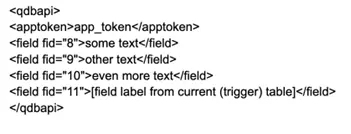
Enter the Message Body. Remember that each tag in the XML must have a corresponding closing tag. The starting parent tag is <qdbapi>. You should include a security token (either user or app token depending on your app setup).
Next, include the fields on the record that you want to create or update. You can either use field IDs or names for this. You can either hard-code data within the tags for each field or supply dynamic values from the fields in the table where the webhook lives, placing the field name wrapped in brackets within the tag (See example below).
Step 9: Save and Test the Webhook
Now, you are ready to save and test your webhook. After you click Save at the bottom of the webhook form, you will be taken to the list of Webhooks for that table.
Make sure the Active checkbox is checked (See image below). Then test the webhook by adding, modifying, or deleting a record depending on the entry criteria you set up in step 3.

Step 10: Check for Errors
If there are any errors, you will see an exclamation mark in a red circle by the name of your webhook (See Fig. 10).
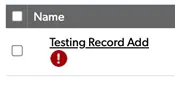
If you see the error icon by the name of your webhook, you can find the details at the top of the webhook page next to the New Webhook button (See image below)

Error messages are simply numeric error codes (See example below).

Congratulations on making your first Quickbase webhook!
- Author: Alistair Marsden
- Title: Solution Consultant | Quickbase
- Email: amarsden@quandarycg.com
- Date Updated: June 18, 2026
Top FAQs About Quickbase Webhooks
1. What are Quickbase Webhooks?
Quickbase Webhooks are event-driven integrations that automatically send data from Quickbase to another application or web service whenever a specified event occurs, such as creating, updating, or deleting a record.
Unlike scheduled integrations, Webhooks transmit information in near real time, helping organizations automate workflows, synchronize data across systems, and eliminate manual data entry. Webhooks use standard HTTP requests and typically exchange data in JSON format, making them compatible with most modern APIs.
2. How do Quickbase Webhooks work?
Quickbase Webhooks monitor specific events within a table. When a configured event occurs, Quickbase packages selected record data into an HTTP request and sends it to a designated API endpoint or web service.
The receiving application processes the information and may return a response confirming successful delivery. This event-driven communication enables applications to remain synchronized without requiring users to manually update multiple systems.
3. What is the difference between Quickbase Webhooks and Quickbase Pipelines?
Although both automate business processes, they serve different purposes.
- Quickbase Webhooks are designed to send real-time HTTP requests to external systems whenever an event occurs. They are lightweight, flexible, and ideal for custom API integrations.
- Quickbase Pipelines provide a visual, low-code automation platform with prebuilt connectors, conditional logic, scheduling, branching, and multi-step workflows. Pipelines are generally better suited for complex business processes involving multiple applications and advanced automation.
Many organizations use both technologies together depending on the integration requirements.
4. When should I use Quickbase Webhooks?
Quickbase Webhooks are an excellent choice when you need real-time communication between Quickbase and another application.
Common use cases include updating CRM systems, creating records in external applications, triggering notifications, launching approval workflows, synchronizing customer information, and integrating Quickbase with custom APIs. Webhooks are particularly valuable when data needs to be transmitted immediately after a business event occurs.
5. What systems can Quickbase Webhooks integrate with?
Quickbase Webhooks can integrate with virtually any application that supports HTTP-based APIs.
Popular integrations include:
- Salesforce
- Microsoft Dynamics 365
- HubSpot
- Slack
- Microsoft Teams
- Asana
- Trello
- Jira
- ServiceNow
- DocuSign
- SharePoint
- AWS
- Azure services
- Workato
- Custom REST APIs
- Internal enterprise applications
This flexibility allows organizations to build connected business processes across their technology ecosystem.
6. Are Quickbase Webhooks real time?
Yes. Quickbase Webhooks are designed to send information almost immediately after a configured event occurs. Because they are event-driven rather than schedule-driven, connected systems receive updates much faster than traditional polling methods.
Actual delivery time may vary depending on network latency and the performance of the receiving application, but Webhooks generally provide near real-time synchronization.
7. What are the limitations of Quickbase Webhooks?
Quickbase Webhooks are powerful, but administrators should understand their limitations when designing integrations.
Current considerations include:
- Maximum of 10 Webhooks per table
- Maximum Webhook payload size of 4 MB
- Maximum record size of approximately 1 MB for records triggering a Webhook
- Asynchronous communication (no immediate response to the user)
- No built-in guaranteed message delivery if the receiving system is unavailable
For more complex integrations requiring retries, queuing, or orchestration, organizations may benefit from using Quickbase Pipelines or enterprise integration platforms such as Workato.
8. Are Quickbase Webhooks secure?
Yes, when properly configured. Quickbase Webhooks communicate using secure HTTPS connections and can integrate with APIs that require authentication, API keys, OAuth, or other security mechanisms.
Organizations should follow security best practices by encrypting data in transit, limiting endpoint access, validating incoming requests, protecting API credentials, and regularly reviewing integration logs and permissions.
9. What are the key benefits of using Quickbase Webhooks?
Quickbase Webhooks help organizations automate repetitive processes while improving data accuracy and operational efficiency.
Key benefits include:
- Real-time data synchronization
- Elimination of duplicate data entry
- Faster business processes
- Improved data consistency across systems
- Reduced manual errors
- Lower administrative effort
- Event-driven automation
- Easy integration with cloud applications and enterprise platforms
- Better scalability for growing organizations
By automating communication between systems, Webhooks allow employees to focus on higher-value work instead of repetitive administrative tasks.
10. What are some common business use cases for Quickbase Webhooks?
Organizations use Quickbase Webhooks across nearly every industry to automate workflows and improve operational efficiency.
Common examples include:
- Automatically creating CRM opportunities when a project is approved
- Sending Slack or Microsoft Teams notifications when high-priority records are created
- Updating ERP systems when purchase orders change
- Triggering invoice generation after project completion
- Synchronizing customer records between Quickbase and Salesforce
- Launching document approval workflows
- Creating service tickets in IT management platforms
- Updating inventory systems after warehouse transactions
- Triggering AI workflows for document classification or customer support
- Notifying external applications when compliance milestones are completed
Because Webhooks are event-driven, they are ideal for any business process requiring immediate communication between Quickbase and another system.
11. Should I use Quickbase Webhooks, Quickbase Pipelines, or an integration platform like Workato?
The right solution depends on the complexity of your integration.
- Use Quickbase Webhooks when you need lightweight, real-time communication with an API.
- Use Quickbase Pipelines when your workflow involves multiple steps, conditional logic, or prebuilt connectors within the Quickbase ecosystem.
Use an enterprise integration platform such as Workato when you need advanced orchestration, error handling, guaranteed delivery, AI-powered automation, large-scale integrations, or enterprise governance across dozens or hundreds of connected systems.
Many enterprise organizations use all three technologies together to build scalable, secure, and resilient automation architectures.


Industries
Resources




© 2026 Quandary Consulting Group. All Rights Reserved.
Privacy Policy